編輯:關於Android編程
一、前言
今天是元旦,也是Single Dog的嚎叫之日,只能寫博客來祛除寂寞了,今天我們繼續來看一下Android中的簽名機制的姊妹篇:Android中是如何驗證一個Apk的簽名。在前一篇文章中我們介紹了,Android中是如何對程序進行簽名的,不了解的同學可以轉戰:
/kf/201512/455388.html
當然在了解我們今天說到的知識點,這篇文章也是需要了解的,不然會有些知識點有些困惑的。
二、知識摘要
在我們沒有開始這篇文章之前,我們回顧一下之前說到的簽名機制流程:
1、對Apk中的每個文件做一次算法(數據摘要+Base64編碼),保存到MANIFEST.MF文件中
2、對MANIFEST.MF整個文件做一次算法(數據摘要+Base64編碼),存放到CERT.SF文件的頭屬性中,在對MANIFEST.MF文件中各個屬性塊做一次算法(數據摘要+Base64編碼),存到到一個屬性塊中。
3、對CERT.SF文件做簽名,內容存檔到CERT.RSA中
所以通過上面的流程可以知道,我們今天來驗證簽名流程也是這三個步驟
三、代碼分析
我們既然要了解Android中的應用程序的簽名驗證過程的話,那麼我們肯定需要從一個類來開始看起,那就是PackageManagerService.java,因為這個類是Apk在安裝的過程中核心類:frameworks\base\services\core\java\com\android\server\pm\PackageManagerService.java
private void installPackageLI(InstallArgs args, PackageInstalledInfo res) {
    ……
    PackageParser pp = new PackageParser();
    ……
    try {
        pp.collectCertificates(pkg, parseFlags);
        pp.collectManifestDigest(pkg);
    } catch (PackageParserException e) {
        res.setError("Failed collect during installPackageLI", e);
        return;
    }
    ……
我們可以看到,有一個核心類:PackageParser
frameworks\base\core\java\android\content\pm\PackageParser.java
這個類也是見名知意,就是需要解析Apk包,那麼就會涉及到簽名信息了,下面我們就從這個類開始入手:
import static android.content.pm.PackageManager.INSTALL_PARSE_FAILED_BAD_MANIFEST;
import static android.content.pm.PackageManager.INSTALL_PARSE_FAILED_BAD_PACKAGE_NAME;
import static android.content.pm.PackageManager.INSTALL_PARSE_FAILED_CERTIFICATE_ENCODING;
import static android.content.pm.PackageManager.INSTALL_PARSE_FAILED_INCONSISTENT_CERTIFICATES;
import static android.content.pm.PackageManager.INSTALL_PARSE_FAILED_MANIFEST_MALFORMED;
import static android.content.pm.PackageManager.INSTALL_PARSE_FAILED_NOT_APK;
import static android.content.pm.PackageManager.INSTALL_PARSE_FAILED_NO_CERTIFICATES;
import static android.content.pm.PackageManager.INSTALL_PARSE_FAILED_UNEXPECTED_EXCEPTION;
我們看到了幾個我們很熟悉的信息:
import static android.content.pm.PackageManager.INSTALL_PARSE_FAILED_NO_CERTIFICATES;這個是在安裝apk包的時候出現的錯誤,沒有證書:
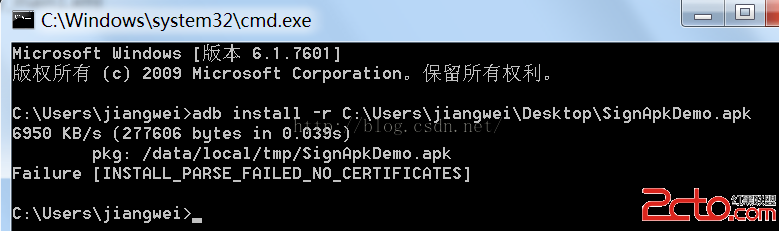
那麼我們就先來查找一下這個字段:
private static void collectCertificates(Package pkg, File apkFile, int flags)
		throws PackageParserException {
	final String apkPath = apkFile.getAbsolutePath();

	StrictJarFile jarFile = null;
	try {
		jarFile = new StrictJarFile(apkPath);

		// Always verify manifest, regardless of source
		final ZipEntry manifestEntry = jarFile.findEntry(ANDROID_MANIFEST_FILENAME);
		if (manifestEntry == null) {
			throw new PackageParserException(INSTALL_PARSE_FAILED_BAD_MANIFEST,
					"Package " + apkPath + " has no manifest");
		}

		final List toVerify = new ArrayList<>();
		toVerify.add(manifestEntry);

		// If we're parsing an untrusted package, verify all contents
		if ((flags & PARSE_IS_SYSTEM) == 0) {
			final Iterator i = jarFile.iterator();
			while (i.hasNext()) {
				final ZipEntry entry = i.next();

				if (entry.isDirectory()) continue;
				if (entry.getName().startsWith("META-INF/")) continue;
				if (entry.getName().equals(ANDROID_MANIFEST_FILENAME)) continue;

				toVerify.add(entry);
			}
		}

		// Verify that entries are signed consistently with the first entry
		// we encountered. Note that for splits, certificates may have
		// already been populated during an earlier parse of a base APK.
		for (ZipEntry entry : toVerify) {
			final Certificate[][] entryCerts = loadCertificates(jarFile, entry);
			if (ArrayUtils.isEmpty(entryCerts)) {
				throw new PackageParserException(INSTALL_PARSE_FAILED_NO_CERTIFICATES,
						"Package " + apkPath + " has no certificates at entry "
								+ entry.getName());
			}
			final Signature[] entrySignatures = convertToSignatures(entryCerts);

			if (pkg.mCertificates == null) {
				pkg.mCertificates = entryCerts;
				pkg.mSignatures = entrySignatures;
				pkg.mSigningKeys = new ArraySet();
				for (int i=0; i < entryCerts.length; i++) {
					pkg.mSigningKeys.add(entryCerts[i][0].getPublicKey());
				}
			} else {
				if (!Signature.areExactMatch(pkg.mSignatures, entrySignatures)) {
					throw new PackageParserException(
							INSTALL_PARSE_FAILED_INCONSISTENT_CERTIFICATES, "Package " + apkPath
							+ " has mismatched certificates at entry "
							+ entry.getName());
				}
			}
		}
	} catch (GeneralSecurityException e) {
		throw new PackageParserException(INSTALL_PARSE_FAILED_CERTIFICATE_ENCODING,
				"Failed to collect certificates from " + apkPath, e);
	} catch (IOException | RuntimeException e) {
		throw new PackageParserException(INSTALL_PARSE_FAILED_NO_CERTIFICATES,
				"Failed to collect certificates from " + apkPath, e);
	} finally {
		closeQuietly(jarFile);
	}
}
這裡看到了,當有異常的時候就會提示這個信息,我們在跟進去看看:
// Verify that entries are signed consistently with the first entry
// we encountered. Note that for splits, certificates may have
// already been populated during an earlier parse of a base APK.
for (ZipEntry entry : toVerify) {
	final Certificate[][] entryCerts = loadCertificates(jarFile, entry);
	if (ArrayUtils.isEmpty(entryCerts)) {
		throw new PackageParserException(INSTALL_PARSE_FAILED_NO_CERTIFICATES,
				"Package " + apkPath + " has no certificates at entry "
						+ entry.getName());
	}
	final Signature[] entrySignatures = convertToSignatures(entryCerts);

	if (pkg.mCertificates == null) {
		pkg.mCertificates = entryCerts;
		pkg.mSignatures = entrySignatures;
		pkg.mSigningKeys = new ArraySet();
		for (int i=0; i < entryCerts.length; i++) {
			pkg.mSigningKeys.add(entryCerts[i][0].getPublicKey());
		}
	} else {
		if (!Signature.areExactMatch(pkg.mSignatures, entrySignatures)) {
			throw new PackageParserException(
					INSTALL_PARSE_FAILED_INCONSISTENT_CERTIFICATES, "Package " + apkPath
					+ " has mismatched certificates at entry "
					+ entry.getName());
		}
	}
}
這裡有一個重要的方法:loadCertificates
private static Certificate[][] loadCertificates(StrictJarFile jarFile, ZipEntry entry)
		throws PackageParserException {
	InputStream is = null;
	try {
		// We must read the stream for the JarEntry to retrieve
		// its certificates.
		is = jarFile.getInputStream(entry);
		readFullyIgnoringContents(is);
		return jarFile.getCertificateChains(entry);
	} catch (IOException | RuntimeException e) {
		throw new PackageParserException(INSTALL_PARSE_FAILED_UNEXPECTED_EXCEPTION,
				"Failed reading " + entry.getName() + " in " + jarFile, e);
	} finally {
		IoUtils.closeQuietly(is);
	}
}
這個方法是加載證書內容的
1、驗證Apk中的每個文件的算法(數據摘要+Base64編碼)和MANIFEST.MF文件中的對應屬性塊內容是否配對
首先獲取StrictJarFile文件中的InputStream對象
StrictJarFile這個類:libcore\luni\src\main\java\java\util\jar\StrictJarFile.java
public InputStream getInputStream(ZipEntry ze) {
	final InputStream is = getZipInputStream(ze);

	if (isSigned) {
		JarVerifier.VerifierEntry entry = verifier.initEntry(ze.getName());
		if (entry == null) {
			return is;
		}

		return new JarFile.JarFileInputStream(is, ze.getSize(), entry);
	}

	return is;
}
1》獲取到VerifierEntry對象entry
在JarVerifier.java:libcore\luni\src\main\java\java\util\jar\JarVerifier.java
VerifierEntry initEntry(String name) {
	// If no manifest is present by the time an entry is found,
	// verification cannot occur. If no signature files have
	// been found, do not verify.
	if (manifest == null || signatures.isEmpty()) {
		return null;
	}
	Attributes attributes = manifest.getAttributes(name);
	// entry has no digest
	if (attributes == null) {
		return null;
	}
	ArrayList certChains = new ArrayList();
	Iterator>> it = signatures.entrySet().iterator();
	while (it.hasNext()) {
		Map.Entry> entry = it.next();
		HashMap hm = entry.getValue();
		if (hm.get(name) != null) {
			// Found an entry for entry name in .SF file
			String signatureFile = entry.getKey();
			Certificate[] certChain = certificates.get(signatureFile);
			if (certChain != null) {
				certChains.add(certChain);
			}
		}
	}
	// entry is not signed
	if (certChains.isEmpty()) {
		return null;
	}
	Certificate[][] certChainsArray = certChains.toArray(new Certificate[certChains.size()][]);
	for (int i = 0; i < DIGEST_ALGORITHMS.length; i++) {
		final String algorithm = DIGEST_ALGORITHMS[i];
		final String hash = attributes.getValue(algorithm + "-Digest");
		if (hash == null) {
			continue;
		}
		byte[] hashBytes = hash.getBytes(StandardCharsets.ISO_8859_1);
		try {
			return new VerifierEntry(name, MessageDigest.getInstance(algorithm), hashBytes,
					certChainsArray, verifiedEntries);
		} catch (NoSuchAlgorithmException ignored) {
		}
	}
	return null;
}
就是構造一個VerifierEntry對象:
/**
 * Stores and a hash and a message digest and verifies that massage digest
 * matches the hash.
 */
static class VerifierEntry extends OutputStream {
	private final String name;
	private final MessageDigest digest;
	private final byte[] hash;
	private final Certificate[][] certChains;
	private final Hashtable verifiedEntries;
	VerifierEntry(String name, MessageDigest digest, byte[] hash,
			Certificate[][] certChains, Hashtable verifedEntries) {
		this.name = name;
		this.digest = digest;
		this.hash = hash;
		this.certChains = certChains;
		this.verifiedEntries = verifedEntries;
	}
	/**
	 * Updates a digest with one byte.
	 */
	 @Override
	 public void write(int value) {
		digest.update((byte) value);
	 }
	 /**
	  * Updates a digest with byte array.
	  */
	 @Override
	 public void write(byte[] buf, int off, int nbytes) {
		 digest.update(buf, off, nbytes);
	 }
	 /**
	  * Verifies that the digests stored in the manifest match the decrypted
	  * digests from the .SF file. This indicates the validity of the
	  * signing, not the integrity of the file, as its digest must be
	  * calculated and verified when its contents are read.
	  *
	  * @throws SecurityException
	  *             if the digest value stored in the manifest does not
	  *             agree with the decrypted digest as recovered from the
	  *             .SF file.
	  */
	 void verify() {
		 byte[] d = digest.digest();
		 if (!MessageDigest.isEqual(d, Base64.decode(hash))) {
			 throw invalidDigest(JarFile.MANIFEST_NAME, name, name);
		 }
		 verifiedEntries.put(name, certChains);
	 }
}
要構造這個對象,必須事先准備好參數。第一個參數很簡單,就是要驗證的文件名,直接將name傳進來就好了。第二個參數是計算摘要的對象,可以通過MessageDigest.getInstance獲得,不過要先告知到底要用哪個摘要算法,同樣也是通過查看MANIFEST.MF文件中對應名字的屬性值來決定的:

所以可以知道所用的摘要算法是SHA1。第三個參數是對應文件的摘要值,這是通過讀取MANIFEST.MF文件獲得的:
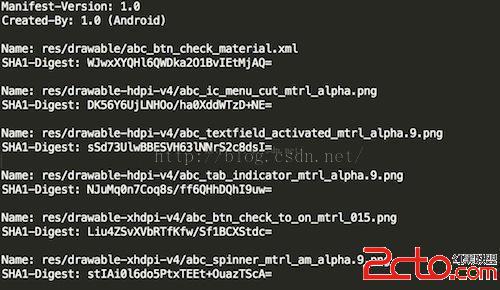
第四個參數是證書鏈,即對該apk文件簽名的所有證書鏈信息。為什麼是二維數組呢?這是因為Android允許用多個證書對apk進行簽名,但是它們的證書文件名必須不同,這個知識點,我在之前的一篇文章中:簽名過程詳解 中有提到。
最後一個參數是已經驗證過的文件列表,VerifierEntry在完成了對指定文件的摘要驗證之後會將該文件的信息加到其中。
static final class JarFileInputStream extends FilterInputStream {
	private long count;

	private ZipEntry zipEntry;

	private JarVerifier.VerifierEntry entry;

	private boolean done = false;

	JarFileInputStream(InputStream is, ZipEntry ze,
			JarVerifier.VerifierEntry e) {
		super(is);
		zipEntry = ze;
		count = zipEntry.getSize();
		entry = e;
	}

	@Override
	public int read() throws IOException {
		if (done) {
			return -1;
		}
		if (count > 0) {
			int r = super.read();
			if (r != -1) {
				entry.write(r);
				count--;
			} else {
				count = 0;
			}
			if (count == 0) {
				done = true;
				entry.verify();
			}
			return r;
		} else {
			done = true;
			entry.verify();
			return -1;
		}
	}

	@Override
	public int read(byte[] buf, int off, int nbytes) throws IOException {
		if (done) {
			return -1;
		}
		if (count > 0) {
			int r = super.read(buf, off, nbytes);
			if (r != -1) {
				int size = r;
				if (count < size) {
					size = (int) count;
				}
				entry.write(buf, off, size);
				count -= size;
			} else {
				count = 0;
			}
			if (count == 0) {
				done = true;
				entry.verify();
			}
			return r;
		} else {
			done = true;
			entry.verify();
			return -1;
		}
	}

	@Override
	public int available() throws IOException {
		if (done) {
			return 0;
		}
		return super.available();
	}

	@Override
	public long skip(long byteCount) throws IOException {
		return Streams.skipByReading(this, byteCount);
	}
}
3》PackageParser的readFullyIgnoringContents方法:
public static long readFullyIgnoringContents(InputStream in) throws IOException {
	byte[] buffer = sBuffer.getAndSet(null);
	if (buffer == null) {
		buffer = new byte[4096];
	}

	int n = 0;
	int count = 0;
	while ((n = in.read(buffer, 0, buffer.length)) != -1) {
		count += n;
	}

	sBuffer.set(buffer);
	return count;
}
得到第二步之後的一個InputStream對象,然後就開始read操作,這裡我沒發現什麼貓膩,但是我們從第一件事做完之後可以發現,這裡的InputStream對象其實是JarInputStream,所以我們可以去看一下他的read方法的實現:
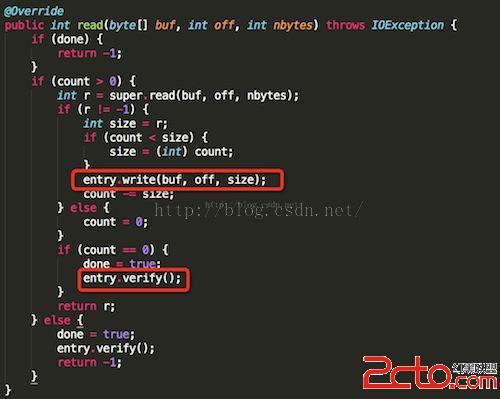
玄機原來在這裡,這裡的JarFileInputStream.read確實會調用其父類的read讀取指定的apk內文件的內容,並且將其傳給JarVerifier.VerifierEntry.write函數。當文件讀完後,會接著調用JarVerifier.VerifierEntry.verify函數對其進行驗證。JarVerifier.VerifierEntry.write函數非常簡單:

就是將讀到的文件的內容傳給digest,這個digest就是前面在構造JarVerifier.VerifierEntry傳進來的,對應於在MANIFEST.MF文件中指定的摘要算法。萬事具備,接下來想要驗證就很簡單了:
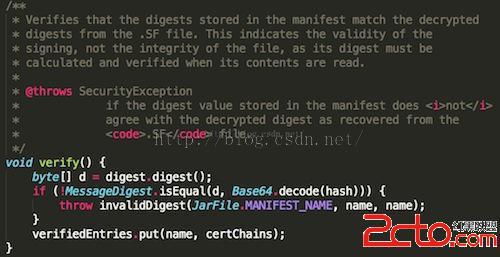
通過digest就可以算出apk內指定文件的真實摘要值。而記錄在MANIFEST.MF文件中對應該文件的摘要值,也在構造JarVerifier.VerifierEntry時傳遞給了hash變量。不過這個hash值是經過Base64編碼的。所以在比較之前,必須通過Base64解碼。如果不一致的話,會拋出SecurityException異常:
private static SecurityException invalidDigest(String signatureFile, String name,
		String jarName) {
	throw new SecurityException(signatureFile + " has invalid digest for " + name +
			" in " + jarName);
}
到這裡我們就分析了,Android中是如何驗證MANIFEST.MF文件中的內容的,我們這裡再來看一下,這裡拋出異常出去:
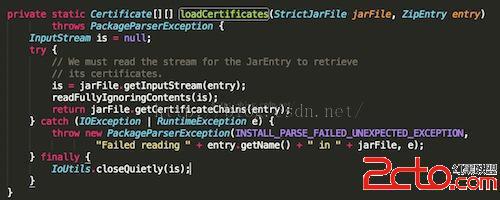
這裡捕獲到異常之後,會在拋異常出去:
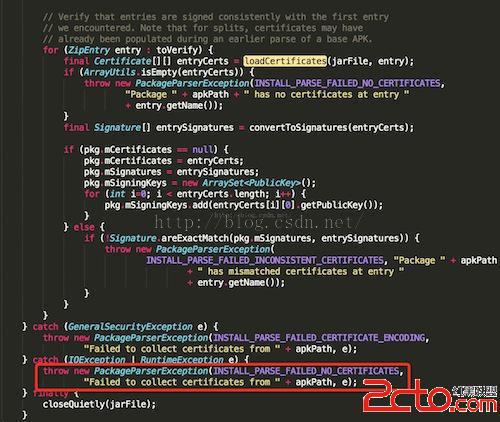
在這裡就會拋出異常信息,所以如果我們修改了一個Apk中的一個文件內容的話,這裡肯定是安裝不上的。
2、驗證CERT.SF文件的簽名信息和CERT.RSA中的內容是否一致
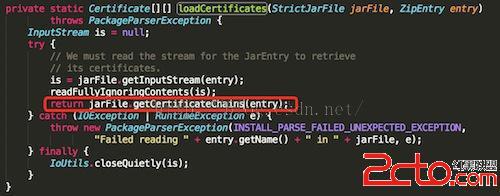
1》我們就來看看StrictJarFile中的getCertificateChains方法:
/**
 * Return all certificate chains for a given {@link ZipEntry} belonging to this jar.
 * This method MUST be called only after fully exhausting the InputStream belonging
 * to this entry.
 *
 * Returns {@code null} if this jar file isn't signed or if this method is
 * called before the stream is processed.
 */
public Certificate[][] getCertificateChains(ZipEntry ze) {
	if (isSigned) {
		return verifier.getCertificateChains(ze.getName());
	}

	return null;
}
這裡有一個變量判斷:isSigned,他是在構造方法中賦值的:
public StrictJarFile(String fileName) throws IOException {
	this.nativeHandle = nativeOpenJarFile(fileName);
	this.raf = new RandomAccessFile(fileName, "r");

	try {
		// Read the MANIFEST and signature files up front and try to
		// parse them. We never want to accept a JAR File with broken signatures
		// or manifests, so it's best to throw as early as possible.
		HashMap metaEntries = getMetaEntries();
		this.manifest = new Manifest(metaEntries.get(JarFile.MANIFEST_NAME), true);
		this.verifier = new JarVerifier(fileName, manifest, metaEntries);

		isSigned = verifier.readCertificates() && verifier.isSignedJar();
	} catch (IOException ioe) {
		nativeClose(this.nativeHandle);
		throw ioe;
	}

	guard.open("close");
}
去verifier中看看這兩個方法:
/**
 * If the associated JAR file is signed, check on the validity of all of the
 * known signatures.
 *
 * @return {@code true} if the associated JAR is signed and an internal
 *         check verifies the validity of the signature(s). {@code false} if
 *         the associated JAR file has no entries at all in its {@code
 *         META-INF} directory. This situation is indicative of an invalid
 *         JAR file.
 *
* Will also return {@code true} if the JAR file is not * signed. * @throws SecurityException * if the JAR file is signed and it is determined that a * signature block file contains an invalid signature for the * corresponding signature file. */ synchronized boolean readCertificates() { if (metaEntries.isEmpty()) { return false; } Iterator
/**
 * Returns a boolean indication of whether or not the
 * associated jar file is signed.
 *
 * @return {@code true} if the JAR is signed, {@code false}
 *         otherwise.
 */
boolean isSignedJar() {
	return certificates.size() > 0;
}
這個方法直接判斷certificates這個集合是否為空。我們全局搜索一下這個集合在哪裡存入的數據的地方,找到了verifyCertificate方法,同時我們發現,在上面的readCertificates方法中,就調用了這個方法,其實這個方法就是讀取證書信息的。
下面來看一下verifyCertificate方法:
/**
 * @param certFile
 */
private void verifyCertificate(String certFile) {
	// Found Digital Sig, .SF should already have been read
	String signatureFile = certFile.substring(0, certFile.lastIndexOf('.')) + ".SF";
	byte[] sfBytes = metaEntries.get(signatureFile);
	if (sfBytes == null) {
		return;
	}
	byte[] manifestBytes = metaEntries.get(JarFile.MANIFEST_NAME);
	// Manifest entry is required for any verifications.
	if (manifestBytes == null) {
		return;
	}
	byte[] sBlockBytes = metaEntries.get(certFile);
	try {
		Certificate[] signerCertChain = JarUtils.verifySignature(
				new ByteArrayInputStream(sfBytes),
				new ByteArrayInputStream(sBlockBytes));
		if (signerCertChain != null) {
			certificates.put(signatureFile, signerCertChain);
		}
	} catch (IOException e) {
		return;
	} catch (GeneralSecurityException e) {
		throw failedVerification(jarName, signatureFile);
	}
	// Verify manifest hash in .sf file
	Attributes attributes = new Attributes();
	HashMap entries = new HashMap();
	try {
		ManifestReader im = new ManifestReader(sfBytes, attributes);
		im.readEntries(entries, null);
	} catch (IOException e) {
		return;
	}
	// Do we actually have any signatures to look at?
	if (attributes.get(Attributes.Name.SIGNATURE_VERSION) == null) {
		return;
	}
	boolean createdBySigntool = false;
	String createdBy = attributes.getValue("Created-By");
	if (createdBy != null) {
		createdBySigntool = createdBy.indexOf("signtool") != -1;
	}
	// Use .SF to verify the mainAttributes of the manifest
	// If there is no -Digest-Manifest-Main-Attributes entry in .SF
	// file, such as those created before java 1.5, then we ignore
	// such verification.
	if (mainAttributesEnd > 0 && !createdBySigntool) {
		String digestAttribute = "-Digest-Manifest-Main-Attributes";
		if (!verify(attributes, digestAttribute, manifestBytes, 0, mainAttributesEnd, false, true)) {
			throw failedVerification(jarName, signatureFile);
		}
	}
	// Use .SF to verify the whole manifest.
	String digestAttribute = createdBySigntool ? "-Digest" : "-Digest-Manifest";
	if (!verify(attributes, digestAttribute, manifestBytes, 0, manifestBytes.length, false, false)) {
		Iterator> it = entries.entrySet().iterator();
		while (it.hasNext()) {
			Map.Entry entry = it.next();
			Manifest.Chunk chunk = manifest.getChunk(entry.getKey());
			if (chunk == null) {
				return;
			}
			if (!verify(entry.getValue(), "-Digest", manifestBytes,
					chunk.start, chunk.end, createdBySigntool, false)) {
				throw invalidDigest(signatureFile, entry.getKey(), jarName);
			}
		}
	}
	metaEntries.put(signatureFile, null);
	signatures.put(signatureFile, entries);
}
2》獲取證書信息,並且驗證CERT.SF文件的簽名信息和CERT.RSA中的內容是否一致。
// Found Digital Sig, .SF should already have been read
String signatureFile = certFile.substring(0, certFile.lastIndexOf('.')) + ".SF";
byte[] sfBytes = metaEntries.get(signatureFile);
if (sfBytes == null) {
	return;
}
byte[] manifestBytes = metaEntries.get(JarFile.MANIFEST_NAME);
// Manifest entry is required for any verifications.
if (manifestBytes == null) {
	return;
}
byte[] sBlockBytes = metaEntries.get(certFile);
try {
	Certificate[] signerCertChain = JarUtils.verifySignature(
			new ByteArrayInputStream(sfBytes),
			new ByteArrayInputStream(sBlockBytes));
	if (signerCertChain != null) {
		certificates.put(signatureFile, signerCertChain);
	}
} catch (IOException e) {
	return;
} catch (GeneralSecurityException e) {
	throw failedVerification(jarName, signatureFile);
}
這裡首先獲取到,簽名文件。我們在之前的一篇文章中說到了,簽名文件和證書文件的名字是一樣的。
同時這裡還調用了JarUtils類:libcore\luni\src\main\java\org\apache\harmony\security\utils\JarUtils.java
中的verifySignature方法來獲取證書,這裡就不做太多的解釋了,如何從一個RSA文件中獲取證書,這樣的代碼網上也是有的,而且後面我會演示一下,如何獲取。
/**
 * This method handle all the work with  PKCS7, ASN1 encoding, signature verifying,
 * and certification path building.
 * See also PKCS #7: Cryptographic Message Syntax Standard:
 * http://www.ietf.org/rfc/rfc2315.txt
 * @param signature - the input stream of signature file to be verified
 * @param signatureBlock - the input stream of corresponding signature block file
 * @return array of certificates used to verify the signature file
 * @throws IOException - if some errors occurs during reading from the stream
 * @throws GeneralSecurityException - if signature verification process fails
 */
public static Certificate[] verifySignature(InputStream signature, InputStream
		signatureBlock) throws IOException, GeneralSecurityException {

	BerInputStream bis = new BerInputStream(signatureBlock);
	ContentInfo info = (ContentInfo)ContentInfo.ASN1.decode(bis);
	SignedData signedData = info.getSignedData();
	if (signedData == null) {
		throw new IOException("No SignedData found");
	}
	Collection encCerts
	= signedData.getCertificates();
	if (encCerts.isEmpty()) {
		return null;
	}
	X509Certificate[] certs = new X509Certificate[encCerts.size()];
	int i = 0;
	for (org.apache.harmony.security.x509.Certificate encCert : encCerts) {
		certs[i++] = new X509CertImpl(encCert);
	}

	List sigInfos = signedData.getSignerInfos();
	SignerInfo sigInfo;
	if (!sigInfos.isEmpty()) {
		sigInfo = sigInfos.get(0);
	} else {
		return null;
	}

	// Issuer
	X500Principal issuer = sigInfo.getIssuer();

	// Certificate serial number
	BigInteger snum = sigInfo.getSerialNumber();

	// Locate the certificate
	int issuerSertIndex = 0;
	for (i = 0; i < certs.length; i++) {
		if (issuer.equals(certs[i].getIssuerDN()) &&
				snum.equals(certs[i].getSerialNumber())) {
			issuerSertIndex = i;
			break;
		}
	}
	if (i == certs.length) { // No issuer certificate found
		return null;
	}

	if (certs[issuerSertIndex].hasUnsupportedCriticalExtension()) {
		throw new SecurityException("Can not recognize a critical extension");
	}

	// Get Signature instance
	Signature sig = null;
	String da = sigInfo.getDigestAlgorithm();
	String dea = sigInfo.getDigestEncryptionAlgorithm();
	String alg = null;
	if (da != null && dea != null) {
		alg = da + "with" +  dea;
		try {
			sig = Signature.getInstance(alg, OpenSSLProvider.PROVIDER_NAME);
		} catch (NoSuchAlgorithmException e) {}
	}
	if (sig == null) {
		alg = da;
		if (alg == null) {
			return null;
		}
		try {
			sig = Signature.getInstance(alg, OpenSSLProvider.PROVIDER_NAME);
		} catch (NoSuchAlgorithmException e) {
			return null;
		}
	}
	sig.initVerify(certs[issuerSertIndex]);
	......
這裡返回的是一個證書的數組。
3、MANIFEST.MF整個文件簽名在CERT.SF文件中頭屬性中的值是否匹配以及驗證MANIFEST.MF文件中的各個屬性塊的簽名在CERT.SF文件中是否匹配
1》第一件事是:驗證MANIFEST.MF整個文件簽名在CERT.SF文件中頭屬性中的值是否匹配
// Use .SF to verify the mainAttributes of the manifest
// If there is no -Digest-Manifest-Main-Attributes entry in .SF
// file, such as those created before java 1.5, then we ignore
// such verification.
if (mainAttributesEnd > 0 && !createdBySigntool) {
	String digestAttribute = "-Digest-Manifest-Main-Attributes";
	if (!verify(attributes, digestAttribute, manifestBytes, 0, mainAttributesEnd, false, true)) {
		throw failedVerification(jarName, signatureFile);
	}
}
這裡的manifestBytes:
byte[] manifestBytes = metaEntries.get(JarFile.MANIFEST_NAME);就是MANIFEST.MF文件內容。繼續看一下verify方法:
private boolean verify(Attributes attributes, String entry, byte[] data,
		int start, int end, boolean ignoreSecondEndline, boolean ignorable) {
	for (int i = 0; i < DIGEST_ALGORITHMS.length; i++) {
		String algorithm = DIGEST_ALGORITHMS[i];
		String hash = attributes.getValue(algorithm + entry);
		if (hash == null) {
			continue;
		}
		MessageDigest md;
		try {
			md = MessageDigest.getInstance(algorithm);
		} catch (NoSuchAlgorithmException e) {
			continue;
		}
		if (ignoreSecondEndline && data[end - 1] == '\n' && data[end - 2] == '\n') {
			md.update(data, start, end - 1 - start);
		} else {
			md.update(data, start, end - start);
		}
		byte[] b = md.digest();
		byte[] hashBytes = hash.getBytes(StandardCharsets.ISO_8859_1);
		return MessageDigest.isEqual(b, Base64.decode(hashBytes));
	}
	return ignorable;
}
這個方法其實很簡單,就是驗證傳入的data數據塊的數據摘要算法和傳入的attributes中的算法塊的值是否匹配,比如這裡:
String algorithm = DIGEST_ALGORITHMS[i];
String hash = attributes.getValue(algorithm + entry);
這裡的algorithm是算法:
private static final String[] DIGEST_ALGORITHMS = new String[] {
	"SHA-512",
	"SHA-384",
	"SHA-256",
	"SHA1",
};
這裡的entry也是傳入的,我們看到傳入的是:-Digest
這樣就是CERT.SF文件中的一個條目:
2》第二件事是:驗證MANIFEST.MF文件中的各個屬性塊的簽名在CERT.SF文件中是否匹配
// Use .SF to verify the whole manifest.
String digestAttribute = createdBySigntool ? "-Digest" : "-Digest-Manifest";
if (!verify(attributes, digestAttribute, manifestBytes, 0, manifestBytes.length, false, false)) {
	Iterator> it = entries.entrySet().iterator();
	while (it.hasNext()) {
		Map.Entry entry = it.next();
		Manifest.Chunk chunk = manifest.getChunk(entry.getKey());
		if (chunk == null) {
			return;
		}
		if (!verify(entry.getValue(), "-Digest", manifestBytes,
				chunk.start, chunk.end, createdBySigntool, false)) {
			throw invalidDigest(signatureFile, entry.getKey(), jarName);
		}
	}
}
這裡我們可以看到也是同樣調用verify方法來驗證CERT.SF中的條目信息的。
最後我們再看一下是如何配對簽名信息的,在PackageParser中的collectCertificates方法:
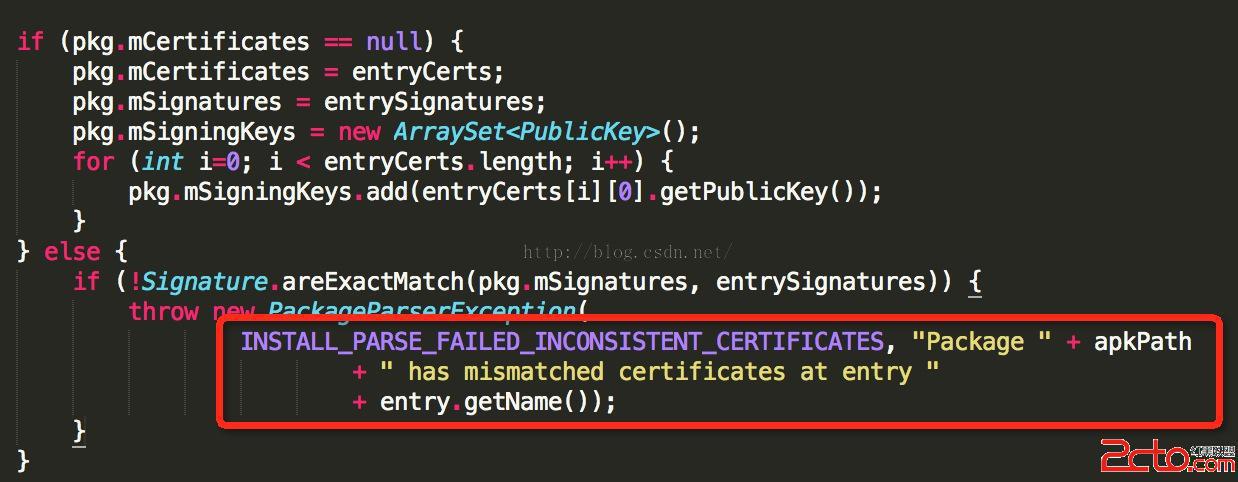
這裡會比對已經安裝的apk的簽名和准備要安裝的apk的簽名是否一致,如果不一致的話,就會報錯:

這個錯,也是我們經常會遇到的,就是同樣的apk,簽名不一致導致的問題。
我們從上面的分析代碼中可以看到,這裡的Signature比對簽名,其實就是比對證書中的公鑰信息:
上面我們就看完了Android中驗證簽名信息的流程,下面我們再來梳理一下流程吧:
所有有關apk文件的簽名驗證工作都是在JarVerifier裡面做的,一共分成三步:
1、JarVerifier.VerifierEntry.verify做了驗證,即保證apk文件中包含的所有文件,對應的摘要值與MANIFEST.MF文件中記錄的一致。
2、JarVeirifer.verifyCertificate使用證書文件(在META-INF目錄下,以.DSA、.RSA或者.EC結尾的文件)檢驗簽名文件(在META-INF目錄下,和證書文件同名,但擴展名為.SF的文件)是沒有被修改過的。這裡我們可以注意到,Android中在驗證的過程中對SF喝RSA文件的名字並不關心,這個在之前的 簽名過程 文章中介紹到了。
3、JarVeirifer.verifyCertificate中使用簽名文件CERT.SF,檢驗MANIFEST.MF文件中的內容也沒有被篡改過
綜上所述:
首先,如果你改變了apk包中的任何文件,那麼在apk安裝校驗時,改變後的文件摘要信息與MANIFEST.MF的檢驗信息不同,於是驗證失敗,程序就不能成功安裝。
其次,如果你對更改的過的文件相應的算出新的摘要值,然後更改MANIFEST.MF文件裡面對應的屬性值,那麼必定與CERT.SF文件中算出的摘要值不一樣,照樣驗證失敗。
這裡都會提示安裝失敗信息:
如果你還不死心,繼續計算MANIFEST.MF的摘要值,相應的更改CERT.SF裡面的值.
那麼數字簽名值必定與CERT.RSA文件中記錄的不一樣,還是失敗。
這裡的失敗信息:
那麼能不能繼續偽造數字簽名呢?不可能,因為沒有數字證書對應的私鑰。
所以,如果要重新打包後的應用程序能再Android設備上安裝,必須對其進行重簽名。
從上面的分析可以得出,只要修改了Apk中的任何內容,就必須重新簽名,不然會提示安裝失敗,當然這裡不會分析,後面一篇文章會注重分析為何會提示安裝失敗。
總結
到這裡我們就介紹完了Android中的apk的簽名驗證過程,再結合之前的一篇文章,我們可以了解到了Android中的簽名機制了。這個也是對Android中的安全機制的一個深入了解吧,新年快樂~~
 Android之AnimationDrawable簡單模擬動態圖
Drawable animation可以加載Drawable資源實現幀動畫。AnimationDrawable是實現Drawable animations的基本類。&nb
 Android中屏幕密度和圖片大小的關系分析
前言 Android中支持許多資源,包括圖片(Bitmap),對應於bitmap的文件夾是drawable,除了drawable,還有drawable-ld
 Android源碼解析——LruCache
我認為在寫涉及到數據結構或算法的實現類的源碼解析博客時,不應該急於講它的使用或馬上展開對源碼的解析,而是要先交待一下這個數據結構或算法的資料,了解它的設計,再從它的設計
 Android實現原生側滑菜單的超簡單方式
先來看看效果圖當你點擊菜單可以更改圖標,例如點擊happy,首頁就會變一個笑臉,這個實現的過程超級簡單你需要使用ToolBar與DrawableLayout兩個比較新的控