編輯:關於Android編程
Android3.0引入了Fragment,主要目的是用在大屏幕設備上,支持更加動態和靈活的UI設計。Fragment在你的應用中應當是一個模塊化和可重用的組件,因為Fragment定義了它自己的布局,以及通過使用它自己的聲明周期回調回調方法定義了它自己的行為,可以將Fragment包含到多個Activity中。
(1)Fragment可以作為Activity界面的一部分組成出現;
(2)可以在一個Activity中同時出現多個Fragment,並且一個Fragment也可以在多個Activity中使用;
(3)在Activity運行過程中,可以添加、移除或替換Fragment;
(4)Fragment可以響應自己的輸入事件,並且有自己的聲明周期,它們的生命周期受宿主Activity的生命周期影響;
(5)Fragment在第一次繪制它的用戶界面時,系統會調用onCreateView()方法,此方法返回一個View。(如果不顯示UI,返回null);
Fragment兩種加載方式:靜態加載、動態加載。
本文以及後續將使用一個APP來講解關於Fragment的知識,大致布局如下:
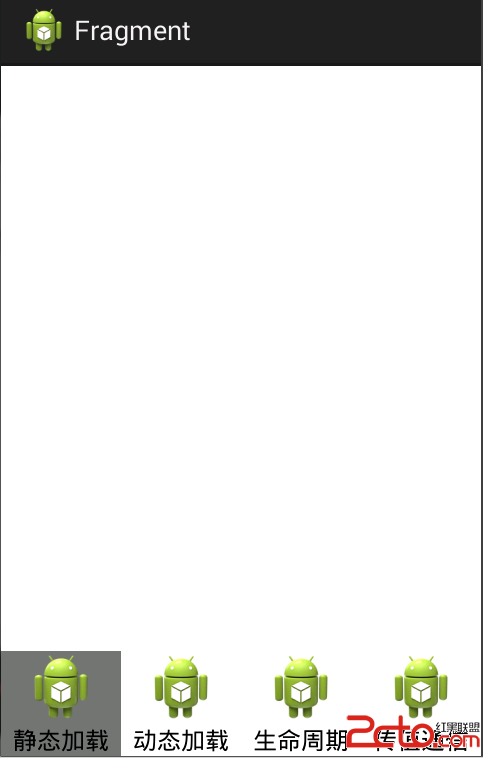
values添加color.xml:
<!--{cke_protected}{C}%3C!%2D%2D%3Fxml%20version%3D%221.0%22%20encoding%3D%22utf-8%22%3F%2D%2D%3E-->
<resources>

    <color name="gray">#88000000</color>
    <color name="white">#ffffff</color>

</resources>
drawable中添加radio_pressed.xml
    <?xml version="1.0" encoding="utf-8"?>
    <selector xmlns:android="http://schemas.android.com/apk/res/android">

        <item android:drawable="@color/gray" android:state_checked="true"></item>
        <item android:drawable="@color/white" android:state_pressed="true"></item>
        <item android:drawable="@color/white"></item>

    </selector>
main主布局:
<!--{cke_protected}{C}%3C!%2D%2D%3Fxml%20version%3D%221.0%22%20encoding%3D%22utf-8%22%3F%2D%2D%3E-->
<relativelayout xmlns:android="http://schemas.android.com/apk/res/android" android:layout_width="match_parent" android:layout_height="match_parent">

    <linearlayout android:id="@+id/frame" android:layout_width="match_parent" android:layout_height="wrap_content" android:orientation="vertical">
    </linearlayout>


    <radiogroup android:id="@+id/radiogroup" android:layout_width="match_parent" android:layout_height="wrap_content" android:layout_alignparentbottom="true" android:gravity="center_horizontal" android:orientation="horizontal">

        <radiobutton android:id="@+id/first" android:layout_width="0dp" android:layout_height="wrap_content" android:layout_weight="1" android:background="@drawable/radio_pressed" android:button="@null" android:drawabletop="@drawable/ic_launcher" android:gravity="center_horizontal" android:text="靜態加載">

        <radiobutton android:id="@+id/second" android:layout_width="0dp" android:layout_height="wrap_content" android:layout_weight="1" android:background="@drawable/radio_pressed" android:button="@null" android:drawabletop="@drawable/ic_launcher" android:gravity="center_horizontal" android:text="動態加載">

        <radiobutton android:id="@+id/thrid" android:layout_width="0dp" android:layout_height="wrap_content" android:layout_weight="1" android:background="@drawable/radio_pressed" android:button="@null" android:drawabletop="@drawable/ic_launcher" android:gravity="center_horizontal" android:text="生命周期">

        <radiobutton android:id="@+id/fourth" android:layout_width="0dp" android:layout_height="wrap_content" android:layout_weight="1" android:background="@drawable/radio_pressed" android:button="@null" android:drawabletop="@drawable/ic_launcher" android:gravity="center_horizontal" android:text="傳值通信">
    </radiobutton></radiobutton></radiobutton></radiobutton></radiogroup>

</relativelayout>
MainActivity加載main:
package com.example.fragment;

import android.os.Bundle;
import android.app.Activity;
import android.view.Menu;
import android.widget.RadioGroup;
import android.widget.RadioGroup.OnCheckedChangeListener;

public class MainActivity extends Activity implements OnCheckedChangeListener {

	private RadioGroup group;

	@Override
	protected void onCreate(Bundle savedInstanceState) {
		super.onCreate(savedInstanceState);
		setContentView(R.layout.main);

		group=(RadioGroup) findViewById(R.id.radiogroup);
		group.setOnCheckedChangeListener(this);
	}

	@Override
	public boolean onCreateOptionsMenu(Menu menu) {
		// Inflate the menu; this adds items to the action bar if it is present.
		getMenuInflater().inflate(R.menu.main, menu);
		return true;
	}

	@Override
	public void onCheckedChanged(RadioGroup group, int checkedId) {
		// TODO Auto-generated method stub
		switch (checkedId) {
		case R.id.first:
			//演示靜態加載

			break;

		case R.id.second:
			//演示動態加載

			break;

		case R.id.thrid:
			//演示生命周期

			break;

		case R.id.fourth:
			//演示傳值通信

			break;
		}
	}

}
在Activity的layout文件中聲明Fragment(特別注意:在
添加fragment.xml:
<!--{cke_protected}{C}%3C!%2D%2D%3Fxml%20version%3D%221.0%22%20encoding%3D%22utf-8%22%3F%2D%2D%3E-->
<linearlayout xmlns:android="http://schemas.android.com/apk/res/android" android:layout_width="match_parent" android:layout_height="match_parent" android:orientation="vertical">

	<textview android:id="@+id/text" android:layout_width="wrap_content" android:layout_height="wrap_content" android:text="我的Fragment"><button android:layout_width="wrap_content" android:layout_height="wrap_content" android:id="@+id/button"></button></textview></linearlayout>
添加MyFragment類,並加載fragment布局:
package com.example.fragment;

import android.app.Fragment;
import android.os.Bundle;
import android.view.LayoutInflater;
import android.view.View;
import android.view.View.OnClickListener;
import android.view.ViewGroup;
import android.widget.Button;
import android.widget.TextView;

public class MyFragment extends Fragment {
	@Override
	public View onCreateView(LayoutInflater inflater, ViewGroup container,
			Bundle savedInstanceState) {
		// layout布局文件轉換成View對象
		/**
		 * inflater.inflate(resource, root, attachToRoot)
		 * resource:Fragment需要加載的布局文件
		 * root:加載layout的父ViewGroup
		 * attactToRoot:false,不返回父ViewGroup
		 */
		View view = inflater.inflate(R.layout.fragment, container, false);
		TextView text = (TextView) view.findViewById(R.id.text);
		Button button = (Button) view.findViewById(R.id.button);
		text.setText("靜態加載Fragment");
		button.setText("獲取內容");
		button.setOnClickListener(new OnClickListener() {

			@Override
			public void onClick(View v) {
				// TODO Auto-generated method stub
				// String value = getAaa();
				// Toast.makeText(getActivity(), "value="+value,
				// Toast.LENGTH_SHORT).show();
			}
		});
		return view;

	}
}
添加jigntai.xml:
<!--{cke_protected}{C}%3C!%2D%2D%3Fxml%20version%3D%221.0%22%20encoding%3D%22utf-8%22%3F%2D%2D%3E-->
<linearlayout xmlns:android="http://schemas.android.com/apk/res/android" android:layout_width="match_parent" android:layout_height="match_parent" android:orientation="vertical">

    <!--{cke_protected}{C}%3C!%2D%2D%20android%3Aid%EF%BC%9A%E9%9D%99%E6%80%81%E5%8A%A0%E8%BD%BD%E5%BF%85%E9%A1%BB%E6%8C%87%E5%AE%9A%E4%B8%80%E4%B8%AAID%20%2D%2D%3E-->
    <!--{cke_protected}{C}%3C!%2D%2D%20android%3Aname%EF%BC%9A%E5%AE%8C%E6%95%B4%E5%8C%85%E5%90%8D%20%2D%2D%3E-->
    <fragment android:id="@+id/fragment" android:layout_width="wrap_content" android:layout_height="wrap_content" android:name="com.example.fragment.MyFragment">
</fragment></linearlayout>
添加JingTaiActivity類:
public class JingTaiActivity extends Activity {

	private TextView tv;

	@Override
	protected void onCreate(Bundle savedInstanceState) {
		// TODO Auto-generated method stub
		super.onCreate(savedInstanceState);
		setContentView(R.layout.jingtai);

		Button button=(Button) findViewById(R.id.button);
		tv=(TextView) findViewById(R.id.text);
		button.setText("改變");
		button.setOnClickListener(new OnClickListener() {

			@Override
			public void onClick(View v) {
				// TODO Auto-generated method stub
				tv.setText("TextView改變了");
			}
		});
	}
}
主MainActivity中演示靜態加載部分添加:
		case R.id.first:
			//演示靜態加載
			Intent jingtaiIntent=new Intent(MainActivity.this,JingTaiActivity.class);
			startActivity(jingtaiIntent);
			break;
也就是說,當一個布局文件中通過靜態加載Fragment加載到Activity中來,Fragment中的布局文件對Activity也是共享的。
 Android消息循環機制
Android的消息循環機制主要先關的類有:Handler Looper Message MessageQueue ActivityThread實際上應用程序
 Android Drawable的9種子類 介紹
Drawable 在android裡面 就是代表著圖像,注意是圖像 而不是圖片。 圖片是圖像的子集。圖像除了可以包含圖片以外 還可以包含顏色。換句話說Drawble就是c
 Android實現自動提取短信驗證碼功能
本文實例講解了Android自動提取短信驗證碼解決方案,分享給大家供大家參考,具體內容如下主要功能及優點1.收到驗證碼短信後,自動提取短信中的驗證碼填寫到相應輸入框 2.
 Android實戰技巧之三十三:android.hardware.camera2使用指南
API 21中將原來的camera API棄用轉而推薦使用新增的camera2 API,這是一個大的動作,因為新API換了架構,讓開發者用起來更難了。先來看看camera