編輯:關於Android編程
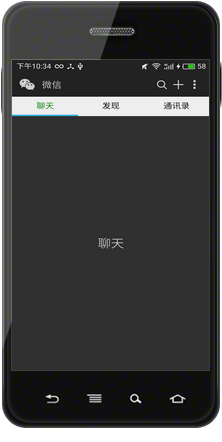
最近做一個頁面,反饋問題頁面,有個用戶上傳問題圖片的功能。本來很笨的想把系統的所有圖片列出來,然後讓用戶選擇,後來發現原來可以直接打開手機所有圖片的api的。效果如圖:
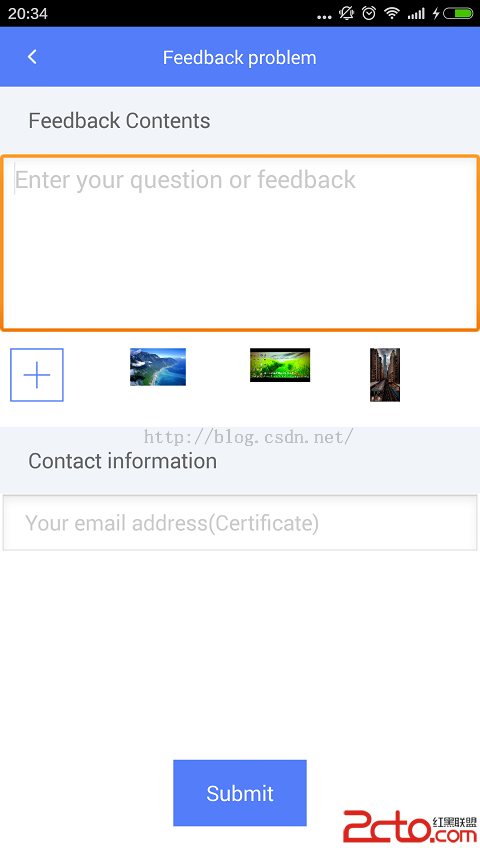
給出主要代碼:
1、選擇圖片
    Intent i = new Intent(Intent.ACTION_PICK, android.provider.MediaStore.Images.Media.EXTERNAL_CONTENT_URI);
    startActivityForResult(i, 1);
2、獲取圖片
    protected void onActivityResult(int requestCode, int resultCode, Intent data) {
        super.onActivityResult(requestCode, resultCode, data);
        try {
            if (requestCode == 1 && resultCode == RESULT_OK && null != data) {
                Uri selectedImage = data.getData();
                String[] filePathColumn = { MediaStore.Images.Media.DATA };

                Cursor cursor = getContentResolver().query(selectedImage, filePathColumn, null, null, null);
                cursor.moveToFirst();

                int columnIndex = cursor.getColumnIndex(filePathColumn[0]);
                String picturePath = cursor.getString(columnIndex);
                cursor.close();

                BitmapFactory.Options opts = new BitmapFactory.Options();
                opts.inJustDecodeBounds = true;
                BitmapFactory.decodeFile(picturePath, opts);
                opts.inSampleSize = computeSampleSize(opts, -1, 160 * 160);//轉換成160*160大小圖片

                // 這裡一定要將其設置回false,因為之前我們將其設置成了true
                opts.inJustDecodeBounds = false;
                try {
                    Bitmap bmp = BitmapFactory.decodeFile(picturePath, opts);
                    if (mPosition != 0)// 替換
                    {
                        fba.getmImgs().set(mPosition, bmp);
                        fba.getmImgPaths().set(mPosition, picturePath);
                    } else {
                        fba.getmImgs().add(bmp);
                        fba.getmImgPaths().add(picturePath);
                    }

                } catch (OutOfMemoryError err) {
                    if (err != null) {
                        err.printStackTrace();
                    }
                }
                fba.notifyDataSetChanged();

            }

        } catch (Exception e) {
            if (e != null) {
                e.printStackTrace();
            }
        } catch (OutOfMemoryError e) {
            if (e != null) {
                e.printStackTrace();
            }
        }

    }
   public int computeSampleSize(BitmapFactory.Options options, int minSideLength, int maxNumOfPixels) {
        int initialSize = computeInitialSampleSize(options, minSideLength, maxNumOfPixels);

        int roundedSize;
        if (initialSize <= 8) {
            roundedSize = 1;
            while (roundedSize < initialSize) {
                roundedSize <<= 1;
            }
        } else {
            roundedSize = (initialSize + 7) / 8 * 8;
        }

        return roundedSize;
    }

    private int computeInitialSampleSize(BitmapFactory.Options options, int minSideLength, int maxNumOfPixels) {
        double w = options.outWidth;
        double h = options.outHeight;

        int lowerBound = (maxNumOfPixels == -1) ? 1 : (int) Math.ceil(Math.sqrt(w * h / maxNumOfPixels));
        int upperBound = (minSideLength == -1) ? 128 : (int) Math.min(Math.floor(w / minSideLength), Math.floor(h / minSideLength));

        if (upperBound < lowerBound) {
            return lowerBound;
        }

        if ((maxNumOfPixels == -1) && (minSideLength == -1)) {
            return 1;
        } else if (minSideLength == -1) {
            return lowerBound;
        } else {
            return upperBound;
        }
    }
 Android通過Path實現復雜效果(搜索按鈕+時鐘的實現 )
Path :在Android中復雜的圖形的繪制絕大多數是通過path來實現,比如繪制一條曲線,然後讓一個物體隨著這個曲線運動,比如搜索按鈕,比如一個簡單時鐘的實現:&nb
 android 微信 sdk api調用不成功解決方案
最近一直在調用微信的API,卻發現一直調用不成功,糾結了好久,各方面找教程,找官方,官方裡的文檔也只是寫得很模糊,說是按三步走。1、申請App_ID 2、填寫包
 android NDK編程:使用posix多線程與mutex互斥同步
MainActivity.java 0) { startThreads(threads, iterations); } } }); }
 Android氣泡效果實現方法
本文實例講述了Android氣泡效果實現方法。分享給大家供大家參考,具體如下:最近在看以前在eoe上收藏的一些源代碼,准備將這些代碼加上一些自己的注釋,然後貼出來,方便自