編輯:關於Android編程
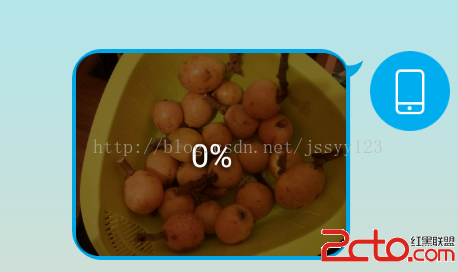
首先看下我們想要實現的效果如下圖(qq聊天中發送圖片時的效果):
再看一下我實現的效果:
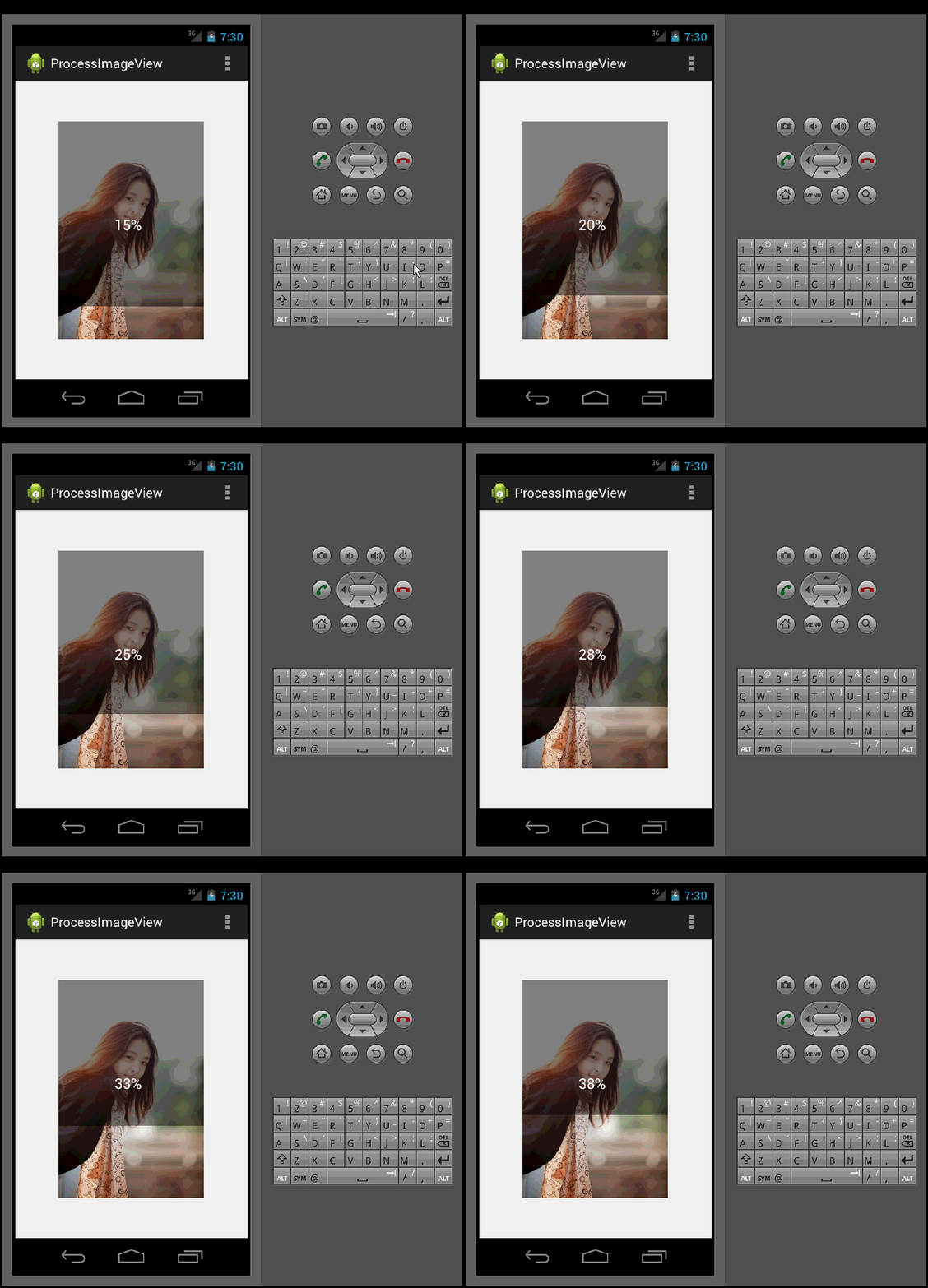
1、效果已經看見了,下面我們來實現它。首先我創建一個android工程ProgressImageView。然後我們重寫ImageView控件,創建ProcessImageView類代碼如下:
package com.example.processimageview;

import android.annotation.SuppressLint;
import android.content.Context;
import android.graphics.Canvas;
import android.graphics.Color;
import android.graphics.Paint;
import android.graphics.Rect;
import android.util.AttributeSet;
import android.view.ViewGroup.LayoutParams;
import android.widget.ImageView;

public class ProcessImageView extends ImageView {

    private Paint mPaint;// 畫筆
    int width = 0;
    int height = 0;
    Context context = null;
    int progress = 0;

    public ProcessImageView(Context context) {
        super(context);
        // TODO Auto-generated constructor stub
    }

    public ProcessImageView(Context context, AttributeSet attrs) {
        this(context, attrs, 0);
    }

    public ProcessImageView(Context context, AttributeSet attrs,
            int defStyleAttr) {
        super(context, attrs, defStyleAttr);
        this.context = context;
        mPaint = new Paint();
    }

    @SuppressLint("DrawAllocation")
    @Override
    protected void onDraw(Canvas canvas) {
        super.onDraw(canvas);
        mPaint.setAntiAlias(true); // 消除鋸齒
        mPaint.setStyle(Paint.Style.FILL);


        mPaint.setColor(Color.parseColor("#70000000"));// 半透明
        canvas.drawRect(0, 0, getWidth(), getHeight()- getHeight() * progress
                / 100, mPaint);

        mPaint.setColor(Color.parseColor("#00000000"));// 全透明
        canvas.drawRect(0, getHeight() - getHeight() * progress / 100,
                getWidth(), getHeight(), mPaint);

        mPaint.setTextSize(30);
        mPaint.setColor(Color.parseColor("#FFFFFF"));
        mPaint.setStrokeWidth(2);
        Rect rect = new Rect();
        mPaint.getTextBounds("100%", 0, "100%".length(), rect);// 確定文字的寬度
        canvas.drawText(progress + "%", getWidth() / 2 - rect.width() / 2,
                getHeight() / 2, mPaint);

    }

    public void setProgress(int progress) {
        this.progress = progress;
        postInvalidate();
    };

}
2、將ProcessImageView控件加入activity_layout.xml布局文件中,代碼如下;
3、最後一步,顯示效果(是不是很激動 ),在MainActivity類加入顯示進度條的ImageView,代碼如下:
package com.example.processimageview;

import android.app.Activity;
import android.os.Bundle;
import android.os.Handler;
import android.os.Message;
import android.view.Menu;
import android.view.MenuItem;
import android.view.View;
import android.view.ViewGroup.LayoutParams;
import android.widget.Toast;

public class MainActivity extends Activity {

    ProcessImageView processImageView =null;
    private final int SUCCESS=0;
    int progress=0;

    Handler handler=new Handler(){
        @Override
        public void handleMessage(Message msg) {
            super.handleMessage(msg);
            switch (msg.what) {
            case SUCCESS:
                Toast.makeText(MainActivity.this, "圖片上傳完成", Toast.LENGTH_SHORT).show();
                processImageView.setVisibility(View.GONE);
                break;
            }
        }
    };

    @Override
    protected void onCreate(Bundle savedInstanceState) {
        super.onCreate(savedInstanceState);
        setContentView(R.layout.activity_main);

      processImageView=(ProcessImageView) findViewById(R.id.image);
        //模擬圖片上傳進度
        new Thread(new Runnable() {
            @Override
            public void run() {
                 while (true){
                     if(progress==100){//圖片上傳完成
                         handler.sendEmptyMessage(SUCCESS);
                         return;
                     }
                     progress++;
                     processImageView.setProgress(progress);
                    try{
                        Thread.sleep(200);  //暫停0.2秒
                    } catch (InterruptedException e){
                        e.printStackTrace();
                    }
                }
            }
        }).start();
    }

    @Override
    public boolean onCreateOptionsMenu(Menu menu) {
        // Inflate the menu; this adds items to the action bar if it is present.
        getMenuInflater().inflate(R.menu.main, menu);
        return true;
    }

    @Override
    public boolean onOptionsItemSelected(MenuItem item) {
        // Handle action bar item clicks here. The action bar will
        // automatically handle clicks on the Home/Up button, so long
        // as you specify a parent activity in AndroidManifest.xml.
        int id = item.getItemId();
        if (id == R.id.action_settings) {
            return true;
        }
        return super.onOptionsItemSelected(item);
    }
}
 Android 仿淘寶商品屬性標簽頁
需求1.動態加載屬性,如尺碼,顏色,款式等 由於每件商品的屬性是不確定的,有的商品的屬性是顏色和尺碼,有的是口味,有的是大小,所以這些屬性不能直接寫死到頁面上。2.動態
 android Activity(活動)詳解
1.Android程序的基本組織結構:1)src: src目錄是放置我們所有Java代碼的地方2)gen: 自動生成的,主要有R.java,項目中添加的任何資源都會在其中
 android 事件分發機制(圖文詳解)
在Android開發中,事件分發機制是一塊Android比較重要的知識體系,了解並熟悉整套的分發機制有助於更好的分析各種點擊滑動失效問題,更好去擴展控件的事件功能和開發自
 Android -- Context(Application的應用)
Interface to global information about an application environment. This is an abstrac
 【Android】ListView、RecyclerView、ScrollView裡嵌套ListView 相對優雅的解決方案:NestFullListView
一 背景概述:ScrollView裡嵌套ListView,一直是Andr