編輯:關於Android編程
背景:其實,關於實現機器人聊天,是偶然的情況下的,公司需要做一個ios版的機器人,用於自動購買東西,然後ios就研發了一個,我覺得這種機器人挺好玩的,想明白到底怎麼實現,於是就上了百度,這東西是神器,果斷需要好好利用利用。
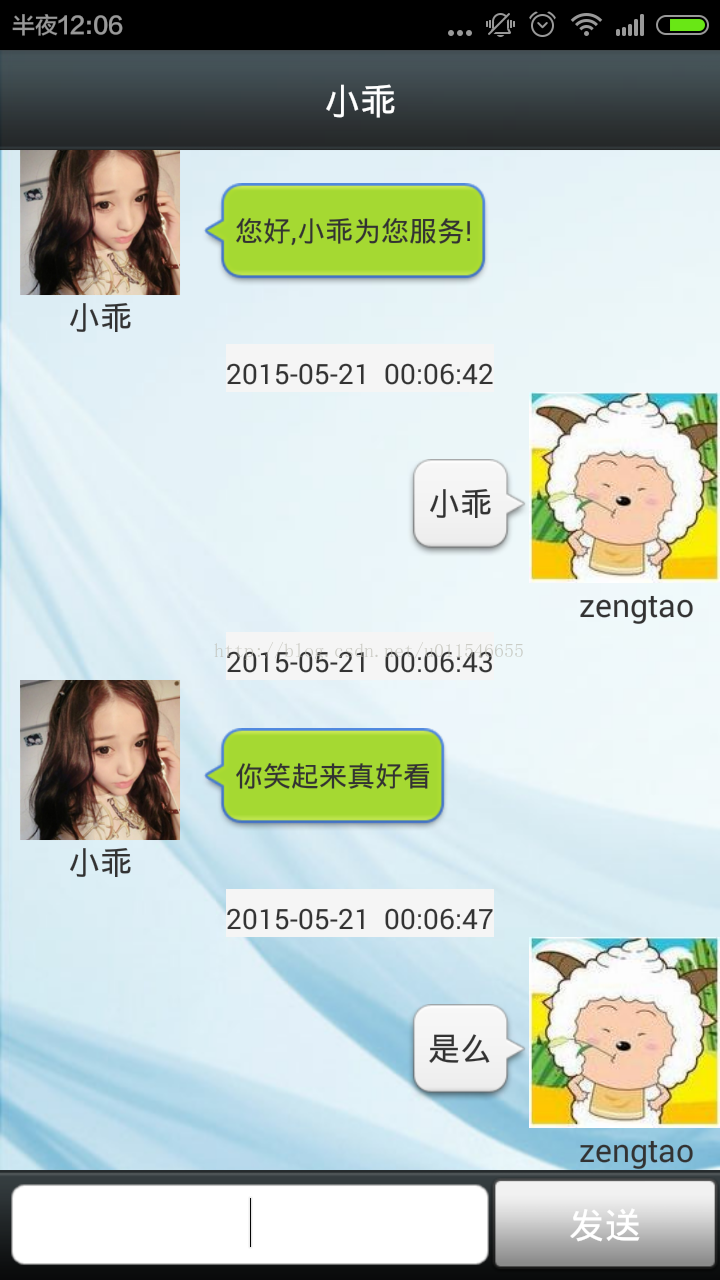
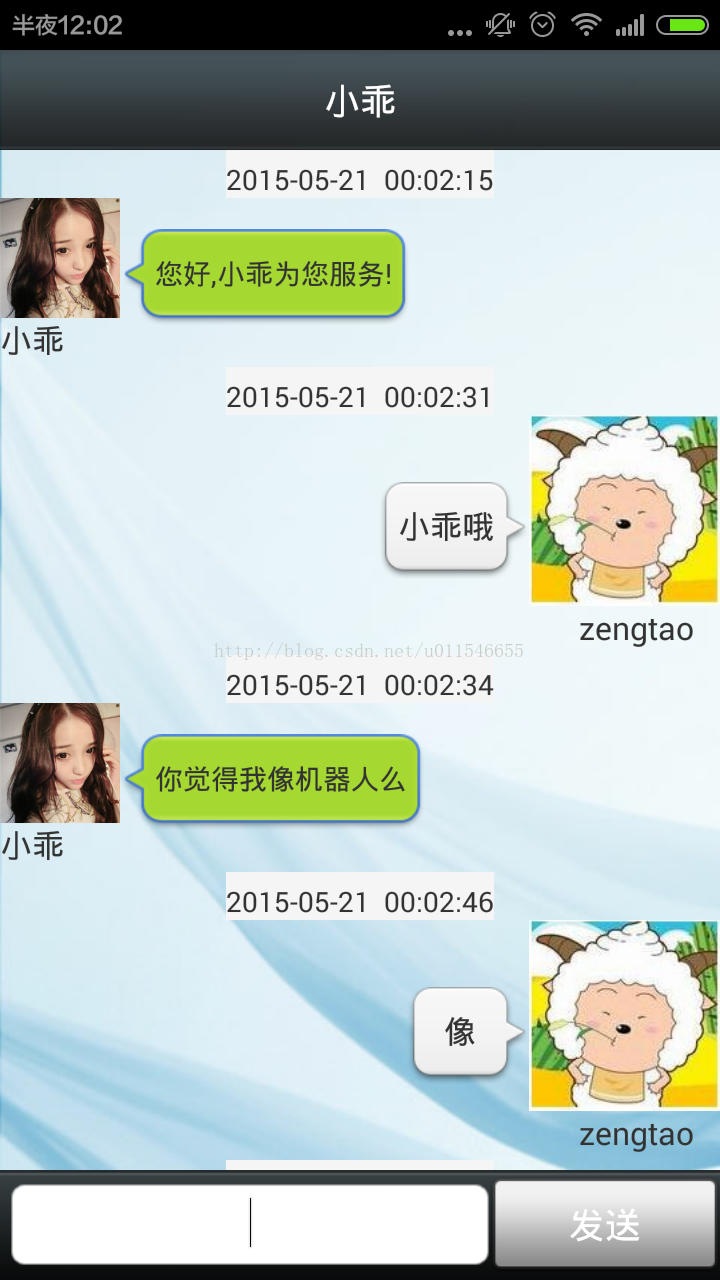
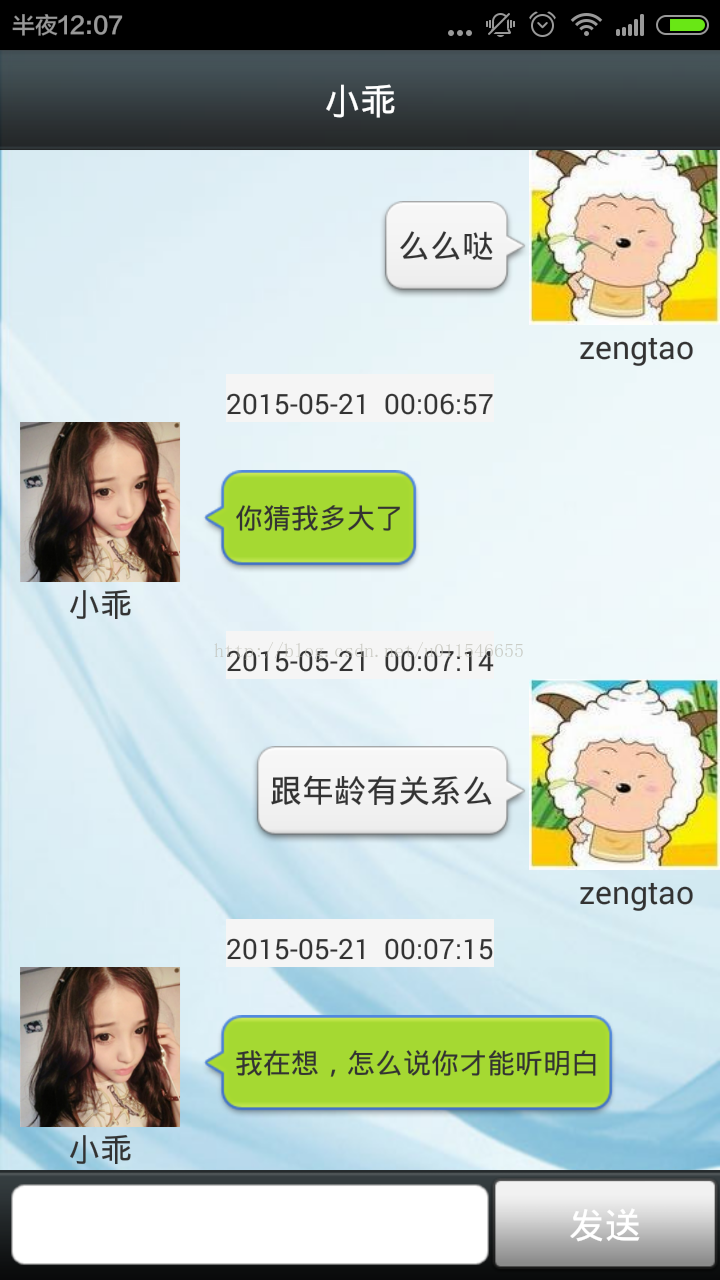
一:老規矩,先上效果圖
二:原理分析
1.接入圖靈機器人api
2.根據api完成網絡請求消息的發送和接收
3.完成布局界面
4.實現和小家伙的對話
三:實例切割(源碼展示)
1.圖靈機器人是一個非常強大,方便使用的平台,我們在實現智能機器人聊天的時候,便是依靠其強大的api,實現我們在聊天的功能,可以為我們聊天,解悶,打豆豆,呵呵。
圖靈機器人接入api地址:http://www.tuling123.com/openapi/cloud/access_api.jsp
從圖靈機器的網站,我們可以看出,他的一個請求方式,就一個get,一個組裝url,然後就返回gson格式的數據,真簡單,方便,照著它說的做,就ok了
2.api請求消息的接收和發送(工具類)
(1)配置類
package com.robot.tools;

/**
 * 配置類
 *
 * @author zengtao 2015年5月5日 下午7:59:42
 */
public class Config {
	public static final String URL_KEY = http://www.tuling123.com/openapi/api;
	public static final String APP_KEY = 817259da4b7b4f105d1ca8d3072ed7ab;
}
(2)日期工具
package com.robot.tools;

import android.annotation.SuppressLint;
import java.text.SimpleDateFormat;
import java.util.Date;

/**
 * 時間格式化工具
 *
 * @author zengtao 2015年5月6日 下午3:27:14
 */
public class DateUtils {

	@SuppressLint(SimpleDateFormat)
	public static String dateToString(Date date) {
		SimpleDateFormat df = new SimpleDateFormat(yyyy-MM-dd  HH:mm:ss);
		return df.format(date);
	}
}
package com.robot.tools;

import java.io.ByteArrayOutputStream;
import java.io.IOException;
import java.io.InputStream;
import java.io.UnsupportedEncodingException;
import java.net.HttpURLConnection;
import java.net.URL;
import java.net.URLEncoder;
import java.util.Date;

import com.google.gson.Gson;
import com.robot.bean.ChatMessage;
import com.robot.bean.ChatMessage.Type;
import com.robot.bean.Result;

/**
 * http工具類
 *
 * @author zengtao 2015年5月5日 下午7:59:15
 */
public class HttpUtils {

	/**
	 * 發送消息到服務器
	 *
	 * @param message
	 *            :發送的消息
	 * @return:消息對象
	 */
	public static ChatMessage sendMessage(String message) {
		ChatMessage chatMessage = new ChatMessage();
		String gsonResult = doGet(message);
		Gson gson = new Gson();
		Result result = null;
		if (gsonResult != null) {
			try {
				result = gson.fromJson(gsonResult, Result.class);
				chatMessage.setMessage(result.getText());
			} catch (Exception e) {
				chatMessage.setMessage(服務器繁忙,請稍候再試...);
			}
		}
		chatMessage.setData(new Date());
		chatMessage.setType(Type.INCOUNT);
		return chatMessage;
	}

	/**
	 * get請求
	 *
	 * @param message
	 *            :發送的話
	 * @return:數據
	 */
	public static String doGet(String message) {
		String result = ;
		String url = setParmat(message);
		System.out.println(------------url =  + url);
		InputStream is = null;
		ByteArrayOutputStream baos = null;
		try {
			URL urls = new URL(url);
			HttpURLConnection connection = (HttpURLConnection) urls
					.openConnection();
			connection.setReadTimeout(5 * 1000);
			connection.setConnectTimeout(5 * 1000);
			connection.setRequestMethod(GET);

			is = connection.getInputStream();
			baos = new ByteArrayOutputStream();
			int len = -1;
			byte[] buff = new byte[1024];
			while ((len = is.read(buff)) != -1) {
				baos.write(buff, 0, len);
			}
			baos.flush();
			result = new String(baos.toByteArray());
		} catch (Exception e) {
			e.printStackTrace();
		} finally {
			if (is != null) {
				try {
					is.close();
				} catch (IOException e) {
					e.printStackTrace();
				}
			}

			if (baos != null) {
				try {
					baos.close();
				} catch (IOException e) {
					e.printStackTrace();
				}
			}
		}
		return result;
	}

	/**
	 * 設置參數
	 *
	 * @param message
	 *            : 信息
	 * @return : url
	 */
	private static String setParmat(String message) {
		String url = ;
		try {
			url = Config.URL_KEY + ? + key= + Config.APP_KEY + &info=
					+ URLEncoder.encode(message, UTF-8);
		} catch (UnsupportedEncodingException e) {
			e.printStackTrace();
		}
		return url;
	}
}
(1)圖靈機器人的返回結果
package com.robot.bean;

/**
 * 映射服務器返回的結果
 *
 * @author zengtao 2015年5月6日 上午9:50:52
 */
public class Result {

	private int code; // code碼
	private String text; // 信息

	public int getCode() {
		return code;
	}

	public void setCode(int code) {
		this.code = code;
	}

	public String getText() {
		return text;
	}

	public void setText(String text) {
		this.text = text;
	}

}
(2)聊天信息的實體類
package com.robot.bean;

import java.util.Date;

/**
 * 聊天信息實體類
 *
 * @author zengtao 2015年5月6日 上午9:47:01
 */
public class ChatMessage {

	private String name;// 姓名
	private String message;// 消息
	private Type type;// 類型:0.發送者 1.接受者
	private Date data;// 時間

	public ChatMessage() {

	}

	public ChatMessage(String message, Type type, Date data) {
		super();
		this.message = message;
		this.type = type;
		this.data = data;
	}

	public String getName() {
		return name;
	}

	public void setName(String name) {
		this.name = name;
	}

	public String getMessage() {
		return message;
	}

	public void setMessage(String message) {
		this.message = message;
	}

	public Type getType() {
		return type;
	}

	public void setType(Type type) {
		this.type = type;
	}

	public Date getData() {
		return data;
	}

	public void setData(Date data) {
		this.data = data;
	}

	public enum Type {
		INCOUNT, OUTCOUNT
	}
}
4.布局的實現
(1)左面布局的實現
(2)聊天右邊的布局
(3)主界面(聊天界面)布局
5.聊天信息的適配器
package com.robot.adapter;

import java.util.List;

import android.annotation.SuppressLint;
import android.view.LayoutInflater;
import android.view.View;
import android.view.ViewGroup;
import android.widget.BaseAdapter;
import android.widget.TextView;

import com.robot.bean.ChatMessage;
import com.robot.bean.ChatMessage.Type;
import com.robot.tools.DateUtils;
import com.robot.ui.R;

/**
 * 聊天信息適配器
 *
 * @author zengtao 2015年5月6日 下午2:25:10
 */
public class ChatMessageAdapter extends BaseAdapter {

	private List list;

	public ChatMessageAdapter(List list) {
		this.list = list;
	}

	@Override
	public int getCount() {
		return list.isEmpty() ? 0 : list.size();
	}

	@Override
	public Object getItem(int position) {
		return list.get(position);
	}

	@Override
	public long getItemId(int position) {
		return position;
	}

	@Override
	public int getItemViewType(int position) {
		ChatMessage chatMessage = list.get(position);
		// 如果是接收消息:0,發送消息:1
		if (chatMessage.getType() == Type.INCOUNT) {
			return 0;
		}
		return 1;
	}

	@Override
	public int getViewTypeCount() {
		return 2;
	}

	@SuppressLint(InflateParams)
	@Override
	public View getView(int position, View convertView, ViewGroup parent) {
		ChatMessage chatMessage = list.get(position);
		if (convertView == null) {
			ViewHolder viewHolder = null;
			// 通過ItemType加載不同的布局
			if (getItemViewType(position) == 0) {
				convertView = LayoutInflater.from(parent.getContext()).inflate(
						R.layout.list_chat_left_item, null);
				viewHolder = new ViewHolder();
				viewHolder.chat_time = (TextView) convertView
						.findViewById(R.id.chat_left_time);
				viewHolder.chat_message = (TextView) convertView
						.findViewById(R.id.chat_left_message);
			} else {
				convertView = LayoutInflater.from(parent.getContext()).inflate(
						R.layout.list_chat_right_item, null);
				viewHolder = new ViewHolder();
				viewHolder.chat_time = (TextView) convertView
						.findViewById(R.id.chat_right_time);
				viewHolder.chat_message = (TextView) convertView
						.findViewById(R.id.chat_right_message);
			}
			convertView.setTag(viewHolder);
		}
		// 設置數據
		ViewHolder vh = (ViewHolder) convertView.getTag();
		vh.chat_time.setText(DateUtils.dateToString(chatMessage.getData()));
		vh.chat_message.setText(chatMessage.getMessage());
		return convertView;
	}

	/**
	 * 內部類:只尋找一次控件
	 *
	 * @author zengtao 2015年5月6日 下午2:27:57
	 */
	private class ViewHolder {
		private TextView chat_time, chat_message;
	}
}
6.主界面調用
package com.robot.ui;

import java.util.ArrayList;
import java.util.Date;
import java.util.List;

import android.annotation.SuppressLint;
import android.app.Activity;
import android.os.Bundle;
import android.os.Handler;
import android.os.Message;
import android.text.TextUtils;
import android.view.View;
import android.view.View.OnClickListener;
import android.view.Window;
import android.widget.Button;
import android.widget.EditText;
import android.widget.ListView;
import android.widget.Toast;

import com.robot.adapter.ChatMessageAdapter;
import com.robot.bean.ChatMessage;
import com.robot.bean.ChatMessage.Type;
import com.robot.tools.HttpUtils;

public class MainActivity extends Activity {
	private List list;
	private ListView chat_listview;
	private EditText chat_input;
	private Button chat_send;
	private ChatMessageAdapter chatAdapter;
	private ChatMessage chatMessage = null;

	@Override
	protected void onCreate(Bundle savedInstanceState) {
		super.onCreate(savedInstanceState);
		requestWindowFeature(Window.FEATURE_NO_TITLE);
		setContentView(R.layout.main_activity);
		initView();
		initListener();
		initData();
	}

	// 1.初始試圖
	private void initView() {
		// 1.初始化
		chat_listview = (ListView) findViewById(R.id.chat_listview);
		chat_input = (EditText) findViewById(R.id.chat_input_message);
		chat_send = (Button) findViewById(R.id.chat_send);
	}

	// 2.設置監聽事件
	private void initListener() {
		chat_send.setOnClickListener(onClickListener);
	}

	// 3.初始化數據
	private void initData() {
		list = new ArrayList();
		list.add(new ChatMessage(您好,小乖為您服務!, Type.INCOUNT, new Date()));
		chatAdapter = new ChatMessageAdapter(list);
		chat_listview.setAdapter(chatAdapter);
		chatAdapter.notifyDataSetChanged();
	}

	// 4.發送消息聊天
	private void chat() {
		// 1.判斷是否輸入內容
		final String send_message = chat_input.getText().toString().trim();
		if (TextUtils.isEmpty(send_message)) {
			Toast.makeText(MainActivity.this, 對不起,您還未發送任何消息,
					Toast.LENGTH_SHORT).show();
			return;
		}

		// 2.自己輸入的內容也是一條記錄,記錄刷新
		ChatMessage sendChatMessage = new ChatMessage();
		sendChatMessage.setMessage(send_message);
		sendChatMessage.setData(new Date());
		sendChatMessage.setType(Type.OUTCOUNT);
		list.add(sendChatMessage);
		chatAdapter.notifyDataSetChanged();
		chat_input.setText();

		// 3.發送你的消息,去服務器端,返回數據
		new Thread() {
			public void run() {
				ChatMessage chat = HttpUtils.sendMessage(send_message);
				Message message = new Message();
				message.what = 0x1;
				message.obj = chat;
				handler.sendMessage(message);
			};
		}.start();
	}

	@SuppressLint(HandlerLeak)
	private Handler handler = new Handler() {

		public void handleMessage(android.os.Message msg) {
			if (msg.what == 0x1) {
				if (msg.obj != null) {
					chatMessage = (ChatMessage) msg.obj;
				}
				// 添加數據到list中,更新數據
				list.add(chatMessage);
				chatAdapter.notifyDataSetChanged();
			}
		};
	};

	// 點擊事件監聽
	OnClickListener onClickListener = new OnClickListener() {

		@Override
		public void onClick(View v) {
			switch (v.getId()) {
			case R.id.chat_send:
				chat();
				break;
			}
		}
	};
}
7.當然記得AndroidManifest.xml裡面的權限問題
四:總結
以上呢,變KO了這個所謂的智能機器人,我們的小乖乖也就完成了,現在你就可以開始逗她玩了,想怎麼玩就怎麼玩,不過千萬不要玩壞了,冒煙了就不好了,當然我們的小乖還可以增加很多功能,你可以選擇增加語言功能功什麼的,如果有實現的,跪求分享,我也好學習學習,每天撸一撸代碼,一天一撸,十撸成神。
 Android 源碼系列之(三)從安全的角度深入理解BroadcastReceiver(下)
在上一篇文章中我們結合實驗講解了有關使用BroadcastReceiver存在的安全性問題並且給出了相應的解決方案,最後一條的解決方案是采用官方v4包中的LocalBro
 GraphicsLab Project之輝光(Glare,Glow)效果
引言從GraphicsLab Project項目立項以來,一直都在忙著搭建Shader的實驗環境,現在基本的實驗環境已經搭建完畢,所以就試著使用它來編寫一些效果。本篇文章
 手勢識別(二)--單目手勢識別算法總結
手勢有三個主要特征:手型,方向,運動軌跡一個基於視覺手勢識別系統的構成應包括:圖像的采集,預處理,特征提取和選擇,分類器的設計,以及手勢識別。其流程大致如下:上面識別過程
 Android5.x Notification應用解析
Notification可以讓我們在獲得消息的時候,在狀態欄,鎖屏界面來顯示相應的信息,很難想象如果沒有Notification,那我們的qq和微信以及其他應用沒法主動通