編輯:關於Android編程
簡介:
Volley是Google I/O 2013上Google官方發布的一款Android平台上的網絡通信庫。
以前的網絡請求,要考慮開啟線程、內存洩漏、性能等等復雜的問題。但是Volley框架已經幫我們把這些問題處理好了,對外提供了相應的完善的請求API,我們只需要按照要求使用即可。
特點:
能使網絡通信更快,更簡單,更健壯
Get、Post網絡請求及網絡圖像的高效率異步處理請求
可以對網絡請求進行排序優先級管理
網絡請求的緩存
多級別取消請求
和Activity生命周期的聯動(Activity結束時同時取消所有網絡請求)
使用Volley可以簡化一些網絡通信的開發,當然Volley不適合大數據(large payloads )和流媒體的網絡請求。例如上百兆的文件、視頻下載。
Volley開源,可以進行定制修改也可以直接使用Jar包的形式。
用法:
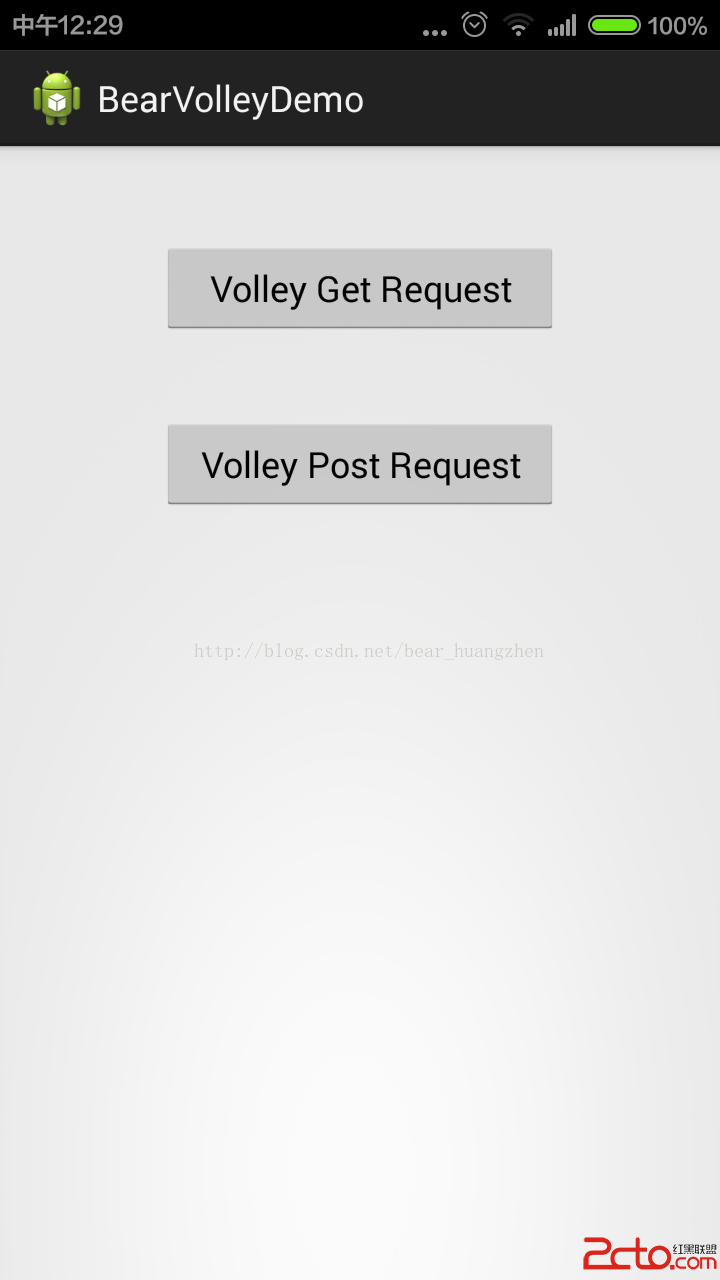
Volley的Get和Post請求方式的使用
Volley的網絡請求隊列建立和取消隊列請求
建立請求首先建立隊列,將請求添加到請求隊列裡。
然後進行相應的Get和Post請求,請求結果在回調裡獲取解析。
Volley有自己的請求隊列管理機制,可以控制每個請求的建立與取消。非常方便和安全。
這樣也就可以做到隨時控制某個請求在什麼時候結束,Activity生命周期關聯,防止無謂的請求。
示例:
首先我們需要選擇一個網絡服務API,這裡我選擇聚合數據裡面的手機歸屬地查詢API,1注冊2申請,申請之後會為你的應用分配一個AppKey,下面是API說明:
/**
 *
接口地址:http://apis.juhe.cn/mobile/get
支持格式:JSON/XML
請求方式:GET/POST
請求示例:http://apis.juhe.cn/mobile/get?phone=13429667914&key=您申請的KEY
請求參數:
 	名稱	類型	必填	說明
 	phone	int	是	需要查詢的手機號碼或手機號碼前7位
 	key	string	是	應用APPKEY(應用詳細頁查詢)
 	dtype	string	否	返回數據的格式,xml或json,默認json
調用樣例及調試工具:
  API測試工具
返回字段:
 	名稱	類型	說明
 	error_code	int	返回碼
 	reason	string	返回說明
 	result	string	返回結果集
 	province	string	省份
 	city	string	城市
 	areacode	string	區號
 	zip	string	郵編
 	company	string	運營商
 	card	string	卡類型
JSON返回示例:
{
resultcode:200,
reason:Return Successd!,
result:{
    province:浙江,
    city:杭州,
    areacode:0571,
    zip:310000,
    company:中國移動,
    card:移動動感地帶卡
}
}
XML返回示例:

-
      200
      Return Successd!
    -
          浙江
          杭州
          0571
          310000
          中國移動
          移動動感地帶卡


 *
 */
public class MainActivity extends Activity implements OnClickListener{

	//聲明一個Volley請求隊列
	private RequestQueue requestQueue = null;
	//Get請求方式的URL
	private static final String URL_GET = http://apis.juhe.cn/mobile/get?phone=18952201314&key=a53155cc6af64daabc66655b060db56a;
	//Post請求方式的URL
	private static final String URL_POST = http://apis.juhe.cn/mobile/get?;
	//當前查詢的手機號碼歸屬地對象
	private PhoneAttribuion phoneAttribuion = null;

	@Override
	protected void onCreate(Bundle savedInstanceState) {
		super.onCreate(savedInstanceState);
		setContentView(R.layout.activity_main);
		setupViews();
		initVolleyRequest();
	}

	@Override
	protected void onStop() {
		//當Activity界面已經停止的時候,取消掉所有的網絡請求
		requestQueue.cancelAll(GET_TAG);
		requestQueue.cancelAll(POST_TAG);
		super.onStop();
	}

	@Override
	public void onClick(View v) {
		int id = v.getId();
		switch (id) {
		case R.id.button1:
			//當你點擊了Volley Get Request時
			volleyGet();
			break;
		case R.id.button2:
			//當你點擊了Volley Post Request時
			volleyPost();
			break;

		default:
			break;
		}

	}

	private void setupViews(){
		findViewById(R.id.button1).setOnClickListener(this);
		findViewById(R.id.button2).setOnClickListener(this);
	}

	private void initVolleyRequest(){
		//初始化請求隊列
		requestQueue = Volley.newRequestQueue(this.getApplicationContext());
	}

	//Get請求方法
	private void volleyGet(){
		//新建一個get請求,請求結果從回調方法onResponse()中獲得
		StringRequest stringRequest = new StringRequest(Method.GET, URL_GET, new Listener() {

			@Override
			public void onResponse(String arg0) {
				System.out.println(網絡請求成功...);
				String result = arg0;

				System.out.println(result);

				//返回結果為json格式,如下格式:
				//{
				//  resultcode:200,
				//	reason:Return Successd!,
				//	result:{province:江蘇,city:徐州,areacode:0516,zip:221000,company:中國電信,card:中國電信天翼卡},
				//	error_code:0
				//}

				//將結果封裝為對象
				try {
					//將結果String轉換成Json對象
					JSONObject ret = new JSONObject(result);
					//讀取resultcode值
					String resultCode = ret.getString(resultcode).trim();
					if(200.equals(result)){
						//請求結果正常
						JSONObject resultJson = ret.getJSONObject(result);

						//將所有的屬性值讀取出來
						String province = resultJson.getString(province);
						String city = resultJson.getString(city);
						String areaCode = resultJson.getString(areacode);
						String zip = resultJson.getString(zip);
						String company = resultJson.getString(company);
						String card = resultJson.getString(card);

						//新建一個手機歸屬地對象,將所有值封裝到phoneAttribuion對象中去
						phoneAttribuion = new PhoneAttribuion(province, city, areaCode,
								zip, company, card);

						//至此Get請求結束...

					}else{
						//請求結果異常
						System.out.println(請求結果異常...);
					}
				} catch (Exception e) {
					System.out.println(e);
				}


			}
		}, new ErrorListener() {

			@Override
			public void onErrorResponse(VolleyError arg0) {
				System.out.println(網絡請求失敗...);

			}
		});
		//為此get請求設置一個Tag屬性
		stringRequest.setTag(GET_TAG);
		//將此get請求加入
		requestQueue.add(stringRequest);
	}

	private void volleyPost(){
		//新建一個post請求,請求結果從回調方法onResponse()中獲得
		StringRequest stringRequest = new StringRequest(Method.POST, URL_POST, new Listener() {

			//重寫Listener的抽象方法
			@Override
			public void onResponse(String arg0) {
				System.out.println(網絡請求成功...);
				String result = arg0;

				System.out.println(result);

				//如果需要將結果封裝為PhoneAttribution對象,可參照Get方法中的方式,你也可以將該方式提取為業務方法,在這裡調用...

			}
		}, new ErrorListener() {

			//重寫ErrorListener的抽象方法
			@Override
			public void onErrorResponse(VolleyError arg0) {
				System.out.println(網絡請求失敗...);

			}
		}){
			//重寫StringRequest的抽象方法
			@Override
			protected Map getParams() throws AuthFailureError {
				Map map = new HashMap();
				map.put(phone, 18952201314);
				map.put(key, a53155cc6af64daabc66655b060db56a);
				return map;
			}
		};

		//為此get請求設置一個Tag屬性
		stringRequest.setTag(POST_TAG);
		//將此get請求加入
		requestQueue.add(stringRequest);
	}
}
代碼中用到了自己定義的一個實體類PhoneAttribution,內容如下:
//手機號碼歸屬地類
public class PhoneAttribuion {

	private String province; //省份
	private String city;	//城市
	private String areaCode; //區號
	private String zip;    //郵編
	private String company;   //運營商
	private String card; //卡套餐類型

	public PhoneAttribuion(String province, String city, String areaCode,
			String zip, String company, String card) {
		super();
		this.province = province;
		this.city = city;
		this.areaCode = areaCode;
		this.zip = zip;
		this.company = company;
		this.card = card;
	}

	public String getProvince() {
		return province;
	}

	public void setProvince(String province) {
		this.province = province;
	}

	public String getCity() {
		return city;
	}

	public void setCity(String city) {
		this.city = city;
	}

	public String getAreaCode() {
		return areaCode;
	}

	public void setAreaCode(String areaCode) {
		this.areaCode = areaCode;
	}

	public String getZip() {
		return zip;
	}

	public void setZip(String zip) {
		this.zip = zip;
	}

	public String getCompany() {
		return company;
	}

	public void setCompany(String company) {
		this.company = company;
	}

	public String getCard() {
		return card;
	}

	public void setCard(String card) {
		this.card = card;
	}

}
 (Android 基礎(二十四)) EditText
介紹A text field allows the user to type text into your app. It can be either single li
 Android導入第三方jar包
這個和純JAVA項目有點出入。引入最終要編譯成APK。需要連同JAR包一起帶進去。 在adt17 的版本之前,導入第三方jar包時要建立一個lib目錄,並 add to
 Android插件化開發之Hook StartActivity方法
第一步、先爆項目demo照片,代碼不多,不要怕 第二步、應該知道Java反射相關知識如果不知道或者忘記的小伙伴請猛搓這裡,Android插件化開發基礎之Java
 Android混淆心得
最近在做Android應用的混淆,踩了一些坑,這裡記錄分享下個人的心得。混淆介紹首先先簡單說一下什麼是混淆和混淆的作用,其實這個搜索下可以找到一堆官方的說法等等,這裡簡單