編輯:關於Android編程
最近項目用到了二維碼的生成與識別,之前沒有接觸這塊,然後就上網搜了搜,發現有好多這方面的資源,特別是google Zxing對二維碼的封裝,實現的已經不錯了,可以直接拿過來引用,下載了他們的源碼後,只做了少少的改動,就是在Demo中增加了長按識別的功能,網上雖然也有長按識別的Demo,但好多下載下來卻無法運行,然後總結了一下,加在了下面的Demo中。
如圖所示,引用時直接把用紅色圈起來的包放在你項目所對應的文件夾下,當然一些資源文件,比如string.xml裡項目的引用你自己添加上就是 當然別忘了放架包
下面來介紹這個Demo的主類
public class BarCodeTestActivity extends Activity {

private TextView resultTextView;
private EditText qrStrEditText;
private ImageView qrImgImageView;
private String time;
    private File file = null;
    @Override
    public void onCreate(Bundle savedInstanceState) {
        super.onCreate(savedInstanceState);
        setContentView(R.layout.main);
        resultTextView = (TextView) this.findViewById(R.id.tv_scan_result);
        qrStrEditText = (EditText) this.findViewById(R.id.et_qr_string);
        qrImgImageView = (ImageView) this.findViewById(R.id.iv_qr_image);

        Button scanBarCodeButton = (Button) this.findViewById(R.id.btn_scan_barcode);
        scanBarCodeButton.setOnClickListener(new OnClickListener() {

@Override
public void onClick(View v) {
//打開掃描界面掃描條形碼或二維碼
Intent openCameraIntent = new Intent(BarCodeTestActivity.this,CaptureActivity.class);
startActivityForResult(openCameraIntent, 0);
}
});

        qrImgImageView.setOnLongClickListener(new OnLongClickListener() {

@Override
public boolean onLongClick(View v) {
// 長按識別二維碼

  saveCurrentImage();
return true;
}
});


        Button generateQRCodeButton = (Button) this.findViewById(R.id.btn_add_qrcode);
        generateQRCodeButton.setOnClickListener(new OnClickListener() {

@Override
public void onClick(View v) {
try {
String contentString = qrStrEditText.getText().toString();
if (!contentString.equals("")) {
//根據字符串生成二維碼圖片並顯示在界面上,第二個參數為圖片的大小(350*350)
Bitmap qrCodeBitmap = EncodingHandler.createQRCode(contentString, 350);
qrImgImageView.setImageBitmap(qrCodeBitmap);
}else {
//提示文本不能是空的
Toast.makeText(BarCodeTestActivity.this, "Text can not be empty", Toast.LENGTH_SHORT).show();
}

} catch (WriterException e) {
// TODO Auto-generated catch block
e.printStackTrace();
}
}
});
    }

    //這種方法狀態欄是空白,顯示不了狀態欄的信息
    private void saveCurrentImage()
    {
        //獲取當前屏幕的大小
        int width = getWindow().getDecorView().getRootView().getWidth();
        int height = getWindow().getDecorView().getRootView().getHeight();
        //生成相同大小的圖片
        Bitmap temBitmap = Bitmap.createBitmap( width, height, Bitmap.Config.ARGB_8888 );
        //找到當前頁面的根布局
        View view =  getWindow().getDecorView().getRootView();
        //設置緩存
        view.setDrawingCacheEnabled(true);
        view.buildDrawingCache();
        //從緩存中獲取當前屏幕的圖片,創建一個DrawingCache的拷貝,因為DrawingCache得到的位圖在禁用後會被回收
        temBitmap = view.getDrawingCache();
        SimpleDateFormat df = new SimpleDateFormat("yyyymmddhhmmss");
        time = df.format(new Date());
        if(Environment.MEDIA_MOUNTED.equals(Environment.getExternalStorageState())){
            file = new File(Environment.getExternalStorageDirectory().getAbsolutePath() + "/screen",time + ".png");
            if(!file.exists()){
                file.getParentFile().mkdirs();
                try {
                    file.createNewFile();
                } catch (IOException e) {
                    // TODO Auto-generated catch block
                    e.printStackTrace();
                }
            }
            FileOutputStream fos = null;
            try {
                fos = new FileOutputStream(file);
                temBitmap.compress(Bitmap.CompressFormat.PNG, 100, fos);
                fos.flush();
                fos.close();
            } catch (FileNotFoundException e) {
                e.printStackTrace();
            } catch (IOException e) {
                // TODO Auto-generated catch block
                e.printStackTrace();
            }
            new Thread(new Runnable() {
                @Override
                public void run() {
                    String path = Environment.getExternalStorageDirectory().getAbsolutePath() + "/screen/" + time + ".png";
                    final Result result = parseQRcodeBitmap(path);
                    runOnUiThread(new Runnable() {
                        public void run() {
                        if(null!=result){
                        resultTextView.setText(result.toString());
                        }else{
                            Toast.makeText(BarCodeTestActivity.this, "無法識別", Toast.LENGTH_LONG).show();
                        }
                        }
                    });
                }
            }).start();
            //禁用DrawingCahce否則會影響性能 ,而且不禁止會導致每次截圖到保存的是緩存的位圖
            view.setDrawingCacheEnabled(false);
        }
    }


    //解析二維碼圖片,返回結果封裝在Result對象中
    private com.google.zxing.Result  parseQRcodeBitmap(String bitmapPath){
        //解析轉換類型UTF-8
        Hashtable hints = new Hashtable();
        hints.put(DecodeHintType.CHARACTER_SET, "utf-8");
        //獲取到待解析的圖片
        BitmapFactory.Options options = new BitmapFactory.Options();
        //如果我們把inJustDecodeBounds設為true,那麼BitmapFactory.decodeFile(String path, Options opt)
        //並不會真的返回一個Bitmap給你,它僅僅會把它的寬,高取回來給你
        options.inJustDecodeBounds = true;
        //此時的bitmap是null,這段代碼之後,options.outWidth 和 options.outHeight就是我們想要的寬和高了
        Bitmap bitmap = BitmapFactory.decodeFile(bitmapPath,options);
        //我們現在想取出來的圖片的邊長(二維碼圖片是正方形的)設置為400像素
        /**
            options.outHeight = 400;
            options.outWidth = 400;
            options.inJustDecodeBounds = false;
            bitmap = BitmapFactory.decodeFile(bitmapPath, options);
        */
        //以上這種做法,雖然把bitmap限定到了我們要的大小,但是並沒有節約內存,如果要節約內存,我們還需要使用inSimpleSize這個屬性
        options.inSampleSize = options.outHeight / 400;
        if(options.inSampleSize <= 0){
            options.inSampleSize = 1; //防止其值小於或等於0
        }
        /**
         * 輔助節約內存設置
         *
         * options.inPreferredConfig = Bitmap.Config.ARGB_4444;    // 默認是Bitmap.Config.ARGB_8888
         * options.inPurgeable = true;
         * options.inInputShareable = true;
         */
        options.inJustDecodeBounds = false;
        bitmap = BitmapFactory.decodeFile(bitmapPath, options);
        //新建一個RGBLuminanceSource對象,將bitmap圖片傳給此對象
        RGBLuminanceSource rgbLuminanceSource = new RGBLuminanceSource(bitmap);
        //將圖片轉換成二進制圖片
        BinaryBitmap binaryBitmap = new BinaryBitmap(new HybridBinarizer(rgbLuminanceSource));
        //初始化解析對象
        QRCodeReader reader = new QRCodeReader();
        //開始解析
        Result result = null;
        try {
            result = reader.decode(binaryBitmap, hints);
        } catch (Exception e) {
            // TODO: handle exception
        }

        return result;
    }

@Override
protected void onActivityResult(int requestCode, int resultCode, Intent data) {
super.onActivityResult(requestCode, resultCode, data);
//處理掃描結果(在界面上顯示)
if (resultCode == RESULT_OK) {
Bundle bundle = data.getExtras();
String scanResult = bundle.getString("result");
resultTextView.setText(scanResult);
}
}
}
然後長按識別二維碼調用了RGBLuminanceSource這個類
public class RGBLuminanceSource  extends LuminanceSource {


private byte bitmapPixels[];


protected RGBLuminanceSource(Bitmap bitmap) {
super(bitmap.getWidth(), bitmap.getHeight());


// 首先,要取得該圖片的像素數組內容
int[] data = new int[bitmap.getWidth() * bitmap.getHeight()];
this.bitmapPixels = new byte[bitmap.getWidth() * bitmap.getHeight()];
bitmap.getPixels(data, 0, getWidth(), 0, 0, getWidth(), getHeight());


// 將int數組轉換為byte數組,也就是取像素值中藍色值部分作為辨析內容
for (int i = 0; i < data.length; i++) {
this.bitmapPixels[i] = (byte) data[i];
}
}


@Override
public byte[] getMatrix() {
// 返回我們生成好的像素數據
return bitmapPixels;
}


@Override
public byte[] getRow(int y, byte[] row) {
// 這裡要得到指定行的像素數據
System.arraycopy(bitmapPixels, y * getWidth(), row, 0, getWidth());
return row;
}
}
相機識別二維碼調用了CaptureActivity這個類
public class CaptureActivity extends Activity implements Callback {


private CaptureActivityHandler handler;
private ViewfinderView viewfinderView;
private boolean hasSurface;
private Vector decodeFormats;
private String characterSet;
private InactivityTimer inactivityTimer;
private MediaPlayer mediaPlayer;
private boolean playBeep;
private static final float BEEP_VOLUME = 0.10f;
private boolean vibrate;
private Button cancelScanButton;


/** Called when the activity is first created. */
@Override
public void onCreate(Bundle savedInstanceState) {
super.onCreate(savedInstanceState);
setContentView(R.layout.camera);

CameraManager.init(getApplication());
viewfinderView = (ViewfinderView) findViewById(R.id.viewfinder_view);
cancelScanButton = (Button) this.findViewById(R.id.btn_cancel_scan);
hasSurface = false;
inactivityTimer = new InactivityTimer(this);
}


@Override
protected void onResume() {
super.onResume();
SurfaceView surfaceView = (SurfaceView) findViewById(R.id.preview_view);
SurfaceHolder surfaceHolder = surfaceView.getHolder();
if (hasSurface) {
initCamera(surfaceHolder);
} else {
surfaceHolder.addCallback(this);
surfaceHolder.setType(SurfaceHolder.SURFACE_TYPE_PUSH_BUFFERS);
}
decodeFormats = null;
characterSet = null;


playBeep = true;
AudioManager audioService = (AudioManager) getSystemService(AUDIO_SERVICE);
if (audioService.getRingerMode() != AudioManager.RINGER_MODE_NORMAL) {
playBeep = false;
}
initBeepSound();
vibrate = true;

//quit the scan view
cancelScanButton.setOnClickListener(new OnClickListener() {

@Override
public void onClick(View v) {
CaptureActivity.this.finish();
}
});
}


@Override
protected void onPause() {
super.onPause();
if (handler != null) {
handler.quitSynchronously();
handler = null;
}
CameraManager.get().closeDriver();
}


@Override
protected void onDestroy() {
inactivityTimer.shutdown();
super.onDestroy();
}

/**
* Handler scan result
* @param result
* @param barcode
*/
public void handleDecode(Result result, Bitmap barcode) {
inactivityTimer.onActivity();
playBeepSoundAndVibrate();
String resultString = result.getText();
//FIXME
if (resultString.equals("")) {
//掃描失敗
Toast.makeText(CaptureActivity.this, "Scan failed!", Toast.LENGTH_SHORT).show();
}else {
// System.out.println("Result:"+resultString);
Intent resultIntent = new Intent();
Bundle bundle = new Bundle();
bundle.putString("result", resultString);
resultIntent.putExtras(bundle);
this.setResult(RESULT_OK, resultIntent);
}
CaptureActivity.this.finish();
}

private void initCamera(SurfaceHolder surfaceHolder) {
try {
CameraManager.get().openDriver(surfaceHolder);
} catch (IOException ioe) {
return;
} catch (RuntimeException e) {
return;
}
if (handler == null) {
handler = new CaptureActivityHandler(this, decodeFormats,
characterSet);
}
}


@Override
public void surfaceChanged(SurfaceHolder holder, int format, int width,
int height) {


}


@Override
public void surfaceCreated(SurfaceHolder holder) {
if (!hasSurface) {
hasSurface = true;
initCamera(holder);
}


}


@Override
public void surfaceDestroyed(SurfaceHolder holder) {
hasSurface = false;


}


public ViewfinderView getViewfinderView() {
return viewfinderView;
}


public Handler getHandler() {
return handler;
}


public void drawViewfinder() {
viewfinderView.drawViewfinder();


}


private void initBeepSound() {
if (playBeep && mediaPlayer == null) {
// The volume on STREAM_SYSTEM is not adjustable, and users found it
// too loud,
// so we now play on the music stream.
setVolumeControlStream(AudioManager.STREAM_MUSIC);
mediaPlayer = new MediaPlayer();
mediaPlayer.setAudioStreamType(AudioManager.STREAM_MUSIC);
mediaPlayer.setOnCompletionListener(beepListener);


AssetFileDescriptor file = getResources().openRawResourceFd(
R.raw.beep);
try {
mediaPlayer.setDataSource(file.getFileDescriptor(),
file.getStartOffset(), file.getLength());
file.close();
mediaPlayer.setVolume(BEEP_VOLUME, BEEP_VOLUME);
mediaPlayer.prepare();
} catch (IOException e) {
mediaPlayer = null;
}
}
}


private static final long VIBRATE_DURATION = 200L;


private void playBeepSoundAndVibrate() {
if (playBeep && mediaPlayer != null) {
mediaPlayer.start();
}
if (vibrate) {
Vibrator vibrator = (Vibrator) getSystemService(VIBRATOR_SERVICE);
vibrator.vibrate(VIBRATE_DURATION);
}
}


/**
* When the beep has finished playing, rewind to queue up another one.
*/
private final OnCompletionListener beepListener = new OnCompletionListener() {
public void onCompletion(MediaPlayer mediaPlayer) {
mediaPlayer.seekTo(0);
}
};


}
下面是主布局mian文件
詳細了解 的請下載demo自己看,Demo中解決了在豎拍解碼時二維碼被拉伸的現象。
不過我遇到了一個問題是 二維碼的掃描框調大後,掃描的靈敏度降低了,希望知道的朋友給指導下
 Android消息處理機制:Looper,MessageQueue,Handler
C++ LooperLooperLooper類[system/core/libutils/Looper.cpp]提供了pollOnce(),wake()函數來完成睡眠等待
 Android API Guides---Drawable Resources
繪圖資源也可以看看2D圖形可繪制資源是可以被繪制到屏幕上,哪些是你可以用的API,如getDrawable(INT)檢索或應用到另一個XML資源與屬性,比如Android
 Android 中無法取消標題欄的問題小結(兩種方法)
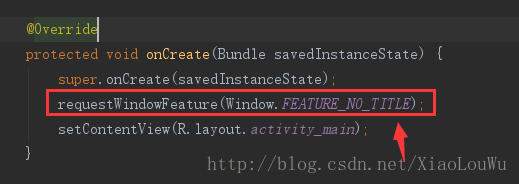
我們都知道取消標題欄有兩種方式,一種是在Java代碼中取消,另一種通過設置styles.xml文件中的Theme即可;如下圖:第一種:第二種:但是運行在Android 5
 Android Studio安裝後Fetching android sdk component information超時的解決方案
本文為大家講解的是Android Studio安裝後啟動時Fetching android sdk component information超時的解決方案,感興趣的同