編輯:關於Android編程
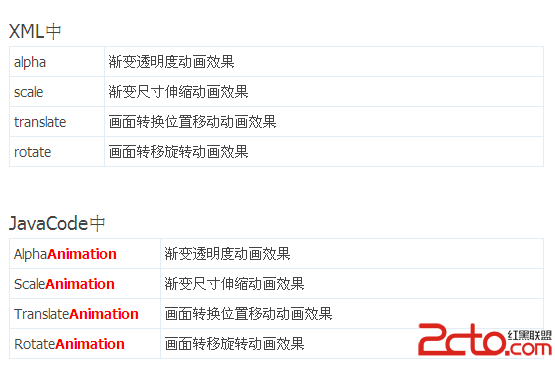
XML中
JavaCode
alpha
AlphaAnimation
scale
ScaleAnimation
一種是frame by frame(畫面轉換動畫)
XML中
JavaCode
translate
TranslateAnimation
rotate
RotateAnimation
如何在XML文件中定義動畫
① 打開Eclipse,新建Android工程
② 在res目錄中新建anim文件夾
③ 在anim目錄中新建一個myanim.xml(注意文件名小寫)
④ 加入XML的動畫代碼
"1.0" encoding="utf-8"?> <set xmlns:android="http://schemas.android.com/apk/res/android"> set>
Android動畫解析--XML
"1.0" encoding="utf-8"?> <set xmlns:android="http://schemas.android.com/apk/res/android" >
	android:fromAlpha="0.1"

	android:toAlpha="1.0"

	android:duration="3000"

	/>


	set>
"1.0" encoding="utf-8"?> "http://schemas.android.com/apk/res/android">
android:interpolator=
"@android:anim/accelerate_decelerate_interpolator"
android:fromXScale="0.0"
android:toXScale="1.4"
android:fromYScale="0.0"
android:toYScale="1.4"
android:pivotX="50%"
android:pivotY="50%"
android:fillAfter="false"
android:duration="700" />
"1.0" encoding="utf-8"?> "http://schemas.android.com/apk/res/android">
android:fromXDelta="30"
android:toXDelta="-80"
android:fromYDelta="30"
android:toYDelta="300"
android:duration="2000"
/>
"1.0" encoding="utf-8"?> "http://schemas.android.com/apk/res/android">
android:interpolator="@android:anim/accelerate_decelerate_interpolator"
android:fromDegrees="0"
android:toDegrees="+350"
android:pivotX="50%"
android:pivotY="50%"
android:duration="3000" />
如何使用XML中的動畫效果
public static Animation loadAnimation (Context context, int id)
//第一個參數Context為程序的上下文
//第二個參數id為動畫XML文件的引用
//例子:
myAnimation= AnimationUtils.loadAnimation(this,R.anim.my_action);
//使用AnimationUtils類的靜態方法loadAnimation()來加載XML中的動畫XML文件
如何在Java代碼中定義動畫
//在代碼中定義 動畫實例對象
private Animation myAnimation_Alpha;
private Animation myAnimation_Scale;
private Animation myAnimation_Translate;
private Animation myAnimation_Rotate;
//根據各自的構造方法來初始化一個實例對象
myAnimation_Alpha=new AlphaAnimation(0.1f, 1.0f);
myAnimation_Scale =new ScaleAnimation(0.0f, 1.4f, 0.0f, 1.4f,
Animation.RELATIVE_TO_SELF, 0.5f, Animation.RELATIVE_TO_SELF, 0.5f);
myAnimation_Translate=new TranslateAnimation(30.0f, -80.0f, 30.0f, 300.0f);
myAnimation_Rotate=new RotateAnimation(0.0f, +350.0f,
Animation.RELATIVE_TO_SELF,0.5f,Animation.RELATIVE_TO_SELF, 0.5f);
Android動畫解析--JavaCode
AlphaAnimation
① AlphaAnimation類對象定義
private AlphaAnimation myAnimation_Alpha;
② AlphaAnimation類對象構造
AlphaAnimation(float fromAlpha, float toAlpha)
//第一個參數fromAlpha為 動畫開始時候透明度
//第二個參數toAlpha為 動畫結束時候透明度
myAnimation_Alpha=new AlphaAnimation(0.1f, 1.0f);
//說明:
// 0.0表示完全透明
// 1.0表示完全不透明
③ 設置動畫持續時間
myAnimation_Alpha.setDuration(5000);
//設置時間持續時間為 5000毫秒
ScaleAnimation
① ScaleAnimation類對象定義
private AlphaAnimation myAnimation_Alpha;
② ScaleAnimation類對象構造
ScaleAnimation(float fromX, float toX, float fromY, float toY,
int pivotXType, float pivotXValue, int pivotYType, float pivotYValue)
//第一個參數fromX為動畫起始時 X坐標上的伸縮尺寸
//第二個參數toX為動畫結束時 X坐標上的伸縮尺寸
//第三個參數fromY為動畫起始時Y坐標上的伸縮尺寸
//第四個參數toY為動畫結束時Y坐標上的伸縮尺寸
/*說明:
以上四種屬性值
0.0表示收縮到沒有
1.0表示正常無伸縮
值小於1.0表示收縮
值大於1.0表示放大
*/
//第五個參數pivotXType為動畫在X軸相對於物件位置類型
//第六個參數pivotXValue為動畫相對於物件的X坐標的開始位置
//第七個參數pivotXType為動畫在Y軸相對於物件位置類型
//第八個參數pivotYValue為動畫相對於物件的Y坐標的開始位置
myAnimation_Scale =new ScaleAnimation(0.0f, 1.4f, 0.0f, 1.4f,
Animation.RELATIVE_TO_SELF, 0.5f, Animation.RELATIVE_TO_SELF, 0.5f);
③ 設置動畫持續時間
myAnimation_Scale.setDuration(700);
//設置時間持續時間為 700毫秒
TranslateAnimation
① TranslateAnimation類對象定義
private AlphaAnimation myAnimation_Alpha;
② TranslateAnimation類對象構造
TranslateAnimation(float fromXDelta, float toXDelta,
float fromYDelta, float toYDelta)
//第一個參數fromXDelta為動畫起始時 X坐標上的移動位置
//第二個參數toXDelta為動畫結束時 X坐標上的移動位置
//第三個參數fromYDelta為動畫起始時Y坐標上的移動位置
//第四個參數toYDelta為動畫結束時Y坐標上的移動位置
RotateAnimation
① RotateAnimation類對象定義
private AlphaAnimation myAnimation_Alpha;
② RotateAnimation類對象構造
RotateAnimation(float fromDegrees, float toDegrees,
int pivotXType, float pivotXValue, int pivotYType, float pivotYValue)
//第一個參數fromDegrees為動畫起始時的旋轉角度
//第二個參數toDegrees為動畫旋轉到的角度
//第三個參數pivotXType為動畫在X軸相對於物件位置類型
//第四個參數pivotXValue為動畫相對於物件的X坐標的開始位置
//第五個參數pivotXType為動畫在Y軸相對於物件位置類型
//第六個參數pivotYValue為動畫相對於物件的Y坐標的開始位置
myAnimation_Rotate=new RotateAnimation(0.0f, +350.0f,
Animation.RELATIVE_TO_SELF,0.5f,Animation.RELATIVE_TO_SELF, 0.5f);
③ 設置動畫持續時間
myAnimation_Rotate.setDuration(3000);
//設置時間持續時間為 3000毫秒
如何使用Java代碼中的動畫效果
使用從View父類繼承過來的方法startAnimation()來為View或是子類View等等添加一個動畫效果
實例應用:

動畫效果編程基礎--Animation電子書
動畫分析.zip
demo
 基於Android 下載文件時,更新UI簡單幫助類
由於在項目開發時,有這樣的簡單需求,問谷歌,網絡上也有好多Utils工具類,但是比較冗余。自己就簡單的寫了一個簡單幫助類。/** * 下載文件,更新UI簡單幫助類 *
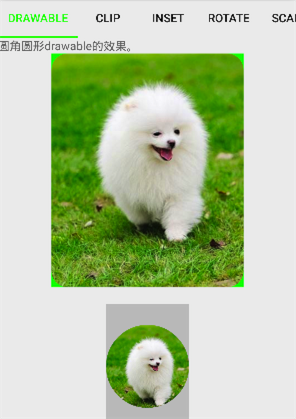 Android開發——Color/Drawable
Android開發中,我們經常會用到Color或Drawable,有時他們是可以混用的,有時卻有嚴格的區別。Drawable體系結構Drawable是可繪制物件的一般抽象
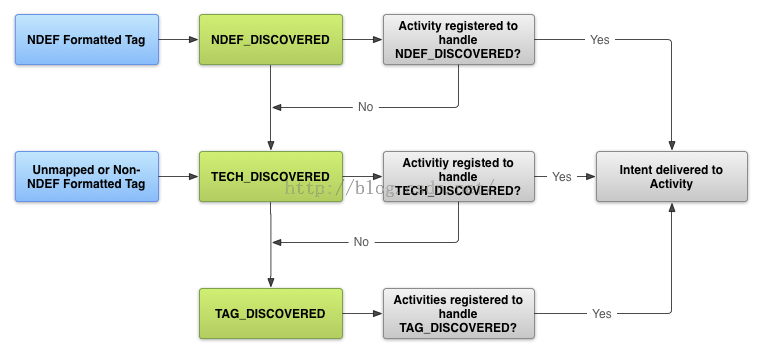 Android API Guides---NFC Basics
本文檔介紹了Android中執行基本任務NFC。它說明了如何在NDEF消息的形式發送和接收數據的NFC並介紹了支持這些功能的Andr??oid框架的API。對於更高級的主
 Android界面編程——導航欄及菜單(六)
2.7導航欄及菜單2.7.1 ActionBarActionBar是Android3.0(API 11)開始增加的新特性,ActionBar出現在活動窗口的頂部,可以顯示