編輯:關於Android編程
主要類 :ActivityThread(一個應用的啟動入口) ActivityServiceManager(負責所有activity的管理)
每個應用的啟動都會產生一條ActivityThread線程 負責維護該應用
當ActivityThread接收到ActivityServiceManager發送而來的啟動activity的信息時
調用 scheduleLaunchActivity
 public final void scheduleLaunchActivity(Intent intent, IBinder token, int ident,
                ActivityInfo info, Bundle state, List pendingResults,
                List pendingNewIntents, boolean notResumed, boolean isForward) {
            ActivityClientRecord r = new ActivityClientRecord();

            r.token = token;
            r.ident = ident;
            r.intent = intent;
            r.activityInfo = info;
            r.state = state;

            r.pendingResults = pendingResults;
            r.pendingIntents = pendingNewIntents;

            r.startsNotResumed = notResumed;
            r.isForward = isForward;

            queueOrSendMessage(H.LAUNCH_ACTIVITY, r);
        }
然後通過handler發送一條異步處理請求 在handleMessage中處理了請求
 public void handleMessage(Message msg) {
            if (DEBUG_MESSAGES) Slog.v(TAG, ">>> handling: " + msg.what);
            switch (msg.what) {
                case LAUNCH_ACTIVITY: {
                    ActivityClientRecord r = (ActivityClientRecord)msg.obj;

                    r.packageInfo = getPackageInfoNoCheck(
                            r.activityInfo.applicationInfo);
                    handleLaunchActivity(r, null);
                } break;
......
}
handleLaunchActivity:
 private final void handleLaunchActivity(ActivityClientRecord r, Intent customIntent) {
        // If we are getting ready to gc after going to the background, well
        // we are back active so skip it.
        unscheduleGcIdler();

        if (localLOGV) Slog.v(
            TAG, "Handling launch of " + r);
        Activity a = performLaunchActivity(r, customIntent);

        if (a != null) {
            r.createdConfig = new Configuration(mConfiguration);
            Bundle oldState = r.state;
            handleResumeActivity(r.token, false, r.isForward);

            if (!r.activity.mFinished && r.startsNotResumed) {
                // The activity manager actually wants this one to start out
                // paused, because it needs to be visible but isn't in the
                // foreground.  We accomplish this by going through the
                // normal startup (because activities expect to go through
                // onResume() the first time they run, before their window
                // is displayed), and then pausing it.  However, in this case
                // we do -not- need to do the full pause cycle (of freezing
                // and such) because the activity manager assumes it can just
                // retain the current state it has.
                try {
                    r.activity.mCalled = false;
                    mInstrumentation.callActivityOnPause(r.activity);
                    // We need to keep around the original state, in case
                    // we need to be created again.
                    r.state = oldState;
                    if (!r.activity.mCalled) {
                        throw new SuperNotCalledException(
                            "Activity " + r.intent.getComponent().toShortString() +
                            " did not call through to super.onPause()");
                    }

                } catch (SuperNotCalledException e) {
                    throw e;

                } catch (Exception e) {
                    if (!mInstrumentation.onException(r.activity, e)) {
                        throw new RuntimeException(
                                "Unable to pause activity "
                                + r.intent.getComponent().toShortString()
                                + ": " + e.toString(), e);
                    }
                }
                r.paused = true;
            }
        } else {
            // If there was an error, for any reason, tell the activity
            // manager to stop us.
            try {
                ActivityManagerNative.getDefault()
                    .finishActivity(r.token, Activity.RESULT_CANCELED, null);
            } catch (RemoteException ex) {
            }
        }
    }
通過performLaunchActivity 最後通過反射得到了activity對象
 private final Activity performLaunchActivity(ActivityClientRecord r, Intent customIntent) {
        // System.out.println("##### [" + System.currentTimeMillis() + "] ActivityThread.performLaunchActivity(" + r + ")");

        ActivityInfo aInfo = r.activityInfo;
        if (r.packageInfo == null) {
            r.packageInfo = getPackageInfo(aInfo.applicationInfo,
                    Context.CONTEXT_INCLUDE_CODE);
        }

        ComponentName component = r.intent.getComponent();
        if (component == null) {
            component = r.intent.resolveActivity(
                mInitialApplication.getPackageManager());
            r.intent.setComponent(component);
        }

        if (r.activityInfo.targetActivity != null) {
            component = new ComponentName(r.activityInfo.packageName,
                    r.activityInfo.targetActivity);
        }

        Activity activity = null;
        try {
            java.lang.ClassLoader cl = r.packageInfo.getClassLoader();
            activity = mInstrumentation.newActivity(
                    cl, component.getClassName(), r.intent);
            r.intent.setExtrasClassLoader(cl);
            if (r.state != null) {
                r.state.setClassLoader(cl);
            }
        } catch (Exception e) {
            if (!mInstrumentation.onException(activity, e)) {
                throw new RuntimeException(
                    "Unable to instantiate activity " + component
                    + ": " + e.toString(), e);
            }
        }

        try {
            Application app = r.packageInfo.makeApplication(false, mInstrumentation);

            if (localLOGV) Slog.v(TAG, "Performing launch of " + r);
            if (localLOGV) Slog.v(
                    TAG, r + ": app=" + app
                    + ", appName=" + app.getPackageName()
                    + ", pkg=" + r.packageInfo.getPackageName()
                    + ", comp=" + r.intent.getComponent().toShortString()
                    + ", dir=" + r.packageInfo.getAppDir());

            if (activity != null) {
                ContextImpl appContext = new ContextImpl();
                appContext.init(r.packageInfo, r.token, this);
                appContext.setOuterContext(activity);
                CharSequence title = r.activityInfo.loadLabel(appContext.getPackageManager());
                Configuration config = new Configuration(mConfiguration);
                if (DEBUG_CONFIGURATION) Slog.v(TAG, "Launching activity "
                        + r.activityInfo.name + " with config " + config);
                activity.attach(appContext, this, getInstrumentation(), r.token,
                        r.ident, app, r.intent, r.activityInfo, title, r.parent,
                        r.embeddedID, r.lastNonConfigurationInstance,
                        r.lastNonConfigurationChildInstances, config);

                if (customIntent != null) {
                    activity.mIntent = customIntent;
                }
                r.lastNonConfigurationInstance = null;
                r.lastNonConfigurationChildInstances = null;
                activity.mStartedActivity = false;
                int theme = r.activityInfo.getThemeResource();
                if (theme != 0) {
                    activity.setTheme(theme);
                }

                activity.mCalled = false;
                mInstrumentation.callActivityOnCreate(activity, r.state);
                if (!activity.mCalled) {
                    throw new SuperNotCalledException(
                        "Activity " + r.intent.getComponent().toShortString() +
                        " did not call through to super.onCreate()");
                }
                r.activity = activity;
                r.stopped = true;
                if (!r.activity.mFinished) {
                    activity.performStart();
                    r.stopped = false;
                }
                if (!r.activity.mFinished) {
                    if (r.state != null) {
                        mInstrumentation.callActivityOnRestoreInstanceState(activity, r.state);
                    }
                }
                if (!r.activity.mFinished) {
                    activity.mCalled = false;
                    mInstrumentation.callActivityOnPostCreate(activity, r.state);
                    if (!activity.mCalled) {
                        throw new SuperNotCalledException(
                            "Activity " + r.intent.getComponent().toShortString() +
                            " did not call through to super.onPostCreate()");
                    }
                }
            }
            r.paused = true;

            mActivities.put(r.token, r);

        } catch (SuperNotCalledException e) {
            throw e;

        } catch (Exception e) {
            if (!mInstrumentation.onException(activity, e)) {
                throw new RuntimeException(
                    "Unable to start activity " + component
                    + ": " + e.toString(), e);
            }
        }

        return activity;
    }
在 performLaunchActivity中執行了
activity.attach(appContext, this, getInstrumentation(), r.token, ---- attach 額外說明在attach()方法中 把contextImpl對象存進去
r.ident, app, r.intent, r.activityInfo, title, r.parent,
r.embeddedID, r.lastNonConfigurationInstance,
r.lastNonConfigurationChildInstances, config);
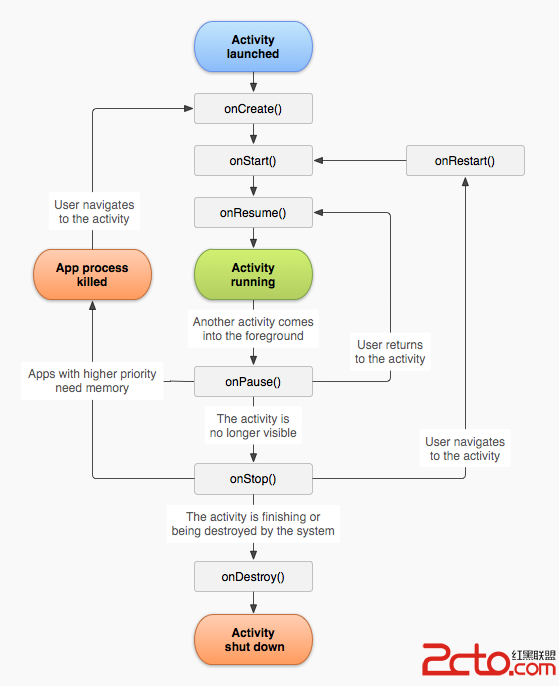
mInstrumentation.callActivityOnCreate(activity, r.state); ----onCreate mInstrumentation內部持有activity對象
activity.performStart();----onstart
if (!r.activity.mFinished) {
                    if (r.state != null) {
                        mInstrumentation.callActivityOnRestoreInstanceState(activity, r.state);
                    }
                }
在onPause之後來恢復狀態的
 ListView擴展上拉加載更多,下拉刷新
一、加載過程動態展示動畫在APP的研發中,加載過程用動畫更改時間的消耗,增強用戶體驗。而有個更精細的加載過程動畫,會不斷從細節優化APP的體驗。且隨著APP與服務器交互的
 的Android進階之旅------)android:drawableLeft的用法
有時候想在EditText左邊放一個圖片,如圖所示:就可以在xml布局文件中的EditText定義代碼中,添加入下面的代碼,即可實現: android:draw
 深入理解Android中Scroller的滾動原理
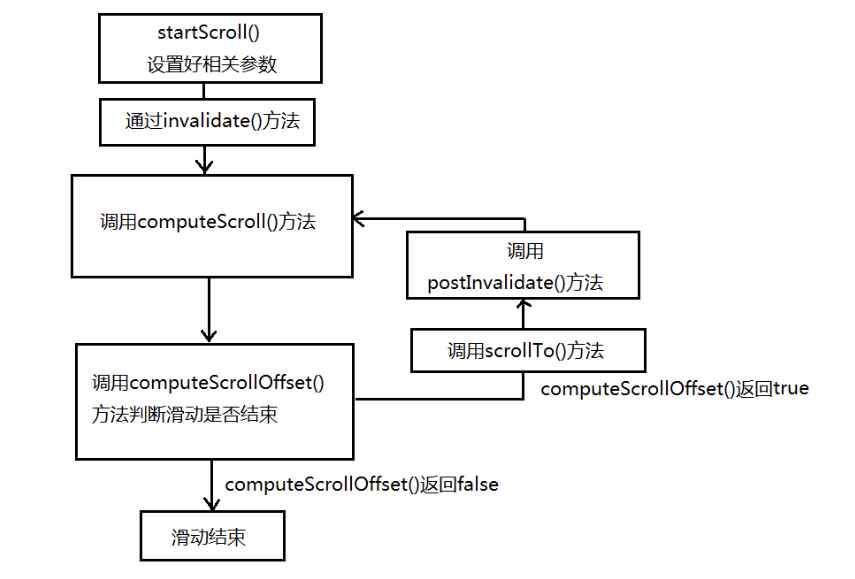
View的平滑滾動效果什麼是實現View的平滑滾動效果呢,舉個簡單的例子,一個View從在我們指定的時間內從一個位置滾動到另外一個位置,我們利用Scroller類可以實現
 listview+checkBox的全選,批量刪除
最近在做項目的時候用到很多次listview+checkBox的全選和批量刪除,因為不能把項目直接放上來,所以自己做了一個demo,希望大家可以看得明白,如果有什麼問題可