編輯:關於Android編程
用網上的一個gprinter.jar開發藍牙與收銀機的對接打印,出現如下錯誤:x + width must be <= bitmap.width()
zs這一系列的錯誤都源自於矩陣的檢測:
 /**
     * Shared code to check for illegal arguments passed to getPixels()
     * or setPixels()
     *
     * @param x left edge of the area of pixels to access
     * @param y top edge of the area of pixels to access
     * @param width width of the area of pixels to access
     * @param height height of the area of pixels to access
     * @param offset offset into pixels[] array
     * @param stride number of elements in pixels[] between each logical row
     * @param pixels array to hold the area of pixels being accessed
    */
    private void checkPixelsAccess(int x, int y, int width, int height,
                                   int offset, int stride, int pixels[]) {
        checkXYSign(x, y);
        if (width < 0) {
            throw new IllegalArgumentException("width must be >= 0");
        }
        if (height < 0) {
            throw new IllegalArgumentException("height must be >= 0");
        }
        if (x + width > getWidth()) {
            throw new IllegalArgumentException(
                    "x + width must be <= bitmap.width()");
        }
        if (y + height > getHeight()) {
            throw new IllegalArgumentException(
                    "y + height must be <= bitmap.height()");
        }
        if (Math.abs(stride) < width) {
            throw new IllegalArgumentException("abs(stride) must be >= width");
        }
        int lastScanline = offset + (height - 1) * stride;
        int length = pixels.length;
        if (offset < 0 || (offset + width > length)
                || lastScanline < 0
                || (lastScanline + width > length)) {
            throw new ArrayIndexOutOfBoundsException();
        }
    }
 public static Bitmap resizeImage(Bitmap bitmap, int w, int h)
  {
    Bitmap BitmapOrg = bitmap;

    int width = BitmapOrg.getWidth();
    int height = BitmapOrg.getHeight();
    int newWidth = w;
    int newHeight = h;

    float scaleWidth = newWidth / width;
    float scaleHeight = newHeight / height;

    Matrix matrix = new Matrix();

    matrix.postScale(scaleWidth, scaleHeight);

    Bitmap resizedBitmap = Bitmap.createBitmap(BitmapOrg, 0, 0, width,
      height, matrix, true);

    return resizedBitmap;
  }
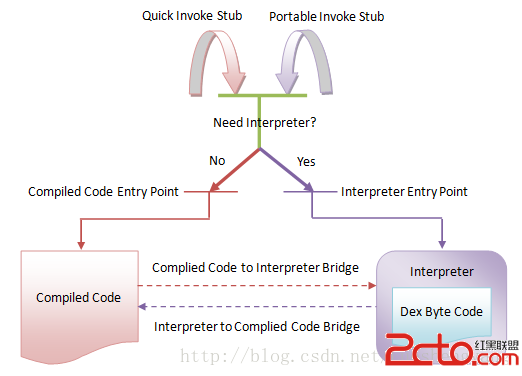 Android運行時ART執行類方法的過程分析
在前面一篇文章中,我們分析了ART運行時加載類以及查找其方法的過程。一旦找到了目標類方法,我們就可以獲得它的DEX字節碼或者本地機器指令,這樣就可以對它進行執行了。在AR
 Android viewpager在最後一頁滑動之後跳轉到主頁面的實例代碼
先給大家說下實現思路主要有是兩個監聽:一是addOnPageChangeListener();二是setOnTouchListener();addOnPageChange
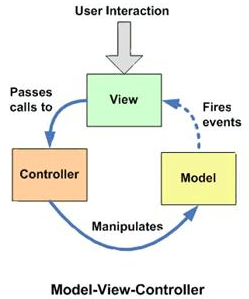 Android App的設計架構:MVC,MVP,MVVM與架構經驗談
和MVC框架模式一樣,Model模型處理數據代碼不變在Android的App開發中,很多人經常會頭疼於App的架構如何設計:我的App需要應用這些設計架構嗎?MVC,MV
 Android——滑動監聽SwipeRefreshLayout+瀑布流Recycl+Butter自動生成
package c.example.jreduch09;import android.os.AsyncTask;import android.os.Bundle;impo