編輯:關於Android編程
有時候對Android的輸入框有字符輸入數量的限制,並且顯示顯示字符輸入的數量。通過以下方式可以實現:
import android.content.Context;
import android.content.res.TypedArray;
import android.telephony.SmsMessage;
import android.text.Editable;
import android.text.InputFilter;
import android.text.TextWatcher;
import android.util.AttributeSet;
import android.widget.EditText;

import us.pinguo.cc.R;

/**
 * Created by crab on 15-3-18.
 */
public class LimitNumEditText extends EditText {
    private int mMaxLength;
    private OnTextCountChangeListener mTextCountChangeListener;

    public LimitNumEditText(Context context) {
        this(context, null);
    }

    public LimitNumEditText(Context context, AttributeSet attrs) {
        super(context, attrs);
        TypedArray typedArray = context.obtainStyledAttributes(attrs, R.styleable.LimitNumEditText);
        mMaxLength = typedArray.getInt(R.styleable.LimitNumEditText_maxLength, -1);
        typedArray.recycle();
        if (mMaxLength >= 0) {
            setFilters(new InputFilter[]{new InputFilter.LengthFilter(mMaxLength)});
        } else {
            setFilters(new InputFilter[0]);
        }
        addTextChangedListener(null);
    }
    /**
     * @return 返回限制輸入的最大字符數量
     */
    public int getLimitLength(){
        return mMaxLength;
    }
    @Override
    public void addTextChangedListener(final TextWatcher watcher) {
        TextWatcher inner=new TextWatcher() {
            @Override
            public void beforeTextChanged(CharSequence s, int start, int count, int after) {
                if(watcher!=null){
                    watcher.beforeTextChanged(s,start,count,after);
                }
            }

            @Override
            public void onTextChanged(CharSequence s, int start, int before, int count) {
                int[] params= SmsMessage.calculateLength(s,false);
                int use=params[1];
                if(mMaxLength>=0 && mTextCountChangeListener!=null){
                    mTextCountChangeListener.onTextCountChange(use,mMaxLength);
                }
                if(watcher!=null){
                    watcher.onTextChanged(s,start,before,count);
                }
            }

            @Override
            public void afterTextChanged(Editable s) {
                if(watcher!=null){
                    watcher.afterTextChanged(s);
                }
            }
        };
        super.addTextChangedListener(inner);
    }

    public LimitNumEditText(Context context, AttributeSet attrs, int defStyle) {
        super(context, attrs, defStyle);
    }
    public void setOnTextCountChangeListener(OnTextCountChangeListener listener){
        mTextCountChangeListener=listener;
    }
    /**
     * 監聽輸入框字符變化
     */
    public interface OnTextCountChangeListener{
        /**
         *
         * @param use 輸入字符贊據的大小
         * @param total 限制輸入數量的上線
         */
        public void onTextCountChange(int use, int total);
    }
 Android中的消息通知(NotificationManager和Notification)
下面來談談notification,這個notification一般用在電話,短信,郵件,鬧鐘鈴聲,在手機的狀態欄上就會出現一個小圖標,提示用戶處理這個通知,這時手從上
 Android Studio SlidingMenu導入/配置 FloatMath找不到符號解決方法
SlidingMenu是一個第三方的開源的側滑控件。是一種很好的交互邏輯。有很多優秀的應用使用了SlidingMenu例如QQ和CSDN的安卓客戶端 其gith
 android開發之使用上下文菜單
android中的上下文菜單類似於PC上的鼠標右鍵單擊,不同的是android上沒有鼠標這一概念,更談不上右鍵單擊,在android中,一般是長按某個View,調出上下文
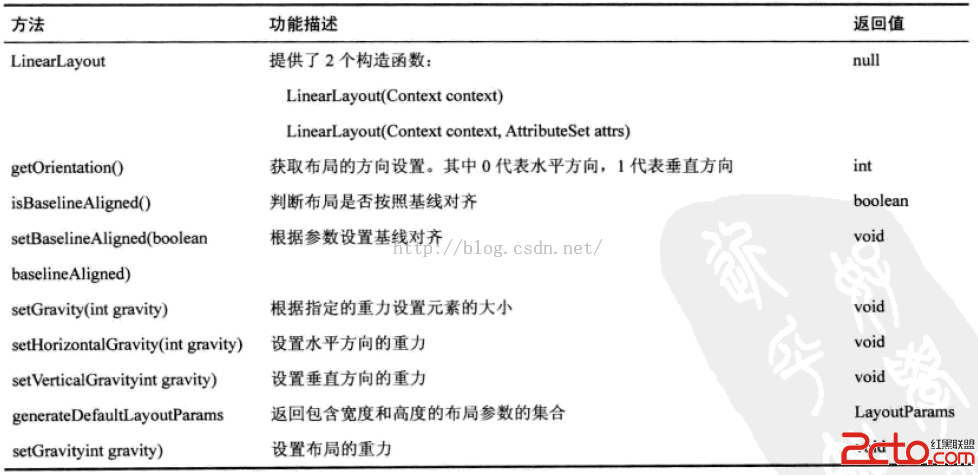 閱讀《Android 從入門到精通》(29)——LinearLayout 等四類方法
LinearLayout 類方法RelativeLayout 類方法TableLayout 類方法AbsoluteLayout 類方法