編輯:關於Android編程
我們先來看看優酷的控件是怎麼回事?

只響應最後也就是最頂部的卡片的點擊事件,如果點擊的不是最頂部的卡片那麼就先把它放到最頂部,然後在移動到最前面來,反復如次。
知道了這幾條那麼我們就很好做了。
裡面的技術細節可能就是child的放置到前面來的動畫問題把。
先看看我們實現得效果:
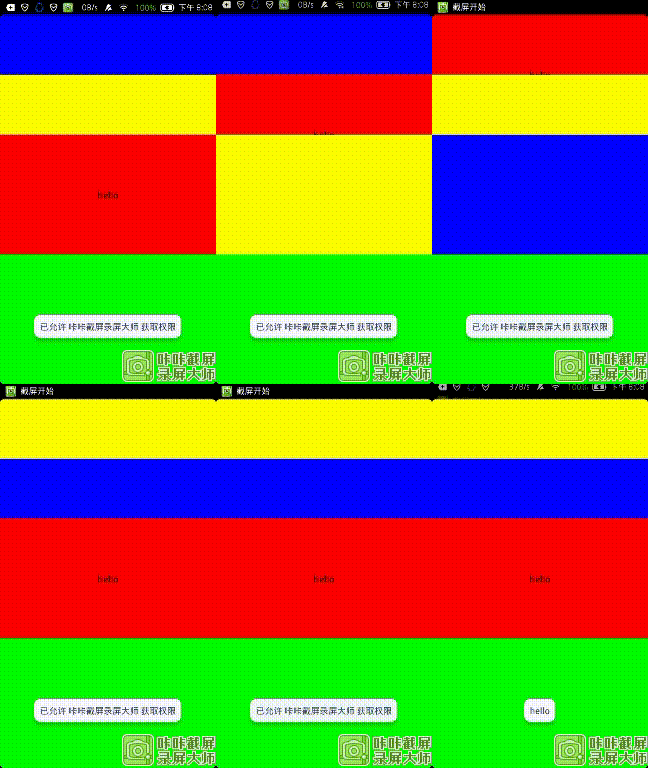
然後仔細分析一下我們要實現怎麼樣的效果:
我也是放置了一個按鈕和兩個view在控件上面,只有當控件在最前面也就是最裡面的時候才會響應事件。
然後我們就動手來實現這個控件。
我們繼承一個ViewGroup並且命名為ExchageCarldView,最開始的當然是它的onMeasure和onLayout方法了。這裡貼出代碼然後一一講解。
        @Override
	protected void onMeasure(int widthMeasureSpec, int heightMeasureSpec)
	{
		measureChildren(widthMeasureSpec, heightMeasureSpec);
		super.onMeasure(widthMeasureSpec, heightMeasureSpec);
	}
        @Override
	protected void onLayout(boolean changed, int l, int t, int r, int b)
	{
		int count = getChildCount();
		if (mIsExchageAnimation) // 動畫路徑
		{
			for (int i = 0; i < count; i++)
			{
				if (mTouchIndex > i) // 當點擊的頭部以上的不需要改變layout
					continue;
				View view = getChildAt(i);
				// 緩存第一次view的信息,就是動畫剛開始的信息
				cacheViewTopAndBottomIfneed(i, view);
				if (count - 1 == i) // 最上層的布局
				{
					// 計算它到底該走多少高度總高度
					int total_dis = view.getHeight() / 2 * (count - 1 - mTouchIndex);
					// 計算當前的線性距離
					int now_dis = (int) (total_dis * (System.currentTimeMillis() - mAnimationStartTime) / Default_animtion_time);
					// 回歸不能超過total_dis這個值
					int dis = Math.min(now_dis, total_dis);

					view.layout(view.getLeft(), mViewsTopCache.get(i) + dis, view.getRight(), mViewsBottomCache.get(i) + dis);
				}
				else
				{
					// 除去最上層的那個那個布局
					// 每個卡片都應該移動view.height的1/2
					int total_dis = view.getHeight() / 2;
					// 計算當前的線性距離
					int now_dis = (int) (total_dis * (System.currentTimeMillis() - mAnimationStartTime) / Default_animtion_time);
					// 回歸不能超過total_dis這個值
					int dis = Math.min(now_dis, total_dis);
					// 放置布局的位置
					view.layout(view.getLeft(), mViewsTopCache.get(i) - dis, view.getRight(), mViewsBottomCache.get(i) - dis);
				}

				// 檢測動畫是否結束
				checkAnimation();
			}
		}
		else
		{
			// 初始化的時候初始化我們的卡片
			mTotalHight = 0;
			for (int i = 0; i < count; i++)
			{
				View view = getChildAt(i);
				view.layout(getPaddingLeft(), mTotalHight, view.getMeasuredWidth(), mTotalHight + view.getMeasuredHeight());
				mTotalHight += view.getMeasuredHeight() / 2; // 這裡取的是一半的布局
			}
		}
	}
/**
	 * 緩存view的頂部和底部信息
	 *
	 * @param i
	 * @param view
	 */
	void cacheViewTopAndBottomIfneed(int i, View view)
	{
		int viewtop = mViewsTopCache.get(i, -1);

		if (viewtop == -1)
		{
			mViewsTopCache.put(i, view.getTop());
		}

		int viewbttom = mViewsBottomCache.get(i, -1);
		if (viewbttom == -1)
		{
			mViewsBottomCache.put(i, view.getBottom());
		}
	}
位置都放置好了那麼我們就可以來看看我們的Touch事件是怎麼處理的了。貼上我們的代碼
	@Override
	public boolean dispatchTouchEvent(MotionEvent event)
	{
		if (mIsExchageAnimation) // 當有動畫的時候我們吃掉這個事件
			return true;
		if (event.getAction() == MotionEvent.ACTION_DOWN)
		{
			mTouchIndex = getTouchChildIndex(event); // 獲取點擊視圖的index
			if (mTouchIndex != -1 && mTouchIndex != getChildCount() - 1) // 點擊的是最後的一個的時候不用開啟動畫
			{
				startAnimation();
			}
		}
		// return super.dispatchTouchEvent(event);
		// // 只響應最後一個卡片的點擊的事件
		if (mTouchIndex == getChildCount() - 1)
		{
			return super.dispatchTouchEvent(event);
		}
		else
		{
			// 其他的點擊事件吃掉
			return true;
		}
	}
這裡的代碼也很簡單就是在點擊的時候判斷是不是在動畫如果在動畫就返回,然後獲取到點擊的child的index調用startAnimation開啟動畫,後面的判斷就是判斷只相應最後一個卡片的點擊事件。
下面也挨著來看看其他兩個函數的代碼。
/***
	 * 根據點擊的事件獲取child的index
	 *
	 * @param event
	 * @return
	 */
	int getTouchChildIndex(MotionEvent event)
	{
		for (int i = 0; i < getChildCount(); i++)
		{
			View view = getChildAt(i);
			Rect r = new Rect();
			view.getGlobalVisibleRect(r);
			r = new Rect(r.left, r.top, r.right, r.bottom - view.getHeight() / 2); // 需要注意的是這裡我們是取的上半部分來做點判斷
			if (r.contains((int) event.getRawX(), (int) event.getRawY()))
			{
				return i;
			}
		}
		return -1;
	}
然後就是我們的開啟動畫的代碼了。
/**
	 * 開始動畫
	 */
	private void startAnimation()
	{
		mIsExchageAnimation = true;
		mViewsBottomCache.clear();
		mViewsTopCache.clear();
		mAnimationStartTime = System.currentTimeMillis();

		View view = getChildAt(mTouchIndex);
		view.bringToFront(); // 這一句代碼是主要的代碼

		timer = new Timer();
		timer.schedule(new TimerTask()
		{
			@Override
			public void run()
			{
				mAnimationHandler.sendEmptyMessage(0);
			}
		}, 0, 24);
	}
總結一下這個demo:
1:卡片顯示的多少我是直接取的這個控件的一半
2:通過layout來改變動畫
3:最重要的就是理解bringtofront裡面孩子的排列
4:緩存view的top和bottom
貼上所有代碼,注釋都應該很詳細了。
/**
 *
 * @author edsheng
 * @filename ExchageCarldView.java
 * @date 2015/3/12
 * @version v1.0
 */
public class ExchageCarldView extends ViewGroup
{

	private int mTotalHight = 0; // 總高度
	private boolean mIsExchageAnimation = false; // 是否在做交換動畫
	private SparseIntArray mViewsTopCache = new SparseIntArray(); // 卡片頂部邊界的cache
	private SparseIntArray mViewsBottomCache = new SparseIntArray();// 卡片底部邊界的cache

	private long mAnimationStartTime = 0; // 動畫開始的時間
	private long Default_animtion_time = 250;// 動畫時間
	private Timer timer; // 動畫定時器
	private int mTouchIndex = -1;// touchindex

	Handler mAnimationHandler = new Handler()
	{
		public void dispatchMessage(android.os.Message msg)
		{
			requestLayout(); // 更新界面布局動畫
		};
	};

	public ExchageCarldView(Context context)
	{
		super(context);
	}

	/**
	 * 緩存view的頂部和底部信息
	 *
	 * @param i
	 * @param view
	 */
	void cacheViewTopAndBottomIfneed(int i, View view)
	{
		int viewtop = mViewsTopCache.get(i, -1);

		if (viewtop == -1)
		{
			mViewsTopCache.put(i, view.getTop());
		}

		int viewbttom = mViewsBottomCache.get(i, -1);
		if (viewbttom == -1)
		{
			mViewsBottomCache.put(i, view.getBottom());
		}
	}

	@Override
	protected void onMeasure(int widthMeasureSpec, int heightMeasureSpec)
	{
		measureChildren(widthMeasureSpec, heightMeasureSpec);
		super.onMeasure(widthMeasureSpec, heightMeasureSpec);
	}

	/**
	 * 檢測並停止動畫
	 */
	private void checkAnimation()
	{
		// 當時間到了停止動畫
		if (Math.abs((System.currentTimeMillis() - mAnimationStartTime)) >= Default_animtion_time)
		{
			mAnimationHandler.removeMessages(0);
			timer.cancel();
			mIsExchageAnimation = false;
			// postDelayed(new Runnable()
			// {
			//
			// @Override
			// public void run()
			// {
			// requestLayout();
			// }
			// }, 50);
		}
	}

	@Override
	protected void onLayout(boolean changed, int l, int t, int r, int b)
	{
		int count = getChildCount();
		if (mIsExchageAnimation) // 動畫路徑
		{
			for (int i = 0; i < count; i++)
			{
				if (mTouchIndex > i) // 當點擊的頭部以上的不需要改變layout
					continue;
				View view = getChildAt(i);
				// 緩存第一次view的信息,就是動畫剛開始的信息
				cacheViewTopAndBottomIfneed(i, view);
				if (count - 1 == i) // 最上層的布局
				{
					// 計算它到底該走多少高度總高度
					int total_dis = view.getHeight() / 2 * (count - 1 - mTouchIndex);
					// 計算當前的線性距離
					int now_dis = (int) (total_dis * (System.currentTimeMillis() - mAnimationStartTime) / Default_animtion_time);
					// 回歸不能超過total_dis這個值
					int dis = Math.min(now_dis, total_dis);

					view.layout(view.getLeft(), mViewsTopCache.get(i) + dis, view.getRight(), mViewsBottomCache.get(i) + dis);
				}
				else
				{
					// 除去最上層的那個那個布局
					// 每個卡片都應該移動view.height的1/2
					int total_dis = view.getHeight() / 2;
					// 計算當前的線性距離
					int now_dis = (int) (total_dis * (System.currentTimeMillis() - mAnimationStartTime) / Default_animtion_time);
					// 回歸不能超過total_dis這個值
					int dis = Math.min(now_dis, total_dis);
					// 放置布局的位置
					view.layout(view.getLeft(), mViewsTopCache.get(i) - dis, view.getRight(), mViewsBottomCache.get(i) - dis);
				}

				// 檢測動畫是否結束
				checkAnimation();
			}
		}
		else
		{
			// 初始化的時候初始化我們的卡片
			mTotalHight = 0;
			for (int i = 0; i < count; i++)
			{
				View view = getChildAt(i);
				view.layout(getPaddingLeft(), mTotalHight, view.getMeasuredWidth(), mTotalHight + view.getMeasuredHeight());
				mTotalHight += view.getMeasuredHeight() / 2; // 這裡取的是一半的布局
			}
		}
	}

	/**
	 * 開始動畫
	 */
	private void startAnimation()
	{
		mIsExchageAnimation = true;
		mViewsBottomCache.clear();
		mViewsTopCache.clear();
		mAnimationStartTime = System.currentTimeMillis();

		View view = getChildAt(mTouchIndex);
		view.bringToFront(); // 這一句代碼是主要的代碼

		timer = new Timer();
		timer.schedule(new TimerTask()
		{
			@Override
			public void run()
			{
				mAnimationHandler.sendEmptyMessage(0);
			}
		}, 0, 24);
	}

	@Override
	public boolean dispatchTouchEvent(MotionEvent event)
	{
		if (mIsExchageAnimation) // 當有動畫的時候我們吃掉這個事件
			return true;
		if (event.getAction() == MotionEvent.ACTION_DOWN)
		{
			mTouchIndex = getTouchChildIndex(event); // 獲取點擊視圖的index
			if (mTouchIndex != -1 && mTouchIndex != getChildCount() - 1) // 點擊的是最後的一個的時候不用開啟動畫
			{
				startAnimation();
			}
		}
		// return super.dispatchTouchEvent(event);
		// // 只響應最後一個卡片的點擊的事件
		if (mTouchIndex == getChildCount() - 1)
		{
			return super.dispatchTouchEvent(event);
		}
		else
		{
			// 其他的點擊事件吃掉
			return true;
		}
	}

	/***
	 * 根據點擊的事件獲取child的index
	 *
	 * @param event
	 * @return
	 */
	int getTouchChildIndex(MotionEvent event)
	{
		for (int i = 0; i < getChildCount(); i++)
		{
			View view = getChildAt(i);
			Rect r = new Rect();
			view.getGlobalVisibleRect(r);
			r = new Rect(r.left, r.top, r.right, r.bottom - view.getHeight() / 2); // 需要注意的是這裡我們是取的上半部分來做點判斷
			if (r.contains((int) event.getRawX(), (int) event.getRawY()))
			{
				return i;
			}
		}
		return -1;
	}
}
最後是測試代碼。
public class CardExchageDemo extends Activity
{
	@Override
	protected void onCreate(Bundle savedInstanceState)
	{
		// TODO Auto-generated method stub
		super.onCreate(savedInstanceState);
		requestWindowFeature(Window.FEATURE_NO_TITLE);

		ExchageCarldView exchageView = new ExchageCarldView(this);

		View view = new View(this);
		view.setLayoutParams(new LayoutParams(LayoutParams.MATCH_PARENT, 300));
		view.setBackgroundColor(Color.YELLOW);
		exchageView.addView(view);

		View view1 = new View(this);
		view1.setLayoutParams(new LayoutParams(LayoutParams.MATCH_PARENT, 300));
		view1.setBackgroundColor(Color.BLUE);
		exchageView.addView(view1);

		Button view2 = new Button(this);
		view2.setOnClickListener(new OnClickListener()
		{

			@Override
			public void onClick(View v)
			{
				Toast.makeText(CardExchageDemo.this, hello, 0).show();
			}
		});
		view2.setLayoutParams(new LayoutParams(LayoutParams.MATCH_PARENT, 300));
		view2.setBackgroundColor(Color.RED);
		view2.setText(hello);
		exchageView.addView(view2);

		exchageView.setBackgroundColor(Color.GREEN);
		setContentView(exchageView);
	}
}
 Android+SSH開發商城App(1)數據庫的創建和環境的搭建
項目簡介 該項目主要是使用SSH開發Android後端服務器程序和前端App代碼的實現,主要技術包含: Android AsyncTask 、常見自定義控件、客戶端高層類
 [android架構篇]mvp+rxjava+retrofit+eventBus
android架構篇mvp+rxjava+retrofit+eventBus高層不應該知道低層的細節,應該是面向抽象的編程。業務的實現交給實現的接口的類。高層只負責調用。
 探究startActivityForResult在singleTop和singleTask啟動模式討論
最近在研究AMS代碼遇到一個問題,在函數startActivityUncheckedLocked中 Slog.d("DDY", "!!
 Android入門之TabHost與TabWidget實例解析
本文實例介紹的是Android的Tab控件,Tab控件可以達到分頁的效果,讓一個屏幕的內容盡量豐富,當然也會增加開發的復雜程度,在有必要的時候再使用。Android的Ta