編輯:關於Android編程
現在一般的android軟件都是需要不斷更新的,當你打開某個app的時候,如果有新的版本,它會提示你有新版本需要更新。該小程序實現的就是這個功能。
該小程序的特點是,當有更新時,會彈出一個提示框,點擊確定,則在通知來創建一個進度條進行下載,點擊取消,則取消更新。
以下是詳細代碼:
1.創建布局文件notification_item.xml,用於在通知欄生成一個進度條和下載圖標。
package com.test.application;

import android.app.Application;
import android.content.Context;

import com.test.update.config.Config;

public class AppContext extends Application {
	private static AppContext appInstance;
	private Context context;

	public static AppContext getInstance() {
		return appInstance;
	}

	@Override
	public void onCreate() {
		// TODO Auto-generated method stub
		super.onCreate();
		appInstance = this;
		context = this.getBaseContext();
//		// 獲取當前版本號
//		try {
//			PackageInfo packageInfo = getApplicationContext()
//					.getPackageManager().getPackageInfo(getPackageName(), 0);
//			Config.localVersion = packageInfo.versionCode;
//			Config.serverVersion = 1;// 假定服務器版本為2,本地版本默認是1
//		} catch (NameNotFoundException e) {
//			e.printStackTrace();
//		}
		initGlobal();
	}

	public void initGlobal() {
		try {
			Config.localVersion = getPackageManager().getPackageInfo(
					getPackageName(), 0).versionCode; // 設置本地版本號
			Config.serverVersion = 2;// 假定服務器版本為2,本地版本默認是1--實際開發中是從服務器獲取最新版本號,android具體與後端的交互見我另///外的博文
		} catch (Exception ex) {
			ex.printStackTrace();
		}
	}
}
package com.test.update.config;

public class Config {
	//版本信息
    public static int localVersion = 0;
    public static int serverVersion = 0;
    /* 下載包安裝路徑 */
    public static final String savePath = /sdcard/test/;

    public static final String saveFileName = savePath + test.apk;
}
4.編寫更新服務類UpdateServcie.java
package com.test.update;

import java.io.File;
import java.io.FileOutputStream;
import java.io.InputStream;
import java.net.HttpURLConnection;
import java.net.URL;

import android.annotation.SuppressLint;
import android.app.Notification;
import android.app.NotificationManager;
import android.app.PendingIntent;
import android.app.Service;
import android.content.Intent;
import android.net.Uri;
import android.os.Environment;
import android.os.Handler;
import android.os.IBinder;
import android.os.Message;
import android.widget.RemoteViews;

import com.test.update.config.Config;

public class UpdateService extends Service {
	// 標題
	private int titleId = 0;

	// 文件存儲
	private File updateDir = null;
	private File updateFile = null;
	// 下載狀態
	private final static int DOWNLOAD_COMPLETE = 0;
	private final static int DOWNLOAD_FAIL = 1;
	// 通知欄
	private NotificationManager updateNotificationManager = null;
	private Notification updateNotification = null;
	// 通知欄跳轉Intent
	private Intent updateIntent = null;
	private PendingIntent updatePendingIntent = null;
	/***
	 * 創建通知欄
	 */
	RemoteViews contentView;
	// 這樣的下載代碼很多,我就不做過多的說明
	int downloadCount = 0;
	int currentSize = 0;
	long totalSize = 0;
	int updateTotalSize = 0;

	// 在onStartCommand()方法中准備相關的下載工作:
	@SuppressWarnings(deprecation)
	@Override
	public int onStartCommand(Intent intent, int flags, int startId) {
		// 獲取傳值
		titleId = intent.getIntExtra(titleId, 0);
		// 創建文件
		if (android.os.Environment.MEDIA_MOUNTED.equals(android.os.Environment
				.getExternalStorageState())) {
			updateDir = new File(Environment.getExternalStorageDirectory(),
					Config.saveFileName);
			updateFile = new File(updateDir.getPath(), getResources()
					.getString(titleId) + .apk);
		}

		this.updateNotificationManager = (NotificationManager) getSystemService(NOTIFICATION_SERVICE);
		this.updateNotification = new Notification();

		// 設置下載過程中,點擊通知欄,回到主界面
		updateIntent = new Intent(this, UpdateActivity.class);
		updatePendingIntent = PendingIntent.getActivity(this, 0, updateIntent,
				0);
		// 設置通知欄顯示內容
		updateNotification.icon = R.drawable.ic_launcher;
		updateNotification.tickerText = 開始下載;
		updateNotification.setLatestEventInfo(this, QQ, 0%,
				updatePendingIntent);
		// 發出通知
		updateNotificationManager.notify(0, updateNotification);

		// 開啟一個新的線程下載,如果使用Service同步下載,會導致ANR問題,Service本身也會阻塞
		new Thread(new updateRunnable()).start();// 這個是下載的重點,是下載的過程

		return super.onStartCommand(intent, flags, startId);
	}

	@Override
	public IBinder onBind(Intent arg0) {
		// TODO Auto-generated method stub
		return null;
	}

	@SuppressLint(HandlerLeak)
	private Handler updateHandler = new Handler() {
		@Override
		public void handleMessage(Message msg) {
			switch (msg.what) {

			case DOWNLOAD_COMPLETE:
				// 點擊安裝PendingIntent
				Uri uri = Uri.fromFile(updateFile);
				Intent installIntent = new Intent(Intent.ACTION_VIEW);
				installIntent.setDataAndType(uri,
						application/vnd.android.package-archive);

				updatePendingIntent = PendingIntent.getActivity(
						UpdateService.this, 0, installIntent, 0);

				updateNotification.defaults = Notification.DEFAULT_SOUND;// 鈴聲提醒
				updateNotification.setLatestEventInfo(UpdateService.this,
						QQ, 下載完成,點擊安裝。, updatePendingIntent);
				updateNotificationManager.notify(0, updateNotification);

				// 停止服務
				stopService(updateIntent);
			case DOWNLOAD_FAIL:
				// 下載失敗
				updateNotification.setLatestEventInfo(UpdateService.this,
						QQ, 下載完成,點擊安裝。, updatePendingIntent);
				updateNotificationManager.notify(0, updateNotification);
			default:
				stopService(updateIntent);
			}
		}
	};

	public long downloadUpdateFile(String downloadUrl, File saveFile)
			throws Exception {

		HttpURLConnection httpConnection = null;
		InputStream is = null;
		FileOutputStream fos = null;

		try {
			URL url = new URL(downloadUrl);
			httpConnection = (HttpURLConnection) url.openConnection();
			httpConnection
					.setRequestProperty(User-Agent, PacificHttpClient);
			if (currentSize > 0) {
				httpConnection.setRequestProperty(RANGE, bytes=
						+ currentSize + -);
			}
			httpConnection.setConnectTimeout(10000);
			httpConnection.setReadTimeout(20000);
			updateTotalSize = httpConnection.getContentLength();
			if (httpConnection.getResponseCode() == 404) {
				throw new Exception(fail!);
			}
			is = httpConnection.getInputStream();
			fos = new FileOutputStream(saveFile, false);
			byte buffer[] = new byte[4096];
			int readsize = 0;
			while ((readsize = is.read(buffer)) > 0) {
				fos.write(buffer, 0, readsize);
				totalSize += readsize;
				// 為了防止頻繁的通知導致應用吃緊,百分比增加10才通知一次
				if ((downloadCount == 0)
						|| (int) (totalSize * 100 / updateTotalSize) - 10 > downloadCount) {
					downloadCount += 10;

					updateNotification.setLatestEventInfo(UpdateService.this,
							正在下載, (int) totalSize * 100 / updateTotalSize
									+ %, updatePendingIntent);


					/***
					 * 在這裡我們用自定的view來顯示Notification
					 */
					updateNotification.contentView = new RemoteViews(
							getPackageName(), R.layout.notification_item);
					updateNotification.contentView.setTextViewText(
							R.id.notificationTitle, 正在下載);
					updateNotification.contentView.setProgressBar(
							R.id.notificationProgress, 100, downloadCount, false);

					updateNotificationManager.notify(0, updateNotification);
				}
			}
		} finally {
			if (httpConnection != null) {
				httpConnection.disconnect();
			}
			if (is != null) {
				is.close();
			}
			if (fos != null) {
				fos.close();
			}
		}
		return totalSize;
	}

	class updateRunnable implements Runnable {
		Message message = updateHandler.obtainMessage();

		public void run() {
			message.what = DOWNLOAD_COMPLETE;


			try {
				// 增加權限;
				if (!updateDir.exists()) {
					updateDir.mkdirs();
				}
				if (!updateFile.exists()) {
					updateFile.createNewFile();
				}
				// 下載函數,以QQ為例子
				// 增加權限;
				long downloadSize = downloadUpdateFile(
						http://softfile.3g.qq.com:8080/msoft/179/1105/10753/MobileQQ1.0(Android)_Build0198.apk,
						updateFile);
				if (downloadSize > 0) {
					// 下載成功
					updateHandler.sendMessage(message);
				}
			} catch (Exception ex) {
				ex.printStackTrace();
				message.what = DOWNLOAD_FAIL;
				// 下載失敗
				updateHandler.sendMessage(message);
			}
		}
	}
}
package com.test.update;

import com.test.update.config.Config;

import android.support.v4.app.Fragment;
import android.app.Activity;
import android.app.AlertDialog;
import android.content.DialogInterface;
import android.content.Intent;
import android.os.Bundle;
import android.util.Log;
import android.view.LayoutInflater;

public class UpdateActivity extends Activity {

	@Override
	protected void onCreate(Bundle savedInstanceState) {
		super.onCreate(savedInstanceState);
		setContentView(R.layout.activity_main);
		checkVersion();
	}

	/**
	 * 檢查更新版本
	 */
	public void checkVersion() {

		if (Config.localVersion < Config.serverVersion) {
			Log.i(hgncxzy, ==============================);
			// 發現新版本,提示用戶更新
			AlertDialog.Builder alert = new AlertDialog.Builder(this);
			alert.setTitle(軟件升級)
					.setMessage(發現新版本,建議立即更新使用.)
					.setPositiveButton(更新,
							new DialogInterface.OnClickListener() {
								public void onClick(DialogInterface dialog,
										int which) {
									// 開啟更新服務UpdateService
									// 這裡為了把update更好模塊化,可以傳一些updateService依賴的值
									// 如布局ID,資源ID,動態獲取的標題,這裡以app_name為例
									Intent updateIntent = new Intent(
											UpdateActivity.this,
											UpdateService.class);
									updateIntent.putExtra(titleId,
											R.string.app_name);
									startService(updateIntent);
								}
							})
					.setNegativeButton(取消,
							new DialogInterface.OnClickListener() {
								public void onClick(DialogInterface dialog,
										int which) {
									dialog.dismiss();
								}
							});
			alert.create().show();
		} else {
			// 清理工作,略去
			// cheanUpdateFile()
		}
	}
}
 Android惡意代碼編年史
概述 移動互聯網安全無疑已成為當今主流安全威脅之一。統計 2011 年至今的移動惡意代碼病毒庫,可以看到 Android 平台下的惡意軟件數量增長可謂
 android百度地圖 添加覆蓋物Marker與InfoWindow的使用
如何添加覆蓋物,實現周邊搜索,以及對覆蓋物的點擊出現介紹等效果。效果圖:我們的需求是,當用戶點擊衣食住行,或者對對附近搜索是,從服務器返回數據(經緯度,商家信息,介紹等)
 Android學習路線(二十四)ActionBar Fragment運用最佳實踐
通過前面的幾篇博客,大家看到了Google是如何解釋action bar和fragment以及推薦的用法。俗話說沒有demo的博客不是好博客,下面我會介紹一
 android插件化-apkplug中OSGI服務基本原理-08
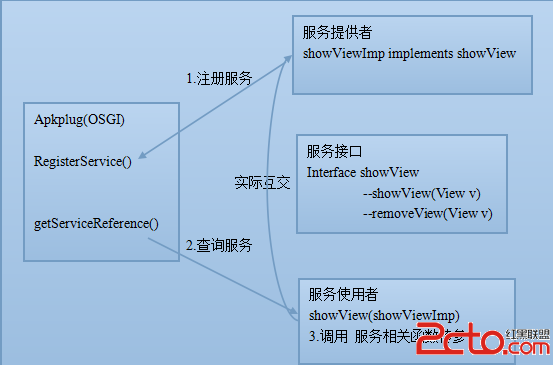
一 OSGI與android Service 異同點 OSGI服務與android Service概念差不多也是Service ,Client 關系。 an