編輯:關於Android編程
怎麼才能快速的開發出帶json的android應用。自己定義json對應的具體java beans,用Android自帶的Json庫解析json是一件很繁瑣的事情。所以在這裡,我引入一個工具和一個庫。
Jsonschema2pojo:可以更具json自動生成出相應的javaclasses(http://code.google.com/p/jsonschema2pojo/)Jackson:可以將java對象轉換成json,也可以將json轉換成java對象。(www.2cto.com)
我們使用命令行模式來從json生成javaclasses
解壓下載的版本,你會看見很多的jsonschema2pojo jar文件,一個lib文件夾和兩個腳本文件。將你要使用的json文件放到解壓目錄下(可以到http://www.json-schema.org/address下載Json例子):然後在命令行下輸入:
jsonschema2pojo --source address --target java-gen
現在你就可以在java-gen文件夾下面找到生成的java class文件了。在Android項目中使用這些class文件,你需要刪除其中的@Generated(com.googlecode.jsonschema2pojo)注意:address 是你需要轉換的json數據。你可以輸入—help選項查看其它參數:
jsonschema2pojo –help
對有的非標准的Json文件,你需要加入-T參數
jsonschema2pojo --source address --target java-gen -T JSON -a NONE
舉例說明:
天氣預報的json數據 test.json
{
    weatherinfo: {
        city: 珠海,
        cityid: 101280701,
        temp1: 14℃,
        temp2: 19℃,
        weather: 多雲,
        img1: n1.gif,
        img2: d1.gif,
        ptime: 18:00
    }
}
經過轉換之後生成如下實體類 自動生成Weatherinfo.java java文件,都不需要我自己命名,這個類直接拿過來使用會有些錯誤,將錯誤去除就可以使用了。
import java.util.HashMap;
import java.util.Map;
import javax.annotation.Generated;
import org.apache.commons.lang.builder.EqualsBuilder;
import org.apache.commons.lang.builder.HashCodeBuilder;
import org.apache.commons.lang.builder.ToStringBuilder;

@Generated(org.jsonschema2pojo)
public class Weatherinfo {

    private String city;
    private String cityid;
    private String temp1;
    private String temp2;
    private String weather;
    private String img1;
    private String img2;
    private String ptime;
    private Map additionalProperties = new HashMap();

    /**
     *
     * @return
     *     The city
     */
    public String getCity() {
        return city;
    }

    /**
     *
     * @param city
     *     The city
     */
    public void setCity(String city) {
        this.city = city;
    }

    /**
     *
     * @return
     *     The cityid
     */
    public String getCityid() {
        return cityid;
    }

    /**
     *
     * @param cityid
     *     The cityid
     */
    public void setCityid(String cityid) {
        this.cityid = cityid;
    }

    /**
     *
     * @return
     *     The temp1
     */
    public String getTemp1() {
        return temp1;
    }

    /**
     *
     * @param temp1
     *     The temp1
     */
    public void setTemp1(String temp1) {
        this.temp1 = temp1;
    }

    /**
     *
     * @return
     *     The temp2
     */
    public String getTemp2() {
        return temp2;
    }

    /**
     *
     * @param temp2
     *     The temp2
     */
    public void setTemp2(String temp2) {
        this.temp2 = temp2;
    }

    /**
     *
     * @return
     *     The weather
     */
    public String getWeather() {
        return weather;
    }

    /**
     *
     * @param weather
     *     The weather
     */
    public void setWeather(String weather) {
        this.weather = weather;
    }

    /**
     *
     * @return
     *     The img1
     */
    public String getImg1() {
        return img1;
    }

    /**
     *
     * @param img1
     *     The img1
     */
    public void setImg1(String img1) {
        this.img1 = img1;
    }

    /**
     *
     * @return
     *     The img2
     */
    public String getImg2() {
        return img2;
    }

    /**
     *
     * @param img2
     *     The img2
     */
    public void setImg2(String img2) {
        this.img2 = img2;
    }

    /**
     *
     * @return
     *     The ptime
     */
    public String getPtime() {
        return ptime;
    }

    /**
     *
     * @param ptime
     *     The ptime
     */
    public void setPtime(String ptime) {
        this.ptime = ptime;
    }

    @Override
    public String toString() {
        return ToStringBuilder.reflectionToString(this);
    }

    public Map getAdditionalProperties() {
        return this.additionalProperties;
    }

    public void setAdditionalProperty(String name, Object value) {
        this.additionalProperties.put(name, value);
    }

    @Override
    public int hashCode() {
        return new HashCodeBuilder().append(city).append(cityid).append(temp1).append(temp2).append(weather).append(img1).append(img2).append(ptime).append(additionalProperties).toHashCode();
    }

    @Override
    public boolean equals(Object other) {
        if (other == this) {
            return true;
        }
        if ((other instanceof Weatherinfo) == false) {
            return false;
        }
        Weatherinfo rhs = ((Weatherinfo) other);
        return new EqualsBuilder().append(city, rhs.city).append(cityid, rhs.cityid).append(temp1, rhs.temp1).append(temp2, rhs.temp2).append(weather, rhs.weather).append(img1, rhs.img1).append(img2, rhs.img2).append(ptime, rhs.ptime).append(additionalProperties, rhs.additionalProperties).isEquals();
    }

}
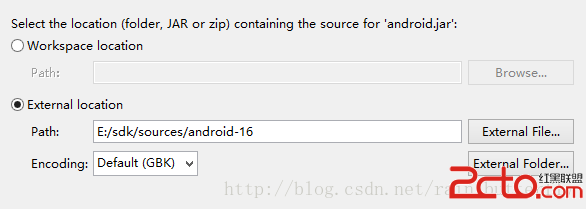 Android Eclipse中查看 Android框架源碼
有時候用Eclipse想按住ctrl鍵查看源碼怎麼辦? 下面具體步驟讓你輕松看源碼: 點擊android.jar下面的source: 這裡可以添加zip和文件夾,zi
 Android仿網易客戶端頂部導航欄效果
最近剛寫了一個網易客戶端首頁導航條的動畫效果,現在分享出來給大家學習學習。我說一下這個效果的核心原理。下面是效果圖: &nb
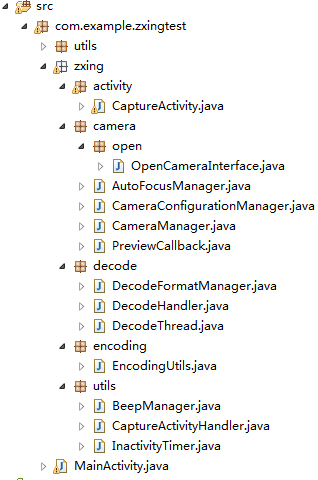 Android中的二維碼生成與掃描功能
0. 前言今天這篇文章主要描述二維碼的生成與掃描,使用目前流行的Zxing,為什麼要講二維碼,因為二維碼太普遍了,隨便一個Android APP都會有二維碼掃描。本篇旨在
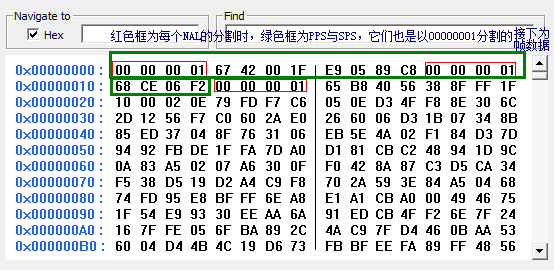 android直播中的一些流媒體技術淺析
最近在做一個直播的android手機app,難點在於流媒體的處理,主要是對流媒體進行編碼與傳輸,在此用H264編碼,傳輸協議采用RTMP,流媒體服務器用nginx並進行配