編輯:關於Android編程
前些天分析了一下FM的流程以及主要類,接下來我們分析一下FM的錄音功能;
首先看下流程圖:
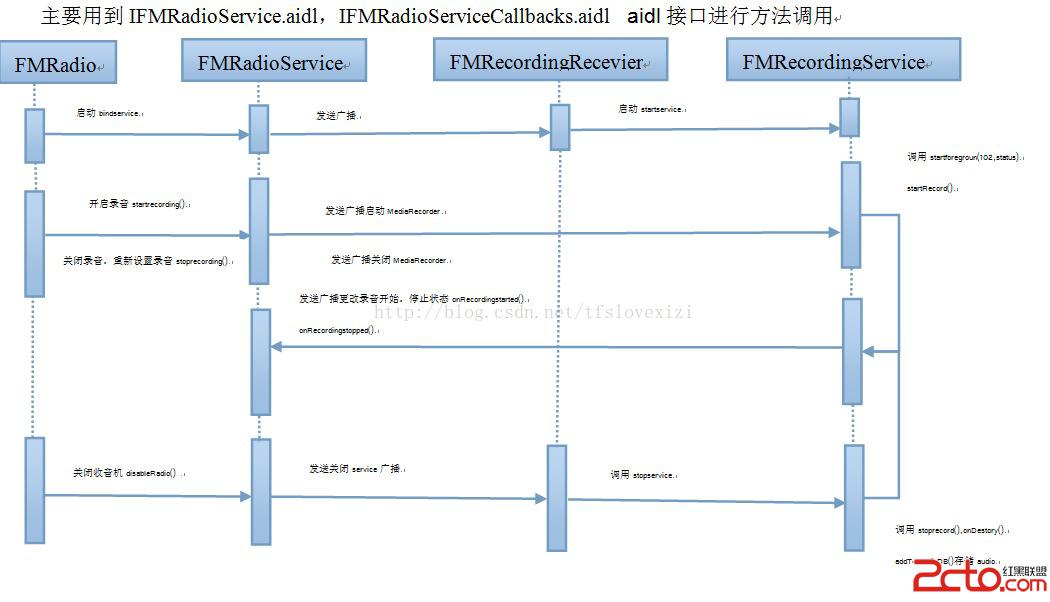
Fm錄音時,當點擊了錄音按鈕,會發一個廣播出去,源碼在FMRadioService.java中
 public void startRecording() {

       Log.d(LOGTAG, "In startRecording of Recorder");
       if ((true == mSingleRecordingInstanceSupported) &&
                               (true == mOverA2DP )) {
            Toast.makeText( this,
                      "playback on BT in progress,can't record now",
                       Toast.LENGTH_SHORT).show();
            return;
       }
       sendRecordIntent(RECORD_START);
   }
State狀態控制FMRecordingService.java類service啟動與關閉
if (state == 1) {
Log.d(TAG,"FM ONintent received");
startService = true;
context.startService(in);
} elseif(state == 0){
Log.d(TAG,"FM OFFintent received");
startService = false;
context.stopService(in);
}
Fm廣播接收的action publicstatic final StringACTION_FM = "codeaurora.intent.action.FM";
當FMRadioservice類的private void sendRecordServiceIntent(int action)方法發送一個廣播並附帶一個開關錄音的狀態int值
private void sendRecordServiceIntent(int action) {
       Intent intent = new Intent(ACTION_FM);
       intent.putExtra("state", action);
       intent.addFlags(Intent.FLAG_RECEIVER_FOREGROUND);
       Log.d(LOGTAG, "Sending Recording intent for = " +action);
       getApplicationContext().sendBroadcast(intent);
   }
State狀態控制FMRecordingService.java類service啟動與關閉
public class FMRecordingReceiver extends BroadcastReceiver {

    private static final String TAG = "FMRecordingReceiver";
    public static final String ACTION_FM =
           "codeaurora.intent.action.FM";
    @Override
    public void onReceive(Context context, Intent intent) {
        String action = intent.getAction();
        Log.d(TAG, "Received intent: " + action); if((action != null) && action.equals(ACTION_FM)) {
            Log.d(TAG, "FM intent received");
            Intent in = new Intent();
            in.putExtras(intent);
            in.setClass(context, FMRecordingService.class);
            int state = intent.getIntExtra("state", 0);
            boolean startService = true;

            if (state == 1) {Log.d(TAG, "FM ON intent received");
                startService = true;
                context.startService(in);
            } else if(state == 0){
                Log.d(TAG, "FM OFF intent received");
                startService = false;
                context.stopService(in);
            }
        }
   }
}
Fm接收廣播的action
 public static final String ACTION_FM_RECORDING =
                       "codeaurora.intent.action.FM_Recording";
    public static final String ACTION_FM_RECORDING_STATUS =
                "codeaurora.intent.action.FM.Recording.Status";
onCreat()方法裡注冊廣播接受機制,一個廣播是錄音狀態,一個是關閉fm狀態
public void onCreate() {

        super.onCreate();
        Log.d(TAG, "FMRecording Service onCreate");
        registerRecordingListner();
        registerShutdownListner();
        registerStorageMediaListener();

    }
onDestroy()方法裡寫了卸載注冊停止錄音
public void onDestroy() {
        Log.d(TAG, "FMRecording Service onDestroy");
        if (mFmRecordingOn == true) {
            Log.d(TAG, "Still recording on progress, Stoping it");
            stopRecord();
        }
        unregisterBroadCastReceiver(mFmRecordingReceiver);
        unregisterBroadCastReceiver(mFmShutdownReceiver);
        unregisterBroadCastReceiver(mSdcardUnmountReceiver);
        super.onDestroy();
    }
stopRecord();停止錄音
 private void stopRecord() {
        Log.d(TAG, "Enter stopRecord");
        mFmRecordingOn = false;
        if (mRecorder == null)
            return;
        try {
             mRecorder.stop();
             mRecorder.reset();
             mRecorder.release();
             mRecorder = null;
        } catch(Exception e) {
             e.printStackTrace();
        }

        sendRecordingStatusIntent(STOP);
        saveFile();
        stopForeground(true);
        stopClientStatusCheck();
    }
registerShutdownListner();注冊接受方法中停止fm錄音
private void registerShutdownListner() {
        if (mFmShutdownReceiver == null) {
            mFmShutdownReceiver = new BroadcastReceiver() {
                 @Override
                 public void onReceive(Context context, Intent intent) {
                     Log.d(TAG, "Received intent " +intent);
                     String action = intent.getAction();
                     Log.d(TAG, " action = " +action);
                     if (action.equals("android.intent.action.ACTION_SHUTDOWN")) {
                         Log.d(TAG, "android.intent.action.ACTION_SHUTDOWN Intent received");
                         stopRecord();
                     }
                 }
            };
            IntentFilter iFilter = new IntentFilter();
            iFilter.addAction("android.intent.action.ACTION_SHUTDOWN");
            registerReceiver(mFmShutdownReceiver, iFilter);
        }
    }
獲取sd卡有效空間
private static long getAvailableSpace() {
        String state = Environment.getExternalStorageState();
        Log.d(TAG, "External storage state=" + state);
        if (Environment.MEDIA_CHECKING.equals(state)) {
            return PREPARING;
        }
        if (!Environment.MEDIA_MOUNTED.equals(state)) {
            return UNAVAILABLE;
        }

        try {
             File sampleDir = Environment.getExternalStorageDirectory();
             StatFs stat = new StatFs(sampleDir.getAbsolutePath());
             return stat.getAvailableBlocks() * (long) stat.getBlockSize();
        } catch (Exception e) {
             Log.i(TAG, "Fail to access external storage", e);
        }
        return UNKNOWN_SIZE;
    }
主要通過以下方法實現:
FilesampleDir = Environment.getExternalStorageDirectory();
StatFs stat = newStatFs(sampleDir.getAbsolutePath());
return stat.getAvailableBlocks() *(long) stat.getBlockSize();
有四種值:
Environment.MEDIA_CHECKING檢查sd卡准備讀取
Environment.MEDIA_MOUNTED沒有sd卡
UNKNOWN_SIZE sd卡有效空間等於UNKNOWN_SIZE值
LOW_STORAGE_THRESHOLD低於存儲空間極限值
更新顯示存儲判斷提示方法
private boolean updateAndShowStorageHint() {
        mStorageSpace = getAvailableSpace();
        return showStorageHint();
    }
發送一個錄音狀態廣播
private void sendRecordingStatusIntent(int status) {
        Intent intent = new Intent(ACTION_FM_RECORDING_STATUS);
        intent.putExtra("state", status);
        Log.d(TAG, "posting intent for FM Recording status as = " +status);
        getApplicationContext().sendBroadcastAsUser(intent, UserHandle.ALL);
    }
getApplicationContext().sendBroadcastAsUser(intent,UserHandle.ALL);
UserHandle.ALL一個類的對象,USER_ALL= -1返回的一個字符串UserHandle{-1}
回調方法,去fmradioservice.java回調
mCallbacks.onRecordingStarted();方法
mCallbacks.onRecordingStopped();方法
public void registerFMRecordingStatus()
啟動錄音
private boolean startRecord() {

        Log.d(TAG, "Enter startRecord");
        if (mRecorder != null) { /* Stop existing recording if any */
            Log.d(TAG, "Stopping existing record");
            try {
                 mRecorder.stop();
                 mRecorder.reset();
                 mRecorder.release();
                 mRecorder = null;
            } catch(Exception e) {
                 e.printStackTrace();
            }
        } if (!updateAndShowStorageHint())
            return false;
        long maxFileSize = mStorageSpace - LOW_STORAGE_THRESHOLD;
        mRecorder = new MediaRecorder();
        try {
             mRecorder.setMaxFileSize(maxFileSize);
             if(mRecordDuration >= 0)
                mRecorder.setMaxDuration(mRecordDuration);
        } catch (RuntimeException exception) {

        }
        mSampleFile = null;


        File sampleDir;
        if((Environment.getExternalSDStorageState(this).equals(Environment.MEDIA_MOUNTED))){
            sampleDir = new File(Environment.getExternalSDStorageDirectory(), "/FMRecording");
        }else{
            sampleDir = new File(Environment.getExternalStorageDirectory().getAbsolutePath() +"/FMRecording");
        }


        if(!(sampleDir.mkdirs() || sampleDir.isDirectory()))
            return false;

        try {
             mSampleFile = File.createTempFile("FMRecording", ".3gpp", sampleDir);
        } catch (IOException e) {
             Log.e(TAG, "Not able to access SD Card");
             Toast.makeText(this, "Not able to access SD Card", Toast.LENGTH_SHORT).show();
        }
        try {
             Log.d(TAG, "AudioSource.FM_RX" +MediaRecorder.AudioSource.FM_RX);
             mRecorder.setAudioSource(MediaRecorder.AudioSource.FM_RX);
             mRecorder.setOutputFormat(MediaRecorder.OutputFormat.THREE_GPP);
             mRecorder.setAudioEncoder(MediaRecorder.AudioEncoder.AAC);
             mAudioType = "audio/3gpp";
        } catch (RuntimeException exception) {
             Log.d(TAG, "RuntimeException while settings");
             mRecorder.reset();
             mRecorder.release();
             mRecorder = null;
             return false;
        }
        Log.d(TAG, "setOutputFile");
        mRecorder.setOutputFile(mSampleFile.getAbsolutePath());
        try {mRecorder.prepare();
             Log.d(TAG, "start");
             mRecorder.start();
        } catch (IOException e) {
             Log.d(TAG, "IOException while start");
             mRecorder.reset();
             mRecorder.release();
             mRecorder = null;
             return false;
        } catch (RuntimeException e) {
             Log.d(TAG, "RuntimeException while start");
             mRecorder.reset();
             mRecorder.release();
             mRecorder = null;
             return false;
        }
        mFmRecordingOn = true; Log.d(TAG, "mSampleFile.getAbsolutePath() " +mSampleFile.getAbsolutePath());
        mRecorder.setOnInfoListener(new MediaRecorder.OnInfoListener() {
             public void onInfo(MediaRecorder mr, int what, int extra) {
                 if ((what == MediaRecorder.MEDIA_RECORDER_INFO_MAX_DURATION_REACHED) ||
                     (what == MediaRecorder.MEDIA_RECORDER_INFO_MAX_FILESIZE_REACHED)) {
                     if (mFmRecordingOn) {
                         Log.d(TAG, "Maximum file size/duration reached, stopping the recording");
                         stopRecord();
                     }
                     if (what == MediaRecorder.MEDIA_RECORDER_INFO_MAX_FILESIZE_REACHED) {
                         // Show the toast.
                         Toast.makeText(FMRecordingService.this,
                                        R.string.FMRecording_reach_size_limit,
                                        Toast.LENGTH_LONG).show();
                     }
                 }
             }
             // from MediaRecorder.OnErrorListenerpublic void onError(MediaRecorder mr, int what, int extra) {
                 Log.e(TAG, "MediaRecorder error. what=" + what + ". extra=" + extra);
                 if (what == MediaRecorder.MEDIA_RECORDER_ERROR_UNKNOWN) {
                     // We may have run out of space on the sdcard.
                     if (mFmRecordingOn) {
                         stopRecord();
                     }
                     updateAndShowStorageHint();
                 }
             }
        });
        mSampleStart = System.currentTimeMillis();
        sendRecordingStatusIntent(START);
        startNotification();
        return true;
    }
錄音不為空先設置為停止錄音從新設置釋放資源
mRecorder!= null
mRecorder.stop();
mRecorder.reset();
mRecorder.release();
mRecorder = null;
錄音判斷存儲空間夠用不
if (!updateAndShowStorageHint())
return false;
錄音最大值為當前值前去低於存儲極限值。
longmaxFileSize = mStorageSpace - LOW_STORAGE_THRESHOLD;
設置錄音最大值
mRecorder.setMaxFileSize(maxFileSize);
設置錄音持續
mRecorder.setMaxDuration(mRecordDuration);
設置錄音來源,放置的位置,錄音audio格式,audio寫入音源編碼格式
mRecorder.setAudioSource(MediaRecorder.AudioSource.FM_RX);
mRecorder.setOutputFormat(MediaRecorder.OutputFormat.THREE_GPP);
mRecorder.setAudioEncoder(MediaRecorder.AudioEncoder.AAC);
mRecorder.setOutputFile(mSampleFile.getAbsolutePath());
錄音監聽mediaRecorder監聽
mRecorder.setOnInfoListener(new MediaRecorder.OnInfoListener()
what ==MediaRecorder.MEDIA_RECORDER_INFO_MAX_DURATION_REACHED
what ==MediaRecorder.MEDIA_RECORDER_INFO_MAX_FILESIZE_REACHED
mFmRecordingOn 為true 停止錄音
stopRecord();
錄音過程報錯停止錄音
stopRecord();彈出提示
updateAndShowStorageHint();
獲取當前時間,發送錄音狀態廣播,啟動通知
mSampleStart= System.currentTimeMillis();
sendRecordingStatusIntent(START);
startNotification();
發送通知,設置遠程控制,startForeground(102,status);設置sevice至於前台
 private void startNotification() {
        RemoteViews views = new RemoteViews(getPackageName(), R.layout.record_status_bar);
        Notification status = new Notification();
        status.contentView = views;
        status.flags |= Notification.FLAG_ONGOING_EVENT;
        status.icon = R.drawable.ic_menu_record;
        startForeground(102, status);
    }
停止錄音,保存錄音文件,停止錄音之前台,停止狀體切換
private void stopRecord()
sendRecordingStatusIntent(STOP);
saveFile();
stopForeground(true);
stopClientStatusCheck();
保存錄音方法(錄音一開錄,就在往默認內置T中寫數據以字節方式寫入數據)
private void saveFile() {
        int sampleLength = (int)((System.currentTimeMillis() - mSampleStart)/1000 );
        Log.d(TAG, "Enter saveFile");
        if (sampleLength == 0)
            return;
        String state = Environment.getExternalStorageState();
        Log.d(TAG, "storage state is " + state);

        if (Environment.MEDIA_MOUNTED.equals(state)) {
            try {
                 this.addToMediaDB(mSampleFile);
                 Toast.makeText(this,getString(R.string.save_record_file,
                                               mSampleFile.getAbsolutePath( )),
                                               Toast.LENGTH_LONG).show();
            } catch(Exception e) {
                 e.printStackTrace();
            }
        } else {
            Log.e(TAG, "SD card must have removed during recording. ");
            Toast.makeText(this, "Recording aborted", Toast.LENGTH_SHORT).show();
        }
        return;
    }
獲取當時減去錄音起始時間如果為零就跳出保存方法不保存數據
intsampleLength = (int)((System.currentTimeMillis() - mSampleStart)/1000 );
Environment.MEDIA_MOUNTED.equals(state)sd卡可用就將錄音路徑添加到多媒體數據庫中
this.addToMediaDB(mSampleFile);
將信息添加到多媒體數據庫,音頻的audio格式存入數據庫中
 private Uri addToMediaDB(File file) {
        Log.d(TAG, "In addToMediaDB");
        Resources res = getResources();
        ContentValues cv = new ContentValues();
        long current = System.currentTimeMillis();
        long modDate = file.lastModified();
        Date date = new Date(current);
        SimpleDateFormat formatter = new SimpleDateFormat(
                  res.getString(R.string.audio_db_title_format));
        String title = formatter.format(date);

        // Lets label the recorded audio file as NON-MUSIC so that the file
        // won't be displayed automatically, except for in the playlist.
        cv.put(MediaStore.Audio.Media.IS_MUSIC, "1");cv.put(MediaStore.Audio.Media.TITLE, title);
        cv.put(MediaStore.Audio.Media.DATA, file.getAbsolutePath());
        cv.put(MediaStore.Audio.Media.DATE_ADDED, (int) (current / 1000));
        cv.put(MediaStore.Audio.Media.DATE_MODIFIED, (int) (modDate / 1000));
        cv.put(MediaStore.Audio.Media.MIME_TYPE, mAudioType);
        cv.put(MediaStore.Audio.Media.ARTIST,
                res.getString(R.string.audio_db_artist_name));
        cv.put(MediaStore.Audio.Media.ALBUM,
                res.getString(R.string.audio_db_album_name));
        Log.d(TAG, "Inserting audio record: " + cv.toString());ContentResolver resolver = getContentResolver();
        Uri base = MediaStore.Audio.Media.EXTERNAL_CONTENT_URI;
        Log.d(TAG, "ContentURI: " + base);
        Uri result = resolver.insert(base, cv);
        if (result == null) {
            Toast.makeText(this, R.string.unable_to_store, Toast.LENGTH_SHORT).show();
            return null;
        }
        if (getPlaylistId(res) == -1) {
            createPlaylist(res, resolver);
        }
        int audioId = Integer.valueOf(result.getLastPathSegment());
        addToPlaylist(resolver, audioId, getPlaylistId(res));

        // Notify those applications such as Music listening to the
        // scanner events that a recorded audio file just created.
        sendBroadcast(new Intent(Intent.ACTION_MEDIA_SCANNER_SCAN_FILE, result));
        return result;
    }
獲取audio的uri
Uri base =MediaStore.Audio.Media.EXTERNAL_CONTENT_URI
添加到播放列表
addToPlaylist(resolver,audioId, getPlaylistId(res));
可以存入music數據
cv.put(MediaStore.Audio.Media.IS_MUSIC,"1")
發送廣播掃描
sendBroadcast(newIntent(Intent.ACTION_MEDIA_SCANNER_SCAN_FILE, result));
privatevoid registerRecordingListner()廣播接收者
private void registerRecordingListner() {
        if (mFmRecordingReceiver == null) {
            mFmRecordingReceiver = new BroadcastReceiver() {
                 @Override
                 public void onReceive(Context context, Intent intent) {
                     Log.d(TAG, "Received intent " +intent);
                     String action = intent.getAction();
                     Log.d(TAG, " action = " +action);
                     if (action.equals(ACTION_FM_RECORDING)) {
                         int state = intent.getIntExtra("state", STOP);
                         Log.d(TAG, "ACTION_FM_RECORDING Intent received" + state);
                         if (state == START) {
                             Log.d(TAG, "Recording start");
                             mRecordDuration = intent.getIntExtra("record_duration", mRecordDuration);
                             if(startRecord()) {
                                clientProcessName = intent.getStringExtra("process_name");
                                clientPid = intent.getIntExtra("process_id", -1);
                                startClientStatusCheck();
                             }} else if (state == STOP) {
                             Log.d(TAG, "Stop recording");
                             stopRecord();
                         }
                     }
                 }
            };
            IntentFilter iFilter = new IntentFilter();
            iFilter.addAction(ACTION_FM_RECORDING);
            registerReceiver(mFmRecordingReceiver, iFilter);
        }
    }
廣播狀態為1的時候就開始錄音並檢查線程
private void startClientStatusCheck()
獲取客戶端所有進程信息進行匹配如果啟動的app沒有被殺死就繼續錄音否則停止
privateboolean getClientStatus(int pid, String processName)
ActivityManageractvityManager =
(ActivityManager)this.getSystemService(
this.ACTIVITY_SERVICE);
List
actvityManager.getRunningAppProcesses();
for(RunningAppProcessInfo procInfo :procInfos) {
if ((pid == procInfo.pid)
&&
(procInfo.processName.equals(processName))) {
status = true;
break;
}
}
procInfos.clear();
privateRunnable clientStatusCheckThread = new Runnable()
停止錄音後睡眠500毫秒
privatevoid stopClientStatusCheck()中斷線程mStatusCheckThread
private void stopClientStatusCheck() {
       if(mStatusCheckThread != null) {
          mStatusCheckThread.interrupt();
       }
   }
 Android WebSocket協議
首先明確一下概念,WebSocket協議是一種建立在TCP連接基礎上的全雙工通信的協議。概念強調了兩點內容:TCP基礎上 全雙工通信那麼什麼是全雙工通信呢? 全雙工就是指
 最新Android ListView 下拉刷新 上滑加載
開發項目過程中基本都會用到listView的下拉刷新和上滑加載更多,之前大家最常用的應該是pull to refresh或它的變種版吧,google官方在最新的andro
 初探Google推薦Android圖片加載框架Glide
簡介現在在Android上加載圖片的框架都已經爛大街了,所以我們這裡也不說誰好誰壞,當然也不做比較了,因為得出的結果都是片面的,沒有誰好誰壞只有適不適合需求罷了起因是在泰
 Android WebView 優化之路
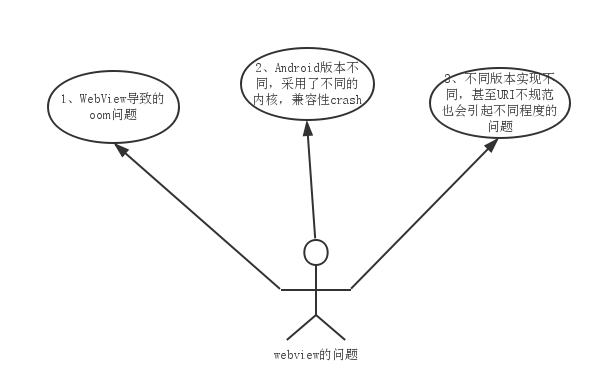
隨著app的迭代,嵌入的html5界面越來越多了,Webview這個強大組件引起的問題越發的多起來,例如: 1、WebView導致的oom問題 2、Android版本