編輯:關於Android編程
寫正文之前,小小的吐槽一下,還有一個月就放假了,作業、考試、還有實習(研一,下半學期課不多,也不想在實驗室)的考慮,最近基於hadoop的數據分析馬上也要驗收了,真的忙的“外焦裡嫩”啊!目前定的方向是Android開發,所以想過年來了找一個Android的實習工作,提高一點在真正的項目中的經驗。
好了,說了這麼多廢話,開始進入正題吧。
整個計步器的項目已經上傳到github上了,感興趣的朋友可以去看看(最好能給小弟我打顆星星哦~)
www.2cto.com
首先,這是兩張今天要實現的效果圖:
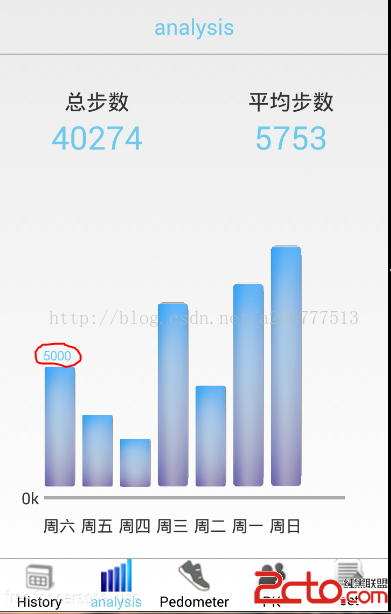
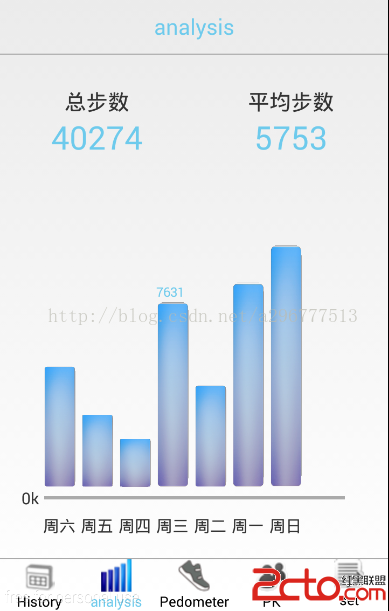
最主要的實現自己寫的一個HistogramView的類(柱狀圖類)
HistogramView的代碼如下:
package com.example.histogram.widet;


import com.example.changepage1.R;

import android.annotation.SuppressLint;
import android.content.Context;
import android.graphics.Bitmap;
import android.graphics.BitmapFactory;
import android.graphics.Canvas;
import android.graphics.Color;
import android.graphics.Paint;
import android.graphics.RectF;
import android.util.AttributeSet;
import android.view.View;
import android.view.animation.Animation;
import android.view.animation.Transformation;


/**
 * 這是重新寫的一個柱狀圖的view
 * Author: 李垭超   email:296777513@qq.com
 * Date: 2015-1-3
 * Time: 下午6:15
 */
public class HistogramView extends View {
	private boolean Text = false;//判斷是否在柱狀圖上顯示數字
	private int Height;//控件高度
	private int Width;//控件寬度
	private Bitmap bitmap;//柱狀圖的樣子
	private int mHeight;//柱狀圖高度
	private int AnimValue;//實現的動畫
	private double Progress;

	private Canvas canvas;//畫出柱狀圖的各個屬性
	private HistogramAnimation ani;

	public void setText(boolean mText) {
		this.Text = mText;
		invalidate();

	}

	public HistogramView(Context context, AttributeSet attrs, int defStyleAttr) {
		super(context, attrs, defStyleAttr);
		ani = new HistogramAnimation();//初始化自定義的動畫類
		ani.setDuration(1000);//設置整個動畫在1秒內完成
	}

	public HistogramView(Context context, AttributeSet attrs) {
		super(context, attrs);
		ani = new HistogramAnimation();
		ani.setDuration(1000);
	}

	@Override
	protected void onSizeChanged(int w, int h, int oldw, int oldh) {
		super.onSizeChanged(w, h, oldw, oldh);
		//初始化控件和進度的條相關參數
		Width = w;
		Height = h;
		mHeight = (int) (h * Progress * 0.9);

	}

	@SuppressLint(DrawAllocation)
	@Override
	protected void onDraw(Canvas canvas) {
		super.onDraw(canvas);
		this.canvas = canvas;

		Paint paint = new Paint();//設置矩形畫筆,設置柱狀圖的信息
		paint.setAntiAlias(true);
		paint.setStyle(Paint.Style.FILL);
		paint.setTextSize(sp2px(getContext(),12));
		paint.setColor(Color.parseColor(#6DCAEC));


		// 繪制 柱狀圖的形狀 :left,top,right,bottom
		RectF dst = new RectF(0, Height - AnimValue, Width, Height);
		//取出圖片,並且轉換為bitmap類型
		bitmap = BitmapFactory
				.decodeResource(getResources(), R.drawable.column);

		this.canvas.drawBitmap(bitmap, null, dst, paint);//畫出柱狀圖
		if (Text) {
			if (Progress != 0) {
				this.canvas.drawText((int) (Progress * 10000) + , 0,
						(Height - AnimValue) - 10, paint);
			} else {
				this.canvas.drawText((int) (Progress * 10000) + , 0,
						(Height - AnimValue) - 10, paint);
			}

		}
	}

	/**
	 * 對外提供接口來傳進數值
	 * @param Progress
	 */
	public void setProgress(double Progress) {
		if (Progress < 0.03 && Progress != 0) {
			this.Progress = Progress;
			Progress = 0.03;
		}
		this.Progress = Progress;
		this.startAnimation(ani);
	}

	/**
	 * 集成animation的一個動畫類
	 * @author 李垭超
	 *
	 */
	private class HistogramAnimation extends Animation {
		@Override
		protected void applyTransformation(float interpolatedTime,
				Transformation t) {
			super.applyTransformation(interpolatedTime, t);
			if (interpolatedTime < 1.0f) {
				AnimValue = (int) (mHeight * interpolatedTime);
			} else {
				AnimValue = mHeight;
			}
			postInvalidate();
		}
	}


    public static int sp2px(Context context, float spValue) {
        final float fontScale = context.getResources().getDisplayMetrics().scaledDensity;
        return (int) (spValue * fontScale + 0.5f);
    }

}
package com.example.histogram;

import java.text.SimpleDateFormat;
import java.util.Calendar;

import com.example.changepage1.R;
import com.example.histogram.widet.HistogramView;

import android.os.Bundle;
import android.support.v4.app.Fragment;
import android.view.LayoutInflater;
import android.view.View;
import android.view.ViewGroup;

import android.annotation.SuppressLint;

import android.view.View.OnClickListener;
import android.view.animation.Animation;
import android.view.animation.Transformation;

import android.widget.TextView;

/**
 * 這是分析七天步數的碎片 Author: 李垭超 email:296777513@qq.com Date: 2015-1-2 Time: 下午2:39
 */
public class FragmentAnalysis extends Fragment implements OnClickListener {
	private HistogramView hv1, hv2, hv3, hv4, hv5, hv6, hv7;// 這是7個條形柱狀圖

	private TextView day1, day2, day3, day4, day5, day6, day7;// 這是底部顯示的一周7天

	private TextView average_step;// 平均步數
	private TextView sum_step;// 總共步數

	private int average = 0;
	private int sum = 0;
	private int average1 = 0;
	private int sum1 = 0;

	private Calendar calendar;// 日期的操作
	private String day;

	private View view;

	private AllAnimation ani;// 設置的動畫

	@Override
	public View onCreateView(LayoutInflater inflater, ViewGroup container,
			Bundle savedInstanceState) {
		view = inflater.inflate(R.layout.analysis, container, false);
		return view;
	}

	@Override
	public void onActivityCreated(Bundle savedInstanceState) {
		super.onActivityCreated(savedInstanceState);
		init();
		setWeek();
		setProgress();
		view.startAnimation(ani);

	}

	/**
	 * 初始化一些對象
	 */
	private void init() {
		average_step = (TextView) view.findViewById(R.id.average_step);
		sum_step = (TextView) view.findViewById(R.id.sum_step);
		ani = new AllAnimation();// 創建自定義的動畫對象
		ani.setDuration(1000);// 設置完成動畫的時間為1秒

		calendar = Calendar.getInstance();// 對日期進行實例化,顯示當天的日期

		hv1 = (HistogramView) view.findViewById(R.id.map1);
		hv2 = (HistogramView) view.findViewById(R.id.map2);
		hv3 = (HistogramView) view.findViewById(R.id.map3);
		hv4 = (HistogramView) view.findViewById(R.id.map4);
		hv5 = (HistogramView) view.findViewById(R.id.map5);
		hv6 = (HistogramView) view.findViewById(R.id.map6);
		hv7 = (HistogramView) view.findViewById(R.id.map7);

		// 對7個柱狀圖設置點擊時間,可以顯示具體的數值
		hv1.setOnClickListener(this);
		hv2.setOnClickListener(this);
		hv3.setOnClickListener(this);
		hv4.setOnClickListener(this);
		hv5.setOnClickListener(this);
		hv6.setOnClickListener(this);
		hv7.setOnClickListener(this);

		// 顯示對應的周數
		day1 = (TextView) view.findViewById(R.id.Monday);
		day2 = (TextView) view.findViewById(R.id.Tuesday);
		day3 = (TextView) view.findViewById(R.id.Wednesday);
		day4 = (TextView) view.findViewById(R.id.Thursday);
		day5 = (TextView) view.findViewById(R.id.Friday);
		day6 = (TextView) view.findViewById(R.id.Saturday);
		day7 = (TextView) view.findViewById(R.id.Sunday);

	}

	@SuppressLint(SimpleDateFormat)
	private void setProgress() {
		SimpleDateFormat sdf = new SimpleDateFormat(yyyyMMdd);
		day = sdf.format(calendar.getTime());
		// Toast.makeText(getActivity(), day + , Toast.LENGTH_LONG).show();
		hv1.setProgress((5000 / 10000.0));
		sum += 5000;

		calendar.add(Calendar.DAY_OF_MONTH, -1);//把日期設置成為
		day = sdf.format(calendar.getTime());
		hv2.setProgress((3000 / 10000.0));
		sum += 3000;
		// Toast.makeText(getActivity(), day+, Toast.LENGTH_LONG).show();

		calendar.add(Calendar.DAY_OF_MONTH, -1);
		day = sdf.format(calendar.getTime());
		hv3.setProgress((2000 / 10000.0));
		sum += 2000;

		calendar.add(Calendar.DAY_OF_MONTH, -1);
		day = sdf.format(calendar.getTime());
		hv4.setProgress((7631 / 10000.0));
		sum += 7631;

		calendar.add(Calendar.DAY_OF_MONTH, -1);
		day = sdf.format(calendar.getTime());
		hv5.setProgress((4213 / 10000.0));
		sum += 4213;

		calendar.add(Calendar.DAY_OF_MONTH, -1);
		day = sdf.format(calendar.getTime());
		hv6.setProgress((8431/ 10000.0));
		sum += 8431;

		calendar.add(Calendar.DAY_OF_MONTH, -1);
		day = sdf.format(calendar.getTime());
		hv7.setProgress((9999 / 10000.0));
		sum += 9999;

	}

	/**
	 * 設置星期
	 */
	private void setWeek() {

		int day = calendar.get(Calendar.DAY_OF_WEEK);//當天的周數
		// Toast.makeText(getActivity(), day + , Toast.LENGTH_LONG).show();
		day -= 1;
		day1.setText(week(day));
		day2.setText(week(day - 1));
		day3.setText(week(day - 2));
		day4.setText(week(day - 3));
		day5.setText(week(day - 4));
		day6.setText(week(day - 5));
		day7.setText(week(day - 6));
	}

	@Override
	public void onClick(View arg0) {
		switch (arg0.getId()) {
		case R.id.map1:
			hv1.setText(true);
			hv2.setText(false);
			hv3.setText(false);
			hv4.setText(false);
			hv5.setText(false);
			hv6.setText(false);
			hv7.setText(false);
			view.invalidate();
			break;
		case R.id.map2:
			hv1.setText(false);
			hv2.setText(true);
			hv3.setText(false);
			hv4.setText(false);
			hv5.setText(false);
			hv6.setText(false);
			hv7.setText(false);
			view.invalidate();
			break;
		case R.id.map3:
			hv1.setText(false);
			hv2.setText(false);
			hv3.setText(true);
			hv4.setText(false);
			hv5.setText(false);
			hv6.setText(false);
			hv7.setText(false);
			view.invalidate();
			break;
		case R.id.map4:
			hv1.setText(false);
			hv2.setText(false);
			hv3.setText(false);
			hv4.setText(true);
			hv5.setText(false);
			hv6.setText(false);
			hv7.setText(false);
			view.invalidate();
			break;
		case R.id.map5:
			hv1.setText(false);
			hv2.setText(false);
			hv3.setText(false);
			hv4.setText(false);
			hv5.setText(true);
			hv6.setText(false);
			hv7.setText(false);
			view.invalidate();
			break;
		case R.id.map6:
			hv1.setText(false);
			hv2.setText(false);
			hv3.setText(false);
			hv4.setText(false);
			hv5.setText(false);
			hv6.setText(true);
			hv7.setText(false);
			view.invalidate();
			break;
		case R.id.map7:
			hv1.setText(false);
			hv2.setText(false);
			hv3.setText(false);
			hv4.setText(false);
			hv5.setText(false);
			hv6.setText(false);
			hv7.setText(true);
			view.invalidate();
			break;

		default:
			break;
		}

	}

	/**
	 * 將星期由阿拉伯數字變為漢字
	 * @param day
	 * @return
	 */
	private String week(int day) {
		if (day < 1) {
			day += 7;
		}
		switch (day) {
		case 1:
			return 周一;
		case 2:
			return 周二;
		case 3:
			return 周三;
		case 4:
			return 周四;
		case 5:
			return 周五;
		case 6:
			return 周六;
		case 7:
			return 周日;
		default:
			return ;
		}
	}

	/**
	 * 自定義的一個動畫類
	 * @author 李垭超
	 *
	 */
	private class AllAnimation extends Animation {
		@Override
		protected void applyTransformation(float interpolatedTime,
				Transformation t) {
			super.applyTransformation(interpolatedTime, t);
			if (interpolatedTime < 1.0f) {
				sum1 = (int) (sum * interpolatedTime);
				average1 = (int) (average * interpolatedTime);
			} else {
				sum1 = sum;
				average1 = average;
			}
			view.postInvalidate();
			sum_step.setText(sum1 + );
			average = sum / 7;
			average_step.setText(average1 + );

		}
	}

}
 Android中自定義MultipartEntity實現文件上傳以及使用Volley庫實現文件上傳
最近在參加CSDN博客之星,希望大家給投一票,謝謝啦~ 點這裡投我一票吧~前言 在開發當中,我們常常需要實現文件上傳,比較常
 android直播中的一些流媒體技術淺析
最近在做一個直播的android手機app,難點在於流媒體的處理,主要是對流媒體進行編碼與傳輸,在此用H264編碼,傳輸協議采用RTMP,流媒體服務器用nginx並進行配
 魅藍e和紅米pro哪個好 魅藍e和紅米pro詳細圖文對比
隨著最近魅族魅藍e正式發布,再次加劇了魅族和小米之間在千元機之間的對決。許多網友將魅藍e和前不久剛剛發布的紅米pro進行對比了,那麼到底魅藍e和紅米pro哪
 Android嵌套滑動控件的沖突解決和ViewPager適配當前子控件高度不留空白的辦法
最近項目有一個需求,需要多層可滑動控件的嵌套展示,demo效果如下,demo的下載地址在最後 咋一看好像挺簡單啊,不就是一個ScrollView + ViewP