編輯:關於Android編程
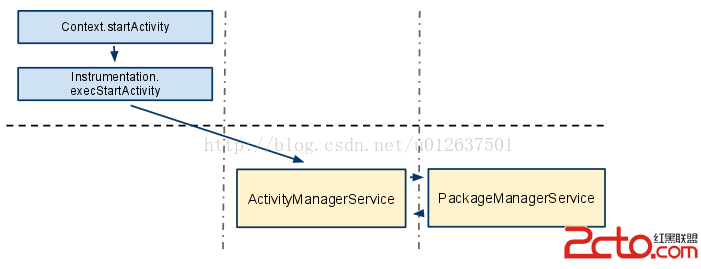 上圖請求一個Activity組件的簡單的實現流程圖,算是用的最多的Intent解析實例。
首先,發出"意圖"的組件,通過調用Context.startActivity(intent)開始啟動組件:發出"意圖"的組件傳入已經構好的Intent對象(為一組信息,它決定了是否能夠成功的啟動另一個組件);
然後,調用"動作"實際的執行著Instrumentation對象,它是整個應用激活的Activity管理者,集中負責應用內所有Activity的運行。它有一個隱藏的方法execStartActivity方法,就是負責根據Intent啟動Activity。該方法去掉一些細節,它做得最重要的事情,就是將此調用,通過RPC的方式,傳遞到ActivityManagerService。
最後,ActivityManagerService會將這些關鍵信息遞交給另一個服務PackageManagerService,此服務掌握整個軟件包及其各組件的信息,它會將傳遞過來的Intent,與已知的所有Intent
Filters進行匹配(如果帶有Component信息,就不用比了)。如果找到了,就把相關Component的信息通知回AcitivityManagerService,在這裡,會完成啟動Activity這個很多細節的事情。
2.Intent匹配
到底發出"意圖"的組件是如何找到所需的組件呢?在這裡,Intent Filters就開始起作用了,Intent Filters定義在AndroidMainFest.xml文件中,每一個Activity都會有一個
上圖請求一個Activity組件的簡單的實現流程圖,算是用的最多的Intent解析實例。
首先,發出"意圖"的組件,通過調用Context.startActivity(intent)開始啟動組件:發出"意圖"的組件傳入已經構好的Intent對象(為一組信息,它決定了是否能夠成功的啟動另一個組件);
然後,調用"動作"實際的執行著Instrumentation對象,它是整個應用激活的Activity管理者,集中負責應用內所有Activity的運行。它有一個隱藏的方法execStartActivity方法,就是負責根據Intent啟動Activity。該方法去掉一些細節,它做得最重要的事情,就是將此調用,通過RPC的方式,傳遞到ActivityManagerService。
最後,ActivityManagerService會將這些關鍵信息遞交給另一個服務PackageManagerService,此服務掌握整個軟件包及其各組件的信息,它會將傳遞過來的Intent,與已知的所有Intent
Filters進行匹配(如果帶有Component信息,就不用比了)。如果找到了,就把相關Component的信息通知回AcitivityManagerService,在這裡,會完成啟動Activity這個很多細節的事情。
2.Intent匹配
到底發出"意圖"的組件是如何找到所需的組件呢?在這裡,Intent Filters就開始起作用了,Intent Filters定義在AndroidMainFest.xml文件中,每一個Activity都會有一個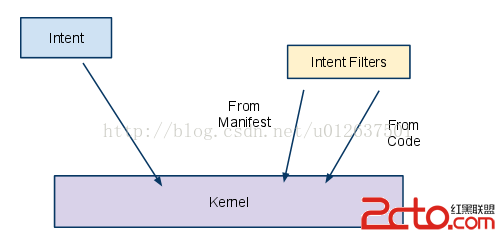 三、Intent對象詳解
Intent類的對象是組件間的通信載體,利用Intent對象我們可以很方便的實現不同組件之間的通信。一個Intent對象就是一組信息,這些信息都是通過其Component、Action、CategZ喎?/kf/ware/vc/" target="_blank" class="keylink">vcnmhokRhdGGhokV4dHJhus1GbGFn1eI31tbK9NDUzOXP1rXEoaNJbnRlbnS0+rHtwctBbmRyb2lk06bTw7XExvS2rw=="意圖",Android應用將會根據Intent來啟動指定組件,至於到底啟動哪個組件,則取決於Intent的屬性。
1.Action屬性
Action屬性為一個普通的字符串,它代表了該Intent對象要完成一個什麼樣的"動作"。當我們為Intent對象指明了一個action時,被啟動的組件就會依照這個動作的指示表現出相應的行為,比如查看、撥打、編輯等,需要注意的是一個組件(如Activity)只能有一個action。我們可以方便自己的應用程序組件之間的通信,自定義action的(字符串)創建新的動作;也可以直接使用Intent類中的靜態成員變量,比如ACTION_VIEW,ACTION_PICK,它們是Android中為action屬性預定義的一批action變量。
在設置Intent對象Action屬性時,有兩種:
三、Intent對象詳解
Intent類的對象是組件間的通信載體,利用Intent對象我們可以很方便的實現不同組件之間的通信。一個Intent對象就是一組信息,這些信息都是通過其Component、Action、CategZ喎?/kf/ware/vc/" target="_blank" class="keylink">vcnmhokRhdGGhokV4dHJhus1GbGFn1eI31tbK9NDUzOXP1rXEoaNJbnRlbnS0+rHtwctBbmRyb2lk06bTw7XExvS2rw=="意圖",Android應用將會根據Intent來啟動指定組件,至於到底啟動哪個組件,則取決於Intent的屬性。
1.Action屬性
Action屬性為一個普通的字符串,它代表了該Intent對象要完成一個什麼樣的"動作"。當我們為Intent對象指明了一個action時,被啟動的組件就會依照這個動作的指示表現出相應的行為,比如查看、撥打、編輯等,需要注意的是一個組件(如Activity)只能有一個action。我們可以方便自己的應用程序組件之間的通信,自定義action的(字符串)創建新的動作;也可以直接使用Intent類中的靜態成員變量,比如ACTION_VIEW,ACTION_PICK,它們是Android中為action屬性預定義的一批action變量。
在設置Intent對象Action屬性時,有兩種:
(1)自定義字符串
public final String CUSTOME_ACTION="intent.action.CUSTOME_JIANG";//字符串可以任意
Intent intent=new Intent();
intent.setAction(ActionAttr.CUSTOME_ACTION); //注意:ActionAttr為我們創建的類,也可以使用this.CUSTOME_ACTION
(2)使用系統預定action常量
Intent intent=new Intent();
intent.setAction(Intent.ACTION_CALL);    //其中ACTION_CALL為Intent類的靜態成員變量,可以類直接調用
                                        //對應字符串"android.intent.action.CALL"
2.Data屬性
Action屬性為Intent對象描述了一個"動作",那麼Data屬性就為Intent對象的Action屬性提供了操作的數據。這裡需要注意的是,Data屬性只接受一個Uri對象,一個Uri對象通常通過如下形式的字符串來表示:
Uri字符串格式:scheme://host:port/path 舉例: content://com.android.contacts/contacts/1或tel://18819463209
在設置Intent對象Data屬性時可以這樣:
Intent intent=new Intent();
String data="content://com.android.contacts/contacts/1";
Uri uri=Uri.parse(data);//將字符串轉換為Uri
intent.setData(uri);
或者
Intent intent=new Intent();
intent.setData(Uri.parse("content://com.android.contacts/contacts/1"));
(1)自定義字符串
public final String CUSTOME_CATEGORY="intent.action.CUSTOME_CATEGORY";//字符串可以任意
Intent intent=new Intent();
intent.addCategory(ActionAttr.CUSTOME_CATEGORY);
(2)使用系統預定action、category常量
    以下代碼實現當點擊某個按鈕時,通過Intent對象實現返回HOME桌面。
Intent intent=new Intent();
intent.setAction(Intent.ACTION_MAIN);
intent.addCategory(Intent.CATEGORY_HOME);//返回Home桌面
ComponentName comp=new ComponentName(ComponentAttr.this,SecondaryActivity.class);
Intent intent=new Intent();
intent.setComponent( comp);//設置intent的Component屬性,指定"意圖"要啟動組件的包和類名
注釋:第一句用於創建一個ComponentName對象,來指定包名和類型-這就可以唯一地確定一個組件類。
四、Intent相關類 1.Activity類 這裡我們只需學習使用Intent啟動Activity組件將要用的的方法 void startActivity(Intent intent) 作用:啟動Activity,具體啟動哪個Activity和怎麼樣啟動由intent屬性決定 void startActivityForResult(Intent intent, int requestCode) 作用:啟動Activity,並返回一個結果。當被啟動的Activity退出時,會調用 onActivityResult() 方法並向其傳入一個 requestCode參數,這個 requestCode參數為非負數(>0),作用是標志是哪個Activity組件發出的"意圖",需要注意的是如果 requestCode小於0時,這個方法的只能用於啟動一個Activity而不能返回值了。另外,Intent的action屬性設為能夠返回一個結果,如果設置為
Intent.ACTION_MAIN or Intent.ACTION_VIEW,也是不能獲取結果的。
待寫:另外還有如何啟動Service、BroadcastReceiver組件的方法,這以後學到了再說吧。
2.Intent類
(1)構造函數
ACTION_VIEW.
SetparseUri(String,
int) instead.
String
getPackage()
Retrieve the application package name this Intent is limited to.
String
getScheme()
Return the scheme portion of the intent's data.
Intent
getSelector()
Return the specific selector associated with this Intent.
Rect
getSourceBounds()
Get the bounds of the sender of this intent, in screen coordinates.
String
getType()
Retrieve any explicit MIME type included in the intent.
boolean
hasCategory(String category)
Check if a category exists in the intent.
boolean
hasExtra(String name)
Returns true if an extra value is associated with the given name.
static Intent
makeMainActivity(ComponentName mainActivity)
Create an intent to launch the main (root) activity of a task.
static Intent
makeMainSelectorActivity(String selectorAction, String selectorCategory)
Make an Intent for the main activity of an application, without specifying a specific activity to run but giving a selector to find the
activity.
static Intent
parseIntent(Resources resources, XmlPullParser parser, AttributeSet attrs)
Parses(解析) the "intent" element (and its children) from XML and instantiates an Intent object.
static Intent
parseUri(String uri,
int flags)
Create an intent from a URI.
Intent
putExtra(String name,
int value)
Add extended data to the intent.
Intent
putExtra(String name, CharSequence value)
Add extended data to the intent.
Intent
setAction(String action)
Set the general action to be performed.
Intent
setClass(Context packageContext, Class
cls)
Convenience for calling setComponent(ComponentName) with
the name returned by a Class object.
Intent
setClassName(Context packageContext, String className)
Convenience for calling setComponent(ComponentName) with
an explicit class name.
Intent
setClassName(String packageName, String className)
Convenience for calling setComponent(ComponentName) with
an explicit application package name and class name.
Intent
setComponent(ComponentName component)
(Usually optional) Explicitly set the component to handle the intent.
Intent
setData(Uri data)
Set the data this intent is operating on.
Intent
setFlags(int
flags)
Set special flags controlling how this intent is handled.
Intent
setPackage(String packageName)
(Usually optional) Set an explicit application package name that limits the components this Intent will resolve to.
void
setSourceBounds(Rect r)
Set the bounds of the sender of this intent, in screen coordinates.
Intent
setType(String type)
Set an explicit MIME data type.
String
toString()
Returns a string containing a concise(簡潔), human-readable (可讀)description of this object.
String
toUri(int
flags)
Convert this Intent into a String holding a URI representation of it.
(3)類靜態成員變量
即ACTION、CAYEGORY常量等,由Intent或其對象調用設置intent屬性
a.標准Activity Actions
以下actions常量,用於Intent定義用來操作各種Activity,通常使用 startActivity(Intent)方法實現。
ACTION_MAIN
          //傳遞返回到主Activity動作
ACTION_VIEW
//傳遞顯示動作ACTION_ATTACH_DATAACTION_EDIT
//傳遞編輯動作ACTION_PICK
ACTION_CHOOSER
//傳遞選擇動作ACTION_GET_CONTENTACTION_DIALACTION_CALLACTION_SENDACTION_SENDTOACTION_ANSWER
//傳遞接聽電話動作ACTION_INSERTACTION_DELETEACTION_RUNACTION_SYNCACTION_PICK_ACTIVITYACTION_SEARCHACTION_WEB_SEARCHACTION_FACTORY_TEST
b.標准Broadcast Actions
以下"意圖"的action屬性常量,用於接收廣播,通常使用 registerReceiver(BroadcastReceiver, IntentFilter)方法或者在AndroidManifest.xml
文件中定義了ACTION_TIME_TICKACTION_TIME_CHANGEDACTION_TIMEZONE_CHANGEDACTION_BOOT_COMPLETEDACTION_PACKAGE_ADDEDACTION_PACKAGE_CHANGEDACTION_PACKAGE_REMOVEDACTION_PACKAGE_RESTARTEDACTION_PACKAGE_DATA_CLEAREDACTION_UID_REMOVEDACTION_BATTERY_CHANGEDACTION_POWER_CONNECTEDACTION_POWER_DISCONNECTEDACTION_SHUTDOWN
c.標准Categories常量
為Action增加額外的附加類別信息,通常使用addCategory (String category)方法。
CATEGORY_DEFAULTCATEGORY_BROWSABLECATEGORY_TABCATEGORY_ALTERNATIVECATEGORY_SELECTED_ALTERNATIVECATEGORY_LAUNCHERCATEGORY_INFOCATEGORY_HOMECATEGORY_PREFERENCECATEGORY_TESTCATEGORY_CAR_DOCKCATEGORY_DESK_DOCKCATEGORY_LE_DESK_DOCKCATEGORY_HE_DESK_DOCKCATEGORY_CAR_MODECATEGORY_APP_MARKET
d.標准Extra Data常量
通過putExtra(String, Bundle)方法實現。
EXTRA_ALARM_COUNTEXTRA_BCCEXTRA_CCEXTRA_CHANGED_COMPONENT_NAMEEXTRA_DATA_REMOVEDEXTRA_DOCK_STATEEXTRA_DOCK_STATE_HE_DESKEXTRA_DOCK_STATE_LE_DESKEXTRA_DOCK_STATE_CAREXTRA_DOCK_STATE_DESKEXTRA_DOCK_STATE_UNDOCKEDEXTRA_DONT_KILL_APPEXTRA_EMAILEXTRA_INITIAL_INTENTSEXTRA_INTENTEXTRA_KEY_EVENTEXTRA_ORIGINATING_URIEXTRA_PHONE_NUMBEREXTRA_REFERREREXTRA_REMOTE_INTENT_TOKENEXTRA_REPLACINGEXTRA_SHORTCUT_ICONEXTRA_SHORTCUT_ICON_RESOURCEEXTRA_SHORTCUT_INTENTEXTRA_STREAMEXTRA_SHORTCUT_NAMEEXTRA_SUBJECTEXTRA_TEMPLATEEXTRA_TEXTEXTRA_TITLEEXTRA_UID
e.Flags
通過 setFlags(int) 和addFlags(int)設置intent的flags屬性。
getFlags()addFlags(int)FLAG_GRANT_READ_URI_PERMISSIONFLAG_GRANT_WRITE_URI_PERMISSIONFLAG_GRANT_PERSISTABLE_URI_PERMISSIONFLAG_GRANT_PREFIX_URI_PERMISSIONFLAG_DEBUG_LOG_RESOLUTIONFLAG_FROM_BACKGROUNDFLAG_ACTIVITY_BROUGHT_TO_FRONTFLAG_ACTIVITY_CLEAR_TASKFLAG_ACTIVITY_CLEAR_TOPFLAG_ACTIVITY_CLEAR_WHEN_TASK_RESETFLAG_ACTIVITY_EXCLUDE_FROM_RECENTSFLAG_ACTIVITY_FORWARD_RESULTFLAG_ACTIVITY_LAUNCHED_FROM_HISTORYFLAG_ACTIVITY_MULTIPLE_TASKFLAG_ACTIVITY_NEW_DOCUMENTFLAG_ACTIVITY_NEW_TASKFLAG_ACTIVITY_NO_ANIMATIONFLAG_ACTIVITY_NO_HISTORYFLAG_ACTIVITY_NO_USER_ACTIONFLAG_ACTIVITY_PREVIOUS_IS_TOPFLAG_ACTIVITY_RESET_TASK_IF_NEEDEDFLAG_ACTIVITY_REORDER_TO_FRONTFLAG_ACTIVITY_SINGLE_TOPFLAG_ACTIVITY_TASK_ON_HOMEFLAG_RECEIVER_REGISTERED_ONLY
參考:http://developer.android.com/reference/android/net/Uri.html
 android中使用Activity實現監聽手指上下左右滑動
用Activity的onTouchEvent方法實現監聽手指上下左右滑動應用了Activity的ontouchEvent方法監聽手指點擊事件,手指滑動的時候會先按下,滑倒
 動態鏈接庫加載原理及HotFix方案介紹
引言隨著項目中動態鏈接庫越來越多,我們也遇到了很多奇怪的問題,比如只在某一種 OS 上會出現的 java.lang.UnsatisfiedLinkError,但是明明我們
 Android 開發之AndFix
阿裡巴巴開源項目,地址:https://github.com/alibaba/AndFixtools裡面有我們需要的工具,docs是一些文檔介紹。AndFix解決在線修復
 Unity3d 數字模型制作規范
本文提到的所有數字模型制作,全部是用3D MAX建立模型,即使是不同的驅動引擎,對模型的要求基本是相同的。當一個VR模型制作完成時,它所包含的基本內容包括場景尺寸、單位,