編輯:關於Android編程
對於android的雙擊事件的判斷,官方是已經給出解決辦法的,主要是使用下面幾個類或者接口:GestureDetector,OnGestureListener,OnDoubleTapListener,GestureDetector.SimpleOnGestureListener
對於它們的介紹以及用法很多了,就不說明了,大家可以參考下面的博客:
http://blog.sina.com.cn/s/blog_77c6324101017hs8.html
需要特殊說明的是OnDoubleTapListener這個接口,GestureDetector有個函數setOnDoubleTapListener來設置OnDoubleTapListener,而不是通過構造函數的方式,但讓了通過構造函數的方式也不是不可以,大家可以參考下面的博客:
/kf/201211/165457.html
通過上面的學習,相信大家就會對這個幾個類用的很熟練了,但是這個並不是我們這篇博客的重點。
如果你因為某些原因,或者說,就是不想用上面的方法,非要用MotionEvent來判斷雙擊的時間的話,那也木有辦法!~這個網上也有很多的博客進行了說明。
但是它們的博客無論什麼實現,都只是通過時間進行判斷,並且也不會進行范圍的判斷,試想,如果你很快速的點擊屏幕最上面和最下面的兩個點,如果按照網絡上大部分判斷時間的做法,那肯定就是雙擊時間,但是這顯然是不合理的。
那麼官方源碼是怎麼判斷的呢?我們一起先來看看,博主參考的是android-17版本的源碼。
....
 case MotionEvent.ACTION_DOWN:
            if (mDoubleTapListener != null) {
                boolean hadTapMessage = mHandler.hasMessages(TAP);
                if (hadTapMessage) mHandler.removeMessages(TAP);
                if ((mCurrentDownEvent != null) && (mPreviousUpEvent != null) && hadTapMessage &&
                        isConsideredDoubleTap(mCurrentDownEvent, mPreviousUpEvent, ev)) {
                    // This is a second tap
                    mIsDoubleTapping = true;
                    // Give a callback with the first tap of the double-tap
                    handled |= mDoubleTapListener.onDoubleTap(mCurrentDownEvent);
                    // Give a callback with down event of the double-tap
                    handled |= mDoubleTapListener.onDoubleTapEvent(ev);
                } else {
                    // This is a first tap
                    mHandler.sendEmptyMessageDelayed(TAP, DOUBLE_TAP_TIMEOUT);
                }
            }

            mDownFocusX = mLastFocusX = focusX;
            mDownFocusY = mLastFocusY = focusY;
            if (mCurrentDownEvent != null) {
                mCurrentDownEvent.recycle();
            }
            mCurrentDownEvent = MotionEvent.obtain(ev);
            mAlwaysInTapRegion = true;
            mAlwaysInBiggerTapRegion = true;
            mStillDown = true;
            mInLongPress = false;
            mDeferConfirmSingleTap = false;
....很明顯的看出來,它們是通過下面這個方法來判斷是否需要分發雙擊事件的:isConsideredDoubleTap(mCurrentDownEvent, mPreviousUpEvent, ev)下面的代碼就是調用listener的接口來處理雙擊事件,並且獲取處理結果,接著後面就是事件分發機制的事情了,不再本文討論范圍之內。
handled |= mDoubleTapListener.onDoubleTap(mCurrentDownEvent);那麼,那三個參數是怎麼來的呢?我們一個一個來看。
1.mCurrentDownEvent
....
case MotionEvent.ACTION_DOWN:
            if (mDoubleTapListener != null) {
                boolean hadTapMessage = mHandler.hasMessages(TAP);
                if (hadTapMessage) mHandler.removeMessages(TAP);
                if ((mCurrentDownEvent != null) && (mPreviousUpEvent != null) && hadTapMessage &&
                        isConsideredDoubleTap(mCurrentDownEvent, mPreviousUpEvent, ev)) {
                    // This is a second tap
                    mIsDoubleTapping = true;
                    // Give a callback with the first tap of the double-tap
                    handled |= mDoubleTapListener.onDoubleTap(mCurrentDownEvent);
                    // Give a callback with down event of the double-tap
                    handled |= mDoubleTapListener.onDoubleTapEvent(ev);
                } else {
                    // This is a first tap
                    mHandler.sendEmptyMessageDelayed(TAP, DOUBLE_TAP_TIMEOUT);
                }
            }

            mDownFocusX = mLastFocusX = focusX;
            mDownFocusY = mLastFocusY = focusY;
            if (mCurrentDownEvent != null) {
                mCurrentDownEvent.recycle();
            }
            mCurrentDownEvent = MotionEvent.obtain(ev);
....2.mPriviousUpEvent
....
case MotionEvent.ACTION_UP:
            mStillDown = false;
            MotionEvent currentUpEvent = MotionEvent.obtain(ev);
            if (mIsDoubleTapping) {
                // Finally, give the up event of the double-tap
                handled |= mDoubleTapListener.onDoubleTapEvent(ev);
            } else if (mInLongPress) {
                mHandler.removeMessages(TAP);
                mInLongPress = false;
            } else if (mAlwaysInTapRegion) {
                handled = mListener.onSingleTapUp(ev);
                if (mDeferConfirmSingleTap && mDoubleTapListener != null) {
                    mDoubleTapListener.onSingleTapConfirmed(ev);
                }
            } else {

                // A fling must travel the minimum tap distance
                final VelocityTracker velocityTracker = mVelocityTracker;
                final int pointerId = ev.getPointerId(0);
                velocityTracker.computeCurrentVelocity(1000, mMaximumFlingVelocity);
                final float velocityY = velocityTracker.getYVelocity(pointerId);
                final float velocityX = velocityTracker.getXVelocity(pointerId);

                if ((Math.abs(velocityY) > mMinimumFlingVelocity)
                        || (Math.abs(velocityX) > mMinimumFlingVelocity)){
                    handled = mListener.onFling(mCurrentDownEvent, ev, velocityX, velocityY);
                }
            }
            if (mPreviousUpEvent != null) {
                mPreviousUpEvent.recycle();
            }
            // Hold the event we obtained above - listeners may have changed the original.
            mPreviousUpEvent = currentUpEvent;
....3.ev
....
public boolean onTouchEvent(MotionEvent ev) {
        if (mInputEventConsistencyVerifier != null) {
            mInputEventConsistencyVerifier.onTouchEvent(ev, 0);
        }

        final int action = ev.getAction();
....
就是當前發生的MotionEvent的事件。
上述三個參數都找到了,接下來就是看看isConsideredDoubleTap方法裡面做了什麼。
private boolean isConsideredDoubleTap(MotionEvent firstDown, MotionEvent firstUp,
            MotionEvent secondDown) {
        if (!mAlwaysInBiggerTapRegion) {
            return false;
        }

        if (secondDown.getEventTime() - firstUp.getEventTime() > DOUBLE_TAP_TIMEOUT) {
            return false;
        }

        int deltaX = (int) firstDown.getX() - (int) secondDown.getX();
        int deltaY = (int) firstDown.getY() - (int) secondDown.getY();
        return (deltaX * deltaX + deltaY * deltaY < mDoubleTapSlopSquare);
    }
方法很簡單,先判斷了事件,再判斷了范圍。下面看看相關參數的獲取,如下:
final ViewConfiguration configuration = ViewConfiguration.get(context);
private static final int DOUBLE_TAP_TIMEOUT = ViewConfiguration.getDoubleTapTimeout();
doubleTapSlop = configuration.getScaledDoubleTapSlop();
mDoubleTapSlopSquare = doubleTapSlop * doubleTapSlop;
經過上述的觀察,相信大家已經知道了,andorid自己是怎麼判斷的了吧?相應的,我們可以模仿來寫一寫。
首先初始化參數:
ViewConfiguration configuration = ViewConfiguration.get(this);
doubleTapSlop = configuration.getScaledDoubleTapSlop(); mDoubleTapSlopSquare = doubleTapSlop * doubleTapSlop;
@Override
	public boolean onTouch(View v, MotionEvent event) {
		switch(event.getAction()){
		case MotionEvent.ACTION_DOWN:
			if(isConsideredDoubleTap(firstDown,firstUp,event)){
				hideOrShowTitleBar(menuRl.getVisibility() != View.GONE);
			}
			if (firstDown != null) {
				firstDown.recycle();
            }
			firstDown = MotionEvent.obtain(event);
			hideOrShowTitleBar(menuRl.getVisibility() != View.GONE);
			break;
		case MotionEvent.ACTION_UP:
			if (firstDown != null) {
				firstUp.recycle();
            }
			firstUp = MotionEvent.obtain(event);
			break;
		}
		return false;
}/**
* 一個方法用來判斷雙擊時間
* @param firstDown
* @param firstUp
* @param secondDown
* @return
*/
private boolean isConsideredDoubleTap(MotionEvent firstDowns,MotionEvent firstUps,MotionEvent secondDowns) {
if(firstDowns == null || secondDowns == null){
return false;
}
// System.out.println("secondDowns.getEventTime():"+secondDowns.getEventTime());
// System.out.println("firstUps.getEventTime():"+firstUps.getEventTime());
if (secondDowns.getEventTime() - firstUps.getEventTime() > Constans.DOUBLE_TAP_TIMEOUT) {
return false;
}
int deltaX = (int) firstDowns.getX() - (int) secondDowns.getX();
int deltaY = (int) firstDowns.getY() - (int) secondDowns.getY();
// System.out.println("deltaX:"+deltaX);
// System.out.println("deltaY:"+deltaY);
// System.out.println("deltaX * deltaX + deltaY * deltaY:"+deltaY);
// System.out.println("mDoubleTapSlopSquare:"+mDoubleTapSlopSquare);
return (deltaX * deltaX + deltaY * deltaY < mDoubleTapSlopSquare);
}
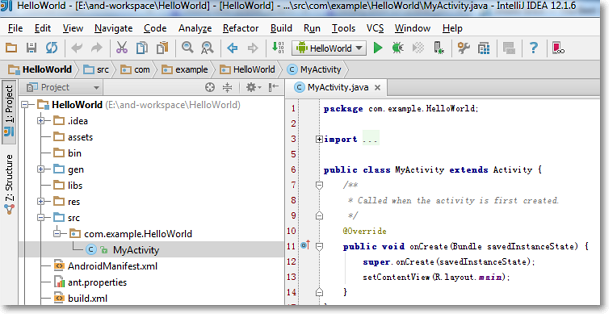 Intellij IDEA + Android SDK + Genymotion Emulator打造最佳Android開發環境
一直使用Eclipse環境開發Android,也嘗鮮使用過Android Studio去開發,各種IDE配合Android SDK及SDK原生的Android Emula
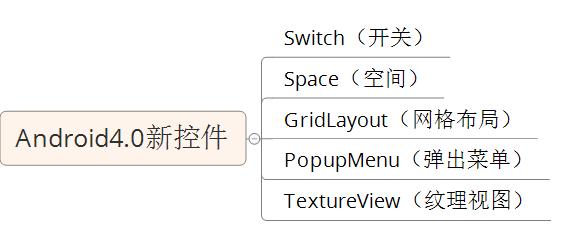 一個Activity掌握Android4.0新控件
一個Activity掌握Android4.0新控件谷歌在推出Android4.0的同時推出了一些新控件,Android4.0中最常用的新控件有下面5種。1. Switch
 Android開發中MotionEvent坐標獲取方法分析
本文實例講述了Android開發中MotionEvent坐標獲取方法。分享給大家供大家參考,具體如下:Android MotionEvent中getX()與getRawX
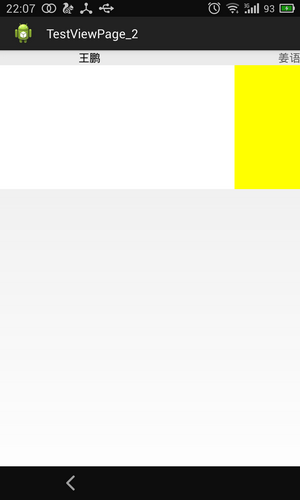 舉例講解Android中ViewPager中的PagerTitleStrip子控件
先看個簡單的,先上個效果圖,吸引大家一下眼球。三個頁面間的滑動,此時是帶著上面的標題一塊滑動的。看一下android 對於PagerTitleStrip的官方解釋:Pag