編輯:關於Android編程
凱撒密碼
1. 介紹
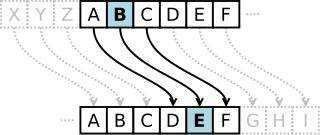
凱撒密碼作為一種最為古老的對稱加密體制,在古羅馬的時候都已經很流行,他的基本思想是:通過把字母移動一定的位數來實現加密和解密。明文中的所有字母都在字母表上向後(或向前)按照一個固定數目進行偏移後被替換成密文。例如,當偏移量是3 的時候,所有的字母A 將被替換成D,B 變成E,由此可見,位數就是凱撒密碼加密和解密的密鑰。
例如:字符串”ABC”的每個字符都右移3 位則變成”DEF”,解密的時候”DEF”的每個字符左移3 位即能還原,如下圖所示:
2. 准備知識
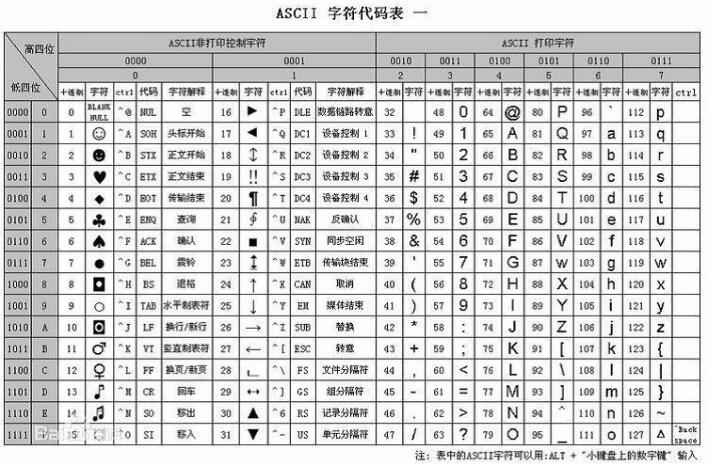
 //字符轉換成ASCII 碼數值
 char charA = 'a';
 int intA = charA; //char 強轉為int 即得到對應的ASCII 碼值,'a'的值為97

//ASCII 碼值轉成char
int intA = 97;//97 對應的ASCII 碼'a'
char charA = (char) intA; //int 值強轉為char 即得到對應的ASCII 字符,即'a'
3. 凱撒密碼的簡單代碼實現
 /**
   * 加密
   * @param input 數據源(需要加密的數據)
   * @param key 秘鑰,即偏移量
   * @return 返回加密後的數據
   */
  public static String encrypt(String input, int key) {
    //得到字符串裡的每一個字符
    char[] array = input.toCharArray();

    for (int i = 0; i < array.length; ++i) {
      //字符轉換成ASCII 碼值
      int ascii = array[i];
      //字符偏移,例如a->b
      ascii = ascii + key;
      //ASCII 碼值轉換為char
      char newChar = (char) ascii;
      //替換原有字符
      array[i] = newChar;

      //以上4 行代碼可以簡寫為一行
      //array[i] = (char) (array[i] + key);
    }

    //字符數組轉換成String
    return new String(array);
  }

  /**
   * 解密
   * @param input 數據源(被加密後的數據)
   * @param key 秘鑰,即偏移量
   * @return 返回解密後的數據
   */
  public static String decrypt(String input, int key) {
    //得到字符串裡的每一個字符
    char[] array = input.toCharArray();
    for (int i = 0; i < array.length; ++i) {
      //字符轉換成ASCII 碼值
      int ascii = array[i];
      //恢復字符偏移,例如b->a
      ascii = ascii - key;
      //ASCII 碼值轉換為char
      char newChar = (char) ascii;
      //替換原有字符
      array[i] = newChar;

      //以上4 行代碼可以簡寫為一行
      //array[i] = (char) (array[i] - key);
    }

    //字符數組轉換成String
    return new String(array);
  }
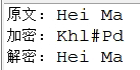
代碼輸出結果:
4. 破解凱撒密碼:頻率分析法
凱撒密碼加密強度太低,只需要用頻度分析法即可破解。
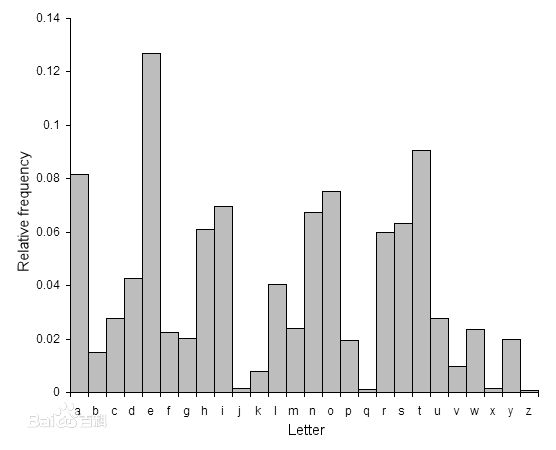
在任何一種書面語言中,不同的字母或字母組合出現的頻率各不相同。而且,對於以這種語言書寫的任意一段文本,都具有大致相同的特征字母分布。比如,在英語中,字母E 出現的頻率很高,而X 則出現得較少。
英語文本中典型的字母分布情況如下圖所示:
5. 破解流程
統計密文裡出現次數最多的字符,例如出現次數最多的字符是是'h'。
計算字符'h'到'e'的偏移量,值為3,則表示原文偏移了3 個位置。
將密文所有字符恢復偏移3 個位置。
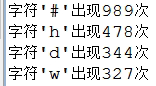
注意點:統計密文裡出現次數最多的字符時,需多統計幾個備選,因為最多的可能是空格或者其他字符,例如下圖出現次數最多的字符'#'是空格加密後的字符,'h'才是'e'偏移後的值。
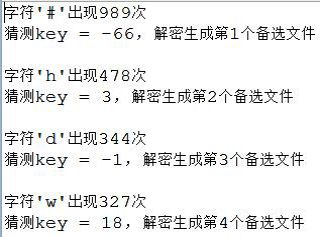
解密時要多幾次嘗試,因為不一定出現次數最多的字符就是我們想要的目標字符,如下圖,第二次解密的結果才是正確的。
/**
 * 頻率分析法破解凱撒密碼
 */
public class FrequencyAnalysis {
  //英文裡出現次數最多的字符
  private static final char MAGIC_CHAR = 'e';
  //破解生成的最大文件數
  private static final int DE_MAX_FILE = 4;

  public static void main(String[] args) throws Exception {
    //測試1,統計字符個數
    //printCharCount("article1_en.txt");

    //加密文件
    //int key = 3;
    //encryptFile("article1.txt", "article1_en.txt", key);

    //讀取加密後的文件
    String artile = file2String("article1_en.txt");
    //解密(會生成多個備選文件)
    decryptCaesarCode(artile, "article1_de.txt");
  }

  public static void printCharCount(String path) throws IOException{
    String data = file2String(path);
    List<Entry<Character, Integer>> mapList = getMaxCountChar(data);
    for (Entry<Character, Integer> entry : mapList) {
      //輸出前幾位的統計信息
      System.out.println("字符'" + entry.getKey() + "'出現" + entry.getValue() + "次");
    }
  }

  public static void encryptFile(String srcFile, String destFile, int key) throws IOException {
    String artile = file2String(srcFile);
    //加密文件
    String encryptData = MyEncrypt.encrypt(artile, key);
    //保存加密後的文件
    string2File(encryptData, destFile);
  }

  /**
   * 破解凱撒密碼
   * @param input 數據源
   * @return 返回解密後的數據
   */
  public static void decryptCaesarCode(String input, String destPath) {
    int deCount = 0;//當前解密生成的備選文件數
    //獲取出現頻率最高的字符信息(出現次數越多越靠前)
    List<Entry<Character, Integer>> mapList = getMaxCountChar(input);
    for (Entry<Character, Integer> entry : mapList) {
      //限制解密文件備選數
      if (deCount >= DE_MAX_FILE) {
        break;
      }

      //輸出前幾位的統計信息
      System.out.println("字符'" + entry.getKey() + "'出現" + entry.getValue() + "次");

      ++deCount;
      //出現次數最高的字符跟MAGIC_CHAR的偏移量即為秘鑰
      int key = entry.getKey() - MAGIC_CHAR;
      System.out.println("猜測key = " + key + ", 解密生成第" + deCount + "個備選文件" + "\n");
      String decrypt = MyEncrypt.decrypt(input, key);

      String fileName = "de_" + deCount + destPath;
      string2File(decrypt, fileName);
    }
  }

  //統計String裡出現最多的字符
  public static List<Entry<Character, Integer>> getMaxCountChar(String data) {
    Map<Character, Integer> map = new HashMap<Character, Integer>();
    char[] array = data.toCharArray();
    for (char c : array) {
      if(!map.containsKey(c)) {
        map.put(c, 1);
      }else{
        Integer count = map.get(c);
        map.put(c, count + 1);
      }
    }

    //輸出統計信息
    /*for (Entry<Character, Integer> entry : map.entrySet()) {
      System.out.println(entry.getKey() + "出現" + entry.getValue() + "次");
    }*/

    //獲取獲取最大值
    int maxCount = 0;
    for (Entry<Character, Integer> entry : map.entrySet()) {
      //不統計空格
      if (/*entry.getKey() != ' ' && */entry.getValue() > maxCount) {
        maxCount = entry.getValue();
      }
    }

    //map轉換成list便於排序
    List<Entry<Character, Integer>> mapList = new ArrayList<Map.Entry<Character,Integer>>(map.entrySet());
    //根據字符出現次數排序
    Collections.sort(mapList, new Comparator<Entry<Character, Integer>>(){
      @Override
      public int compare(Entry<Character, Integer> o1,
          Entry<Character, Integer> o2) {
        return o2.getValue().compareTo(o1.getValue());
      }
    });
    return mapList;
  }

  public static String file2String(String path) throws IOException {
    FileReader reader = new FileReader(new File(path));
    char[] buffer = new char[1024];
    int len = -1;
    StringBuffer sb = new StringBuffer();
    while ((len = reader.read(buffer)) != -1) {
      sb.append(buffer, 0, len);
    }
    return sb.toString();
  }

  public static void string2File(String data, String path){
    FileWriter writer = null;
    try {
      writer = new FileWriter(new File(path));
      writer.write(data);
    } catch (Exception e) {
      e.printStackTrace();
    }finally {
      if (writer != null) {
        try {
          writer.close();
        } catch (IOException e) {
          e.printStackTrace();
        }
      }
    }

  }
}
對稱加密
介紹
加密和解密都使用同一把秘鑰,這種加密方法稱為對稱加密,也稱為單密鑰加密。
簡單理解為:加密解密都是同一把鑰匙。
凱撒密碼就屬於對稱加密,他的字符偏移量即為秘鑰。
對稱加密常用算法
AES、DES、3DES、TDEA、Blowfish、RC2、RC4、RC5、IDEA、SKIPJACK 等。
DES:全稱為Data Encryption Standard,即數據加密標准,是一種使用密鑰加密的塊算法,1976 年被美國聯邦政府的國家標准局確定為聯邦資料處理標准(FIPS),隨後在國際上廣泛流傳開來。
3DES:也叫Triple DES,是三重數據加密算法(TDEA,Triple Data Encryption Algorithm)塊密碼的通稱。
它相當於是對每個數據塊應用三次DES 加密算法。由於計算機運算能力的增強,原版DES 密碼的密鑰長度變得容易被暴力破解;3DES 即是設計用來提供一種相對簡單的方法,即通過增加DES 的密鑰長度來避免類似的攻擊,而不是設計一種全新的塊密碼算法。
AES: 高級加密標准(英語:Advanced Encryption Standard,縮寫:AES),在密碼學中又稱Rijndael 加密法,是美國聯邦政府采用的一種區塊加密標准。這個標准用來替代原先的DES,已經被多方分析且廣為全世界所使用。經過五年的甄選流程,高級加密標准由美國國家標准與技術研究院(NIST)於2001 年11 月26 日發布於FIPS PUB 197,並在2002 年5 月26 日成為有效的標准。2006 年,高級加密標准已然成為對稱密鑰加密中最流行的算法之一。
DES 算法簡介
DES 加密原理(對比特位進行操作,交換位置,異或等等,無需詳細了解)
准備知識
Bit 是計算機最小的傳輸單位。以0 或1 來表示比特位的值
例如數字3 對應的二進制數據為:00000011
代碼示例
 int i = 97;
 String bit = Integer.toBinaryString(i);
 //輸出:97 對應的二進制數據為: 1100001
 System.out.println(i + "對應的二進制數據為: " + bit);
Byte 與Bit 區別
數據存儲是以“字節”(Byte)為單位,數據傳輸是以大多是以“位”(bit,又名“比特”)為單位,一個位就代表一個0 或1(即二進制),每8 個位(bit,簡寫為b)組成一個字節(Byte,簡寫為B),是最小一級的信息單位。
Byte 的取值范圍:
//byte 的取值范圍:-128 到127
System.out.println(Byte.MIN_VALUE + "到" + Byte.MAX_VALUE);
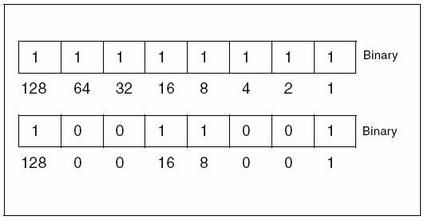
即10000000 到01111111 之間,一個字節占8 個比特位
二進制轉十進制圖示:
任何字符串都可以轉換為字節數組
String data = "1234abcd";
byte[] bytes = data.getBytes();//內容為:49 50 51 52 97 98 99 100
上面數據49 50 51 52 97 98 99 100 對應的二進制數據(即比特位為):
00110001
00110010
00110011
00110100
01100001
01100010
01100011
01100100
將他們間距調大一點,可看做一個矩陣:
0 0 1 1 0 0 0 1
0 0 1 1 0 0 1 0
0 0 1 1 0 0 1 1
0 0 1 1 0 1 0 0
0 1 1 0 0 0 0 1
0 1 1 0 0 0 1 0
0 1 1 0 0 0 1 1
0 1 1 0 0 1 0 0
之後可對他們進行各種操作,例如交換位置、分割、異或運算等,常見的加密方式就是這樣操作比特位的。
以上就是本文的全部內容,希望對大家的學習有所幫助,也希望大家多多支持本站。
 Android應用開發中Fragment與Activity間通信示例講解
首先,如果你想在android3.0及以下版本使用fragment,你必須引用android-support-v4.jar這個包然後你寫的activity不能再繼承自Ac
 Android程序版本更新之通知欄更新下載安裝
Android應用檢查版本更新後,在通知欄下載,更新下載進度,下載完成自動安裝,效果圖如下:•檢查當前版本號AndroidManifest文件中的versio
 Android自定義控件之亂塗
隨著Android的不斷壯大,你想要的很多控件在github上基本都能找到,對於愛折騰的我來說,閒暇之余更喜歡自己倒騰,之前博客有提到想研究圖片這一塊,今天就來折騰一下編
 Android面試之JAVA基礎Junit了解
什麼叫Junit Junit是一個java單元測試框架 是 對程序進行白盒測試 一般來說要對一個方法進行測試其結果 可以寫一個main入口 然後調用其方法來進行測