編輯:關於Android編程
在寫程序時有些異步程序只執行一遍就不需要了,為了方便經常會寫下面的代碼
new Thread(new Runnable() {

    @Override
    public void run() {
        // TODO Auto-generated method stub
    }
}).start();
這樣new出來的匿名對象會存在一些問題
Java的線程池對Android也是適用的
線程池的作用:
線程池作用就是限制系統中執行線程的數量。
根據系統的環境情況,可以自動或手動設置線程數量,達到運行的最佳效果;少了浪費了系統資源,多了造成系統擁擠效率不高。用線程池控制線程數量,其他線程排隊等候。一個任務執行完畢,再從隊列的中取最前面的任務開始執行。若隊列中沒有等待進程,線程池的這一資源處於等待。當一個新任務需要運行時,如果線程池中有等待的工作線程,就可以開始運行了;否則進入等待隊列。
為什麼要用線程池:
1.減少了創建和銷毀線程的次數,每個工作線程都可以被重復利用,可執行多個任務。
2.可以根據系統的承受能力,調整線程池中工作線線程的數目,防止因為消耗過多的內存,而把服務器累趴下(每個線程需要大約1MB內存,線程開的越多,消耗的內存也就越大,最後死機)。
Java通過Executors提供四種線程池,分別為:
newCachedThreadPool創建一個可緩存線程池,如果線程池長度超過處理需要,可靈活回收空閒線程,若無可回收,則新建線程。
newFixedThreadPool 創建一個定長線程池,可控制線程最大並發數,超出的線程會在隊列中等待。
newScheduledThreadPool 創建一個定長線程池,支持定時及周期性任務執行。
newSingleThreadExecutor 創建一個單線程化的線程池,它只會用唯一的工作線程來執行任務,保證所有任務按照指定順序(FIFO, LIFO, 優先級)執行。
1.newCachedThreadPool
/**
	 * 可以緩存線程池
	 */
	public static void Function1() {
		ExecutorService executorService = Executors.newCachedThreadPool();
		for (int i = 0; i < 50; i++) {
			final int index = i;
			try {
				Thread.sleep(100); // 休眠時間越短創建的線程數越多
			} catch (InterruptedException e) {
				// TODO Auto-generated catch block
				e.printStackTrace();
			}
			executorService.execute(new Runnable() {

				@Override
				public void run() {
					// TODO Auto-generated method stub
					System.out.println("active count = " + Thread.activeCount()
							+ " index = " + index);
					try {
						Thread.sleep(1000);
					} catch (InterruptedException e) {
						// TODO Auto-generated catch block
						e.printStackTrace();
					}
				}
			});
		}
	}
打印結果
active count = 2 index = 0
active count = 3 index = 1
active count = 4 index = 2
active count = 5 index = 3
active count = 6 index = 4
active count = 7 index = 5
active count = 8 index = 6
active count = 9 index = 7
active count = 10 index = 8
active count = 11 index = 9
active count = 11 index = 10
active count = 11 index = 11
active count = 11 index = 12
active count = 11 index = 13
active count = 11 index = 14
active count = 11 index = 15
active count = 11 index = 16
active count = 11 index = 17
active count = 11 index = 18
active count = 11 index = 19
active count = 11 index = 20
active count = 11 index = 21
active count = 11 index = 22
active count = 11 index = 23
active count = 11 index = 24
active count = 11 index = 25
active count = 11 index = 26
active count = 11 index = 27
active count = 11 index = 28
active count = 11 index = 29
active count = 11 index = 30
active count = 11 index = 31
active count = 11 index = 32
active count = 11 index = 33
active count = 11 index = 34
active count = 11 index = 35
active count = 11 index = 36
active count = 11 index = 37
active count = 11 index = 38
active count = 11 index = 39
active count = 11 index = 40
active count = 11 index = 41
active count = 11 index = 42
active count = 11 index = 43
active count = 11 index = 44
active count = 11 index = 45
active count = 11 index = 46
active count = 11 index = 47
active count = 11 index = 48
active count = 10 index = 49
從打印消息來看開始線程數在增加,後來穩定,可以修改休眠時間,休眠時間越短創建的線程數就越多,因為前面的還沒執行完,線程池中沒有可以執行的就需要創建;如果把休眠時間加大,創建的線程數就會少
2.newFixedThreadPool 根據傳入的參數創建線程數目
/**
	 * 定長線程池
	 */
	public static void Function2() {
		ExecutorService executorService = Executors.newFixedThreadPool(3);
		for (int i = 0; i < 30; i++) {
			final int index = i;
			executorService.execute(new Runnable() {
				@Override
				public void run() {
					try {
						System.out.println("index = " + index
								+ "  thread count = " + Thread.activeCount());
						Thread.sleep(2000);
					} catch (InterruptedException e) {
						// TODO Auto-generated catch block
						e.printStackTrace();
					}
				}
			});
		}
	}
3.newScheduledThreadPool
/**
	 * 定長線程池,可做延時
	 */
	public static void Function3() {
		ScheduledExecutorService executorService = Executors
				.newScheduledThreadPool(5);
		executorService.schedule(new Runnable() {

			@Override
			public void run() {
				System.out.println("delay 3 seconds" + "  thread count = "
						+ Thread.activeCount());
			}
		}, 3, TimeUnit.SECONDS);
	}

	/**
	 * 定期執行,可以用來做定時器
	 */
	public static void Function4() {
		ScheduledExecutorService executorService = Executors
				.newScheduledThreadPool(3);
		executorService.scheduleAtFixedRate(new Runnable() {
			@Override
			public void run() {
				System.out
						.println("delay 1 seconds, and excute every 3 seconds"
								+ "  thread count = " + Thread.activeCount());
			}
		}, 1, 3, TimeUnit.SECONDS);
	}
打印結果
delay 1 seconds, and excute every 3 seconds  thread count = 2
delay 1 seconds, and excute every 3 seconds  thread count = 3
delay 1 seconds, and excute every 3 seconds  thread count = 4
delay 1 seconds, and excute every 3 seconds  thread count = 4
delay 1 seconds, and excute every 3 seconds  thread count = 4
delay 1 seconds, and excute every 3 seconds  thread count = 4
delay 1 seconds, and excute every 3 seconds  thread count = 4
delay 1 seconds, and excute every 3 seconds  thread count = 4
delay 1 seconds, and excute every 3 seconds  thread count = 4
4.newSingleThreadExecutor這個最簡單
/**
	 * 單例線程
	 */
	public static void Function5() {
		ExecutorService singleThreadExecutor = Executors
				.newSingleThreadExecutor();
		for (int i = 0; i < 5; i++) {
			final int index = i;
			singleThreadExecutor.execute(new Runnable() {

				@Override
				public void run() {
					try {
						System.out.println("index = " + index
								+ "  thread count = " + Thread.activeCount());
						Thread.sleep(1000);
					} catch (InterruptedException e) {
						// TODO Auto-generated catch block
						e.printStackTrace();
					}
				}
			});
		}
	}
打印結果:
index = 0  thread count = 2
index = 1  thread count = 2
index = 2  thread count = 2
index = 3  thread count = 2
index = 4  thread count = 2
只創建了一個線程
 開發首屏廣告(Android)簡述
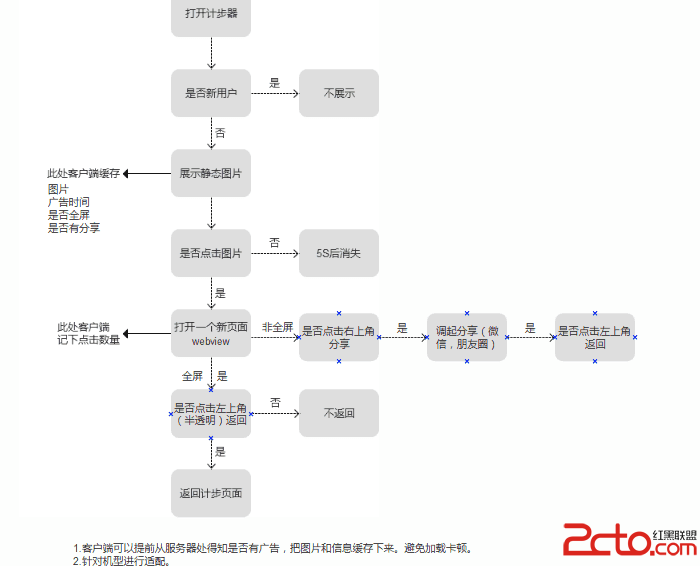
作為一個成熟的應用, 必須要有廣告. 那麼, 如何優雅地開發廣告呢? 需要注意一些細節.本文提供一個簡單的示例, 代碼僅供參考.需求:1. 下載廣告在歡迎頁面中, 啟動一
 Android 界面開發顏色整理
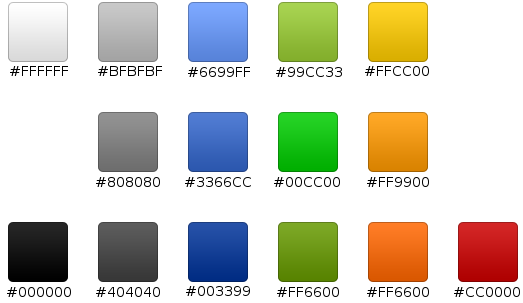
下圖是幫助文檔中的關於界面開發的推薦色值,大家可以參考一下: 補充一些常用的顏色值: <color name=white>#f
 詳解Android Checkbox的使用方法
0和1是計算機的基礎,數理邏輯中0和1代表兩種狀態,真與假.0和1看似簡單,其實變化無窮. 今天我就來聊聊android控件中擁有著0和1這種特性的魔力控件checkbo
 Android官方技術文檔翻譯——Eclilpse項目遷移
翻譯工作耗時費神,如果你覺得本文翻譯得還OK,請點擊文末的“頂”;如有錯訛,敬請指正。謝謝。 Eclip