編輯:關於Android編程
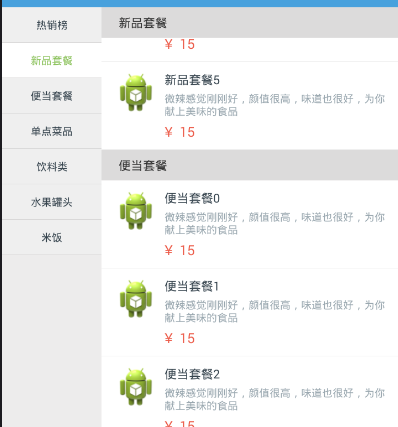
如果獲取contact的頭像信息並展示:
如何根據photoId來獲取bitmap:
public static Bitmap getContactPhoto(Context context, long photoId, BitmapFactory.Options options) {
        if (photoId < 0) {
            return null;
        }

        Cursor cursor = null;
        try {
            cursor = context.getContentResolver().query(
                    ContentUris.withAppendedId(ContactsContract.Data.CONTENT_URI, photoId),
                    new String[] { Photo.PHOTO }, null, null, null);

            if (cursor != null && cursor.moveToFirst() && !cursor.isNull(0)) {
                byte[] photoData = cursor.getBlob(0);

                if (options == null) {
                    options = new BitmapFactory.Options();
                }
                options.inTempStorage = new byte[16 * 1024];
                options.inSampleSize = 2;
                return BitmapFactory.decodeByteArray(photoData, 0, photoData.length, options);
            }
        } catch (java.lang.Throwable error) {
        } finally {
            if (cursor != null) {
                cursor.close();
            }
        }
        return null;
    }
在bindView中加入:
	protected void setContactPhoto(Cursor cursor, final ImageView viewToUse, int column) {
			long photoId = 0;

			if (!cursor.isNull(column)) {
				photoId = cursor.getLong(column);
			}

			final int position = cursor.getPosition();
			viewToUse.setTag(new PhotoInfo(position, photoId));

			if (photoId == 0) {
				viewToUse.setImageResource(R.drawable.avatar);
			} else {

				Bitmap photo = null;

				SoftReference ref = mBitmapCache.get(photoId);
				if (ref != null) {

					photo = ref.get();
					if (photo == null) {
						mBitmapCache.remove(photoId);
					}
				}

				if (photo != null) {
					viewToUse.setImageBitmap(photo);
				} else {
					viewToUse.setImageResource(R.drawable.avatar);
					mItemsMissingImages.add(viewToUse);
					if (mScrollState != OnScrollListener.SCROLL_STATE_FLING) {
						sendFetchImageMessage(viewToUse);
					}
				}
			}
} private class ImageLoaderHandler extends Handler {
@Override
public void handleMessage(Message message) {
if (isFinishing()) {
return;
}
switch (message.what) {
case FETCH_IMAGE_MSG: {
final ImageView imageView = (ImageView) message.obj;
if (imageView == null) {
break;
}
final PhotoInfo info = (PhotoInfo) imageView.getTag();
if (info == null) {
break;
}
final long photoId = info.photoId;
if (photoId == 0) {
break;
}
SoftReference photoRef = mBitmapCache.get(photoId);
if (photoRef == null) {
break;
}
Bitmap photo = photoRef.get();
if (photo == null) {
mBitmapCache.remove(photoId);
break;
}
synchronized (imageView) {
final PhotoInfo updatedInfo = (PhotoInfo) imageView
.getTag();
long currentPhotoId = updatedInfo.photoId;
if (currentPhotoId == photoId) {
imageView.setImageBitmap(photo);
mItemsMissingImages.remove(imageView);
} else {
}
}
break;
}
}
}
public void clearImageFecthing() {
removeMessages(FETCH_IMAGE_MSG);
}
}
private class ImageLoader implements Runnable {
long mPhotoId;
private ImageView mImageView;
public ImageLoader(long photoId, ImageView imageView) {
this.mPhotoId = photoId;
this.mImageView = imageView;
}
public void run() {
if (isFinishing()) {
return;
}
if (Thread.interrupted()) {
return;
}
if (mPhotoId < 0) {
return;
}
Bitmap photo = ContactsUtils.getContactPhoto(getBaseContext(),
mPhotoId, null);
if (photo == null) {
return;
}
mBitmapCache.put(mPhotoId, new SoftReference(photo));
if (Thread.interrupted()) {
return;
}
Message msg = new Message();
msg.what = FETCH_IMAGE_MSG;
msg.obj = mImageView;
mHandler.sendMessage(msg);
}
} private void processMissingImageItems(AbsListView view) {
for (ImageView iv : mItemsMissingImages) {
sendFetchImageMessage(iv);
}
}
protected void sendFetchImageMessage(ImageView view) {
final PhotoInfo info = (PhotoInfo) view.getTag();
if (info == null) {
return;
}
final long photoId = info.photoId;
if (photoId == 0) {
return;
}
mImageFetcher = new ImageLoader(photoId, view);
synchronized (ContactsList.this) {
if (sImageFetchThreadPool == null) {
sImageFetchThreadPool = Executors.newFixedThreadPool(3);
}
sImageFetchThreadPool.execute(mImageFetcher);
}
}
public void clearImageFetching() {
synchronized (ContactsList.this) {
if (sImageFetchThreadPool != null) {
sImageFetchThreadPool.shutdownNow();
sImageFetchThreadPool = null;
}
}
mHandler.clearImageFecthing();
} @Override
public void onScrollStateChanged(AbsListView view, int scrollState) {
if (SCROLL_STATE_TOUCH_SCROLL == scrollState) {
View currentFocus = getCurrentFocus();
if (currentFocus != null) {
currentFocus.clearFocus();
}
}
mScrollState = scrollState;
if (scrollState == OnScrollListener.SCROLL_STATE_FLING) {
clearImageFetching();
} else {
processMissingImageItems(view);
}
}
@Override
public void onScroll(AbsListView view, int firstVisibleItem,
int visibleItemCount, int totalItemCount) {
}@Override
protected void onDestroy() {
super.onDestroy();
if (mQueryHandler != null) {
mQueryHandler.cancelOperation(QUERY_TOKEN);
mQueryHandler = null;
}
if (mAdapter != null && mAdapter.mItemsMissingImages != null) {
mAdapter.mItemsMissingImages.clear();
mAdapter.clearMessages();
}
// Workaround for Android Issue 8488
// http://code.google.com/p/android/issues/detail?id=8488
if (mAdapter != null && mAdapter.mBitmapCache != null) {
for (SoftReference bitmap : mAdapter.mBitmapCache.values()) {
if (bitmap != null && bitmap.get() != null) {
bitmap.get().recycle();
bitmap = null;
}
}
mAdapter.mBitmapCache.clear();
}
}  Android實現顯示電量的控件代碼
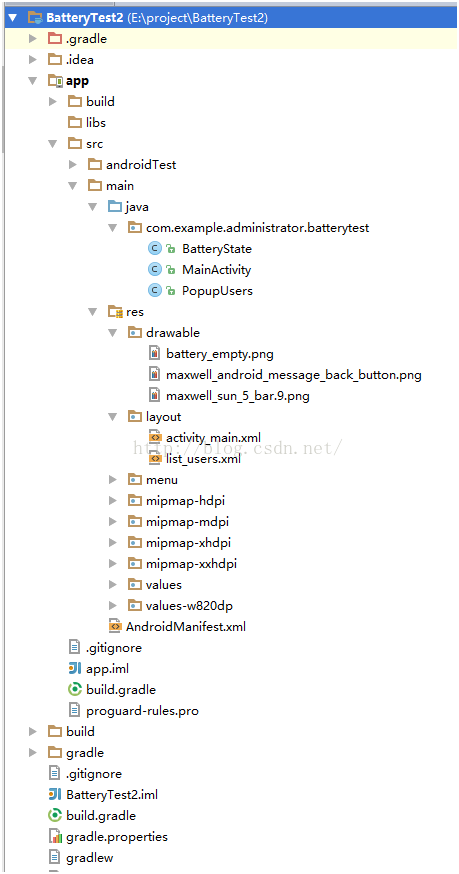
下面介紹了Android實現顯示電量的控件代碼,具體代碼如下:1、目錄結構,本人是使用安卓死丟丟。2、運行界面,輸入框中輸入數值,點擊刷新,會再電池中顯示出相應的電量3、
 手機SD卡損壞的修復方法
經常會網友遇到手機使用時間較久後會遇到提示“SD卡已損壞,您可能必須將其重新格式化”故障,導致手機SD卡無法使用。最近身邊有朋友手機
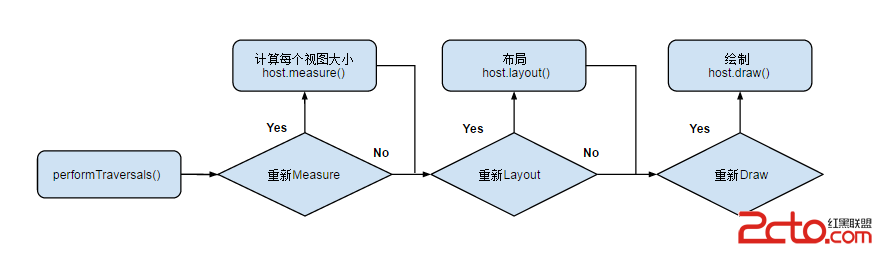 Android_View_View繪制流程
1. View 樹的繪圖流程當 Activity 接收到焦點的時候,它會被請求繪制布局,該請求由Android framework 處理.繪制是從根節點開始,
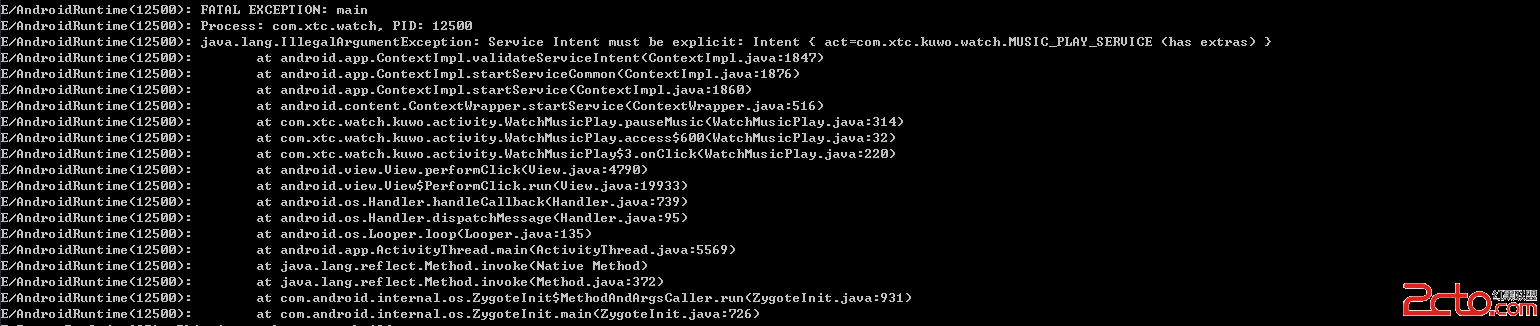 我的Android進階之旅------Android 5.0中出現警告的解決方法: Service Intent must be explicit:
1.錯誤描述今天在Android4.4 的小米4手機上運行我的程序的時候沒有報錯,而在Android 5.1的華為P7上運行我的程序的時候報了以下的錯誤,錯誤提示如下:E