編輯:關於Android編程
先上效果圖:
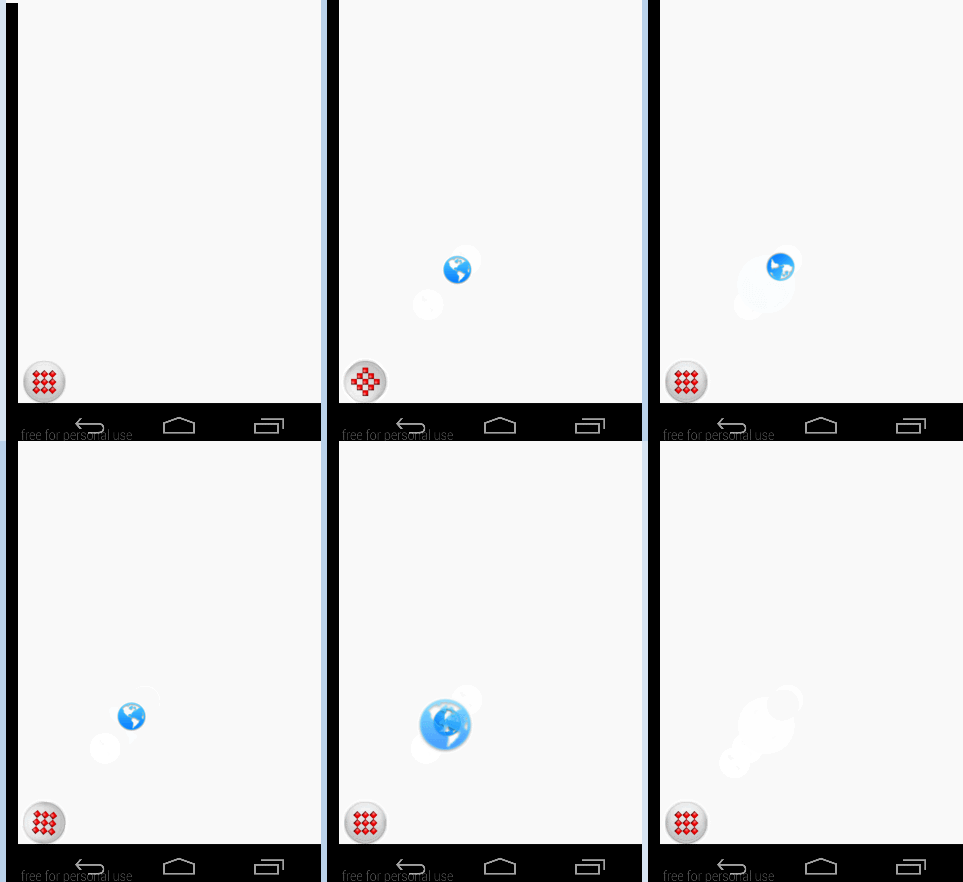
先寫Layout文件:
初始化這3個imageView:
  sat_main = (ImageView)findViewById(R.id.sat_main);
		final ImageView itemView = (ImageView)findViewById(R.id.sat_item);
		final ImageView cloneView = (ImageView)findViewById(R.id.clone_item);
		cloneView.setImageResource(R.drawable.searchable_web);
		itemView.setImageResource(R.drawable.searchable_web);
		itemView.setVisibility(View.GONE);
初始化cloneView的位置:
//這個是使cloneview固定在leftmargin x bottomMargin y的地方
		RelativeLayout.LayoutParams layoutParams =(RelativeLayout.LayoutParams) cloneView.getLayoutParams();
		layoutParams.bottomMargin = Math.abs(y);
		layoutParams.leftMargin = Math.abs(x);
		cloneView.setLayoutParams(layoutParams);
點擊按鈕時候,按鈕本身會旋轉:
	//取得distance的cos(degree)
	public static int getTranslateX(float degree, int distance) {
		return Double.valueOf(distance * Math.cos(Math.toRadians(degree))).intValue();
	}

	public static int getTranslateY(float degree, int distance){
        return Double.valueOf(-1 * distance * Math.sin(Math.toRadians(degree))).intValue();
    }
然後球彈起的動畫:
	public static Animation createItemOutAnimation(Context context, int index, long expandDuration, int x, int y){

        AlphaAnimation alphaAnimation = new AlphaAnimation(0f, 1f);
        long alphaDuration = 60;
        if(expandDuration < 60){
        	alphaDuration = expandDuration / 4;
        }
        alphaAnimation.setDuration(alphaDuration);
        alphaAnimation.setStartOffset(0);

        //x和y是球彈到最高點的坐標
        TranslateAnimation translate = new TranslateAnimation(0, x, 0, y);

        translate.setStartOffset(0);
        translate.setDuration(expandDuration);
        //OvershootInterpolator:表示向前甩一定值後再回到原來位置。
        translate.setInterpolator(context, R.anim.sat_item_overshoot_interpolator);

        RotateAnimation rotate = new RotateAnimation(0f, 360f,
                Animation.RELATIVE_TO_SELF, 0.5f,
                Animation.RELATIVE_TO_SELF, 0.5f);

        //AccelerateInterpolator:動畫從開始到結束,變化率是一個加速的過程。
        //DecelerateInterpolator:動畫從開始到結束,變化率是一個減速的過程
        rotate.setInterpolator(context, R.anim.sat_item_out_rotate_interpolator);

        long duration = 100;
        if(expandDuration <= 150){
            duration = expandDuration / 3;
        }

        rotate.setDuration(expandDuration-duration);
        rotate.setStartOffset(duration);

        AnimationSet animationSet = new AnimationSet(false);
        animationSet.setFillAfter(false);
        animationSet.setFillBefore(true);
        animationSet.setFillEnabled(true);

        animationSet.addAnimation(alphaAnimation);
        animationSet.addAnimation(rotate);
        animationSet.addAnimation(translate);

        animationSet.setStartOffset(30*index);

        return animationSet;
    }
這個動畫彈到最高點後,我們得使itemview gone掉,cloneview visible
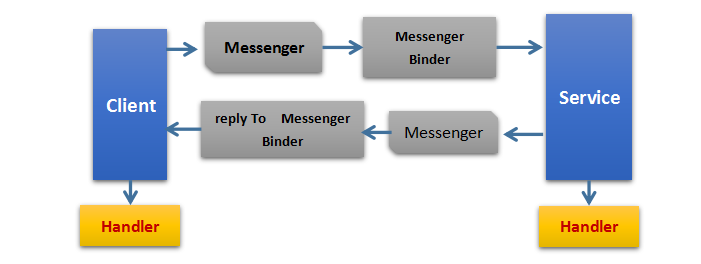 Android中進程間通信(IPC)方式總結
IPC為進程間通信或跨進程通信,是指兩個進程進行進程間通信的過程。在PC和移動設備上一個進程指的是一個程序或者一個應用,所以我們可以將進程間通信簡單理解為不同應用之間的通
 開發Android硬件抽象層代碼
1、開發Android硬件抽象層代碼 ~/android-2.3_r1/hardware/libhardware ----include
 Android安卓手機如何進入工程模式的方式
說到工程模式,好多非技術流的玩家都很頭疼。手機工程模式給人的印象就是生硬的黑白屏,全屏的英文和代碼命令,就像視窗重新回到了DOS系統,雖然好奇但又怕手機變磚
 android之三種方式解析xml(dom,sax,pull)
dom 我的理解就是先把整個文檔讀取到內存中,然後才解析,讀取大點的文件的話這樣效率就會很低。而 sax和pull 它們是基於事件解析的。一行一行去解析,效率會高點。下面