編輯:關於Android編程
Preference主要實現一些配置數據,一些我們上次點擊選擇的內容,我們希望在下次應用調起的時候依然有效,無須用戶再一次進行配置或選擇。Android提供preference這個鍵值對的方式來處理這種情況,自動保存這些數據,並立時生效,同時Android提供一種類似的layout的方式來進行Preference的布局。
Preference組件有ListPreference,EditTextPreference,CheckBoxPreference和SwitchPreference,相對於View中的ListView,EditText,CheckBox,Switch和RingtonePreference .
1.介紹Preference組件的相關屬性
android:key : 每個Preference控件獨一無二的”ID”,唯一表示此Preference。
android:defaultValue : 默認值。 例如,CheckPreference的默認值可為”true”,默認為選中狀態;
EditTextPreference的默認值可為”110”。
android:enabled : 表示該Preference是否可用狀態。
android:title : 每個Preference在PreferenceScreen布局上顯示的標題——大標題
android:summary : 每個Preference在PreferenceScreen布局上顯示的標題——小標題(可以沒有)
android:persistent: 表示Preference元素所對應的值是否寫入sharedPreferen文件中,如果是true,則表示寫
入;否則,則表示不寫入該Preference元素的值。
android:dependency: 表示一個Preference(用A表示)的可用狀態依賴另外一個Preference(用B表示)。B可用,
則A可用;B不可用,則A不可用。
android:disableDependentsState: 與android:dependency相反。B可用,則A不可用;B不可用,則A可用。
特性:ListPreference
android:dialogTitle:彈出控件對話框時顯示的標題
android:entries:類型為array,控件欲顯示的文本
android:entryValues:類型為array,與文本相對應的key-value鍵值對,value保存至sharedPreference文件
RingtonePreference
android:ringtoneType:響鈴的鈴聲類型,主要有:ringtone(音樂)、notification(通知)、alarm(鬧鈴)
、all(所有可用聲 音類型)。
android:showDefault :默認鈴聲,可以使用系統(布爾值---true,false)的或者自定義的鈴聲
android:showSilent :指定鈴聲是否為靜音。指定鈴聲包括系統默認鈴聲或者自定義的鈴聲
2.實例實現上述所講控件
1> 代碼目錄結構
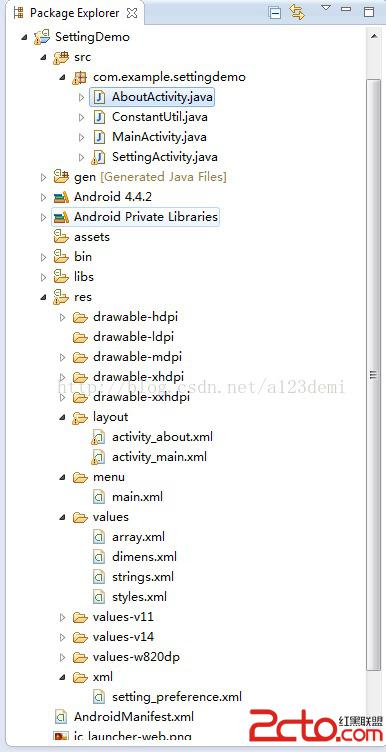
2>效果圖
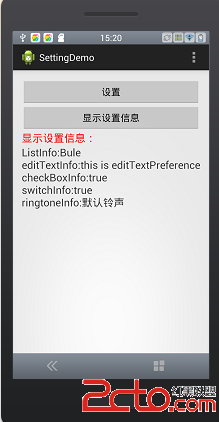
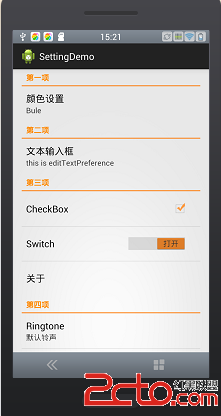
3>xml相關文件
a.xml-> setting_preference.xml
Preference的xml文件不是放在res->layout下,而是需要新建一個xml文件夾,將setting_preference.xml放置在該xml文件夾下:
c.layout->activity_about.xml
d.value->array.xml
- Red
- Green
- Bule
a. 常量ConstantUtil.java
package com.example.settingdemo;

public class ConstantUtil {
	public static final String LIST_KEY = "list_key";
	public static final String EDIT_TEXT_KEY = "edit_text_key";
	public static final String CHECK_BOX_KEY = "check_box_key";
	public static final String SWITCH_KEY = "switch_key";
	public static final String RING_TONE_KEY = "ring_tone_key";
	public static final String PREFERENCE_KEY = "preference_key";
	public static final String MY_PREFERENCE_KEY = "my_preference_key";
}
package com.example.settingdemo;

import android.app.Activity;
import android.content.Intent;
import android.content.SharedPreferences;
import android.os.Bundle;
import android.preference.PreferenceManager;
import android.view.Menu;
import android.view.MenuItem;
import android.view.View;
import android.view.View.OnClickListener;
import android.widget.Button;
import android.widget.TextView;

public class MainActivity extends Activity implements OnClickListener {

	private Button settingBtn, showSettingInfoBtn;
	private TextView showInfoTv;

	@Override
	protected void onCreate(Bundle savedInstanceState) {
		super.onCreate(savedInstanceState);
		setContentView(R.layout.activity_main);

		settingBtn = (Button) this.findViewById(R.id.setting_btn);
		showSettingInfoBtn = (Button) this
				.findViewById(R.id.show_setting_info_btn);
		showInfoTv = (TextView) this.findViewById(R.id.show_info_tv);

		settingBtn.setOnClickListener(this);
		showSettingInfoBtn.setOnClickListener(this);
	}

	@Override
	public void onResume() {
		super.onResume();
		showSettingInfo();
	}

	/**
	 * 顯示設置信息
	 */
	private void showSettingInfo() {
		SharedPreferences share = PreferenceManager
				.getDefaultSharedPreferences(this);
		StringBuffer info = new StringBuffer();
		String listInfo = share.getString(ConstantUtil.LIST_KEY, "Green");
		String editTextInfo = share.getString(ConstantUtil.EDIT_TEXT_KEY,
				"this is editTextPreference");
		boolean checkBoxInfo = share.getBoolean(ConstantUtil.CHECK_BOX_KEY,
				true);
		boolean switchInfo = share.getBoolean(ConstantUtil.SWITCH_KEY, true);
		String ringtoneInfo = share.getString(ConstantUtil.RING_TONE_KEY,
				"默認鈴聲");

		info.append("ListInfo:").append(listInfo).append("\n")
				.append("editTextInfo:").append(editTextInfo).append("\n")
				.append("checkBoxInfo:").append(checkBoxInfo).append("\n")
				.append("switchInfo:").append(switchInfo).append("\n")
				.append("ringtoneInfo:").append(ringtoneInfo).append("\n");

		showInfoTv.setText(info.toString());
	}

	@Override
	public boolean onCreateOptionsMenu(Menu menu) {

		// Inflate the menu; this adds items to the action bar if it is present.
		getMenuInflater().inflate(R.menu.main, menu);
		return true;
	}

	@Override
	public boolean onOptionsItemSelected(MenuItem item) {
		// Handle action bar item clicks here. The action bar will
		// automatically handle clicks on the Home/Up button, so long
		// as you specify a parent activity in AndroidManifest.xml.
		int id = item.getItemId();
		if (id == R.id.action_settings) {
			return true;
		}
		return super.onOptionsItemSelected(item);
	}

	@Override
	public void onClick(View v) {
		// TODO Auto-generated method stub
		switch (v.getId()) {
		case R.id.setting_btn:
			Intent intent = new Intent(MainActivity.this, SettingActivity.class);
			startActivity(intent);
			break;
		case R.id.show_setting_info_btn:
			showSettingInfo();
			break;
		}
	}

}
package com.example.settingdemo;

import android.content.Intent;
import android.content.SharedPreferences;
import android.content.SharedPreferences.OnSharedPreferenceChangeListener;
import android.os.Bundle;
import android.preference.CheckBoxPreference;
import android.preference.EditTextPreference;
import android.preference.ListPreference;
import android.preference.Preference;
import android.preference.Preference.OnPreferenceClickListener;
import android.preference.PreferenceActivity;
import android.preference.RingtonePreference;
import android.preference.SwitchPreference;
import android.widget.Toast;

public class SettingActivity extends PreferenceActivity implements OnSharedPreferenceChangeListener,OnPreferenceClickListener{

	private ListPreference mListPreference;
	private EditTextPreference mEditTextPreference;
	private CheckBoxPreference mCheckBoxPreference;
	private SwitchPreference mSwitchPreference;
	private Preference mPreference;
	private RingtonePreference mRingtonePreference;
	@SuppressWarnings("deprecation")
	@Override
	public void onCreate(Bundle savedInstanceState){
		super.onCreate(savedInstanceState);
		this.addPreferencesFromResource(R.xml.setting_preference);

		initPreference();
	}

	@SuppressWarnings("deprecation")
	private void initPreference(){
		mListPreference = (ListPreference) this.findPreference(ConstantUtil.LIST_KEY);
		mEditTextPreference = (EditTextPreference) this.findPreference(ConstantUtil.EDIT_TEXT_KEY);
		mCheckBoxPreference = (CheckBoxPreference) this.findPreference(ConstantUtil.CHECK_BOX_KEY);
		mSwitchPreference = (SwitchPreference) this.findPreference(ConstantUtil.SWITCH_KEY);
		mPreference = (Preference) this.findPreference(ConstantUtil.PREFERENCE_KEY);
		mRingtonePreference = (RingtonePreference) this.findPreference(ConstantUtil.RING_TONE_KEY);

		mPreference.setOnPreferenceClickListener(this);
	}

	@SuppressWarnings("deprecation")
	@Override
	public void onResume(){
		super.onResume();
		SharedPreferences share = this.getPreferenceScreen().getSharedPreferences();

		setDefaultSummary(share);

		share.registerOnSharedPreferenceChangeListener(this);
	}

	@SuppressWarnings("deprecation")
	@Override
	public void onPause(){
		super.onPause();

		this.getPreferenceScreen().getSharedPreferences().unregisterOnSharedPreferenceChangeListener(this);
	}

	/**
	 * 設置組件小標題
	 * @param share
	 */
	private void setDefaultSummary(SharedPreferences share){
		mListPreference.setSummary(share.getString(ConstantUtil.LIST_KEY, "Green"));
		mEditTextPreference.setSummary(share.getString(ConstantUtil.EDIT_TEXT_KEY, "this is editTextPreference"));
		mRingtonePreference.setSummary(share.getString(ConstantUtil.RING_TONE_KEY, "默認鈴聲"));
	}

	@Override
	public void onSharedPreferenceChanged(SharedPreferences sharedPreferences,
			String key) {
		// TODO Auto-generated method stub
		if(ConstantUtil.LIST_KEY.equals(key)){
			mListPreference.setSummary(mListPreference.getEntry());
		}else if(ConstantUtil.EDIT_TEXT_KEY.equals(key)){
			mEditTextPreference.setSummary(sharedPreferences.getString(key, "this is editTextPreference"));
		}else if(ConstantUtil.RING_TONE_KEY.equals(key)){
			mRingtonePreference.setSummary(sharedPreferences.getString(key, "默認鈴聲"));
		}
	}

	@Override
	public boolean onPreferenceClick(Preference preference) {
		// TODO Auto-generated method stub
		if(ConstantUtil.PREFERENCE_KEY.equals(preference.getKey())){
			Intent intent = new Intent(SettingActivity.this,AboutActivity.class);
			startActivity(intent);
		}else if(ConstantUtil.MY_PREFERENCE_KEY.equals(preference.getKey())){
			Toast.makeText(this, "點擊MyPreference", Toast.LENGTH_SHORT).show();
		}
		return false;
	}
}
package com.example.settingdemo;

import android.app.Activity;
import android.os.Bundle;

public class AboutActivity extends Activity {
	@Override
	public void onCreate(Bundle savedInstanceState){
		super.onCreate(savedInstanceState);
		setContentView(R.layout.activity_about);
	}
}
源代碼下載鏈接:http://download.csdn.net/detail/a123demi/7564135
 android MediaRecorder錄制音頻
使用MediaRecorder錄制音頻步驟: 創建MediaRecorder對象MediaRecorder recorder = new MediaRecorder()
 AndroidSDK Support自帶夜間、日間模式切換詳解
寫這篇博客的目的就是教大家利用AndroidSDK自帶的support lib來實現APP日間/夜間模式的切換,最近看到好多帖子在做關於這個日夜間模式切換的開源項目,其實
 Android Dialog
Android 開發中對話框隨處可見,現將自己做過的項目中的Dialog,做出一個系統的總結。從以下方面開始總結:1.AlertDialog的使用2.Dialog的使用3
 Android學會屬性動畫的基本用法(下),Interpolator 與ViewPropertyAnimator的用法
Interpolator的用法Interpolator這個東西很難進行翻譯,直譯過來的話是補間器的意思,它的主要作用是可以控制動畫的變化速率,比如去實現一種非線性運動的動