編輯:關於Android編程
		?	布局管理器高度為屏幕高度
		?	默認顯示文字
			?	組件高度為文字高度
public class Send extends Activity {
	private Button mybut = null ;			// 按鈕組件
	private TextView msg = null ;			// 文本組件
	@Override
	public void onCreate(Bundle savedInstanceState) {
		super.onCreate(savedInstanceState);
		super.setContentView(R.layout.send_main);		// 默認布局管理器
		this.mybut = (Button) super.findViewById(R.id.mybut) ;	// 取得組件
		this.msg = (TextView) super.findViewById(R.id.msg) ;	// 取得組件
		this.mybut.setOnClickListener(new OnClickListenerImpl());	// 定義單擊事件
	}
	private class OnClickListenerImpl implements OnClickListener {
		@Override
		public void onClick(View view) {
			Intent it = new Intent(Send.this, Receive.class);	// 實例化Intent
			it.putExtra("myinfo", "我打算打算打算打算的水電費") ;	// 附加信息
			Send.this.startActivityForResult(it, 1);		// 啟動Activity
		}
	}
	@Override
	protected void onActivityResult(int requestCode, int resultCode, Intent data) {
		switch (resultCode) {			// 判斷操作類型
		case RESULT_OK:			// 成功操作
			msg.setText("返回的內容是:" + data.getStringExtra("retmsg"));
			break;
		case RESULT_CANCELED:			// 取消操作
			msg.setText("操作取消。");
			break ;
		default:
			break;
		}
	}
}
		?	此布局管理器高度為屏幕高度
		?	組件高度為文字高度
			?	默認顯示文字
public class Receive extends Activity {
	private TextView show = null ;		// 文本顯示組件
	private Button retbut = null ;		// 按鈕組件
	@Override
	public void onCreate(Bundle savedInstanceState) {
		super.onCreate(savedInstanceState);
		super.setContentView(R.layout.receive_main);	// 調用默認布局管理器
		this.show = (TextView) super.findViewById(R.id.show) ;// 取得組件
		this.retbut = (Button) super.findViewById(R.id.retbut) ;// 取得組件
		Intent it = super.getIntent() ;		// 取得啟動此程序的Intent
		String info = it.getStringExtra("myinfo") ;	// 取得設置的附加信息
		this.show.setText(info) ;			// 設置文本顯示信息
		this.retbut.setOnClickListener(new OnClickListenerImpl()) ;	// 設置監聽
	}
	private class OnClickListenerImpl implements OnClickListener {
		@Override
		public void onClick(View view) {
			Receive.this.getIntent().putExtra("retmsg", "哈哈哈") ;// 返回信息
			// 設置返回數據的狀態,RESULT_OK與Send.java中的onActivityResult()裡判斷的對應
			Receive.this.setResult(RESULT_OK, Receive.this.getIntent()) ;
			Receive.this.finish() ;		// 結束Intent
		}
	}
}
 Android中直播視頻技術探究之---基礎核心類ByteBuffer解析
一、前言前一篇文章我們介紹了Android中直播視頻技術的基礎大綱知識,這裡就開始一一講解各個知識點,首先主要來看一下視頻直播中的一個重要的基礎核心類:ByteBuffe
 分享Android中pullToRefresh的使用心得
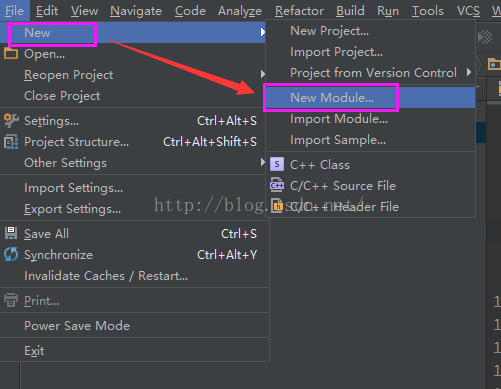
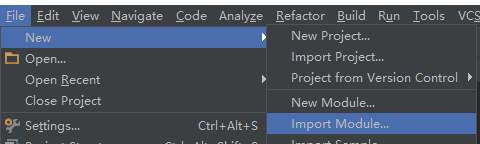
pullToRefresh的導入首先,點擊new按鈕 -> import Module 然後在 New Module界面選擇已經在本地的含有源代碼的pul
 詳細分析Android中onTouch事件傳遞機制
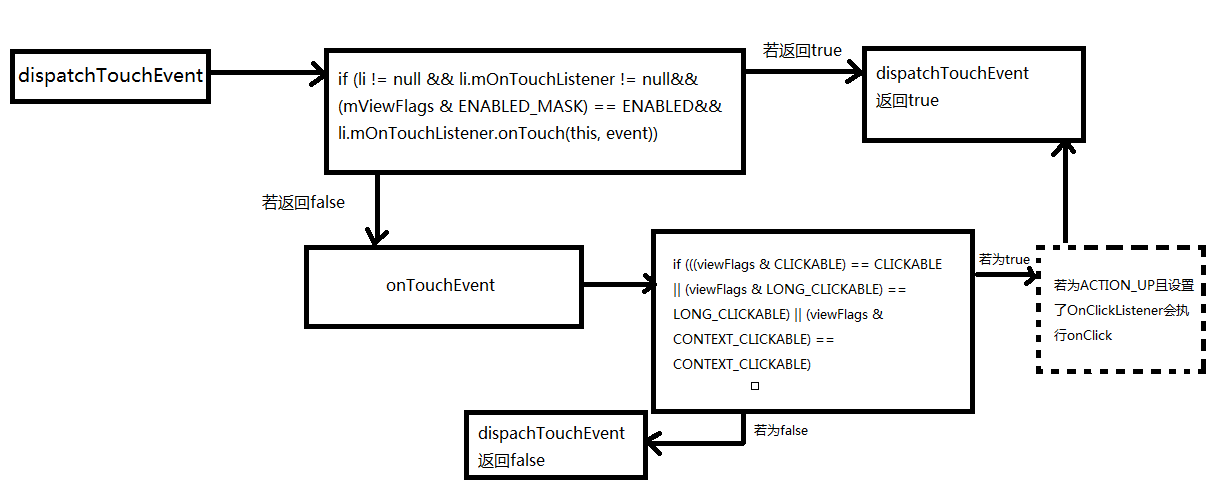
onTach介紹ontach是Android系統中整個事件機制的基礎。Android中的其他事件,如onClick、onLongClick等都是以onTach為基礎的。o
 微信號怎麼改 微信號怎麼改第二次
想必現在有很多朋友都曾經遇到過這樣的困惑。小編也嘗試過修改幾個微信號都沒能成功;結果有一個是兩年前注冊的微信號,並且當時是已經填寫了自己的微信號(不是默認號