編輯:關於Android編程
本文主要介紹程序如何利用root權限靜默安裝APK,如何自動選擇普通安裝還是靜默安裝以及擴展PackageUtils實現靜默刪除APK。
1、root權限靜默安裝調用
直接調用PackageUtils.installSlient函數(直接引入TrineaAndroidCommon@GoogleCode或TrineaAndroidCommon@Github作為你項目的library),系統授權管理會彈出對話框讓用戶選擇是否允許應用獲得root權限。允許的話即可靜默安裝。該函數返回PackageUtils.INSTALL_SUCCEEDED表示安裝成功,失敗則返回相應錯誤碼,可以得到失敗的詳細原因,包括文件不存在,apk無效,系統內存不足,簽名不正確,缺少公共庫,share
user錯誤等等判斷。
注意對於較大apk安裝過程非常耗時,所以最好新啟線程去調用PackageUtils.installSlient。
2、root權限靜默安裝實現
PackageUtils.installSlient的實現實際使用的是su
pm install -r filePath命令。核心代碼如下:
PackageUtils.installSlient的實現代碼
  Java
  public static final String COMMAND_SU = "su";
  public static final String COMMAND_SH = "sh";
  public static final String COMMAND_EXIT = "exit\n";
  public static final String COMMAND_LINE_END = "\n";
  public static CommandResult execCommand(String[] commands, boolean isRoot, boolean isNeedResultMsg) {
  int result = -1;
  if (commands == null || commands.length == 0) {
  return new CommandResult(result, null, null);
  }
  Process process = null;
  BufferedReader successResult = null;
  BufferedReader errorResult = null;
  StringBuilder successMsg = null;
  StringBuilder errorMsg = null;
  DataOutputStream os = null;
  try {
  process = Runtime.getRuntime().exec(isRoot ? COMMAND_SU : COMMAND_SH);
  os = new DataOutputStream(process.getOutputStream());
  for (String command : commands) {
  if (command == null) {
  continue;
  }
  // donnot use os.writeBytes(commmand), avoid chinese charset error
  os.write(command.getBytes());
  os.writeBytes(COMMAND_LINE_END);
  os.flush();
  }
  os.writeBytes(COMMAND_EXIT);
  os.flush();
  result = process.waitFor();
  // get command result
  if (isNeedResultMsg) {
  successMsg = new StringBuilder();
  errorMsg = new StringBuilder();
  successResult = new BufferedReader(new InputStreamReader(process.getInputStream()));
  errorResult = new BufferedReader(new InputStreamReader(process.getErrorStream()));
  String s;
  while ((s = successResult.readLine()) != null) {
  successMsg.append(s);
  }
  while ((s = errorResult.readLine()) != null) {
  errorMsg.append(s);
  }
  }
  } catch (IOException e) {
  e.printStackTrace();
  } catch (Exception e) {
  e.printStackTrace();
  } finally {
  try {
  if (os != null) {
  os.close();
  }
  if (successResult != null) {
  successResult.close();
  }
  if (errorResult != null) {
  errorResult.close();
  }
  } catch (IOException e) {
  e.printStackTrace();
  }
  if (process != null) {
  process.destroy();
  }
  }
  return new CommandResult(result, successMsg == null ? null : successMsg.toString(), errorMsg == null ? null
  : errorMsg.toString());
  }
  public static final String COMMAND_SU = "su";
  public static final String COMMAND_SH = "sh";
  public static final String COMMAND_EXIT = "exit\n";
  public static final String COMMAND_LINE_END = "\n";
  public static CommandResult execCommand(String[] commands, boolean isRoot, boolean isNeedResultMsg) {
  int result = -1;
  if (commands == null || commands.length == 0) {
  return new CommandResult(result, null, null);
  }
  Process process = null;
  BufferedReader successResult = null;
  BufferedReader errorResult = null;
  StringBuilder successMsg = null;
  StringBuilder errorMsg = null;
  DataOutputStream os = null;
  try {
  process = Runtime.getRuntime().exec(isRoot ? COMMAND_SU : COMMAND_SH);
  os = new DataOutputStream(process.getOutputStream());
  for (String command : commands) {
  if (command == null) {
  continue;
  }
  // donnot use os.writeBytes(commmand), avoid chinese charset error
  os.write(command.getBytes());
  os.writeBytes(COMMAND_LINE_END);
  os.flush();
  }
  os.writeBytes(COMMAND_EXIT);
  os.flush();
  result = process.waitFor();
  // get command result
  if (isNeedResultMsg) {
  successMsg = new StringBuilder();
  errorMsg = new StringBuilder();
  successResult = new BufferedReader(new InputStreamReader(process.getInputStream()));
  errorResult = new BufferedReader(new InputStreamReader(process.getErrorStream()));
  String s;
  while ((s = successResult.readLine()) != null) {
  successMsg.append(s);
  }
  while ((s = errorResult.readLine()) != null) {
  errorMsg.append(s);
  }
  }
  } catch (IOException e) {
  e.printStackTrace();
  } catch (Exception e) {
  e.printStackTrace();
  } finally {
  try {
  if (os != null) {
  os.close();
  }
  if (successResult != null) {
  successResult.close();
  }
  if (errorResult != null) {
  errorResult.close();
  }
  } catch (IOException e) {
  e.printStackTrace();
  }
  if (process != null) {
  process.destroy();
  }
  }
  return new CommandResult(result, successMsg == null ? null : successMsg.toString(), errorMsg == null ? null
  : errorMsg.toString());
  }
3、普通安裝,系統權限靜默安裝,root權限靜默安裝的自動選擇
查看PackageUtils源碼會發現我還提供了其他幾個安裝函數,其中PackageUtils.install函數會根據是否是系統應用以及是否擁有root權限,從而確定調用哪種安裝方式(普通安裝方式、root靜默安裝方式還是系統權限靜默安裝),源碼如下:
Java
  /**
  * install according conditions
  *
  *
  if system application or rooted, see {@link #installSilent(Context, String)}
  *
  else see {@link #installNormal(Context, String)}
  *
  *
  * @param context
  * @param filePath
  * @return
  */
  public static final int install(Context context, String filePath) {
  if (!PackageUtils.isSystemApplication(context)) {
  boolean isRoot = ShellUtils.checkRootPermission();
  if (!isRoot) {
  return installNormal(context, filePath) ? INSTALL_SUCCEEDED : INSTALL_FAILED_INVALID_URI;
  }
  }
  return installSilent(context, filePath);
  }
  /**
  * install according conditions
  *
  *
  if system application or rooted, see {@link #installSilent(Context, String)}
  *
  else see {@link #installNormal(Context, String)}
  *
  *
  * @param context
  * @param filePath
  * @return
  */
  public static final int install(Context context, String filePath) {
  if (!PackageUtils.isSystemApplication(context)) {
  boolean isRoot = ShellUtils.checkRootPermission();
  if (!isRoot) {
  return installNormal(context, filePath) ? INSTALL_SUCCEEDED : INSTALL_FAILED_INVALID_URI;
  }
  }
  return installSilent(context, filePath);
  }
沒有時間實現靜默卸載應用的代碼,不過原理都一樣,請參考PackageUtils.installSlient編寫root權限靜默刪除應用代碼。使用pm uninstall [-k] PACKAGE命令即可。
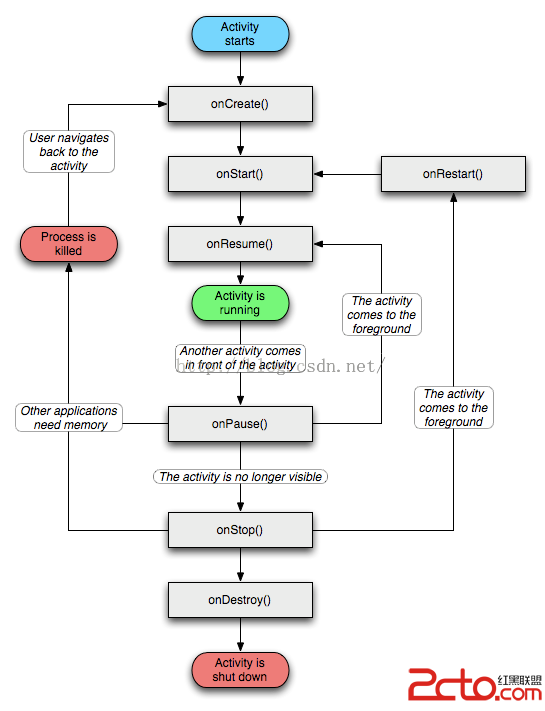 [better practice系列]Android處理好activity正確情況下的生命周期和意外情況下的生命周期淺析
前言:Activity生命周期是每一個Android開發者接觸Android之始就會學習的東西,每個人都會說出點什麼,我想任何一個經驗老道高級語言開發程序員談到生命周期這
 android開發往SDK上追加文件
android手機內存本來就不大,要是老把數據放在手機裡,很明顯會讓手機的使用者體驗到什麼是“卡”,所以,我們把數據要放到SD卡中,以減少手機內存的使用,本文僅寫入文件
 Android中Service(後台服務)詳解
1.概念: (1).Service可以說是一個在後台運行的Activity。它不是一個單獨的進程,它只需要應用告訴它要在後台做什麼就可以了。 (2).它要是實現和用戶的交
 Android App在線程中創建handler的方法講解
相關概念1.Handler:可以看做是一個工具類,用來向消息隊列中插入消息的;2.Thread:所有與Handler相關的功能都是與Thread密不可分的,Handler