編輯:關於Android編程
通過《Android之——AIDL小結》與《Android之——AIDL深入》兩篇博文,相信大家已經對Android AIDL有了一定的了解,下面,我們就利用Android的AIDL實現自動掛斷電話的功能,好了,不多說了,我們直接進入主題。
掛斷電話的AIDL文件都是Android自帶的文件,我們可以從Android的源代碼中找到這兩個文件,它們分別是NeighboringCellInfo.aidl和ITelephony.aidl
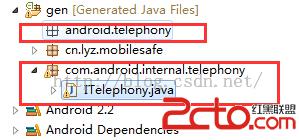
我把NeighboringCellInfo.aidl放在項目的android.telephony包下,將ITelephony.aidl放在com.android.internal.telephony包下
NeighboringCellInfo.aid具體內容如下:
/* //device/java/android/android/content/Intent.aidl
**
** Copyright 2007, The Android Open Source Project
**
** Licensed under the Apache License, Version 2.0 (the License);
** you may not use this file except in compliance with the License.
** You may obtain a copy of the License at
**
**     http://www.apache.org/licenses/LICENSE-2.0
**
** Unless required by applicable law or agreed to in writing, software
** distributed under the License is distributed on an AS IS BASIS,
** WITHOUT WARRANTIES OR CONDITIONS OF ANY KIND, either express or implied.
** See the License for the specific language governing permissions and
** limitations under the License.
*/

package android.telephony;

parcelable NeighboringCellInfo;
ITelephony.aidl具體內容如下:
/*
 * Copyright (C) 2007 The Android Open Source Project
 *
 * Licensed under the Apache License, Version 2.0 (the License);
 * you may not use this file except in compliance with the License.
 * You may obtain a copy of the License at
 *
 *      http://www.apache.org/licenses/LICENSE-2.0
 *
 * Unless required by applicable law or agreed to in writing, software
 * distributed under the License is distributed on an AS IS BASIS,
 * WITHOUT WARRANTIES OR CONDITIONS OF ANY KIND, either express or implied.
 * See the License for the specific language governing permissions and
 * limitations under the License.
 */

package com.android.internal.telephony;

import android.os.Bundle;
import java.util.List;
import android.telephony.NeighboringCellInfo;

/**
 * Interface used to interact with the phone.  Mostly this is used by the
 * TelephonyManager class.  A few places are still using this directly.
 * Please clean them up if possible and use TelephonyManager insteadl.
 *
 * {@hide}
 */
interface ITelephony {

    /**
     * Dial a number. This doesn't place the call. It displays
     * the Dialer screen.
     * @param number the number to be dialed. If null, this
     * would display the Dialer screen with no number pre-filled.
     */
    void dial(String number);

    /**
     * Place a call to the specified number.
     * @param number the number to be called.
     */
    void call(String number);

    /**
     * If there is currently a call in progress, show the call screen.
     * The DTMF dialpad may or may not be visible initially, depending on
     * whether it was up when the user last exited the InCallScreen.
     *
     * @return true if the call screen was shown.
     */
    boolean showCallScreen();

    /**
     * Variation of showCallScreen() that also specifies whether the
     * DTMF dialpad should be initially visible when the InCallScreen
     * comes up.
     *
     * @param showDialpad if true, make the dialpad visible initially,
     *                    otherwise hide the dialpad initially.
     * @return true if the call screen was shown.
     *
     * @see showCallScreen
     */
    boolean showCallScreenWithDialpad(boolean showDialpad);

    /**
     * End call or go to the Home screen
     *
     * @return whether it hung up
     */
    boolean endCall();

    /**
     * Answer the currently-ringing call.
     *
     * If there's already a current active call, that call will be
     * automatically put on hold.  If both lines are currently in use, the
     * current active call will be ended.
     *
     * TODO: provide a flag to let the caller specify what policy to use
     * if both lines are in use.  (The current behavior is hardwired to
     * answer incoming, end ongoing, which is how the CALL button
     * is specced to behave.)
     *
     * TODO: this should be a oneway call (especially since it's called
     * directly from the key queue thread).
     */
    void answerRingingCall();

    /**
     * Silence the ringer if an incoming call is currently ringing.
     * (If vibrating, stop the vibrator also.)
     *
     * It's safe to call this if the ringer has already been silenced, or
     * even if there's no incoming call.  (If so, this method will do nothing.)
     *
     * TODO: this should be a oneway call too (see above).
     *       (Actually *all* the methods here that return void can
     *       probably be oneway.)
     */
    void silenceRinger();

    /**
     * Check if we are in either an active or holding call
     * @return true if the phone state is OFFHOOK.
     */
    boolean isOffhook();

    /**
     * Check if an incoming phone call is ringing or call waiting.
     * @return true if the phone state is RINGING.
     */
    boolean isRinging();

    /**
     * Check if the phone is idle.
     * @return true if the phone state is IDLE.
     */
    boolean isIdle();

    /**
     * Check to see if the radio is on or not.
     * @return returns true if the radio is on.
     */
    boolean isRadioOn();

    /**
     * Check if the SIM pin lock is enabled.
     * @return true if the SIM pin lock is enabled.
     */
    boolean isSimPinEnabled();

    /**
     * Cancels the missed calls notification.
     */
    void cancelMissedCallsNotification();

    /**
     * Supply a pin to unlock the SIM.  Blocks until a result is determined.
     * @param pin The pin to check.
     * @return whether the operation was a success.
     */
    boolean supplyPin(String pin);

    /**
     * Handles PIN MMI commands (PIN/PIN2/PUK/PUK2), which are initiated
     * without SEND (so dial is not appropriate).
     *
     * @param dialString the MMI command to be executed.
     * @return true if MMI command is executed.
     */
    boolean handlePinMmi(String dialString);

    /**
     * Toggles the radio on or off.
     */
    void toggleRadioOnOff();

    /**
     * Set the radio to on or off
     */
    boolean setRadio(boolean turnOn);

    /**
     * Request to update location information in service state
     */
    void updateServiceLocation();

    /**
     * Enable location update notifications.
     */
    void enableLocationUpdates();

    /**
     * Disable location update notifications.
     */
    void disableLocationUpdates();

    /**
     * Enable a specific APN type.
     */
    int enableApnType(String type);

    /**
     * Disable a specific APN type.
     */
    int disableApnType(String type);

    /**
     * Allow mobile data connections.
     */
    boolean enableDataConnectivity();

    /**
     * Disallow mobile data connections.
     */
    boolean disableDataConnectivity();

    /**
     * Report whether data connectivity is possible.
     */
    boolean isDataConnectivityPossible();

    Bundle getCellLocation();

    /**
     * Returns the neighboring cell information of the device.
     */
    List getNeighboringCellInfo();

     int getCallState();
     int getDataActivity();
     int getDataState();

    /**
     * Returns the current active phone type as integer.
     * Returns TelephonyManager.PHONE_TYPE_CDMA if RILConstants.CDMA_PHONE
     * and TelephonyManager.PHONE_TYPE_GSM if RILConstants.GSM_PHONE
     */
    int getActivePhoneType();

    /**
     * Returns the CDMA ERI icon index to display
     */
    int getCdmaEriIconIndex();

    /**
     * Returns the CDMA ERI icon mode,
     * 0 - ON
     * 1 - FLASHING
     */
    int getCdmaEriIconMode();

    /**
     * Returns the CDMA ERI text,
     */
    String getCdmaEriText();

    /**
     * Returns true if CDMA provisioning needs to run.
     */
    boolean getCdmaNeedsProvisioning();

    /**
      * Returns the unread count of voicemails
      */
    int getVoiceMessageCount();

    /**
      * Returns the network type
      */
    int getNetworkType();

    /**
     * Return true if an ICC card is present
     */
    boolean hasIccCard();
}
准備好文件後,會在項目的gen目錄下自動生成與兩個文件所在包一樣的包,同時會自動生成ITelephony.java文件
如下圖:
這個方法就是掛斷電話的方法,具體實現如下
//掛斷電話
public void endCall(String incomingNumber){
	try {
			Class clazz = Class.forName(android.os.ServiceManager);
			Method method = clazz.getMethod(getService, String.class);
			IBinder ibinder = (IBinder) method.invoke(null, Context.TELEPHONY_SERVICE);
			ITelephony iTelephony = ITelephony.Stub.asInterface(ibinder);
			iTelephony.endCall();
		}catch(Exception e){
			e.printStrackTrace();
		}
}
最後別忘了在AndroidManifest.xml文件中注冊權限
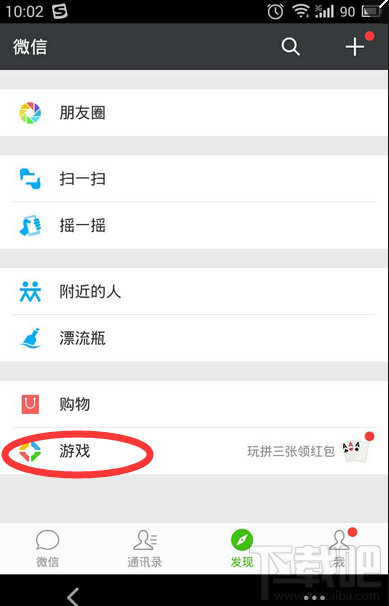 微信游戲有哪些 微信游戲在哪裡找
像qq一樣,微信也有自己的游戲入口,微信游戲在哪裡找?微信都有些什麼游戲,讓我們一起來看看吧!微信游戲哪裡找首先登陸微信,點擊“發現&rdquo
 Android實現動態高斯模糊效果
高斯模糊是什麼?高斯模糊(英語:Gaussian Blur),也叫高斯平滑,是在Adobe Photoshop、GIMP以及Paint.NET等圖像處理軟件中廣泛使用的處
 Android Button Maker(在線生成android shape xml文件的工具),真方便!
使用起來超簡單,如圖: Android Button Maker is online tool to generate button
 Android開發技巧——使用PopupWindow實現彈出菜單
在本文當中,我將會與大家分享一個封裝了PopupWindow實現彈出菜單的類,並說明它的實現與使用。 因對界面的需求,android原生的彈出菜單已不能滿足我們的需求,自