編輯:關於Android編程
關於如何監聽設備插拔以及獲取設備權限我就不說了,大家可以在網上搜一下有很多這方面的文章,我這裡就說一下如何讀寫數據。
          UsbInterface usbInterface = usbDevice.getInterface(0);
//USBEndpoint為讀寫數據所需的節點
UsbEndpoint inEndpoint = usbInterface.getEndpoint(0);  //讀數據節點
UsbEndpoint outEndpoint = usbInterface.getEndpoint(1); //寫數據節點
UsbDeviceConnection connection = usbManager.openDevice(usbDevice);
connection.claimInterface(usbInterface, true);

//發送數據
byte[] byte2 = new byte[64];
int out = connection.bulkTransfer(outEndpoint, cmd, cmd.length, 3000);

//讀取數據1   兩種方法讀取數據
int ret = connection.bulkTransfer(inEndpoint, byte2, byte2.length, 3000);
Log.e("ret", "ret:"+ret);
for(Byte byte1 : byte2){
    System.err.println(byte1);
}

//讀取數據2
/*int outMax = outEndpoint.getMaxPacketSize();
int inMax = inEndpoint.getMaxPacketSize();
ByteBuffer byteBuffer = ByteBuffer.allocate(inMax);
UsbRequest usbRequest = new UsbRequest();
usbRequest.initialize(connection, inEndpoint);
usbRequest.queue(byteBuffer, inMax);
if(connection.requestWait() == usbRequest){
    byte[] retData = byteBuffer.array();
    for(Byte byte1 : retData){
        System.err.println(byte1);
    }
}*/

                        UsbInterface usbInterface = usbDevice.getInterface(0);
   //USBEndpoint為讀寫數據所需的節點
   UsbEndpoint inEndpoint = usbInterface.getEndpoint(0);  //讀數據節點
   UsbEndpoint outEndpoint = usbInterface.getEndpoint(1); //寫數據節點
   UsbDeviceConnection connection = usbManager.openDevice(usbDevice);
   connection.claimInterface(usbInterface, true);

   //發送數據
   byte[] byte2 = new byte[64];
   int out = connection.bulkTransfer(outEndpoint, cmd, cmd.length, 3000);

   //讀取數據1   兩種方法讀取數據
   int ret = connection.bulkTransfer(inEndpoint, byte2, byte2.length, 3000);
   Log.e("ret", "ret:"+ret);
   for(Byte byte1 : byte2){
    System.err.println(byte1);
   }

   //讀取數據2
   /*int outMax = outEndpoint.getMaxPacketSize();
   int inMax = inEndpoint.getMaxPacketSize();
   ByteBuffer byteBuffer = ByteBuffer.allocate(inMax);
   UsbRequest usbRequest = new UsbRequest();
   usbRequest.initialize(connection, inEndpoint);
   usbRequest.queue(byteBuffer, inMax);
   if(connection.requestWait() == usbRequest){
    byte[] retData = byteBuffer.array();
    for(Byte byte1 : retData){
     System.err.println(byte1);
    }
   }*/
首先得到可以操作USB設備的節點Endpoint,0為讀數據節點,1未寫數據節點。
然後使用connection.bulkTransfer(endpoint, buffer, length, timeout) 發送數據。
我這裡讀數據的時候有兩種方法,讀數據1和讀數據2
注意:寫數據時傳入的是寫數據節點OutEndpoint,讀數據時傳入的是讀數據節點InEndpoint。
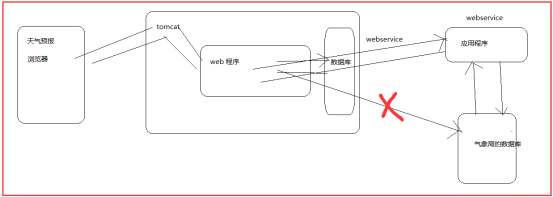 【黑馬Android】(14)webservice概念/調用/wsdl接口
webservice 的概念 webservice 就是一個應用程序,它提供一種通過web方式訪問的api.解決兩個系統或者(應用程序)
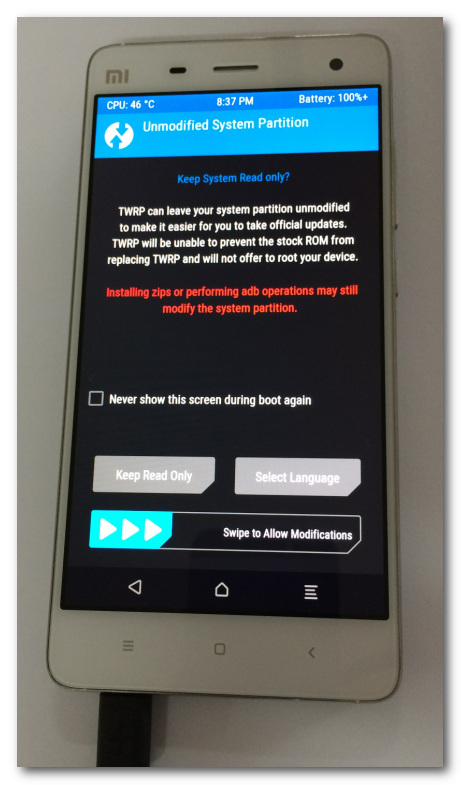 【Android 系統開發】CyanogenMod 13.0 源碼下載 編譯 ROM 制作
本文操作手機平台 : 小米4 ;編譯平台 : Ubuntu 14.04 LTS 虛擬機,使用CyanogenMod 源碼編譯ROM。手機的兩種模式: 在下面有詳細的圖片示
 android 嵌套的listview示例(可參考實現朋友圈評論)
最近在項目中用到listview中再嵌套一個listview,兩層也有監聽,都沒有問題。其實,主要解決裡面那一層的listview的高度計算就可以,外面那一層listvi
 android 驗證碼之短信驗證(雲之訊短信平台)
好久沒更新過博客了。這段時間總算是忙完了,抽點時間出來更新下博客。這次跟大家帶來的是一個很簡單的短信驗證碼。相信這個驗證碼的功能基本上99的項目都需要用到,我這裡是用的雲