編輯:關於Android編程
import java.util.ArrayList;
import java.util.HashMap;
import java.util.List;
import java.util.Map;

import android.app.Activity;
import android.app.AlertDialog;
import android.content.Context;
import android.content.DialogInterface;
import android.content.Intent;
import android.os.Bundle;
import android.view.KeyEvent;
import android.view.View;

import com.example.exmanalysis.umeng.analytics.FragmentStack;
import com.example.exmanalysis.umeng.analytics.FragmentTabs;
import com.example.exmanalysis.umeng.analytics.WebviewAnalytic;
import com.umeng.analytics.MobclickAgent;
import com.umeng.analytics.MobclickAgent.EScenarioType;
import com.umeng.analytics.social.UMPlatformData;
import com.umeng.analytics.social.UMPlatformData.GENDER;
import com.umeng.analytics.social.UMPlatformData.UMedia;

public class UmengActivity extends Activity {
    private final static String TAG = "UmengActivity";
    private Context mContext;

    @Override
    public void onCreate(Bundle savedInstanceState) {
        super.onCreate(savedInstanceState);
        setContentView(R.layout.activity_umeng);

        mContext = this;
        MobclickAgent.setDebugMode(true);
        // SDK在統計Fragment時,需要關閉Activity自帶的頁面統計,
        // 然後在每個頁面中重新集成頁面統計的代碼(包括調用了 onResume 和 onPause 的Activity)。
        MobclickAgent.openActivityDurationTrack(false);
        // MobclickAgent.setAutoLocation(true);
        // MobclickAgent.setSessionContinueMillis(1000);
        // MobclickAgent.startWithConfigure(
        // new UMAnalyticsConfig(mContext, "4f83c5d852701564c0000011", "Umeng", EScenarioType.E_UM_NORMAL));
        MobclickAgent.setScenarioType(mContext, EScenarioType.E_UM_NORMAL);
    }

    @Override
    public void onResume() {
        super.onResume();
        MobclickAgent.onPageStart(TAG);
        MobclickAgent.onResume(mContext);
    }

    @Override
    public void onPause() {
        super.onPause();
        MobclickAgent.onPageEnd(TAG);
        MobclickAgent.onPause(mContext);
    }

    public void onButtonClick(View view) {
        int id = view.getId();
        switch (id) {
        case R.id.umeng_example_analytics_event_cc:
            List keyPath = new ArrayList();
            keyPath.add("one");
            keyPath.add("two");
            keyPath.add("tree");
            MobclickAgent.onEvent(mContext, keyPath, 20, "label");
            break;
        case R.id.umeng_example_analytics_event:
            MobclickAgent.onEvent(mContext, "click");
            MobclickAgent.onEvent(mContext, "click", "button");
            break;
        case R.id.umeng_example_analytics_ekv:
            Map map_ekv = new HashMap();
            map_ekv.put("type", "popular");
            map_ekv.put("artist", "JJLin");

            MobclickAgent.onEvent(mContext, "music", map_ekv);
            break;
        case R.id.umeng_example_analytics_duration:

            Map map_value = new HashMap();
            map_value.put("type", "popular");
            map_value.put("artist", "JJLin");

            MobclickAgent.onEventValue(this, "music", map_value, 12000);
            break;
        case R.id.umeng_example_analytics_make_crash:
            "123".substring(10);
            break;
        case R.id.umeng_example_analytics_js_analytic:
            startActivity(new Intent(this, WebviewAnalytic.class));
            break;
        case R.id.umeng_example_analytics_fragment_stack:
            startActivity(new Intent(this, FragmentStack.class));
            break;
        case R.id.umeng_example_analytics_fragment_tabs:
            startActivity(new Intent(this, FragmentTabs.class));
            break;
        case R.id.umeng_example_analytics_social:

            UMPlatformData platform = new UMPlatformData(UMedia.SINA_WEIBO, "user_id");
            platform.setGender(GENDER.MALE); // optional
            platform.setWeiboId("weiboId"); // optional

            MobclickAgent.onSocialEvent(this, platform);
            break;
        case R.id.umeng_example_analytics_signin:
            MobclickAgent.onProfileSignIn("example_id");
            break;

        case R.id.umeng_example_analytics_signoff:
            MobclickAgent.onProfileSignOff();
            break;
        }
    }

    @Override
    public boolean onKeyDown(int keyCode, KeyEvent event) {
        if (keyCode == KeyEvent.KEYCODE_BACK) {
            Hook();
            return true;
        }

        return super.onKeyDown(keyCode, event);
    }

    // /對於好多應用,會在程序中殺死 進程,這樣會導致我們統計不到此時Activity結束的信息,
    // /對於這種情況需要調用 'MobclickAgent.onKillProcess( Context )'
    // /方法,保存一些頁面調用的數據。正常的應用是不需要調用此方法的。
    private void Hook() {
        AlertDialog.Builder builder = new AlertDialog.Builder(mContext);
        builder.setPositiveButton("退出應用", new DialogInterface.OnClickListener() {
            public void onClick(DialogInterface dialog, int whichButton) {
                MobclickAgent.onKillProcess(mContext);

                int pid = android.os.Process.myPid();
                android.os.Process.killProcess(pid);
            }
        });
        builder.setNeutralButton("後退一下", new DialogInterface.OnClickListener() {
            public void onClick(DialogInterface dialog, int whichButton) {
                finish();
            }
        });
        builder.setNegativeButton("點錯了", new DialogInterface.OnClickListener() {
            public void onClick(DialogInterface dialog, int whichButton) {
            }
        });
        builder.show();
    }
}
import android.app.Activity;
import android.content.Intent;
import android.os.Build;
import android.os.Bundle;
import android.util.Log;
import android.view.View;
import android.view.View.OnClickListener;
import android.widget.Button;
import android.widget.TextView;

import com.baidu.mobstat.NativeCrashHandler;
import com.baidu.mobstat.SendStrategyEnum;
import com.baidu.mobstat.StatService;
import com.example.exmanalysis.baidu.AnotherDemoActivity1;
import com.example.exmanalysis.baidu.Conf;
import com.example.exmanalysis.baidu.DemoActivity2;
import com.example.exmanalysis.baidu.DemoActivity3;
import com.example.exmanalysis.baidu.WebViewActivity;
import com.example.exmanalysis.baidu.appfragment.AppFragmentDemoActivity;
import com.example.exmanalysis.baidu.supportv4fragment.MainFragmentActivity;

public class BaiduActivity extends Activity {
    private Button btnPrev;
    private Button btnNext;
    private Button btnWebview;
    private Button btnException;
    private Button btnNativeException;
    private Button btnSetTV;
    private Button btnEvent;
    private Button btnEventDuration;
    private Button btnEventStart;
    private Button btnEventEnd;
    private Button btnFragmentPage;
    private Button btnAppFragmentPage;

    @Override
    public void onCreate(Bundle savedInstanceState) {
        super.onCreate(savedInstanceState);
        setContentView(R.layout.baidu_activity);
        boolean isWear = getPackageManager().hasSystemFeature("android.hardware.type.watch");
        Log.e("TEST", "isWear: " + isWear);
        Log.e("TEAT", "manufacturer: " + Build.MANUFACTURER);

        // 設置AppKey
        // StatService.setAppKey("a9e2ad84a2"); // appkey必須在mtj網站上注冊生成,該設置建議在AndroidManifest.xml中填寫,代碼設置容易丟失

        /*
         * 設置渠道的推薦方法。該方法同setAppChannel(String), 如果第三個參數設置為true(防止渠道代碼設置會丟失的情況),將會保存該渠道,每次設置都會更新保存的渠道,
         * 如果之前的版本使用了該函數設置渠道,而後來的版本需要AndroidManifest.xml設置渠道,那麼需要將第二個參數設置為空字符串,並且第三個參數設置為false即可。
         * appChannel是應用的發布渠道,不需要在mtj網站上注冊,直接填寫就可以 該參數也可以設置在AndroidManifest.xml中
         */
        // StatService.setAppChannel(this, "RepleceWithYourChannel", true);
        // 測試時,可以使用1秒鐘session過期,這樣不斷的間隔1S啟動退出會產生大量日志。
        StatService.setSessionTimeOut(30);
        // setOn也可以在AndroidManifest.xml文件中填寫,BaiduMobAd_EXCEPTION_LOG,打開崩潰錯誤收集,默認是關閉的
        StatService.setOn(this, StatService.EXCEPTION_LOG);
        /*
         * 設置啟動時日志發送延時的秒數
 單位為秒,大小為0s到30s之間
 注:請在StatService.setSendLogStrategy之前調用,否則設置不起作用
         *
         * 如果設置的是發送策略是啟動時發送,那麼這個參數就會在發送前檢查您設置的這個參數,表示延遲多少S發送。
 這個參數的設置暫時只支持代碼加入,
         * 在您的首個啟動的Activity中的onCreate函數中使用就可以。

         */
        StatService.setLogSenderDelayed(0);
        /*
         * 用於設置日志發送策略
 嵌入位置:Activity的onCreate()函數中

         *
         * 調用方式:StatService.setSendLogStrategy(this,SendStrategyEnum. SET_TIME_INTERVAL, 1, false); 第二個參數可選:
         * SendStrategyEnum.APP_START SendStrategyEnum.ONCE_A_DAY SendStrategyEnum.SET_TIME_INTERVAL 第三個參數:
         * 這個參數在第二個參數選擇SendStrategyEnum.SET_TIME_INTERVAL時生效、 取值。為1-24之間的整數,即1<=rtime_interval<=24,以小時為單位 第四個參數:
         * 表示是否僅支持wifi下日志發送,若為true,表示僅在wifi環境下發送日志;若為false,表示可以在任何聯網環境下發送日志
         */
        StatService.setSendLogStrategy(this, SendStrategyEnum.SET_TIME_INTERVAL, 1, false);
        // 調試百度統計SDK的Log開關,可以在Eclipse中看到sdk打印的日志,發布時去除調用,或者設置為false
        StatService.setDebugOn(true);

        String sdkVersion = StatService.getSdkVersion();

        TextView sdkVersionTxtv = (TextView) findViewById(R.id.tv_sdk_version);
        if (sdkVersion != null) {
            sdkVersionTxtv.setText("sdk version is: " + sdkVersion);
        }

        btnPrev = (Button) findViewById(R.id.layout1_btn1);
        btnNext = (Button) findViewById(R.id.layout1_btn2);
        btnWebview = (Button) findViewById(R.id.layout1_btn_web_view);

        btnException = (Button) findViewById(R.id.layout1_btn_excep);
        btnNativeException = (Button) findViewById(R.id.layout1_btn_native_excep);
        btnNativeException.setOnClickListener(new OnClickListener() {
            @Override
            public void onClick(View v) {
                NativeCrashHandler.doNativeCrash();
            }
        });

        btnSetTV = (Button) findViewById(R.id.layout1_btn_set_TV);
        btnSetTV.setOnClickListener(new OnClickListener() {
            @Override
            public void onClick(View v) {
                StatService.setForTv(BaiduActivity.this, true);
            }
        });

        btnEvent = (Button) findViewById(R.id.layout1_btn_event);
        btnEventDuration = (Button) findViewById(R.id.layout1_btn_event_duration);
        btnEventStart = (Button) findViewById(R.id.layout1_btn_event_start);
        btnEventEnd = (Button) findViewById(R.id.layout1_btn_event_end);
        btnFragmentPage = (Button) findViewById(R.id.layout1_fragment);
        btnAppFragmentPage = (Button) findViewById(R.id.layout1_app_fragment);

        findViewById(R.id.btn_another_process).setOnClickListener(new View.OnClickListener() {
            @Override
            public void onClick(View v) {
                Intent intent = new Intent(BaiduActivity.this, AnotherDemoActivity1.class);
                startActivity(intent);
            }
        });

        btnPrev.setOnClickListener(new OnClickListener() {
            public void onClick(View v) {
                Intent intent = new Intent();
                intent.setClass(BaiduActivity.this, DemoActivity3.class);
                BaiduActivity.this.startActivity(intent);
            }
        });

        btnNext.setOnClickListener(new OnClickListener() {
            public void onClick(View v) {
                Intent intent = new Intent();
                intent.setClass(BaiduActivity.this, DemoActivity2.class);
                BaiduActivity.this.startActivity(intent);
            }
        });

        btnWebview.setOnClickListener(new OnClickListener() {
            @Override
            public void onClick(View v) {
                Intent intent = new Intent();
                intent.setClass(BaiduActivity.this, WebViewActivity.class);
                BaiduActivity.this.startActivity(intent);
            }
        });

        btnException.setOnClickListener(new OnClickListener() {
            public void onClick(View v) {
                Thread t = new Thread() {
                    @Override
                    public void run() {
                        if (!MyApplication.SHIELD_EXCEPTION) {
                            Log.w(Conf.TAG, 10 / 0 + "");
                        }
                    }
                };
                t.start();
            }
        });

        btnEvent.setOnClickListener(new OnClickListener() {
            public void onClick(View v) {
                StatService.onEvent(BaiduActivity.this.getApplicationContext(), "registered id", "pass", 1);
            }
        });

        /**
         * 自定義事件的第一種方法,寫入某個事件的持續時長
         */
        btnEventDuration.setOnClickListener(new OnClickListener() {
            public void onClick(View v) {
                // 事件id("registered id")的事件pass,其時長持續100毫秒
                StatService.onEventDuration(BaiduActivity.this, "registered id", "pass", 100);
            }
        });

        /*
         * 自定義事件的第二種方法,自己定義該事件的起始時間和結束時間
         */
        btnEventStart.setOnClickListener(new OnClickListener() {
            public void onClick(View v) {
                // 事件id("registered id")的事件pass,其時長持續10毫秒
                StatService.onEventStart(BaiduActivity.this, "registered id", "pass"); // 必須和onEventEnd共用才行
            }
        });

        /*
         * 自定義事件的第二種方法,自己定義該事件的起始時間和結束時間
         */
        btnEventEnd.setOnClickListener(new OnClickListener() {
            public void onClick(View v) {
                // 事件id("registered id")的事件pass,其時長持續10毫秒
                StatService.onEventEnd(BaiduActivity.this, "registered id", "pass"); // 必須和onEventStart共用才行
            }
        });

        btnFragmentPage.setOnClickListener(new OnClickListener() {
            public void onClick(View v) {
                Intent in = new Intent();
                in.setClass(BaiduActivity.this, MainFragmentActivity.class);
                startActivity(in);
            }
        });

        btnAppFragmentPage.setOnClickListener(new OnClickListener() {
            public void onClick(View v) {
                if (Build.VERSION.SDK_INT >= Build.VERSION_CODES.HONEYCOMB) {
                    Intent in = new Intent();
                    in.setClass(BaiduActivity.this, AppFragmentDemoActivity.class);
                    startActivity(in);
                }
            }
        });
    }

    public void onResume() {
        super.onResume();
        //頁面起始(每個Activity中都需要添加,如果有繼承的父Activity中已經添加了該調用,那麼子Activity中務必不能添加)
        //不能與StatService.onPageStart一級onPageEnd函數交叉使用
        StatService.onResume(this);
    }

    public void onPause() {
        super.onPause();
        //頁面結束(每個Activity中都需要添加,如果有繼承的父Activity中已經添加了該調用,那麼子Activity中務必不能添加)
        //不能與StatService.onPageStart一級onPageEnd函數交叉使用
        StatService.onPause(this);
    }
}
import java.util.HashMap;
import java.util.Map;
import java.util.Properties;

import android.app.Activity;
import android.app.ActivityManager;
import android.content.Context;
import android.os.Bundle;
import android.os.Environment;
import android.os.MemoryFile;
import android.util.Log;
import android.view.View;
import android.widget.Button;

import com.tencent.stat.StatAppMonitor;
import com.tencent.stat.StatConfig;
import com.tencent.stat.StatNativeCrashReport;
import com.tencent.stat.StatService;
import com.tencent.stat.StatServiceImpl;

public class TencentActivity extends Activity {
    private final static String TAG = "TencentActivity";

	private Context ctx = null;
	private Button btn_customevent_args_count = null;
	private Button btn_customevent_kv_count = null;
	private Button btn_customevent_args_duration_begin = null;
	private Button btn_customevent_args_duration_end = null;
	private Button btn_customevent_kv_duration_begin = null;
	private Button btn_customevent_kv_duration_end = null;
	private Button btn_report_error = null;
	private Button btn_report_exception = null;
	private Button btn_catch_unhandled_exception = null;
	private Button btn_init_nativeCrash = null;
	private Button btn_catch_native_crash = null;
	private Button btn_monitor_events = null;

	public void onActivityOpen() { // 你的函數
		Properties prop = new Properties();
		prop.setProperty("aty", "搶票活動"); // 活動頁面
		prop.setProperty("gid", "潛在付費用戶"); // 用戶組名稱
		prop.setProperty("attr", "1"); // 用戶屬性(年齡、性別等)
		prop.setProperty("act_type", "1"); // 行為類型(最近30天啟動過、最近30天使用時長超過、最近30天是否有過升級行為等)
		prop.setProperty("act_val", "10"); // 行為取值
		StatService.trackCustomKVEvent(this, "mta_tag_activity_open", prop);
	}

	public void onActivityClick2() { // 你的函數
		Properties prop = new Properties();
		prop.setProperty("aty", "搶票活動"); // 活動頁面
		prop.setProperty("btn", "報名"); // 按鈕
		prop.setProperty("gid", "潛在付費用戶"); // 用戶組名稱
		prop.setProperty("attr ", "1"); // 用戶屬性(年齡、性別等)
		prop.setProperty("act_type ", "1"); // 行為類型(最近30天啟動過、最近30天使用時長超過、最近30天是否有過升級行為等)
		prop.setProperty("act_val ", "10"); // 行為取值
		StatService.trackCustomKVEvent(this, "mta_tag_activity_click", prop);
	}

	public void onUserPay() { // 你的函數
		Properties prop = new Properties();
		prop.setProperty("scene", "通關"); // 付費場景
		prop.setProperty("amount", "350"); // 付費金額
		prop.setProperty("way", "手機支付"); // 付費方式(可選擇上報)
		StatService.trackCustomKVEvent(null, "mta_tag_user_pay", prop);
	}
	MemoryFile memoryFile = null;
	private View.OnClickListener l = new View.OnClickListener() {
		@Override
		public void onClick(View v) {
			Log.d(TAG, "ctx==" + ctx);
			int id = v.getId();
			switch (id) {
			case R.id.btn_customevent_args_count:
				StatService.trackCustomEvent(ctx, "trackCustomEvent", "args");
				StatService.trackCustomEvent(ctx, "id1", "args");
				StatService.trackCustomEvent(ctx, "id2", "");
				StatService.trackCustomEvent(ctx, "trackCustomEvent", null);
				StatServiceImpl.trackBackground(getApplicationContext(), 10, null);
				break;
			case R.id.btn_customevent_kv_count:
				Properties prop = new Properties();
				prop.setProperty("key", "value");
				prop.setProperty("key2", "value2");
				StatService.trackCustomKVEvent(ctx, "trackCustomKVEvent", prop);
				prop = new Properties();
				prop.setProperty("a", "b");
				StatService.trackCustomKVEvent(ctx, "4", prop);
				StatService.trackCustomKVEvent(ctx, "trackCustomKVEvent", prop);
				prop = new Properties();
				prop.setProperty("num", "3434");
				StatService.trackCustomKVEvent(ctx, "trackCustomKVEvent", prop);
				break;
			case R.id.btn_customevent_args_duration_begin:
				StatService.trackCustomBeginEvent(ctx, "trackCustomEvent", "loadConfigFile");
				break;
			case R.id.btn_customevent_args_duration_end:
				StatService.trackCustomEndEvent(ctx, "trackCustomEvent", "loadConfigFile");
				break;
			case R.id.btn_customevent_kv_duration_begin:
				Properties properties = new Properties();
				properties.setProperty("load", "config");
				StatService.trackCustomBeginKVEvent(ctx, "trackCustomEvent", properties);
				break;
			case R.id.btn_customevent_kv_duration_end:
				properties = new Properties();
				properties.setProperty("load", "config");
				StatService.trackCustomEndKVEvent(ctx, "trackCustomEvent", properties);
				break;
			case R.id.btn_report_error:
				StatService.reportError(ctx, "I hate error.");
				StatService.commitEvents(getApplicationContext(), -1);
				break;
			case R.id.btn_report_exception:
				try {
					String myNull = null;
					int length = myNull.length();
				} catch (NullPointerException ex) {
					StatService.reportException(ctx, ex);
				}
				break;
			case R.id.btn_monitor_events:
				// 新建監控接口對象
				StatAppMonitor monitor = new StatAppMonitor("ping:www.qq.com");
				// 接口開始執行
				String ip = "www.qq.com";
				Runtime run = Runtime.getRuntime();
				java.lang.Process proc = null;
				try {
					String str = "ping -c 3 -i 0.2 -W 1 " + ip;
					long starttime = System.currentTimeMillis();
					proc = run.exec(str);
					int retCode = proc.waitFor();
					long difftime = System.currentTimeMillis() - starttime;
					// 設置接口耗時
					monitor.setMillisecondsConsume(difftime);
					// 設置接口返回碼
					monitor.setReturnCode(retCode);
					// 設置請求包大小,若有的話
					monitor.setReqSize(1000);
					// 設置響應包大小,若有的話
					monitor.setRespSize(2000);
					// 設置抽樣率,默認為1,表示100%。如果是50%,則填2(100/50),如果是25%,則填4(100/25),以此類推。
					// monitor.setSampling(2);
					if (retCode == 0) {
						Log.d(TAG, "ping連接成功");
						// 標記為成功
						monitor.setResultType(StatAppMonitor.SUCCESS_RESULT_TYPE);
					} else {
						Log.d(TAG, "ping測試失敗");
						// 標記為邏輯失敗,可能由網絡未連接等原因引起的,但對於業務來說不是致命的,是可容忍的
						monitor.setResultType(StatAppMonitor.LOGIC_FAILURE_RESULT_TYPE);
					}
				} catch (Exception e) {
					Log.d(TAG, e.getMessage());
					// 接口調用出現異常,致命的,標識為失敗
					monitor.setResultType(StatAppMonitor.FAILURE_RESULT_TYPE);
				} finally {
					proc.destroy();
				}
				// 上報接口監控的信息
				StatService.reportAppMonitorStat(ctx, monitor);

				Map map = new HashMap();
				map.put("www.qq.com", 80);
				map.put("pingma.qq.com", 80);
				StatService.testSpeed(ctx, map);
				break;
			case R.id.btn_catch_unhandled_exception:
				int i = 1 / 0;
				break;
			case R.id.btn_init_nativeCrash:
				String tombfilepath = Environment.getExternalStorageDirectory()
						.getAbsolutePath() + "/my";
				StatConfig.initNativeCrashReport(ctx, null);
				break;
			case R.id.btn_catch_native_crash:
				StatNativeCrashReport.doNativeCrashTest();
				break;
			default:
				break;
			}
		}
	};

	String getCurProcessName(Context context) {
		int pid = android.os.Process.myPid();
		ActivityManager mActivityManager = (ActivityManager) context
				.getSystemService(Context.ACTIVITY_SERVICE);
		for (ActivityManager.RunningAppProcessInfo appProcess : mActivityManager
				.getRunningAppProcesses()) {
			if (appProcess.pid == pid) {
				return appProcess.processName;
			}
		}
		return null;
	}

	@Override
	protected void onCreate(Bundle savedInstanceState) {
		super.onCreate(savedInstanceState);
		setContentView(R.layout.activity_tencent);
		ctx = this;

		// 高級功能:在線配置更新
		// String onOrOff = StatConfig.getCustomProperty("switch", "off");
		// Log.d(TAG, "switch" + onOrOff);
		// if(onOrOff.equalsIgnoreCase("on")){
		// // 打開某項功能
		// }else{
		// // 禁用某項功能
		// }
		// String appid = "互聯的appid";
		// String appkey = "Aqc" + appid;
		// StatConfig.setAutoExceptionCaught(false); // 禁止捕獲app未處理的異常
		// StatConfig.setEnableSmartReporting(true); // 禁止WIFI網絡實時上報
		// StatConfig.setSendPeriodMinutes(24 * 60); // PERIOD間隔周期,24小時
		// StatConfig.setStatSendStrategy(StatReportStrategy.PERIOD); //
		// PERIOD上報策略
		// try {
		// StatService.startStatService(this, appkey,
		// com.tencent.stat.common.StatConstants.VERSION);
		// } catch (MtaSDkException e) {
		// Log.e("DEBUG", "MTA init Failed.");
		// }
		initActivity();
	}

	private void initActivity() {
		setTitle("常用統計分析");

		btn_customevent_args_count = (Button) findViewById(R.id.btn_customevent_args_count);
		btn_customevent_kv_count = (Button) findViewById(R.id.btn_customevent_kv_count);
		btn_customevent_args_duration_begin = (Button) findViewById(R.id.btn_customevent_args_duration_begin);
		btn_customevent_args_duration_end = (Button) findViewById(R.id.btn_customevent_args_duration_end);
		btn_customevent_kv_duration_begin = (Button) findViewById(R.id.btn_customevent_kv_duration_begin);
		btn_customevent_kv_duration_end = (Button) findViewById(R.id.btn_customevent_kv_duration_end);
		btn_report_error = (Button) findViewById(R.id.btn_report_error);
		btn_report_exception = (Button) findViewById(R.id.btn_report_exception);
		btn_catch_unhandled_exception = (Button) findViewById(R.id.btn_catch_unhandled_exception);
		btn_catch_native_crash = (Button) findViewById(R.id.btn_catch_native_crash);
		btn_init_nativeCrash = (Button) findViewById(R.id.btn_init_nativeCrash);
		btn_monitor_events = (Button) findViewById(R.id.btn_monitor_events);

		btn_customevent_args_count.setOnClickListener(l);
		btn_customevent_kv_count.setOnClickListener(l);
		btn_customevent_args_duration_begin.setOnClickListener(l);
		btn_customevent_args_duration_end.setOnClickListener(l);
		btn_customevent_kv_duration_begin.setOnClickListener(l);
		btn_customevent_kv_duration_end.setOnClickListener(l);
		btn_report_error.setOnClickListener(l);
		btn_report_exception.setOnClickListener(l);
		btn_catch_unhandled_exception.setOnClickListener(l);
		btn_init_nativeCrash.setOnClickListener(l);
		btn_catch_native_crash.setOnClickListener(l);
		btn_monitor_events.setOnClickListener(l);
	}

	@Override
	protected void onResume() {
		super.onResume();
		StatService.onResume(this);
	}

	@Override
	protected void onPause() {
		super.onPause();
		StatService.onPause(this);
	}
}
 怎麼在安卓模擬器裡面安裝app,BlueStacks安卓模擬器安裝apk文件
怎麼在安卓模擬器裡面安裝app?它不像別的軟件那樣一拉一拖就進去的,我開始也是這樣的,老是安裝不了,後來讓我嘗試了,我才知道。下面是我跟大家一起分享一下怎麼
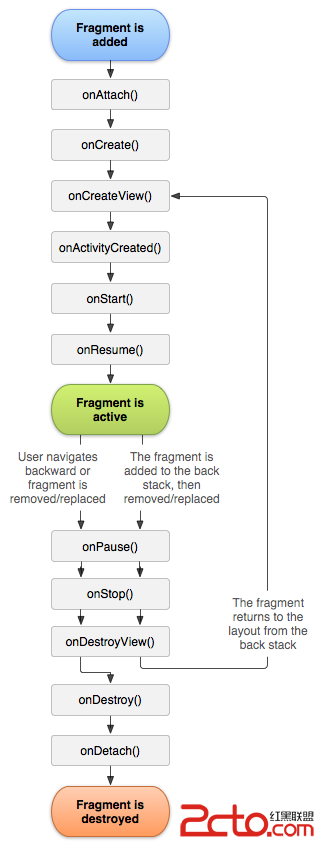 android Fragment生命周期介紹
主要看兩張圖,和跑代碼 一,Fragment的生命周 二,與Activity生命周期的對比 場景演示 : 切換到該Fragment 11-29 14:2
 Android實踐--apk反編譯
Android apk反編譯一步到位 Andriod的apk在編譯打包的時候將資源文件進行了二進制編譯,.class文件編譯成了.dex文件,經過了這幾步之後,我們是無法
 Android輸入事件從讀取到分發五:事件分發前的攔截過程
已經提過事件在分發前要做攔截的事情,只不過當時沒有展開來分析,因此這篇文章的主要目的就是分析事件在分發前的攔截過程。(注:Android源碼版本為6.0)我們分析到Inp