編輯:關於Android編程
一、方法
這裡我們用兩種方法來實現跑馬燈效果,雖然實質上是一種
實質就是:
1、TextView調出跑馬燈效果
2、TextView獲取焦點
第一種:
1、TextView調出跑馬燈效果
android:ellipsize="marquee"
2、TextView獲取焦點
android:focusable="true"
android:focusableInTouchMode="true"
說明:
這種方法如果界面上別的控件獲取焦點的時候就會停止這個跑馬燈效果
第二種:
1、TextView調出跑馬燈效果
android:ellipsize="marquee"
2、TextView獲取焦點
public class MyTextView extends TextView{

  public boolean isFocused() {
    return true;
  }

}
我們的TextView用的就是fry.MyTextView
說明:
就算別的程序獲取焦點,這個跑馬燈效果也不會停止。
二、代碼實例
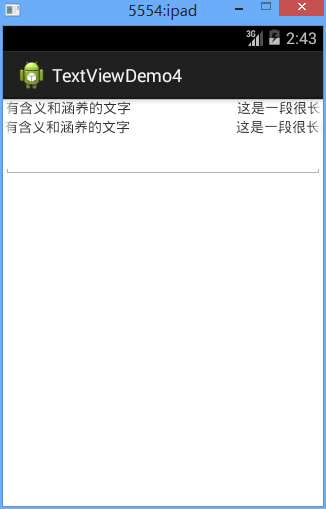
效果圖
三、代碼
fry.MyTextView
package com.example.textviewdemo;

import android.content.Context;
import android.util.AttributeSet;
import android.widget.TextView;

public class MyTextView extends TextView{

 public MyTextView(Context context, AttributeSet attrs, int defStyle) {
 super(context, attrs, defStyle);
 // TODO Auto-generated constructor stub
 }

 public MyTextView(Context context, AttributeSet attrs) {
 super(context, attrs);
 // TODO Auto-generated constructor stub
 }

 public MyTextView(Context context) {
 super(context);
 // TODO Auto-generated constructor stub
 }

 @Override
 public boolean isFocused() {
 return true;
 }
}
/textViewDemo1/res/layout/activity04.xml
<?xml version="1.0" encoding="utf-8"?>
<LinearLayout xmlns:android="http://schemas.android.com/apk/res/android"
 android:layout_width="match_parent"
 android:layout_height="match_parent"
 android:orientation="vertical" >
 <TextView
 android:id="@+id/tv_runHorseLamp"
 android:layout_width="match_parent"
 android:layout_height="wrap_content"
 android:singleLine="true"
 android:ellipsize="marquee"
 android:focusable="true"
 android:focusableInTouchMode="true"
 android:text="這是一段很長的威武霸氣的滾動的實現跑馬燈效果的一段逼格很高的很有含義和涵養的文字"
 />
 <!--ellipsize是小數點的意思 marquee 這句話是添加滾動效果-->
 <!-- 獲取焦點之後才能滾動 -->

 <fry.MyTextView
 android:id="@+id/tv_runHorseLamp1"
 android:layout_width="match_parent"
 android:layout_height="wrap_content"
 android:ellipsize="marquee"
 android:singleLine="true"
 android:text="這是一段很長的威武霸氣的滾動的實現跑馬燈效果的一段逼格很高的很有含義和涵養的文字"
 />


 <EditText
 android:id="@+id/et_1"
 android:layout_width="match_parent"
 android:layout_height="wrap_content"
 >
 </EditText>

</LinearLayout>
以上就是本文的全部內容,希望對大家的學習有所幫助,也希望大家多多支持本站。
 android插件化-apkplugdemo源碼閱讀指南-10
閱讀本節內容前可先了解 apkplug基礎教程 本教程是基於apkplug V1.6.8 版本編寫 最新開發方式以官網為准 可下載最新的apkplugdemo源碼h
 關於Android bitmap你不知道的一些事
本文為大家分享了Android bitmap使用細節,供大家參考,具體內容如下1、計算機表示圖形的幾種方式1)BMP :幾乎不進行壓縮 占用空間比較大 2)JPG : 在
 Android中自定義View實現圓環等待及相關的音量調節效果
圓環交替、等待效果效果就這樣,分析了一下,大概有這幾個屬性,兩個顏色,一個速度,一個圓環的寬度。自定View的幾個步驟:1、自定義View的屬性2、在View的構造方法中
 Android學習總結之WIN上搭建環境
引言 本系列適合0基礎的人員,因為我就是從0開始的,此系列記錄我步入Android開發的一些經驗分享,望與君共勉!作為Android隊伍中的一個新人的我,如果有什麼不對