編輯:關於Android編程
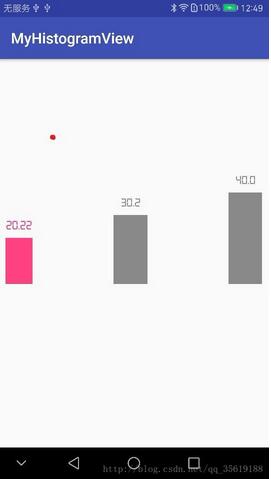
先看一下動態柱狀圖效果。
主要功能是可以自定義指定的字體,柱狀圖顏色,動態效果。
在自定義view
public class Histogram extends View {
 int MAX = 100;//矩形顯示的最大值
 int corner = 0; //矩形的角度。 設置為0 則沒有角度。
 double data = 0.0;//顯示的數
 double tempData = 0; //初始數據
 int textPadding = 50; //字體與矩形圖的距離
  Paint mPaint;
 int mColor;
  Context mContext;


 //構造函數
 public Histogram(Context context) {
  super(context);
  mContext = context;
 }

 public Histogram(Context context, @Nullable AttributeSet attrs) {
  super(context, attrs);
  mContext = context;
  initPaint();
 }

 public Histogram(Context context, @Nullable AttributeSet attrs, int defStyleAttr) {
  super(context, attrs, defStyleAttr);
  mContext = context;
  initPaint();
 }

 //畫筆方法
 private void initPaint() {
  mPaint = new Paint();
  mPaint.setAntiAlias(true);
  mColor = mContext.getResources().getColor(R.color.gary);
  mPaint.setColor(mColor);
 }

 @Override
 public void draw(Canvas canvas) {
  super.draw(canvas);

  if (data == 0.0) {
   mPaint.setTextSize(getWidth() / 2);
   RectF oval3 = new RectF(0, getHeight() - DensityUtils.pxTodip(mContext, 20), getWidth(), getHeight());// 設置個新的長方形
   canvas.drawRoundRect(oval3, DensityUtils.pxTodip(mContext, corner), DensityUtils.pxTodip(mContext, corner), mPaint);

   canvas.drawText("0",
     getWidth() * 0.5f - mPaint.measureText("0") * 0.5f,
     getHeight() - DensityUtils.pxTodip(mContext, 20) - 2 * DensityUtils.pxTodip(mContext, textPadding),
     mPaint);
   return;
  }

  //防止數值很大的的時候,動畫時間過長
  int step = (int) (data / 100 + 1.0);

  if (tempData < data - step) {
   tempData = tempData + step;
  } else {
   tempData = data;
  }
  //畫圓角矩形
  String S = tempData + ""; //如果數字後面需要加% 則在""中添加%
  //設置顯示的字體
  Typeface typeface = Typeface.createFromAsset(getContext().getAssets(),"digital-7.ttf");
  mPaint.setTypeface(typeface);
//  //一個字和兩,三個字的字號相同
  if (S.length() < 4) {
   mPaint.setTextSize(getWidth()/2 );
  } else {
   mPaint.setTextSize(50); //可以通過getWidth()/2 改變字體大小 也可以通過設置數字來改變自己想要的字體大小 當超出矩形圖寬度時不能顯示全部
  }
//
  float textH = mPaint.ascent() + mPaint.descent();
  float MaxH = getHeight() - textH - 2 * DensityUtils.pxTodip(mContext, textPadding);
//  //圓角矩形的實際高度
  float realH = (float) (MaxH / MAX * tempData);
  RectF oval3 = new RectF(0, getHeight() - realH, getWidth(), getHeight());// 設置個新的長方形
  canvas.drawRoundRect(oval3, DensityUtils.pxTodip(mContext, corner), DensityUtils.pxTodip(mContext, corner), mPaint);
  //寫數字
  canvas.drawText(S,
    getWidth() * 0.5f - mPaint.measureText(S) * 0.5f,
    getHeight() - realH - 2 * DensityUtils.pxTodip(mContext, textPadding),
    mPaint);
  if (tempData != data) {
   postInvalidate();
  }
 }

 public void setData(double data, int MAX) {
  this.data = data;
  this.MAX = MAX;
  postInvalidate();
 }

 public int getmColor() {
  return mColor;
 }

 public void setmColor(int mColor) {
  this.mColor = mColor;
 }

}
布局
<?xml version="1.0" encoding="utf-8"?>
<LinearLayout
 xmlns:android="http://schemas.android.com/apk/res/android"
 android:id="@+id/activity_main"
 android:layout_width="match_parent"
 android:layout_height="match_parent"
 android:layout_weight="1"
 >
 <View
  android:layout_width="0dp"
  android:layout_height="match_parent"
  android:layout_weight="0.2"/>
 <com.mieasy.myhistogramview.Histogram
  android:id="@+id/column_one"
  android:layout_width="0dp"
  android:layout_height="300dp"
  android:layout_weight="0.8"/>

 <View
  android:layout_width="0dp"
  android:layout_height="match_parent"
  android:layout_weight="2.4"/>

 <com.mieasy.myhistogramview.Histogram
  android:id="@+id/column_two"
  android:layout_width="0dp"
  android:layout_height="300dp"
  android:layout_weight="1"/>

 <View
  android:layout_width="0dp"
  android:layout_height="match_parent"
  android:layout_weight="2.4"/>

 <com.mieasy.myhistogramview.Histogram
  android:id="@+id/column_three"
  android:layout_width="0dp"
  android:layout_height="300dp"
  android:layout_weight="1"/>
 <View
  android:layout_width="0dp"
  android:layout_height="match_parent"
  android:layout_weight="0.2"/>


</LinearLayout>
MainActivity調用initAllViews()方法
 private void initAllViews() {
  column_one = (Histogram) findViewById(R.id.column_one);
  column_two = (Histogram) findViewById(R.id.column_two);
  column_three = (Histogram) findViewById(R.id.column_three);

  column_one.setData( 20.22, 100);
  column_two.setData(30.2, 100);
  column_three.setData(40, 100);
  column_one.mPaint.setColor(getResources().getColor(R.color.colorAccent)); //改變柱狀圖的顏色
 }
參考文章:100行Android代碼輕松實現帶動畫柱狀圖
以上就是本文的全部內容,希望對大家的學習有所幫助,也希望大家多多支持本站。
 一起學android之如何設置TextView中不同字段的字體顏色
在這裡先看看效果圖: OK,有時候,在我們的項目中會要求TextView中文本有一部分的字體顏色不一樣,這時我們應該使用 SpannableStrin
 Android生成驗證碼
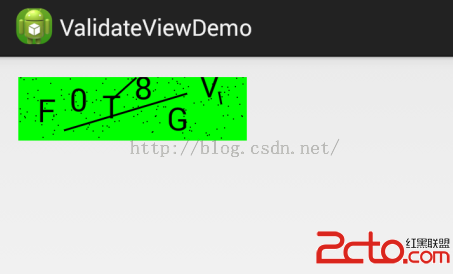
先放上這個小Demo的圖片:點擊圖片可以更換新的驗證碼。驗證碼是以圖片的形式顯示的,所以需要寫一個自定義驗證碼控件 public class ValidateV
 Android的activity學習筆記
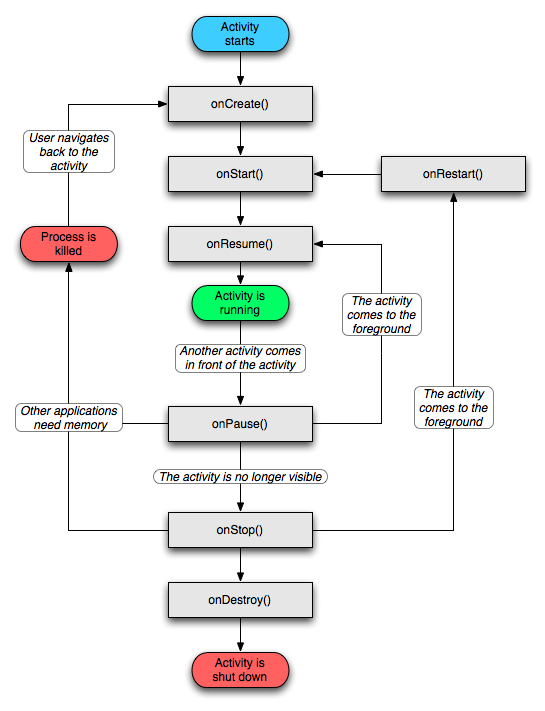
一、什麼是activity Activity 是用戶接口程序,原則上它會提供給用戶一個交互式的接口功能。它是 android 應用程
 Android開發之Activity的生命周期
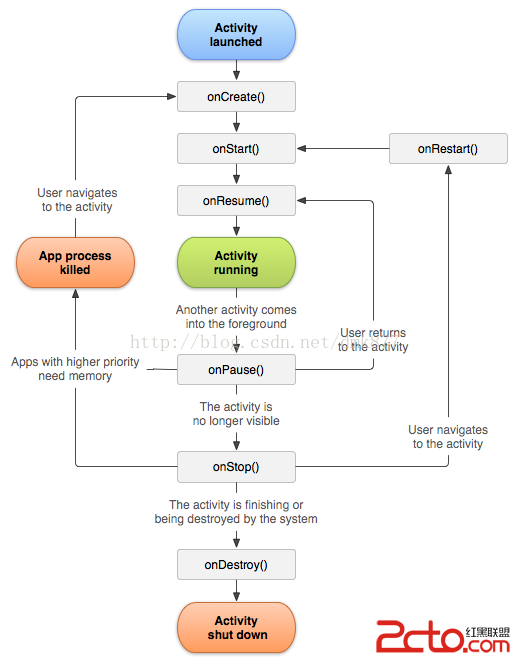
可能很多人會感覺Activity很簡單,但是經歷了半年的android開發,我發現我對Activity的的理解還是比較淺顯的,其實Activity並沒有我們想