

編輯:Android 技術基礎
上一節我們建立了 Socket 的基本概念,並完成了一個简易聊天室的 demo。本節把難度往上拉一階:用 Socket 實作大檔案上傳並支援斷點續傳。
斷點續傳是什麼意思?想像你正在上傳一個幾百 MB 的檔案,網路斷了——如果只能從頭再來,那會非常痛苦。斷點續傳的做法是:客戶端與服務端針對同一個檔案記住「已經傳到哪裡」,重連之後從那個位置繼續送,前面傳過的部分不用重傳。
這裡講解的是一個改寫過的完整範例。目標不是要你能默寫出來,而是理解它的設計思路,需要的時候知道怎麼搬來用。
1. 先把 Socket 服務端跑起來:
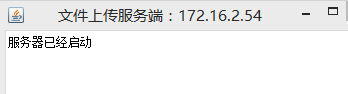
2. 把要上傳的檔案放到裝置的外部儲存空間根目錄:
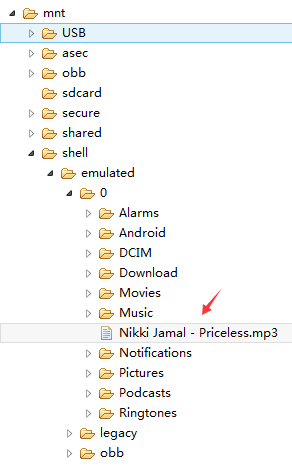
3. 執行客戶端 App:
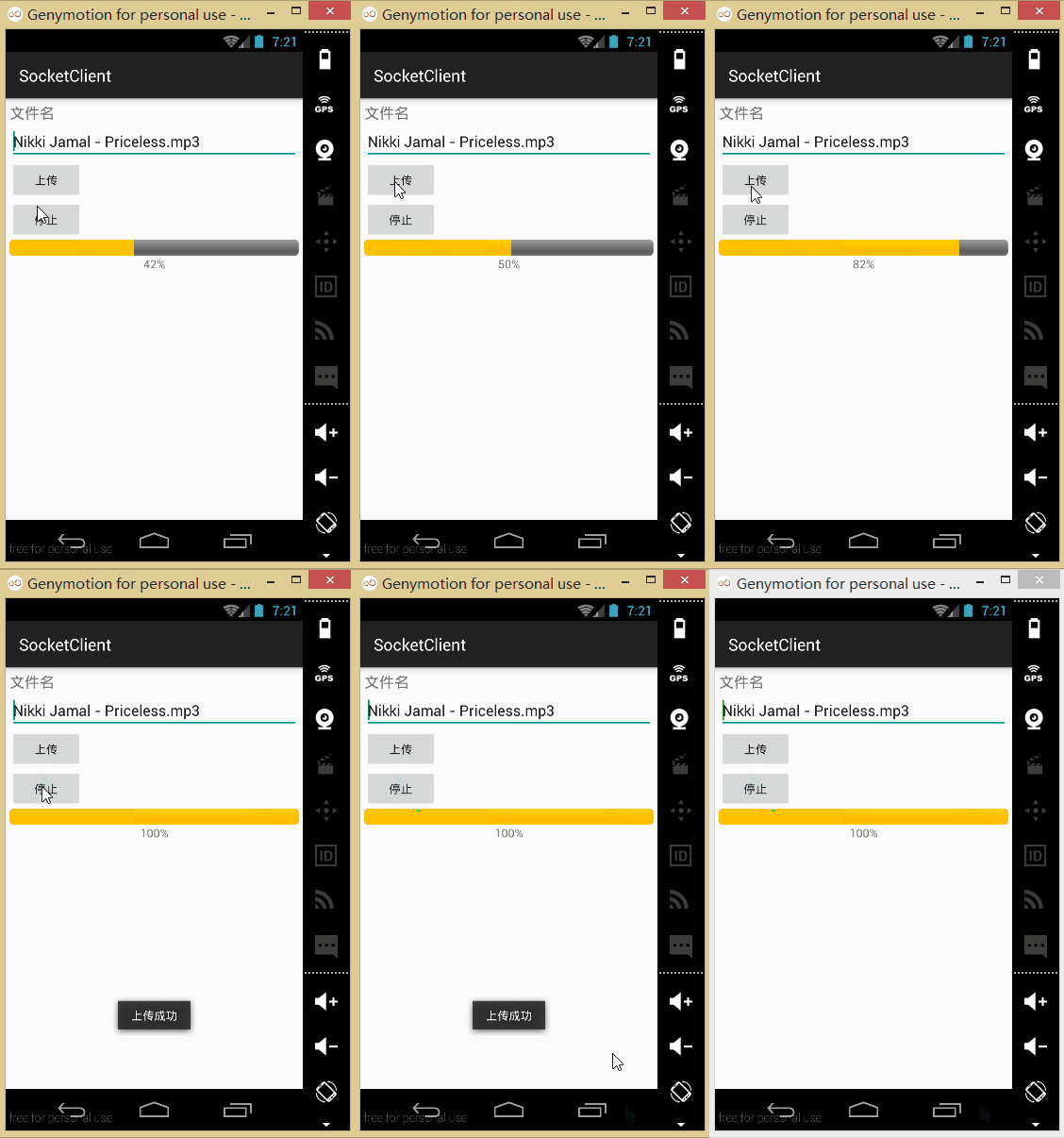
4. 上傳完成後,服務端專案下會多出一個 file 目錄,檔案就在裡面的日期分層路徑下(.log 檔是記錄傳輸進度的檔案):
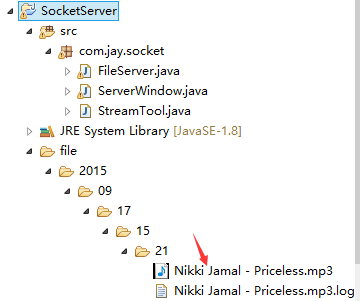
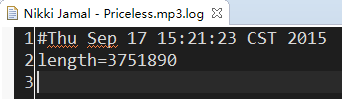
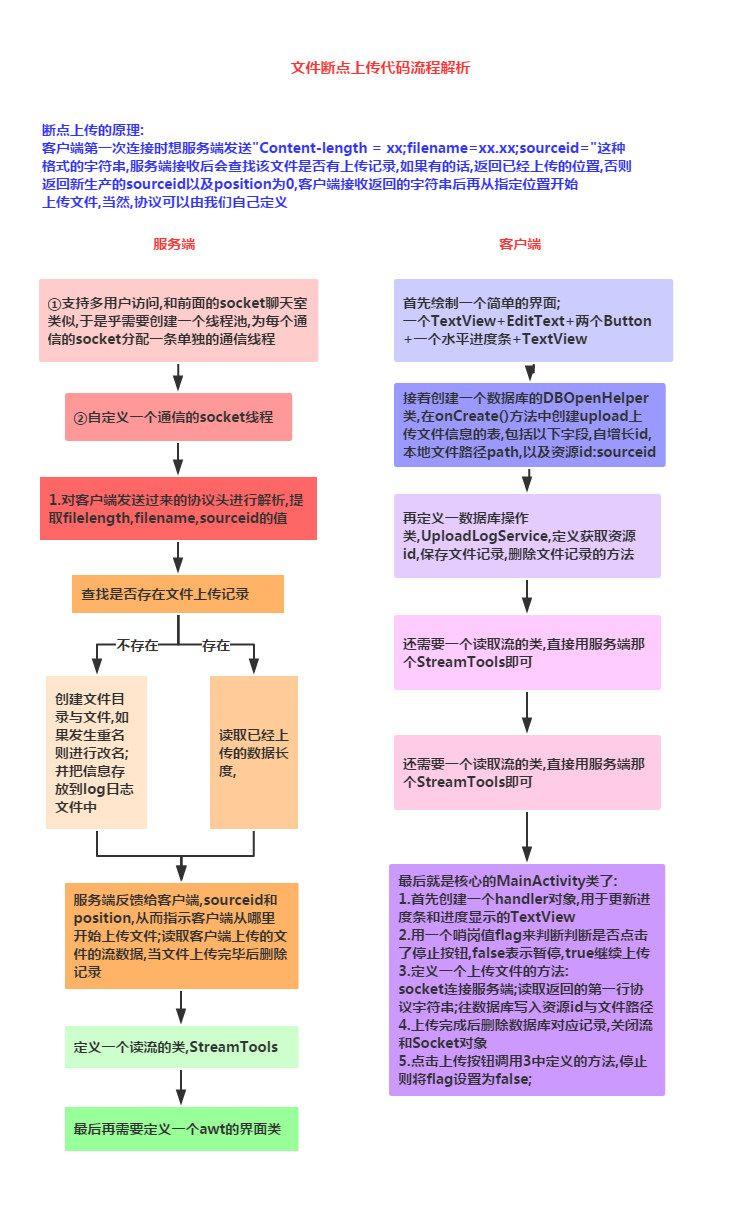
流程可以拆成這幾步:客戶端先送一段自訂的標頭協議(檔名、總長度、以及上次傳到一半時服務端給的 sourceid),服務端解析後判斷這個檔案有沒有傳過;接著回覆 sourceid 與 position,告訴客戶端「從第幾個位元組開始送」;然後才進入真正的資料傳輸迴圈。兩端各自把目前的 position 寫進記錄(客戶端用 SQLite,服務端用 .log 檔),中斷後再來一次就能接上。
這個「先交換狀態、再傳內容」的模式,是實作續傳的核心。
先寫一個兩端共用的串流工具類:
StreamTool.java
 public class StreamTool {

 public static void save(File file, byte[] data) throws Exception {
 FileOutputStream outStream = new FileOutputStream(file);
 outStream.write(data);
 outStream.close();
 }

 // 讀一行,處理 \r\n 與 \n 兩種換行
 public static String readLine(PushbackInputStream in) throws IOException {
 char buf[] = new char[128];
 int room = buf.length;
 int offset = 0;
 int c;
 loop: while (true) {
 switch (c = in.read()) {
 case -1:
 case '\n':
 break loop;
 case '\r':
 int c2 = in.read();
 if ((c2 != '\n') && (c2 != -1)) {
 in.unread(c2);
 }
 break loop;
 default:
 if (--room < 0) {
 char[] lineBuffer = buf;
 buf = new char[offset + 128];
 room = buf.length - offset - 1;
 System.arraycopy(lineBuffer, 0, buf, 0, offset);
 }
 buf[offset++] = (char) c;
 break;
 }
 }
 if ((c == -1) && (offset == 0)) {
 return null;
 }
 return String.copyValueOf(buf, 0, offset);
 }

 /** 讀完整個串流並回傳位元組陣列 */
 public static byte[] readStream(InputStream inStream) throws Exception {
 ByteArrayOutputStream outSteam = new ByteArrayOutputStream();
 byte[] buffer = new byte[1024];
 int len = -1;
 while ((len = inStream.read(buffer)) != -1) {
 outSteam.write(buffer, 0, len);
 }
 outSteam.close();
 inStream.close();
 return outSteam.toByteArray();
 }
 }
負責連線管理與多執行緒調度的類別:
FileServer.java
 public class FileServer {

 private ExecutorService executorService;         // 執行緒池
 private int port;                                 // 監聽埠號
 private boolean quit = false;
 private ServerSocket server;
 private Map<Long, FileLog> datas = new HashMap<Long, FileLog>(); // 斷點記錄

 public FileServer(int port) {
 this.port = port;
 executorService = Executors.newFixedThreadPool(Runtime.getRuntime().availableProcessors() * 50);
 }

 public void quit() {
 this.quit = true;
 try {
 server.close();
 } catch (IOException e) {
 }
 }

 public void start() throws Exception {
 server = new ServerSocket(port);
 while (!quit) {
 try {
 Socket socket = server.accept();
 // 每個連線都交給執行緒池處理,支援多人同時上傳
 executorService.execute(new SocketTask(socket));
 } catch (Exception e) {
 }
 }
 }

 private final class SocketTask implements Runnable {

 private Socket socket = null;

 public SocketTask(Socket socket) {
 this.socket = socket;
 }

 public void run() {
 try {
 System.out.println("accepted connection " + socket.getInetAddress() + ":" + socket.getPort());
 PushbackInputStream inStream = new PushbackInputStream(socket.getInputStream());

 // 第一行是自訂協議:Content-Length=143253434;filename=xxx.3gp;sourceid=
 // 初次上傳時 sourceid 為空字串
 String head = StreamTool.readLine(inStream);
 System.out.println(head);

 if (head != null) {
 String[] items = head.split(";");
 String filelength = items[0].substring(items[0].indexOf("=") + 1);
 String filename = items[1].substring(items[1].indexOf("=") + 1);
 String sourceid = items[2].substring(items[2].indexOf("=") + 1);

 long id = System.currentTimeMillis();
 FileLog log = null;
 if (sourceid != null && !"".equals(sourceid)) {
 id = Long.valueOf(sourceid);
 log = find(id); // 這個檔案以前傳過嗎?
 }

 File file = null;
 int position = 0;

 if (log == null) {
 // 沒有續傳記錄:建立檔案與追蹤記錄
 String path = new SimpleDateFormat("yyyy/MM/dd/HH/mm").format(new Date());
 File dir = new File("file/" + path);
 if (!dir.exists()) {
 dir.mkdirs();
 }
 file = new File(dir, filename);

 // 檔名重複時改名,避免覆蓋
 if (file.exists()) {
 filename = filename.substring(0, filename.indexOf(".") - 1)
 + dir.listFiles().length
 + filename.substring(filename.indexOf("."));
 file = new File(dir, filename);
 }
 save(id, file);
 } else {
 // 有續傳記錄:讀出已接收的長度
 file = new File(log.getPath());
 if (file.exists()) {
 File logFile = new File(file.getParentFile(), file.getName() + ".log");
 if (logFile.exists()) {
 Properties properties = new Properties();
 properties.load(new FileInputStream(logFile));
 position = Integer.valueOf(properties.getProperty("length"));
 }
 }
 }

 OutputStream outStream = socket.getOutputStream();
 // 回覆:告訴客戶端 resource id 與要從哪裡續傳
 String response = "sourceid=" + id + ";position=" + position + "\r\n";
 outStream.write(response.getBytes());

 RandomAccessFile fileOutStream = new RandomAccessFile(file, "rwd");
 if (position == 0) {
 fileOutStream.setLength(Integer.valueOf(filelength)); // 預先配置檔案長度
 }
 fileOutStream.seek(position); // 定位到續傳點

 byte[] buffer = new byte[1024];
 int len = -1;
 int length = position;

 while ((len = inStream.read(buffer)) != -1) {
 fileOutStream.write(buffer, 0, len);
 length += len;

 // 即時把已接收長度寫進 .log,這樣中途斷線也不會白傳
 Properties properties = new Properties();
 properties.put("length", String.valueOf(length));
 FileOutputStream logFile =
 new FileOutputStream(new File(file.getParentFile(), file.getName() + ".log"));
 properties.store(logFile, null);
 logFile.close();
 }

 if (length == fileOutStream.length()) {
 delete(id); // 傳完了,清掉記錄
 }
 fileOutStream.close();
 inStream.close();
 outStream.close();
 file = null;
 }
 } catch (Exception e) {
 e.printStackTrace();
 } finally {
 try {
 if (socket != null && !socket.isClosed()) {
 socket.close();
 }
 } catch (IOException e) {
 }
 }
 }
 }

 public FileLog find(Long sourceid) {
 return datas.get(sourceid);
 }

 public void save(Long id, File saveFile) {
 datas.put(id, new FileLog(id, saveFile.getAbsolutePath()));
 }

 public void delete(long sourceid) {
 if (datas.containsKey(sourceid)) {
 datas.remove(sourceid);
 }
 }

 private class FileLog {
 private Long id;
 private String path;

 public Long getId() {
 return id;
 }

 public void setId(Long id) {
 this.id = id;
 }

 public String getPath() {
 return path;
 }

 public void setPath(String path) {
 this.path = path;
 }

 public FileLog(Long id, String path) {
 this.id = id;
 this.path = path;
 }
 }
 }
服務端視窗類別,ServerWindow.java:
 public class ServerWindow extends Frame {

 private FileServer s = new FileServer(12345);
 private Label label;

 public ServerWindow(String title) {
 super(title);
 label = new Label();
 add(label, BorderLayout.PAGE_START);
 label.setText("伺服器已啟動");

 this.addWindowListener(new WindowListener() {
 public void windowOpened(WindowEvent e) {
 new Thread(new Runnable() {
 public void run() {
 try {
 s.start();
 } catch (Exception e) {
 }
 }
 }).start();
 }

 public void windowIconified(WindowEvent e) {
 }

 public void windowDeiconified(WindowEvent e) {
 }

 public void windowDeactivated(WindowEvent e) {
 }

 public void windowClosing(WindowEvent e) {
 s.quit();
 System.exit(0);
 }

 public void windowClosed(WindowEvent e) {
 }

 public void windowActivated(WindowEvent e) {
 }
 });
 }

 public static void main(String[] args) throws IOException {
 InetAddress address = InetAddress.getLocalHost();
 ServerWindow window = new ServerWindow("檔案上傳服務端:" + address.getHostAddress());
 window.setSize(400, 300);
 window.setVisible(true);
 }
 }
版面配置,activity_main.xml:
 <?xml version="1.0" encoding="utf-8"?>
 <LinearLayout xmlns:android="https://schemas.android.com/apk/res/android"
 android:layout_width="fill_parent"
 android:layout_height="fill_parent"
 android:orientation="vertical"
 android:padding="5dp">

 <TextView
 android:layout_width="fill_parent"
 android:layout_height="wrap_content"
 android:text="檔案名稱"
 android:textSize="18sp" />

 <EditText
 android:id="@+id/edit_fname"
 android:layout_width="fill_parent"
 android:layout_height="wrap_content"
 android:text="Nikki Jamal - Priceless.mp3" />

 <Button
 android:id="@+id/btn_upload"
 android:layout_width="wrap_content"
 android:layout_height="wrap_content"
 android:text="上傳" />

 <Button
 android:id="@+id/btn_stop"
 android:layout_width="wrap_content"
 android:layout_height="wrap_content"
 android:text="停止" />

 <ProgressBar
 android:id="@+id/pgbar"
 android:layout_width="fill_parent"
 android:layout_height="40px" />

 <TextView
 android:id="@+id/txt_result"
 android:layout_width="fill_parent"
 android:layout_height="wrap_content"
 android:gravity="center" />
 </LinearLayout>
因為要記住續傳進度,客戶端這邊需要一個資料庫。先寫 DB 輔助類別:
DBOpenHelper.java
 public class DBOpenHelper extends SQLiteOpenHelper {

 public DBOpenHelper(Context context) {
 super(context, "jay.db", null, 1);
 }

 @Override
 public void onCreate(SQLiteDatabase db) {
 db.execSQL("CREATE TABLE IF NOT EXISTS uploadlog "
 + "(_id integer primary key autoincrement, path varchar(20), sourceid varchar(20))");
 }

 @Override
 public void onUpgrade(SQLiteDatabase db, int oldVersion, int newVersion) {
 }
 }
再寫資料庫操作類別:
UploadHelper.java
 public class UploadHelper {

 private DBOpenHelper dbOpenHelper;

 public UploadHelper(Context context) {
 dbOpenHelper = new DBOpenHelper(context);
 }

 // 這個檔案以前傳過嗎?有的話回傳 sourceid
 public String getBindId(File file) {
 SQLiteDatabase db = dbOpenHelper.getReadableDatabase();
 Cursor cursor = db.rawQuery("select sourceid from uploadlog where path=?",
 new String[] { file.getAbsolutePath() });
 String result = null;
 if (cursor.moveToFirst()) {
 result = cursor.getString(0);
 }
 cursor.close();
 return result;
 }

 public void save(String sourceid, File file) {
 SQLiteDatabase db = dbOpenHelper.getWritableDatabase();
 db.execSQL("insert into uploadlog(path,sourceid) values(?,?)",
 new Object[] { file.getAbsolutePath(), sourceid });
 }

 public void delete(File file) {
 SQLiteDatabase db = dbOpenHelper.getWritableDatabase();
 db.execSQL("delete from uploadlog where path=?",
 new Object[] { file.getAbsolutePath() });
 }
 }
別忘了客戶端也要放一份 StreamTool,最後是 MainActivity:
MainActivity.java
 public class MainActivity extends AppCompatActivity implements View.OnClickListener {

 private EditText edit_fname;
 private Button btn_upload;
 private Button btn_stop;
 private ProgressBar pgbar;
 private TextView txt_result;
 private UploadHelper upHelper;
 private boolean flag = true;

 private Handler handler = new Handler() {
 @Override
 public void handleMessage(Message msg) {
 pgbar.setProgress(msg.getData().getInt("length"));
 float num = (float) pgbar.getProgress() / (float) pgbar.getMax();
 int result = (int) (num * 100);
 txt_result.setText(result + "%");
 if (pgbar.getProgress() == pgbar.getMax()) {
 Toast.makeText(MainActivity.this, "上傳成功", Toast.LENGTH_SHORT).show();
 }
 }
 };

 @Override
 public void onCreate(Bundle savedInstanceState) {
 super.onCreate(savedInstanceState);
 setContentView(R.layout.activity_main);
 bindViews();
 upHelper = new UploadHelper(this);
 }

 private void bindViews() {
 edit_fname = (EditText) findViewById(R.id.edit_fname);
 btn_upload = (Button) findViewById(R.id.btn_upload);
 btn_stop = (Button) findViewById(R.id.btn_stop);
 pgbar = (ProgressBar) findViewById(R.id.pgbar);
 txt_result = (TextView) findViewById(R.id.txt_result);
 btn_upload.setOnClickListener(this);
 btn_stop.setOnClickListener(this);
 }

 @Override
 public void onClick(View v) {
 switch (v.getId()) {
 case R.id.btn_upload:
 String filename = edit_fname.getText().toString();
 flag = true;
 if (Environment.getExternalStorageState().equals(Environment.MEDIA_MOUNTED)) {
 File file = new File(Environment.getExternalStorageDirectory(), filename);
 if (file.exists()) {
 pgbar.setMax((int) file.length());
 uploadFile(file);
 } else {
 Toast.makeText(MainActivity.this, "檔案不存在", Toast.LENGTH_SHORT).show();
 }
 } else {
 Toast.makeText(MainActivity.this, "外部儲存空間不存在或不可用", Toast.LENGTH_SHORT).show();
 }
 break;
 case R.id.btn_stop:
 flag = false;
 break;
 }
 }

 private void uploadFile(final File file) {
 new Thread(new Runnable() {
 public void run() {
 try {
 String sourceid = upHelper.getBindId(file);
 Socket socket = new Socket("172.16.2.54", 12345);
 OutputStream outStream = socket.getOutputStream();

 // 送出標頭,sourceid 不為空即代表要續傳
 String head = "Content-Length=" + file.length()
 + ";filename=" + file.getName()
 + ";sourceid=" + (sourceid != null ? sourceid : "") + "\r\n";
 outStream.write(head.getBytes());

 PushbackInputStream inStream = new PushbackInputStream(socket.getInputStream());
 String response = StreamTool.readLine(inStream);
 String[] items = response.split(";");
 String responseSourceid = items[0].substring(items[0].indexOf("=") + 1);
 String position = items[1].substring(items[1].indexOf("=") + 1);

 // 第一次上傳時,把服務端配發的 id 記下來
 if (sourceid == null) {
 upHelper.save(responseSourceid, file);
 }

 RandomAccessFile fileOutStream = new RandomAccessFile(file, "r");
 fileOutStream.seek(Integer.valueOf(position)); // 跳到續傳位置
 byte[] buffer = new byte[1024];
 int len = -1;
 int length = Integer.valueOf(position);

 while (flag && (len = fileOutStream.read(buffer)) != -1) {
 outStream.write(buffer, 0, len);
 length += len;
 Message msg = new Message();
 msg.getData().putInt("length", length);
 handler.sendMessage(msg);
 }

 if (length == file.length()) {
 upHelper.delete(file); // 完成後清掉續傳記錄
 }
 fileOutStream.close();
 outStream.close();
 inStream.close();
 socket.close();
 } catch (Exception e) {
 Toast.makeText(MainActivity.this, "上傳發生錯誤", Toast.LENGTH_SHORT).show();
 }
 }
 }).start();
 }
 }
最後記得在 AndroidManifest.xml 補上權限:
 <!-- 在外部儲存空間建立與刪除檔案 -->
 <uses-permission android:name="android.permission.MOUNT_UNMOUNT_FILESYSTEMS"/>
 <!-- 寫入外部儲存空間 -->
 <uses-permission android:name="android.permission.WRITE_EXTERNAL_STORAGE"/>
 <!-- 網路存取 -->
 <uses-permission android:name="android.permission.INTERNET"/>
另外提醒兩件事:Android 6.0 起 WRITE_EXTERNAL_STORAGE 屬於執行期權限,光在 manifest 宣告不夠,必須動態向使用者申請;而 IP 位址 172.16.2.54 只是範例,實測前請改成你電腦在該網段的實際位址,並確認兩台裝置在同一個網域且防火牆有放行 12345。
Socket 大檔案上傳 demo
本節完成了一個實用度相當高的範例:以 TCP Socket 實作大檔案斷點續傳。關鍵設計有三點值得記住:
一是自訂標頭協議——先用一行文字交換檔名、大小與續傳識別碼,之後才是二進位資料,這樣伺服器才知道該怎麼處理這個連線。
二是RandomAccessFile 的 seek()——它讓你可以隨機定位到檔案的任意位置讀寫,這是續傳能成立的技術基礎。
三是兩端各自持久化進度——客戶端記 sourceid,服務端記已接收長度,任何一端重啟都能接得上。
下一節我們再寫一個範例:兩隻在同一個 Wi-Fi 下的手機互相傳資料。就聊到這裡,謝謝。
 WebView 雙向橋樑:讓網頁裡的 JavaScript 呼叫 Android 原生方法(從零開始學 Android)
混合式 App 裡有一個很常見的需求:畫面用 HTML 寫,但某些運算或系統能力必須交給原生層處理。這時候就需要一座「橋」——讓 WebView 中的 JavaScrip
 Socket學習前的網絡基礎:從OSI七層模型到TCP三次握手
為什麼要先把網絡基礎補起來 很多剛接觸 Android Socket 的朋友,往往會被面試官的一連串追問弄得措手不及:網絡協議到底分幾層?IP 協議歸在哪一層?Socke
 把網路圖片載入 ImageView:AsyncTask 與 Bitmap 解碼實作(從零開始學 Android)
在 Android 上顯示圖片,最直覺的元件就是 ImageView。但當圖片不在 APK 裡、而是躺在某台伺服器上時,流程就多了兩件事:先把它下載下來,再交給 Imag
 第76章、再識 Intent — 呼叫 ContentProvider 讀取聯絡人(從零開始學 Android)
ContentProvider 是 Android 應用程式的四大元件之一,也是應用程式之間共享資料的唯一標準途徑。它的核心職責在於「儲存與擷取資料」,並對外提供統一的存