

編輯:Android 技術基礎
Android 裡的 Service(服務)是什麼樣的存在?如果你對 Windows 系統的服務有概念,可以把它們視為同理;若不了解也沒關係,你只要把 Service 當成一個「沒有界面的 Activity」來看待即可。
Service 運行在後台,看不見、也沒有畫面。你可以用它來播放音樂、記錄地理位置的變化,或是讓它持續運行、不斷監聽電話與短信等事件。
既然它是無界面的 Activity,那麼它同樣運行在主線程上,因此不適合拿來做耗時的請求或運算。若真有耗時操作,一樣得在服務裡另開一條線程來處理。
(1)本地服務 Local Service:用於應用程式內部。透過 Context.startService() 啟動、Context.stopService() 結束;內部也能以 Service.stopSelf() 或 Service.stopSelfResult() 自行停止。無論呼叫多少次 startService(),只需一次 stopService() 就能停止。
(2)遠程服務 Remote Service:用於 Android 系統內部的應用程式之間。可定義並暴露出介面供其他應用操作,客戶端以 Context.bindService() 建立連接並啟動、Context.unbindService() 關閉連接。多個客戶端能綁定同一個服務;若服務尚未載入,bindService() 會先將它載入。這類服務可被其他應用重複使用,例如定義一個天氣預報服務供各方呼叫。
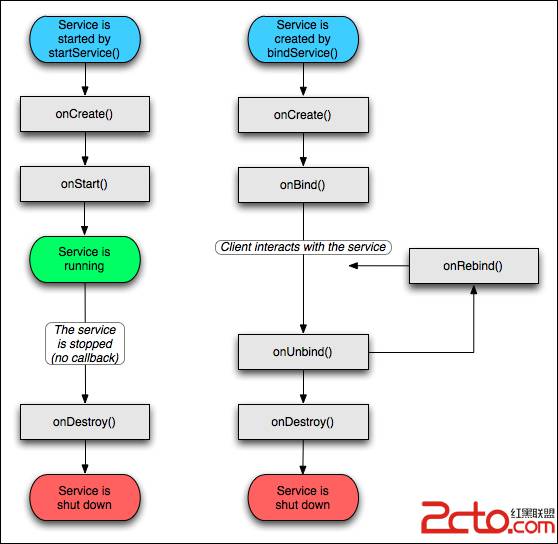
Service 的生命週期比 Activity 簡單,主要圍繞 onCreate()、onStart()、onDestroy()。第一次啟動服務時,會依序呼叫 onCreate() 與 onStart();停止服務時執行 onDestroy()。若服務已啟動,再次啟動時不會重跑 onCreate(),而是直接執行 onStart()。服務可透過 stopSelf() 或 stopSelfResult() 自我了結;只要呼叫一次 stopService(),無論之前啟動過多少次,都能把它停下來。
本章案例示範 Activity 與 Service「不綁定」的用法。
打開 res/layout/activity_main.xml,放兩顆按鈕:
<?xml version="1.0" encoding="utf-8"?>
<LinearLayout
    xmlns:android="https://schemas.android.com/apk/res/android"
    android:layout_width="match_parent"
    android:layout_height="match_parent"
    android:orientation="vertical" >

    <Button
        android:id="@+id/startservice"
        android:layout_width="wrap_content"
        android:layout_height="wrap_content"
        android:text="啟動Service" />

    <Button
        android:id="@+id/stopservice"
        android:layout_width="wrap_content"
        android:layout_height="wrap_content"
        android:text="停止Service" />

</LinearLayout>
打開 src/com.genwoxue.service/ServiceUtil.java:
package com.genwoxue.service;

import android.app.Service;
import android.content.Intent;
import android.os.IBinder;
import android.util.Log;

public class ServiceUtil extends Service {

    private String TAG="ServiceView";

    @Override
    public IBinder onBind(Intent intent){
        return null;
    }

    //創建
    @Override
    public void onCreate(){
        Log.i(TAG, "服務開始創建:onCreate()!");
    }

    //銷毀
    @Override
    public void onDestroy(){
        Log.i(TAG, "服務銷毀:onDestroy()!");
    }

    //啟動
    @Override
    public int onStartCommand(Intent intent,int flags,int startId){
        Log.i(TAG, "服務啟動:onStart()=>Intent"+intent+",startID="+startId);
        return Service.START_CONTINUATION_MASK;
    }

}
打開 src/com.genwoxue.service/MainActivity.java:
package com.genwoxue.service;


import android.os.Bundle;
import android.view.View;
import android.view.View.OnClickListener;
import android.widget.Button;
import android.app.Activity;
import android.content.Intent;

public class MainActivity extends Activity {


    private Button btnStart=null;
    private Button btnStop=null;

    @Override
    protected void onCreate(Bundle savedInstanceState) {
        super.onCreate(savedInstanceState);
        setContentView(R.layout.activity_main);
        btnStart=(Button)super.findViewById(R.id.startservice);
        btnStop=(Button)super.findViewById(R.id.stopservice);

        //啟用Service
        btnStart.setOnClickListener(new OnClickListener(){
            public void onClick(View v)
            {
                Intent intent=new Intent(MainActivity.this,ServiceUtil.class);
                MainActivity.this.startService(intent);
            }
        });

        //停止Service
        btnStop.setOnClickListener(new OnClickListener(){
            public void onClick(View v)
            {
                Intent intent=new Intent(MainActivity.this,ServiceUtil.class);
                MainActivity.this.stopService(intent);
            }
        });

    }


}
打開 AndroidManifest.xml:
<?xml version="1.0" encoding="utf-8"?>
<manifest xmlns:android="https://schemas.android.com/apk/res/android"
    package="com.genwoxue.service"
    android:versionCode="1"
    android:versionName="1.0" >

    <uses-sdk
        android:minSdkVersion="12"
        android:targetSdkVersion="15" />

    <application
        android:allowBackup="true"
        android:icon="@drawable/ic_launcher"
        android:label="@string/app_name"
        android:theme="@style/AppTheme" >
        <activity
            android:name="com.genwoxue.service.MainActivity"
            android:label="@string/app_name" >
            <intent-filter>
                <action android:name="android.intent.action.MAIN" />
                <category android:name="android.intent.category.LAUNCHER" />
            </intent-filter>
        </activity>
        <service android:name="com.genwoxue.service.ServiceUtil" />
    </application>

</manifest>
要啟用服務,別忘了在 AndroidManifest.xml 註冊:
<service android:name="com.genwoxue.service.ServiceUtil" />
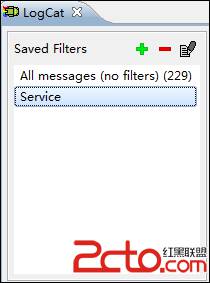
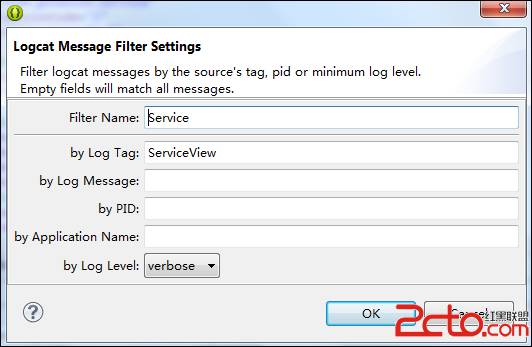
1. 第一步,在 LogCat 中建立名為「Service」的過濾器。
2. 運行 Service App。
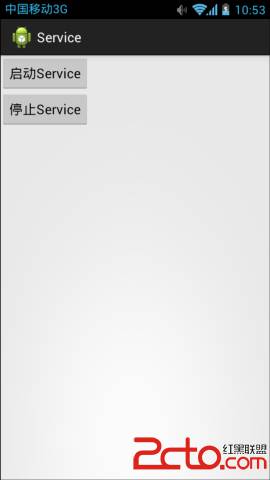
3. 依序點擊「啟用 Service」與「停止 Service」,仔細觀察日誌。

你會看到:紅色背景是啟用 Service 時的輸出,onCreate() 與 onStart() 依序執行,服務進入運行狀態;藍色背景則是停用時的輸出,onDestroy() 被觸發,服務就此銷毀。
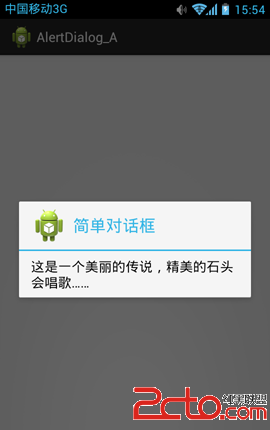 第30章 Android AlertDialog 四種形態:簡單提示、按鈕確認、單選與多選
Android 的對話框家族成員不少:Dialog、AlertDialog、ProgressDialog,還有日期與時間對話框。本章聚焦在最常用的 AlertDialog
 2.6.3 ViewPager 頁面滑動元件詳解
前言 本節要介紹的是 Android 3.0 之後引入的 UI 元件——ViewPager(檢視滑動切換工具)。它有點難用一句話概括:透過手勢滑動就能完成檢視切換,通常
 ToggleButton 與 Switch:兩款開關控件的使用
本節引言: 這一節介紹兩個開關控件:ToggleButton(開關按鈕)和 Switch。說來慚愧,筆者第一間外包公司裡,那個「是否在 WiFi 下聯網」的開關竟然是用
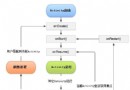 第78章、Activity 生命週期(從零開始學 Android)
從事 Android 開發,絕對不能不了解 Activity 的生命週期。理解 Activity 在各階段之間如何轉換,對應用程式開發可說是至關重要——唯有掌握它,才能確