

編輯:Android 技術基礎
本章我們透過一個網路通信的應用,再次實際體會 Handler、Message、Looper 的協同運作。與其空談理論,不如動手寫一個會「非同步下載網頁、並即時更新進度」的小程式,你會對這套消息機制有更貼身的感受。
打開 res/layout/activity_main.xml,放一個用來顯示狀態與結果的文字元件:
<?xml version="1.0" encoding="utf-8"?>
<LinearLayout
    xmlns:android="https://schemas.android.com/apk/res/android"
    android:layout_width="match_parent"
    android:layout_height="match_parent"
    android:orientation="vertical" >

    <TextView
        android:id="@+id/tvmsg"
        android:layout_width="wrap_content"
        android:layout_height="wrap_content"
        android:text="" />

</LinearLayout>
打開 src/com.genwoxue.hml/MainActivity.java。這段程式會開一條子線程去下載網頁內容,並透過 Handler 把下載進度與最終結果送回主線程更新畫面:
package com.genwoxue.hml;

import java.io.ByteArrayOutputStream;
import java.io.InputStream;

import org.apache.http.HttpEntity;
import org.apache.http.HttpResponse;
import org.apache.http.client.HttpClient;
import org.apache.http.client.methods.HttpGet;
import org.apache.http.impl.client.DefaultHttpClient;
import android.app.Activity;
import android.app.ProgressDialog;
import android.content.DialogInterface;
import android.os.Bundle;
import android.os.Handler;
import android.os.Looper;
import android.os.Message;
import android.util.Log;
import android.widget.TextView;

public class MainActivity extends Activity{

    private String TAG = "HandlerTest";
    private ReceiveMessageThread receiveMessageThread =null;
    private EventHandler mHandler = null;
    private TextView tv = null;
    ProgressDialog pdialog;

    @Override
    public void onCreate(Bundle savedInstanceState) {

        super.onCreate(savedInstanceState);
        setContentView(R.layout.activity_main);
        tv = (TextView)super.findViewById(R.id.tvmsg);

        //創建對話框
        pdialog = new ProgressDialog(this);
        //設置對話框取消按鈕
        pdialog.setButton("cancel", new DialogInterface.OnClickListener() {
            public void onClick(DialogInterface dialog, int i) {
                dialog.cancel();
            }
        });

        //對話對話框取消事件
        pdialog.setOnCancelListener(new DialogInterface.OnCancelListener() {
            public void onCancel(DialogInterface dialog) {
                finish();
            }
        });

        //初始化對話框
        pdialog.setCancelable(true);
        pdialog.setMax(100);
        pdialog.setProgressStyle(ProgressDialog.STYLE_HORIZONTAL);
        pdialog.show();

        tv.setText("正在下載中……");

        //啟動線程
        receiveMessageThread = new ReceiveMessageThread();
        receiveMessageThread.start();

    }


    //消息處理
    class EventHandler extends Handler{
        public EventHandler(Looper looper){
            super(looper);
        }

        public EventHandler(){
            super();
        }
        @Override
        public void handleMessage(Message msg) {
            super.handleMessage(msg);
            switch(msg.what){
            case 1: //消息為1傳遞進度
                int pos=Integer.valueOf((String)msg.obj);
                tv.setText((String)msg.obj);
                pdialog.setProgress(pos);
                break;
            case 2: //消息為2,顯示結果
                tv.setText((String)msg.obj);
                pdialog.dismiss();
                break;
            default:
                Log.e(TAG,(String)msg.obj);
                break;
            }
        }
    }

    //創建子線程,下載網頁文件
    class ReceiveMessageThread extends Thread {

        @Override
        public void run(){
            Looper.prepare();
            System.out.println("thread is start!");

            String result = null;
            try{
                HttpClient client = new DefaultHttpClient();
                HttpGet get = new HttpGet("https://www.genwoxue.com");
                HttpResponse response = client.execute(get);
                HttpEntity entity = response.getEntity();
                long length = entity.getContentLength();
                InputStream is = entity.getContent();
                System.out.print(length);
                if(is != null) {
                    ByteArrayOutputStream baos = new ByteArrayOutputStream();
                    byte[] buf = new byte[128];
                    int ch = -1;
                    int count = 0;
                    int percent=0;
                    while((ch = is.read(buf)) != -1) {
                        baos.write(buf, 0, ch);

                        count += ch;
                        if(length > 0) {

                            percent=(int) ((count / (float) length) * 100);

                            Looper looper = Looper.getMainLooper();
                            mHandler = new EventHandler(looper);
                            mHandler.removeMessages(1);
                            Message msg =new Message();
                            if(percent<100){
                                msg.what=1;
                                msg.obj= String.valueOf(percent);
                            }
                            else{
                                result = new String(baos.toByteArray());
                                msg.what=2;
                                msg.obj= String.valueOf(result);
                            }

                            // 將Message對象送入到main thread的MessageQueue裡面
                            MainActivity.this.mHandler.sendMessage(msg);

                        }
                        Thread.sleep(50);   // 讓線程休眠50ms
                    }

                }
            }catch(Exception e){
                e.printStackTrace();
            }

            Looper.loop();
        }
    }

}
打開 AndroidManifest.xml:
<?xml version="1.0" encoding="utf-8"?>
<manifest xmlns:android="https://schemas.android.com/apk/res/android"
    package="com.genwoxue.hml"
    android:versionCode="1"
    android:versionName="1.0" >

    <uses-sdk
        android:minSdkVersion="10"
        android:targetSdkVersion="15" />

    <uses-permission android:name="android.permission.INTERNET"/>

    <application
        android:allowBackup="true"
        android:icon="@drawable/ic_launcher"
        android:label="@string/app_name"
        android:theme="@style/AppTheme" >
        <activity
            android:name="com.genwoxue.hml.MainActivity"
            android:label="@string/app_name" >
            <intent-filter>
                <action android:name="android.intent.action.MAIN" />
                <category android:name="android.intent.category.LAUNCHER" />
            </intent-filter>
        </activity>
    </application>

</manifest>
由於要訪問互聯網,別忘了加上網路權限:
<uses-permission android:name="android.permission.INTERNET"/>
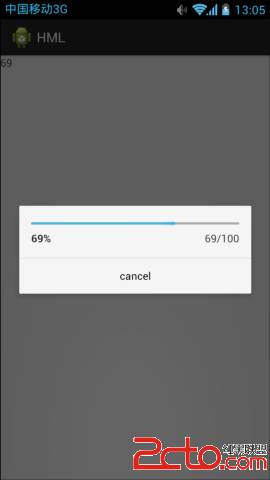
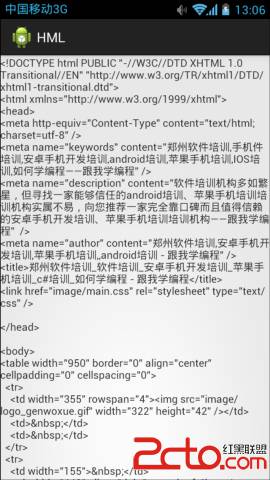
App 啟動後會顯示進度對話框,子線程在背景下載網頁的同時,透過 Handler 不斷把百分比進度送回主線程更新;下載完成後,文字元件會顯示完整的網頁內容,進度框隨之關閉。這正是 Handler-Message-Looper trio 攜手完成「跨線程更新 UI」的經典寫法。
 Android AsyncTask 異步任務入門
為什麼需要異步任務 Android 的 UI 更新必須在主執行緒中進行。若把耗時工作放在主執行緒,可能造成畫面卡頓,甚至引發 ANR。因此,網路請求、檔案讀寫、圖片處理等
 Android 反過來呼叫 JavaScript:WebChromeClient 與 addJavascriptInterface 實作(從零開始學 Android)
上一篇談的是 JavaScript 呼叫 Android,這篇把方向反過來:原生層如何主動驅動網頁。這在混合式 App 裡同樣常見——例如原生收到一則推播,需要讓目前的頁
 2.5.9 AlertDialog 對話框完整指南
前言 本節要介紹的是顯示提示資訊的第三個元件 AlertDialog(對話框),同時它也是其他 Dialog 的父類,例如 ProgressDialog、TimePic
 第75章、再識 Intent — 呼叫系統寄送 Email(從零開始學 Android)
利用 Intent 寄送郵件,其本質其實是「呼叫」Android 系統內建的郵件程式來完成發送,並非自行實作一套郵件傳輸機制。透過 ACTION_SEND 這個動作,再搭