

編輯:Android 技術基礎
JSON(JavaScript Object Notation)是一種輕量級的資料交換格式,可讀性佳、撰寫方便,能在不同平台之間傳遞資料,是目前行動端與伺服器溝通最常見的格式之一。
特性:
· 本質上是一系列鍵值對的集合;
· 已被絕大多數開發者採用,網路傳輸的應用面非常廣;
· 相較 XML,解析過程稍微簡單一些。
與 XML 的比較:
· 可讀性相當;
· 兩者都有成熟的解析手段;
· JSON 的資料體積較小;
· JSON 與 JavaScript 的交互更為自然;
· JSON 對資料的「描述能力」相對較弱(沒有命名空間、schema 這類機制);
· JSON 的解析速度明顯快於 XML。
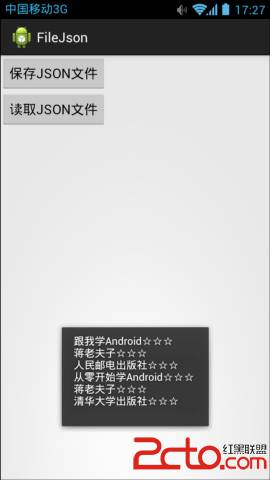
下面用一個完整案例,把「陣列 + 物件」的 JSON 寫入外部儲存空間,再讀出來解析成 Java 集合。
<?xml version="1.0" encoding="utf-8"?>
<LinearLayout xmlns:android="https://schemas.android.com/apk/res/android"
    android:layout_width="match_parent"
    android:layout_height="match_parent"
    android:orientation="vertical" >

    <Button
        android:id="@+id/save"
        android:layout_width="wrap_content"
        android:layout_height="wrap_content"
        android:text="保存 JSON 檔案" />

    <Button
        android:id="@+id/read"
        android:layout_width="wrap_content"
        android:layout_height="wrap_content"
        android:text="讀取 JSON 檔案" />
</LinearLayout>先準備三份書籍資料,按下按鈕時把它們組裝成 JSONArray(每筆是 JSONObject)並寫檔:
package com.genwoxue.filejson;

import java.io.File;
import java.io.FileInputStream;
import java.io.FileNotFoundException;
import java.io.FileOutputStream;
import java.io.InputStream;
import java.io.PrintStream;
import java.util.ArrayList;
import java.util.HashMap;
import java.util.Iterator;
import java.util.List;
import java.util.Map;

import org.json.JSONArray;
import org.json.JSONException;
import org.json.JSONObject;

import android.app.Activity;
import android.os.Bundle;
import android.os.Environment;
import android.view.View;
import android.view.View.OnClickListener;
import android.widget.Button;
import android.widget.Toast;

public class MainActivity extends Activity {

    private Button btnSave = null;
    private Button btnRead = null;
    private File file = null;
    private static final String FILENAME = "json.txt";
    private StringBuffer info = null;

    private String bookName[]   = new String[]{"跟我學Android", "從零開始學Android"};
    private String author[]     = new String[]{"蔣老夫子", "蔣老夫子"};
    private String publisher[]  = new String[]{"人民郵電出版社", "清華大學出版社"};

    @Override
    protected void onCreate(Bundle savedInstanceState) {
        super.onCreate(savedInstanceState);
        setContentView(R.layout.activity_main);

        btnSave = (Button) super.findViewById(R.id.save);
        btnRead = (Button) super.findViewById(R.id.read);

        btnSave.setOnClickListener(new OnClickListener() {
            public void onClick(View v) {
                PrintStream ps = null;
                JSONArray bookArray = new JSONArray();

                // 組裝 JSON 陣列
                for (int i = 0; i < MainActivity.this.bookName.length; i++) {
                    JSONObject object = new JSONObject();
                    try {
                        object.put("bookname", MainActivity.this.bookName[i]);
                        object.put("author", MainActivity.this.author[i]);
                        object.put("publisher", MainActivity.this.publisher[i]);
                    } catch (JSONException e) {
                        e.printStackTrace();
                    }
                    bookArray.put(object);
                }

                // 先確認外部儲存空間是否掛載
                if (!Environment.getExternalStorageState().equals(Environment.MEDIA_MOUNTED)) {
                    Toast.makeText(getApplicationContext(),
                            "儲存失敗,SD 儲存卡不存在!", Toast.LENGTH_LONG).show();
                    return;
                }

                // 組出檔案路徑
                String path = Environment.getExternalStorageDirectory().toString()
                        + File.separator + "genwoxue"
                        + File.separator + FILENAME;
                file = new File(path);

                // 父目錄不存在則建立
                if (!file.getParentFile().exists()) {
                    file.getParentFile().mkdirs();
                }

                try {
                    ps = new PrintStream(new FileOutputStream(file));
                    ps.print(bookArray.toString());     // 輸出成 JSON 字串
                } catch (FileNotFoundException e) {
                    e.printStackTrace();
                } finally {
                    if (ps != null) {
                        ps.close();
                    }
                }
            }
        });

        btnRead.setOnClickListener(new OnClickListener() {
            public void onClick(View v) {
                info = new StringBuffer();

                if (!Environment.getExternalStorageState().equals(Environment.MEDIA_MOUNTED)) {
                    Toast.makeText(getApplicationContext(),
                            "讀取失敗,SD 儲存卡不存在!", Toast.LENGTH_LONG).show();
                    return;
                }

                String path = Environment.getExternalStorageDirectory().toString()
                        + File.separator + "genwoxue"
                        + File.separator + FILENAME;
                file = new File(path);

                if (!file.exists()) {
                    Toast.makeText(getApplicationContext(),
                            "檔案不存在!", Toast.LENGTH_LONG).show();
                    return;
                }

                try {
                    InputStream input = new FileInputStream(file);

                    // 先把串流讀成字串
                    StringBuffer buffer = new StringBuffer();
                    byte[] b = new byte[4096];
                    int n;
                    while ((n = input.read(b)) != -1) {
                        buffer.append(new String(b, 0, n));
                    }

                    // 解析 JSON
                    List<Map<String, Object>> books =
                            MainActivity.this.parseJson(buffer.toString());
                    Iterator<Map<String, Object>> iter = books.iterator();

                    while (iter.hasNext()) {
                        Map<String, Object> map = iter.next();
                        info.append(map.get("bookname")).append("☆☆☆\n");
                        info.append(map.get("author")).append("☆☆☆\n");
                        info.append(map.get("publisher")).append("☆☆☆\n");
                    }
                } catch (Exception e) {
                    e.printStackTrace();
                }

                Toast.makeText(getApplicationContext(),
                        info.toString(), Toast.LENGTH_LONG).show();
            }
        });
    }

    /**
     * 解析 JSON:把 JSONArray 轉成 List<Map>,方便後續綁定 ListView
     */
    public List<Map<String, Object>> parseJson(String s) throws Exception {
        List<Map<String, Object>> list = new ArrayList<Map<String, Object>>();
        JSONArray array = new JSONArray(s);

        for (int i = 0; i < array.length(); i++) {
            Map<String, Object> map = new HashMap<String, Object>();
            JSONObject object = array.getJSONObject(i);
            map.put("bookname", object.getString("bookname"));
            map.put("author", object.getString("author"));
            map.put("publisher", object.getString("publisher"));
            list.add(map);
        }
        return list;
    }
}因為要讀寫外部儲存空間,必須在 AndroidManifest.xml 中宣告兩項權限:
<uses-permission android:name="android.permission.READ_EXTERNAL_STORAGE" />
<uses-permission android:name="android.permission.WRITE_EXTERNAL_STORAGE" />
完整清單:
<?xml version="1.0" encoding="utf-8"?>
<manifest xmlns:android="https://schemas.android.com/apk/res/android"
    package="com.genwoxue.filejson"
    android:versionCode="1"
    android:versionName="1.0" >

    <uses-sdk
        android:minSdkVersion="8"
        android:targetSdkVersion="15" />

    <uses-permission android:name="android.permission.READ_EXTERNAL_STORAGE" />
    <uses-permission android:name="android.permission.WRITE_EXTERNAL_STORAGE" />

    <application
        android:allowBackup="true"
        android:icon="@drawable/ic_launcher"
        android:label="@string/app_name"
        android:theme="@style/AppTheme" >
        <activity
            android:name="com.genwoxue.filejson.MainActivity"
            android:label="@string/app_name" >
            <intent-filter>
                <action android:name="android.intent.action.MAIN" />
                <category android:name="android.intent.category.LAUNCHER" />
            </intent-filter>
        </activity>
    </application>
</manifest>
在 Android 6.0 之後,這兩個屬於危險權限,除了宣告之外還要在執行期用 requestPermissions() 動態申請,否則寫檔會失敗。
· JSONObject.put() 會拋 JSONException(:checked 例外),別忘了包 try-catch。
· 讀檔時用緩衝區迴圈組字串,比一次 read() 到底更保險,也比較省記憶體。
· 檔中不該出現的編碼問題,建議統一用 UTF-8;若要明確指定,可在建立字串時帶入編碼名稱。
· 真正的專案裡,JSON 通常來自網路而非本機檔案,但解析邏輯完全一樣——把「讀檔取得字串」換成「讀串流取得字串」即可,parseJson() 一行都不用改。
· 若 JSON 結構較複雜,可考慮改用 Gson、Moshi 這類對應式(mapping)套件,用資料類別取代手寫的 Map 組裝,能少掉不少樣板程式碼。
 第35章 Android 評分條 RatingBar:星級評分與 change 監聽回呼
要在 App 裡收集「你給這首歌幾顆星」這類意見,RatingBar 是最直覺的選擇。它其實是 SeekBar 與 ProgressBar 的延伸,只是把進度條換成星星,
 Android Studio 簽名打包 APK:流程、用途與注意事項
簽名的作用Android 應用必須經過數位簽名才能安裝。開發除錯時,Android Studio 會自動使用除錯簽名;正式發布時則需要手動建立或選擇正式簽名。簽名可帶來幾
 SeekBar 拖動條:基本用法與簡單定制
本節引言: 這一節來學習 Android 基本 UI 控件裡的拖動條——SeekBar。相信大家都不陌生,最常見的就是音樂、視頻播放器裡的音量控制或播放進度。先看它的類結
 Android 佈局教學:RelativeLayout 相對佈局與常用屬性全整理
RelativeLayout 是一種相對佈局:控件的位置依「相對關係」決定,後一個控件擺在哪裡,取決於前一個控件的基準位置。它是實際專案中最常用、也最靈活的一種佈局。