

編輯:Android 技術基礎
本篇以第三種為主。MediaPlayer 負責解碼與播放,SurfaceView 提供畫面顯示的 Surface,兩者搭配即可完成自訂播放器。
先將 play.png 與 stop.png 複製到 res/drawable-hdpi。
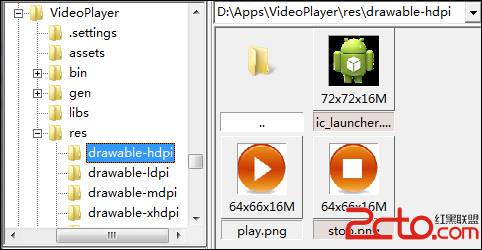
布局中放入兩個 ImageButton 與一個 SurfaceView。
<LinearLayout xmlns:android="https://schemas.android.com/apk/res/android"
    android:layout_width="match_parent"
    android:layout_height="match_parent"
    android:orientation="vertical">

    <ImageButton
        android:id="@+id/playvideo"
        android:layout_width="wrap_content"
        android:layout_height="wrap_content"
        android:src="@drawable/play" />

    <ImageButton
        android:id="@+id/stopvideo"
        android:layout_width="wrap_content"
        android:layout_height="wrap_content"
        android:src="@drawable/stop" />

    <SurfaceView
        android:id="@+id/surface"
        android:layout_width="wrap_content"
        android:layout_height="wrap_content" />
</LinearLayout>MainActivity 取得 SurfaceView 與 SurfaceHolder,建立 MediaPlayer,指定影片路徑。播放時設定音訊串流型態與顯示表面,再 prepare 與 start。
surfaceHolder = surfaceView.getHolder();
surfaceHolder.setType(SurfaceHolder.SURFACE_TYPE_PUSH_BUFFERS);

media = new MediaPlayer();
media.setDataSource(
    Environment.getExternalStorageDirectory().getPath()
    + "/genwoxue/mybaby.3gp");
media.setAudioStreamType(AudioManager.STREAM_MUSIC);
media.setDisplay(surfaceHolder);
media.prepare();
media.start();停止播放:
media.stop();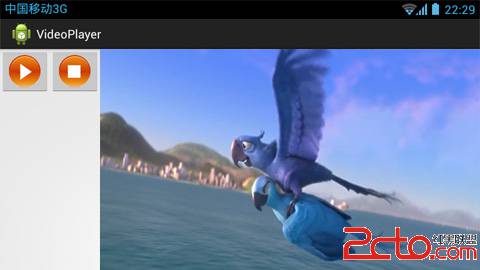
按下播放後,影片會顯示在 SurfaceView 上。
若只是快速播放,可直接用系統 Intent:
Uri uri = Uri.parse(
    Environment.getExternalStorageDirectory().getPath()
    + "/Test_Movie.m4v");

Intent intent = new Intent(Intent.ACTION_VIEW);
intent.setDataAndType(uri, "video/mp4");
startActivity(intent);
或使用 VideoView:
VideoView videoView = findViewById(R.id.video_view);
videoView.setMediaController(new MediaController(this));
videoView.setVideoURI(uri);
videoView.start(); Canvas API 詳解(Part 2):剪切方法合集
本節引言: 本節繼續 Android 繪圖系列之 Canvas API 詳解(Part 2),要講解的是 Canvas 中的 ClipXxx 方法族。文件中為我們提供了三
 第28章 Android ListView 之一:ArrayAdapter 快速做出可捲動清單
只要畫面上出現「一串資料由上到下排好、可以滑」的模樣,背後幾乎都是 ListView。它會依資料長度自動決定要畫幾列、什麼時候該回收重複利用,是 Android 開發最基
 底部導航加 ViewPager:打造可滑動切換的 Fragment 頁面
從底部導航到可滑動頁面前三篇使用不同方式完成底部導航後,可以進一步加入 ViewPager,讓使用者除了點擊底部選單,也能以左右滑動切換頁面。這種做法在內容型 App 中
 WebView 文件下載兩種方案:調用外部瀏覽器與自定義線程
本節引言 本節要介紹的是 WebView 下載文件的知識點。當我們使用普通瀏覽器(比如 UC)時,一旦點擊到可下載的鏈接就會自動開始下載。WebView 作為一個瀏覽器般