利用 Intent 寄送郵件,其本質其實是「呼叫」Android 系統內建的郵件程式來完成發送,並非自行實作一套郵件傳輸機制。透過 ACTION_SEND 這個動作,再搭配收件人、主題與內文等額外資料,就能把內容交給系統的郵件應用處理。
一、設計介面
1. 版面配置
開啟 res/layout/activity_main.xml,加入收件人、主題、內容輸入框以及發送按鈕:
[html] view plain copy
- <?xml version="1.0" encoding="utf-8"?>
- <LinearLayout
- xmlns:android="https://schemas.android.com/apk/res/android"
- android:layout_width="match_parent"
- android:layout_height="match_parent"
- android:orientation="vertical" >
-
- <TextView
- android:id="@+id/textView1"
- android:layout_width="wrap_content"
- android:layout_height="wrap_content"
- android:layout_alignParentLeft="true"
- android:layout_alignParentTop="true"
- android:text="收件人:" />
-
- <EditText
- android:id="@+id/recieve"
- android:layout_width="wrap_content"
- android:layout_height="wrap_content"
- android:ems="10" >
-
- <requestFocus />
- </EditText>
-
- <TextView
- android:id="@+id/textView2"
- android:layout_width="wrap_content"
- android:layout_height="wrap_content"
- android:text="主題" />
-
- <EditText
- android:id="@+id/subject"
- android:layout_width="wrap_content"
- android:layout_height="wrap_content"
- android:ems="10" />
-
-
- <TextView
- android:id="@+id/textView3"
- android:layout_width="wrap_content"
- android:layout_height="wrap_content"
- android:text="內容" />
-
- <EditText
- android:id="@+id/content"
- android:layout_width="wrap_content"
- android:layout_height="wrap_content"
- android:ems="10" />
-
- <Button
- android:id="@+id/send"
- android:layout_width="wrap_content"
- android:layout_height="wrap_content"
- android:text="發送郵件" />
-
- </LinearLayout>
二、程式碼實作
開啟 src/com.genwoxue.intentemail/MainActivity.java,加入以下程式碼:
[java] view plain copy
- package com.genwoxue.intentemail;
-
-
- import android.os.Bundle;
- import android.app.Activity;
- import android.content.Intent;
- import android.view.View;
- import android.view.View.OnClickListener;
- import android.widget.Button;
- import android.widget.TextView;
-
- public class MainActivity extends Activity {
-
- private TextView tvRecieve=null;
- private TextView tvSubject=null;
- private TextView tvContent=null;
- private Button btnSend=null;
- @Override
- public void onCreate(Bundle savedInstanceState)
- {
- super.onCreate(savedInstanceState);
- setContentView(R.layout.activity_main);
-
- tvRecieve=(TextView)super.findViewById(R.id.recieve); //收件人
- tvSubject=(TextView)super.findViewById(R.id.subject); //主題
- tvContent=(TextView)super.findViewById(R.id.content); //內容
-
- btnSend=(Button)super.findViewById(R.id.send);
- //發送郵件Email
- btnSend.setOnClickListener(new OnClickListener(){
- public void onClick(View v)
- {
- String recieve[]=new String[1];
- recieve[0]=tvRecieve.getText().toString(); //獲取收件人
- String subject=tvSubject.getText().toString(); //獲取主題
- String content=tvContent.getText().toString(); //攻取內容
-
- Intent intent=new Intent(Intent.ACTION_SEND); //發送郵件使用ACTION_SEND
- intent.setType("plain/text"); //設置類型
-
- //調用系統發送郵件
- intent.putExtra(Intent.EXTRA_EMAIL,recieve);
- intent.putExtra(Intent.EXTRA_SUBJECT,subject);
- intent.putExtra(Intent.EXTRA_TEXT,content);
- MainActivity.this.startActivity(intent);
- }
- });
- }
-
- }
三、執行結果
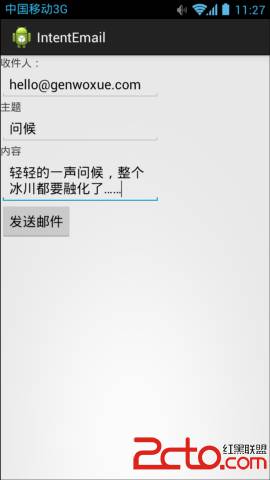
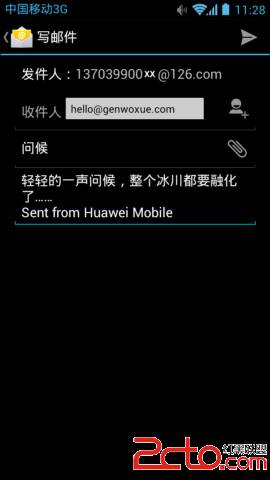


 從零開始學 Android:實作影片錄製功能
 Android Activity 入門:生命週期、啟動方式與螢幕旋轉
 SharedPreferences 保存使用者偏好與 MD5 加密
 2015 最新 Android 基礎入門教程完整目錄(共 148 節)