

編輯:Android 技術基礎
單選按鈕 RadioGroup 和複選框 CheckBox 都各自有 OnCheckedChangeListener 事件,但兩者並不是同一個介面。本章用同一個畫面示範兩種寫法,並把容易踩到的差異說清楚。
打開 res/layout/activity_main.xml,放一組 RadioGroup(含男女兩個選項)與兩個 CheckBox。
<RelativeLayout
    xmlns:android="https://schemas.android.com/apk/res/android"
    xmlns:tools="https://schemas.android.com/tools"
    android:layout_width="match_parent"
    android:layout_height="match_parent"
    tools:context=".MainActivity">

    <RadioGroup
        android:id="@+id/gender"
        android:layout_width="wrap_content"
        android:layout_height="wrap_content"
        android:layout_alignParentLeft="true"
        android:layout_alignParentTop="true">

        <RadioButton
            android:id="@+id/male"
            android:layout_width="wrap_content"
            android:layout_height="wrap_content"
            android:checked="true"
            android:text="男" />

        <RadioButton
            android:id="@+id/female"
            android:layout_width="wrap_content"
            android:layout_height="wrap_content"
            android:text="女" />
    </RadioGroup>

    <CheckBox
        android:id="@+id/football"
        android:layout_width="wrap_content"
        android:layout_height="wrap_content"
        android:layout_alignParentLeft="true"
        android:layout_below="@+id/gender"
        android:text="足球" />

    <CheckBox
        android:id="@+id/basketball"
        android:layout_width="wrap_content"
        android:layout_height="wrap_content"
        android:layout_alignParentLeft="true"
        android:layout_below="@+id/football"
        android:text="藍球" />

</RelativeLayout>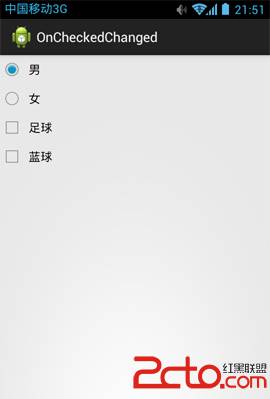
打開 src/com.genwoxue.oncheckedchanged/MainActivity.java。
package com.genwoxue.oncheckedchanged;

import android.os.Bundle;
import android.app.Activity;
import android.widget.RadioGroup;
import android.widget.RadioButton;
import android.widget.RadioGroup.OnCheckedChangeListener;  // RadioGroup 專用的事件介面
import android.widget.CheckBox;
import android.widget.CompoundButton;                     // CheckBox 走這個父類別的介面
import android.widget.Toast;

public class MainActivity extends Activity {

    private RadioGroup GenderGroup = null;
    private RadioButton rbMale = null;
    private RadioButton rbFemale = null;
    private CheckBox cbFootBall = null;
    private CheckBox cbBasketBall = null;

    @Override
    protected void onCreate(Bundle savedInstanceState) {
        super.onCreate(savedInstanceState);
        setContentView(R.layout.activity_main);

        GenderGroup = (RadioGroup) super.findViewById(R.id.gender);
        rbMale = (RadioButton) super.findViewById(R.id.male);
        rbFemale = (RadioButton) super.findViewById(R.id.female);
        cbFootBall = (CheckBox) super.findViewById(R.id.football);
        cbBasketBall = (CheckBox) super.findViewById(R.id.basketball);

        GenderGroup.setOnCheckedChangeListener(new GenderOnCheckedChangeListener());
        cbFootBall.setOnCheckedChangeListener(new BootBallOnCheckedChangeListener());
        cbBasketBall.setOnCheckedChangeListener(new BasketBallOnCheckedChangeListener());
    }

    // RadioGroup 的監聽器:回呼帶的是「被選中的 view id」
    private class GenderOnCheckedChangeListener implements OnCheckedChangeListener {
        @Override
        public void onCheckedChanged(RadioGroup group, int checkedId) {
            String sGender = "";
            if (rbFemale.getId() == checkedId) {
                sGender = rbFemale.getText().toString();
            }
            if (rbMale.getId() == checkedId) {
                sGender = rbMale.getText().toString();
            }
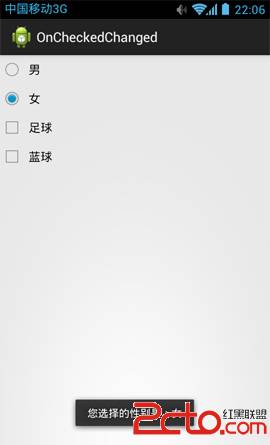
            Toast.makeText(getApplicationContext(), "您選擇的性別是:" + sGender, Toast.LENGTH_LONG).show();
        }
    }

    // CheckBox 的監聽器:回呼帶的是「是否勾選」的布林值
    private class BootBallOnCheckedChangeListener implements CompoundButton.OnCheckedChangeListener {
        @Override
        public void onCheckedChanged(CompoundButton button, boolean isChecked) {
            String sFav = cbFootBall.getText().toString();
            sFav = isChecked ? sFav + "選中!" : sFav + "未選中";
            Toast.makeText(getApplicationContext(), "您選擇的愛好是:" + sFav, Toast.LENGTH_LONG).show();
        }
    }

    private class BasketBallOnCheckedChangeListener implements CompoundButton.OnCheckedChangeListener {
        @Override
        public void onCheckedChanged(CompoundButton button, boolean isChecked) {
            String sFav = cbBasketBall.getText().toString();
            sFav = isChecked ? sFav + "選中!" : sFav + "未選中";
            Toast.makeText(getApplicationContext(), "您選擇的愛好是:" + sFav, Toast.LENGTH_LONG).show();
        }
    }
}RadioGroup 用的是 RadioGroup.OnCheckedChangeListener,回呼參數是「群組 + 被選中項目的 id」,適合判斷整組的變化。
CheckBox 則繼承自 CompoundButton,用的是 CompoundButton.OnCheckedChangeListener,回呼參數是「按鈕本身 + 布林狀態」,每個 CheckBox 都要各自註冊。這也是為什麼同樣叫 OnCheckedChange,卻不能共用同一個寫法。
 Git 使用 GitHub 搭建遠程倉庫:分支、推送與同步
為什麼使用 GitHubGit 能在本地進行版本控制,而 GitHub 則提供遠端倉庫,適合團隊協作與開源專案。將專案托管到 GitHub,可免除自建伺服器的成本。註冊與
 Android 文件上傳:從第三方庫到 HttpURLConnection 實現
本節引言 本節和下一節的文件下載一樣,慎入。現在實際開發涉及文件上傳,一般不會自己寫上傳代碼,而是集成第三方網絡庫來做圖片上傳,比如 android-async-http
 ImageSwitcher 與 Gallery:做一個會淡入淡出的相簿
ImageSwitcher 專門處理「圖片切換」這件事,切換時能套用進出動畫,做出幻燈片般的淡入淡出效果——拿來做相簿再合適不過。它通常和 Gallery 搭配:Gall
 Android 網路編程入門與 HTTP 協議完全解析
本節導讀 終於來到 Android 網路編程這一關鍵章節。前面我們寫的都是單機程式,難免有些意猶未盡。從本節開始,我們正式邁入網路開發的世界。接下來要掌握的內容包括:An