

編輯:Android 開發教學
近來忙於開發 Android 版新浪微博客戶端,累積了一些心得,在此與大家分享。
要在 Android 客戶端實作表情功能,可以依循以下思路:
1. 在首頁把新浪的表情圖片下載到本地資料夾,且圖片命名必須沿用新浪微博表情的原始名稱。舉例來說,新浪的「害羞」表情名為 shame.gif,那麼本地檔也要命名為 shame.gif,如此命名相同,才能對應上表情的 code。
2. 把本地的表情圖片全數放進 Android 的資源目錄 drawable 底下。
3. 存取新浪的表情介面(新浪回傳的資料有 JSON 與 XML 兩種格式,筆者選用 XML),利用 XML 解析器把回傳的資訊解析出來,存進一個 Emotion.java 的 bean 裡,這樣就能依據 Emotion 的 code 找到一一對應的本地表情圖片。
4. 實作一個讓使用者挑選表情的介面,筆者以 GridView 來呈現。
5. 為 GridView 的每個 item 綁定點擊事件:先依 item 的 index 找出對應的表情 code,再用正則表達式把 code 轉換成對應的表情圖片,最後將表情插入 EditText 供使用者發送。
以下是具體實作過程。
1. 把新浪表情圖片下載到本地(這部分可以另建一個 Java 專案來完成):
 public void getFriendList() throws Exception {
     BlogReleaseServiceImpl service = new BlogReleaseServiceImpl();
     List<Emotions> list = service.getEmotion();
     for (Emotions emotions : list) {
         String path = emotions.getUrl();
         String filename = path.substring(path.lastIndexOf("/") + 1, path.length());
         URL url = new URL(path);
         HttpURLConnection conn = (HttpURLConnection)url.openConnection();
         conn.setRequestMethod("GET");
         conn.setReadTimeout(5 * 1000);
         if(conn.getResponseCode() == 200){
             InputStream is = conn.getInputStream();
             byte[] data = readStream(is);
             File file = new File("f:\\sina_images\\" + filename);
             FileOutputStream fs = new FileOutputStream(file);
             fs.write(data);
             fs.close();
         }else{
             System.out.println("請求失敗");
         }
     }
 }
 public byte[] readStream(InputStream is) throws Exception {
     ByteArrayOutputStream os = new ByteArrayOutputStream();
     byte[] buffer = new byte[2048];
     int len = 0;
     while((len = is.read(buffer)) != -1){
         os.write(buffer, 0, len);
     }
     is.close();
     return os.toByteArray();
 }
2. 把本地表情全數放進 Android 的資源目錄 drawable 底下(這一步就毋須多言,直接全選複製即可)。
3.1 存取新浪的表情介面,回傳的資訊如下:
 <emotion>
 <phrase>[嘻嘻]</phrase>
 <type>face</type>
 <url>https://img.t.sinajs.cn/t35/style/images/common/face/ext/normal/c2/tooth.gif</url>
 <is_hot>false</is_hot>
 <is_common>true</is_common>
 <order_number>0</order_number>
 <category></category>
 </emotion>
有了這份資料,就能把每個表情的 phrase(文字代碼)與本地圖片、以及 url 三者串接起來,進而在輸入框中完成表情的插入與顯示。
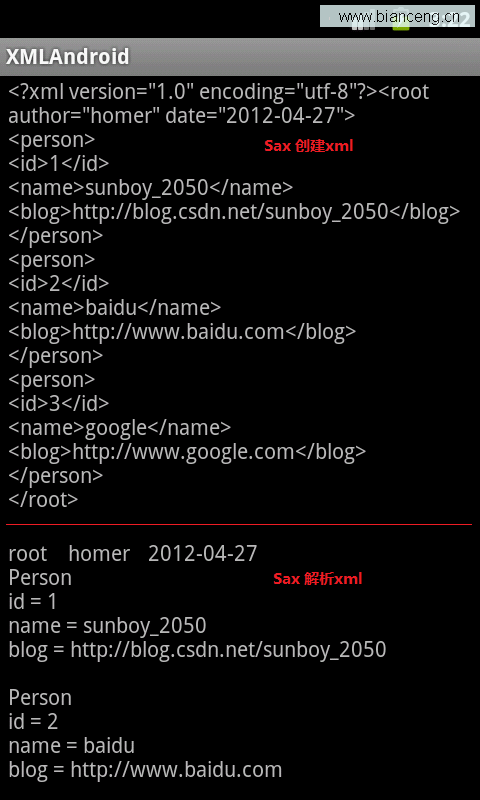 Android XML 處理:SAX 建立與解析
SAX 是事件導向的 XML 解析方式,記憶體佔用低且速度快。事件模型ContentHandler 會在文件開始、結束、元素開始、結束與文字內容時觸發回呼。建立 XML可
 LibGDX 遊戲引擎各模組功能介紹
LibGDX 是一個跨平台遊戲開發框架,提供多個模組,協助開發者處理輸入、繪圖、音訊、檔案與物理等任務。Input:統一處理鍵盤、觸控、滑鼠與感測器輸入。Graphics
 Android 開發入門九:為視圖註冊事件監聽器
使用者與視圖互動時,Android 會觸發各種事件。常見做法包括為按鈕註冊點擊監聽器,或為輸入框註冊焦點變化監聽器。按鈕點擊監聽可透過 setOnClickListene
 Android RoboGuice2 使用指南(1):概述與從 1.1 升級
RoboGuice 推出了 2.0 版本。相比 1.1,主要改進有三點: 穩定性提高、支援 Fragment、更簡潔易用。 但要注意:RoboGuice2 並不完全向下相