

編輯:Android 開發教學
上一節說明了按 MENU 鍵時如何顯示選項選單。除了選項選單,Android 還有情境選單——它通常與 Activity 中的某個元件相關聯,當使用者長按該元件時觸發。例如長按一個 Button,就可能彈出它的情境選單。
要把某個元件與情境選單關聯起來,需在該元件上呼叫 setOnCreateContextMenuListener()。
<?xml version="1.0" encoding="utf-8"?>
<LinearLayout xmlns:android="https://schemas.android.com/apk/res/android"
    android:layout_width="fill_parent"
    android:layout_height="fill_parent"
    android:orientation="vertical" >

    <TextView
        android:layout_width="fill_parent"
        android:layout_height="wrap_content"
        android:text="@string/hello" />

    <Button
        android:id="@+id/button1"
        android:layout_width="match_parent"
        android:layout_height="wrap_content"
        android:text="Click and hold on it" />
</LinearLayout>
public class MenusActivity extends Activity {

    @Override
    public void onCreate(Bundle savedInstanceState) {
        super.onCreate(savedInstanceState);
        setContentView(R.layout.main);
        Button btn = (Button) findViewById(R.id.button1);
        btn.setOnCreateContextMenuListener(this);
    }

    @Override
    public void onCreateContextMenu(ContextMenu menu, View view,
                                    ContextMenuInfo menuInfo) {
        super.onCreateContextMenu(menu, view, menuInfo);
        CreateMenu(menu);
    }

    @Override
    public boolean onCreateOptionsMenu(Menu menu) {
        // ... 選項選單相關
        return true;
    }

    @Override
    public boolean onOptionsItemSelected(MenuItem item) {
        return MenuChoice(item);
    }

    private void CreateMenu(Menu menu) { /* ... */ }

    private boolean MenuChoice(MenuItem item) { /* ... */ }
}
按 F11 在模擬器上除錯。長按 Button 一段時間後,情境選單就會出現。
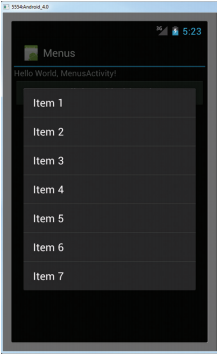
上面之所以能運作,是因為呼叫了 button 的 setOnCreateContextMenuListener(),把 button 與情境選單綁在一起。
當情境選單中的某一項被點擊時,會觸發 onContextItemSelected() 這個方法,因此實際的行為要寫在這裡,而不是 onOptionsItemSelected()——這是最常見的混淆點。
另外,情境選單中的快捷鍵預設是不生效的。若想讓它生效,需要呼叫 setQwertyMode():
private void CreateMenu(Menu menu) {
    menu.setQwertyMode(true);
    MenuItem mnu1 = menu.add(0, 0, 0, "Item 1");
    {
        mnu1.setAlphabeticShortcut('a');
        mnu1.setIcon(R.drawable.ic_launcher);
    }
    // ...
}
實務上要留意:情境選單的 ContextMenuInfo 會帶入被長按項目的資訊(在 ListView 中是 position 與 id),做批次操作時靠它定位,比用其他方式猜要可靠得多。
 Android 使用 Jsoup 解析網頁,開發網站客戶端
若想把網頁內容包裝成 Android 客戶端,可用 Jsoup 解析 HTML。它類似 jQuery 的選取方式,能快速取出標題、連結與結構資料。流程先以 Jsoup.c
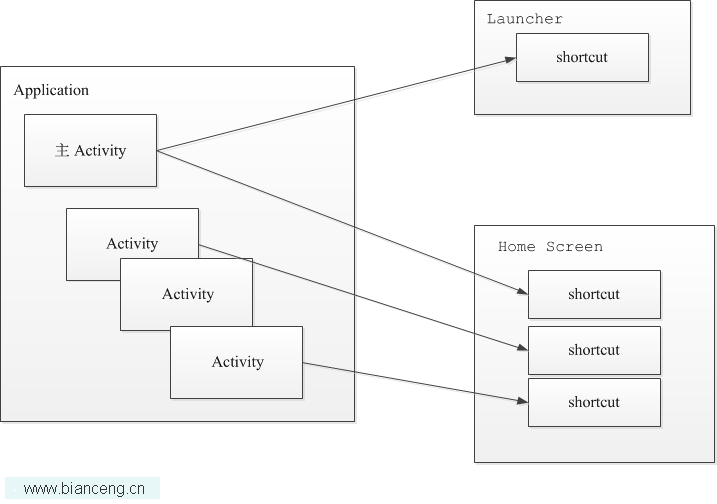 Android ApiDemos 解析(24):App → Launcher Shortcuts
在 Android 中,凡是 <intent-filter> 同時含有下列兩項的 Activity,就會被應用程式管理器(Launcher)列出來,通常這就是
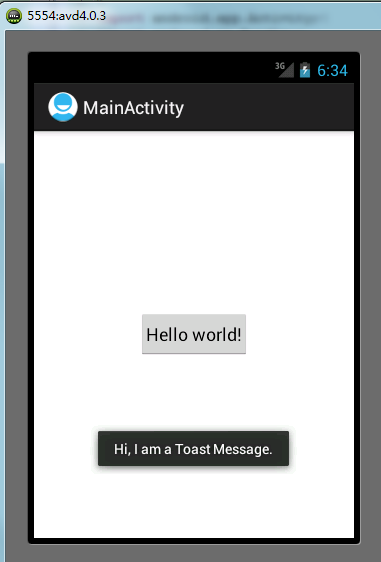 Android 開發入門:Toast 通知
Toast 是 Android 中最簡單的通知方式,會短暫顯示訊息後自動消失,常用於提示操作結果或輕量狀態。使用 Toast.makeText 建立 Toast 物件,再
 Android 使用 Tesseract OCR 進行圖片文字辨識
Tesseract OCR 可在 Android 上實現圖片文字辨識。實作時需準備 OCR 函式庫、語言包與對應的 native 文庫,並將相關 jar 與 lib 加入