

編輯:Android 開發教學
Android 提供了多種保存資料的方式,其中最簡單的一種是 SharedPreferences。它以 Key/Value 對的形式存放資料,支援 boolean、float、long、integer 與 String,最常見的用途就是保存應用偏好。
另一個思路是 onSaveInstanceState(),那是專門用來保存 UI 狀態的機制。
本例 App → Activity → Persistent State 示範如何用 SharedPreferences 保住部分 UI 狀態,具體來說就是 TextView 的值。
建立或修改 SharedPreferences 使用 getSharedPreferences(String name, int mode)。要注意它的作用範圍:SharedPreferences 只用於同一個 Application 內不同 Activity 之間共享資料,無法跨應用共享。
寫入需要透過 SharedPreferences.Editor,方法命名規則是 editor.putXXX(key, value):
protected void onPause() {
    super.onPause();
    SharedPreferences.Editor editor = getPreferences(0).edit();
    editor.putString("text", mSaved.getText().toString());
    editor.putInt("selection-start", mSaved.getSelectionStart());
    editor.putInt("selection-end", mSaved.getSelectionEnd());
    editor.commit();
}
這裡有個細節值得學:除了文字本身,還保存了游標的起訖位置。使用者回來時不只是看到文字還在,連游標都停在原本的地方,體驗完全不同。
另外要留意 commit() 是同步寫入磁碟,會阻塞主執行緒。在資料量小的情況下沒問題,若寫入內容較大,建議改用 apply() 讓它背景處理。
protected void onResume() {
    super.onResume();
    SharedPreferences prefs = getPreferences(0);
    String restoredText = prefs.getString("text", null);
    if (restoredText != null) {
        mSaved.setText(restoredText, TextView.BufferType.EDITABLE);

        int selectionStart = prefs.getInt("selection-start", -1);
        int selectionEnd = prefs.getInt("selection-end", -1);
        if (selectionStart != -1 && selectionEnd != -1) {
            mSaved.setSelection(selectionStart, selectionEnd);
        }
    }
}
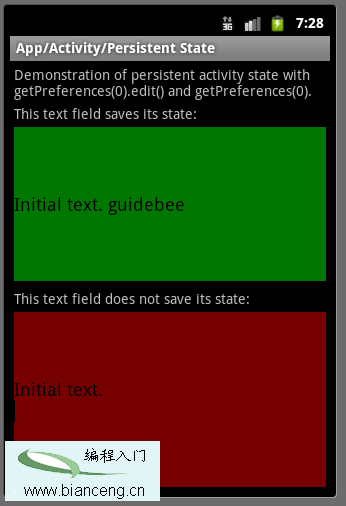
注意每個 getXXX 都帶了第二個參數作為預設值。這不是可選的裝飾——當 key 不存在時,系統就是靠它決定回傳什麼。懶得給預設值,稍後就必須處理 null 造成的空指標例外。
Persistent State 示範了 SharedPreferences 的用法,但如果你的目標只是「Activity 重建時不要丟失 UI 狀態」,更合適的工具是 onSaveInstanceState(Bundle)。兩者的分工是:Bundle 適合放暫時性的 UI 狀態,資料量小、生命週期短;SharedPreferences 適合放需要長期保存的設定與偏好。搞混兩者,常見的後果是要嘛把暫存資料永久留在裝置上,要嘛把使用者設定在旋轉螢幕後弄丟。
 Android 簡明開發教程九:建立應用程式框架
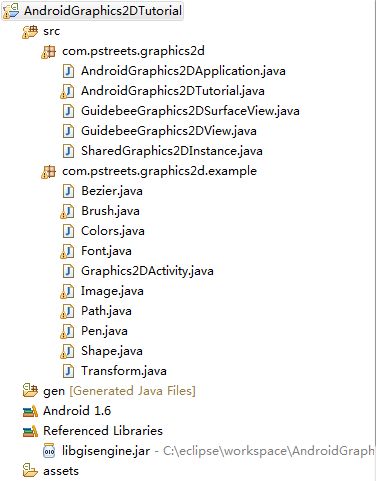
第八篇說明了程式需要實現的功能,現在可以開始建立專案了。請參考教程第三篇建立一個名為 AndroidGraphics2DTutorial 的新專案,並先搭好整體骨架。
 Android Preference 讀寫:SharedPreferences 與 Editor
PreferenceActivity 可讓使用者透過設定畫面修改偏好,而程式若要讀取或修改這些值,需使用 SharedPreferences。讀取與修改讀取時以 getS
 Android 開發入門:解決 Intent-Filter 衝突
intent-filter 用來定義 Activity 如何被啟動。若兩個 Activity 宣告相同 action 與 category,系統無法單靠 filter 決
 把靜態檔案放進 res/raw 並在執行時讀取
除了執行時才建立檔案,也可以在設計階段就把檔案放進程式包中,執行時再取出使用。舉例來說,你想把一些說明文件打包進應用,讓使用者需要時能查看,這種情況就該把檔案放在 res