

編輯:Android 程式設計入門
想像一個快遞站:包裹(任務)陸續送來,站裡有固定數量的快遞員(執行緒),有人有空就派一件,忙不完就先堆在暫存區(佇列)。執行緒池就是這個模式。
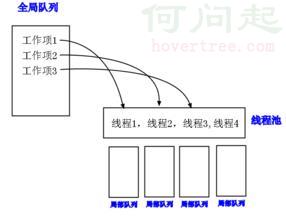
它解決了直接 new Thread() 的三個痛點:
具體實作類別是 ThreadPoolExecutor,其最上層介面是 Executor。
public ThreadPoolExecutor(int corePoolSize, int maximumPoolSize, long keepAliveTime,
        TimeUnit unit, BlockingQueue<Runnable> workQueue, ThreadFactory threadFactory) {
    this(corePoolSize, maximumPoolSize, keepAliveTime, unit, workQueue, threadFactory, defaultHandler);
}
allowCoreThreadTimeOut 設為 true,核心執行緒也會套用第三個參數的超時策略,逾時即終結。keepAliveTime 的時間單位,列舉型別,常用 MILLISECONDS、SECONDS。execute() 送進來的 Runnable 先存在這裡。關鍵順序很多人會記錯:先擴充佇列,再擴充執行緒。這也是為什麼使用無界佇列(如 LinkedBlockingQueue 不給容量)時,maximumPoolSize 實際上永遠用不到。
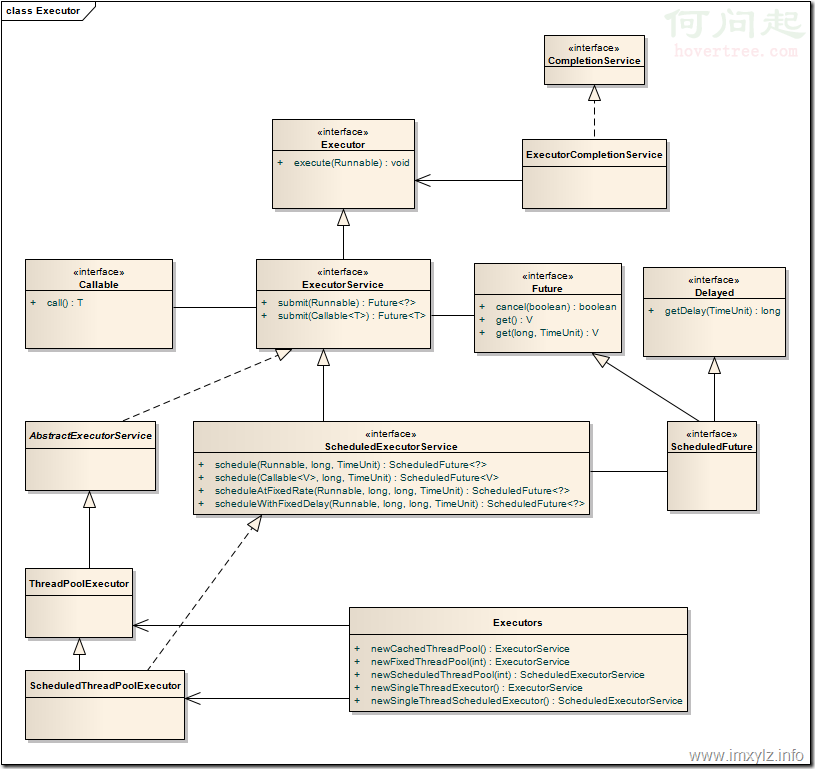
名字只差一個 s,角色完全不同。
Executor 是介面,只有一個方法:
public interface Executor {
    void execute(Runnable command);
}
Executors 則是工廠方法類別,不繼承任何父類,專門負責生產各種執行緒池物件,例如 FixedThreadPool、SingleThreadExecutor、ScheduledThreadPool。這些產品以及自訂的 ThreadPoolExecutor 都實作了 ExecutorService 介面,而 ExecutorService 又繼承自 Executor。
public static ExecutorService newSingleThreadExecutor(ThreadFactory threadFactory) {
    return new FinalizableDelegatedExecutorService(
            new ThreadPoolExecutor(1, 1, 0L, TimeUnit.MILLISECONDS,
                    new LinkedBlockingQueue<Runnable>(), threadFactory));
}
看這段原始碼就很清楚:所謂的「單執行緒池」,本質上就是 corePoolSize = maximumPoolSize = 1 的 ThreadPoolExecutor,外層再包一個委派類別,防止有人把它向下轉型後改參數。
public interface ThreadFactory {
    Thread newThread(Runnable r);
}
與 Executor 同樣體現了面向介面編程。Executors 提供的兩個現成實作:
public static ThreadFactory defaultThreadFactory() {
    return new DefaultThreadFactory();
}
public static ThreadFactory privilegedThreadFactory() {
    return new PrivilegedThreadFactory();
}
DefaultThreadFactory 的實作值得參考,想自訂命名規則、優先權、是否守護執行緒,照著改就行:
static class DefaultThreadFactory implements ThreadFactory {
    private static final AtomicInteger poolNumber = new AtomicInteger(1);
    private final ThreadGroup group;
    private final AtomicInteger threadNumber = new AtomicInteger(1);
    private final String namePrefix;

    DefaultThreadFactory() {
        SecurityManager s = System.getSecurityManager();
        group = (s != null) ? s.getThreadGroup() : Thread.currentThread().getThreadGroup();
        namePrefix = "pool-" + poolNumber.getAndIncrement() + "-thread-";
    }

    public Thread newThread(Runnable r) {
        Thread t = new Thread(group, r, namePrefix + threadNumber.getAndIncrement(), 0);
        if (t.isDaemon()) t.setDaemon(false);
        if (t.getPriority() != Thread.NORM_PRIORITY) t.setPriority(Thread.NORM_PRIORITY);
        return t;
    }
}
順帶一提,自訂 ThreadFactory 給執行緒取有意義的名字,是線上排查問題時最划算的投資之一。
fixed 有「固定」之意,透過 Executors.newFixedThreadPool(n) 建立。它只有核心執行緒且沒有超時策略,執行緒不會被回收,因此能穩定快速地回應請求。
範例:4 個任務、2 條執行緒。
Runnable runnable = new Runnable() {
    @Override
    public void run() {
        Log.d("hello", "sleep前");
        SystemClock.sleep(3000);
        Log.d("hello", "sleep後");
    }
};
ExecutorService executorService = Executors.newFixedThreadPool(2);
executorService.execute(runnable);
executorService.execute(runable1);
executorService.execute(runable2);
executorService.execute(runable3);
輸出:
06-24 15:49:47.962 D/hello: sleep1前
06-24 15:49:47.962 D/hello: sleep前
06-24 15:49:50.962 D/hello: sleep1後
06-24 15:49:50.962 D/hello: sleep2前
06-24 15:49:50.972 D/hello: sleep後
06-24 15:49:50.972 D/hello: sleep3前
06-24 15:49:53.962 D/hello: sleep2後
06-24 15:49:53.972 D/hello: sleep3後
每次只有兩條在跑,一條空出來才轮到下一個。把核心數改成 4,四個任務就會一次跑完。
執行緒數量不固定,只有非核心執行緒,可粗略理解為上限無限大。它的任務佇列近乎空集合,任何任務進來立刻開一條執行緒跑,適合大量但單個耗時很短的任務。閒置超過 60 秒的非核心執行緒會被回收。
把上面的建立方式換成:
ExecutorService executorService = Executors.newCachedThreadPool();
輸出:
06-24 15:53:08.582 D/hello: sleep2前
06-24 15:53:08.582 D/hello: sleep1前
06-24 15:53:08.582 D/hello: sleep前
06-24 15:53:08.582 D/hello: sleep3前
06-24 15:53:11.582 D/hello: sleep2後
06-24 15:53:11.582 D/hello: sleep1後
06-24 15:53:11.582 D/hello: sleep後
06-24 15:53:11.582 D/hello: sleep3後
四條同時起跑,順序完全不定。若任務突然湧入大量請求,這種池可能一口氣開出幾百條執行緒把系統拖垮,使用時要有警覺。
Scheduled 是「預定的」。核心執行緒數固定,非核心執行緒無上限,閒置時立即回收。專門用於定時任務與固定週期重複任務。
延遲 2000ms 後執行:
ScheduledExecutorService scheduledExecutorService = Executors.newScheduledThreadPool(3);
scheduledExecutorService.schedule(runnable, 2000, TimeUnit.MILLISECONDS);
scheduledExecutorService.schedule(runable1, 2000, TimeUnit.MILLISECONDS);
scheduledExecutorService.schedule(runable2, 2000, TimeUnit.MILLISECONDS);
scheduledExecutorService.schedule(runable3, 2000, TimeUnit.MILLISECONDS);
延遲 10ms 後,每 1000ms 執行一次:
scheduledExecutorService.scheduleAtFixedRate(runnable, 10, 1000, TimeUnit.MILLISECONDS);
scheduleAtFixedRate 是「固定頻率」,scheduleWithFixedDelay 是「上一輪結束後再間隔一段時間」,兩者語意不同,選錯會造成非預期的重疊執行。
只有一條核心執行緒,所有任務排隊順序執行、絕不亂序。最大好處是省掉了執行緒同步的煩惱,適合有順序依賴或不想處理鎖的場景。
輸出:
06-24 16:05:02.782 D/hello: sleep前
06-24 16:05:05.782 D/hello: sleep後
06-24 16:05:05.782 D/hello: sleep1前
06-24 16:05:08.782 D/hello: sleep1後
06-24 16:05:08.782 D/hello: sleep2前
06-24 16:05:11.782 D/hello: sleep2後
06-24 16:05:11.782 D/hello: sleep3前
06-24 16:05:14.782 D/hello: sleep3後
AsyncTask 的 THREAD_POOL_EXECUTOR,或使用各家開源的任務調度框架。另外記得:任務一定要能收斂。無界佇列加上無限擴充的執行緒,是線上 OOM 的經典配方。
 Android 自訂背景:虛線、圓角與漸層一次搞定
先看效果,再談做法。 點擊效果: 一、設置虛線 在 res/drawable 下建立一個 XML: <?xml version=1.0 encoding=ut
 Android 開發環境搭建:Android Studio 與 Genymotion 模擬器配合 HBuilder 測試全攻略
一、安裝 Android Studio 可參考整合開發工具資源:https://github.com/inferjay/AndroidDevTools,其中提供 bund
 Android 開發:界面設計基礎知識
一個優秀的 App 不僅要界面美觀,更需要良好的性能與穩定性。作為開發者,既要理解界面設計原則,也要能寫出高質量的佈局代碼。本章著重講解常用控件、界面佈局以及一些常用的界
 Android 源碼筆記:Camera 系統架構全解析
Camera 的架構與 Android 系統的整體分層保持一致,如下圖所示。本文主要從以下四個層面展開說明。 Framework:Camera.java Android