

編輯:Android 程式設計入門
Animations 是 Android 提供的一套 UI 動畫 API,能做旋轉、縮放、淡入淡出、位移等效果,且幾乎可以套用在所有控制項上。它是理解 Android 動畫體系的起點。
提供旋轉、移動、伸展與淡出等效果,四種基本型別為:
建立一串 Drawable 序列,讓它們依指定的時間間隔逐格顯示,本質上就是播放動圖。適合角色行走這類複雜動作,但要注意圖片總量對記憶體的壓力。
Tweened Animation 的標準流程:
startAnimation() 啟動。四個子類別分別是:AlphaAnimation、TranslateAnimation、ScaleAnimation、RotateAnimation。
setDuration(long durationMillis)——設定動畫持續時間,單位毫秒。setFillAfter(boolean fillAfter)——為 true 時,動畫結束後控制項停留在終態。setFillBefore(boolean fillBefore)——為 true 時,動畫結束後控制項回到執行前的狀態。setStartOffset(long startOffset)——設定動畫開始前的等待時間。setRepeatCount(int repeatCount)——設定重複次數,可用 INFINITE 無限循環。setRepeatMode(int repeatMode)——設定重複模式,REVERSE 為來回播放,RESTART 為每次都從頭開始。Interpolator 定義了動畫的速率曲線,框架內建幾種:
1. 在 set 標籤上設定
<set xmlns:android="https://schemas.android.com/apk/res/android"
    android:interpolator="@android:anim/accelerate_interpolator">
2. 讓整組動畫共用一個 Interpolator
android:shareInterpolator="true"
3. 不共用,各自指定
此時要設 android:shareInterpolator="false",並在每個子動畫上分別加上 interpolator:
<alpha
    android:interpolator="@android:anim/accelerate_decelerate_interpolator"
    android:fromAlpha="1.0"
    android:toAlpha="0.0"
    android:startOffset="500"
    android:duration="500" />
4. 程式碼中讓整組共用
AnimationSet animationSet = new AnimationSet(true);
animationSet.setInterpolator(new AccelerateInterpolator());
5. 程式碼中不共用
AnimationSet animationSet = new AnimationSet(false);
alphaAnimation.setInterpolator(new AccelerateInterpolator());
rotateAnimation.setInterpolator(new DecelerateInterpolator());
package com.example.thestudyanimationview;

import android.app.Activity;
import android.os.Bundle;
import android.view.View;
import android.view.View.OnClickListener;
import android.view.animation.AlphaAnimation;
import android.view.animation.Animation;
import android.view.animation.AnimationSet;
import android.view.animation.RotateAnimation;
import android.view.animation.ScaleAnimation;
import android.view.animation.TranslateAnimation;
import android.view.animation.Animation.AnimationListener;
import android.widget.Button;
import android.widget.ImageView;

public class MainActivity extends Activity implements OnClickListener {

    private Button rotateButton, scaleButton, alphaButton, translateButton;
    private ImageView iv_rotateanimation, iv_scaleanimation, iv_alphaanimation, iv_translateanimation;

    @Override
    protected void onCreate(Bundle savedInstanceState) {
        super.onCreate(savedInstanceState);
        setContentView(R.layout.activity_main);

        rotateButton = (Button) findViewById(R.id.rotateButton);
        scaleButton = (Button) findViewById(R.id.scaleButton);
        alphaButton = (Button) findViewById(R.id.alphaButton);
        translateButton = (Button) findViewById(R.id.translateButton);

        iv_rotateanimation = (ImageView) findViewById(R.id.iv_rotateanimation);
        iv_scaleanimation = (ImageView) findViewById(R.id.iv_scaleanimation);
        iv_alphaanimation = (ImageView) findViewById(R.id.iv_alphaanimation);
        iv_translateanimation = (ImageView) findViewById(R.id.iv_translateanimation);

        rotateButton.setOnClickListener(this);
        scaleButton.setOnClickListener(this);
        alphaButton.setOnClickListener(this);
        translateButton.setOnClickListener(this);
    }

    public void onClick(View v) {
        switch (v.getId()) {
            case R.id.rotateButton:    rotateAnimation();    break;
            case R.id.scaleButton:     scaleAnimation();     break;
            case R.id.alphaButton:     alphaAnimation();     break;
            case R.id.translateButton: translateAnimation(); break;
        }
    }

    public void rotateAnimation() {
        AnimationSet animationSet = new AnimationSet(true);
        // 參數1:起始角度  參數2:結束角度
        // 後四個參數決定旋轉圓心位置
        // 座標型別可選 ABSOLUTE(絕對)、RELATIVE_TO_SELF(相對自身)、RELATIVE_TO_PARENT(相對父容器)
        // 0.5f 搭配 RELATIVE_TO_SELF 即為自身寬高的一半
        RotateAnimation rotateAnimation = new RotateAnimation(
                0, 360,
                Animation.RELATIVE_TO_SELF, 0.5f,
                Animation.RELATIVE_TO_SELF, 0.5f);
        rotateAnimation.setDuration(1000);
        animationSet.addAnimation(rotateAnimation);
        iv_rotateanimation.startAnimation(animationSet);

        rotateAnimation.setAnimationListener(new AnimationListener() {
            public void onAnimationStart(Animation arg0) { }
            public void onAnimationRepeat(Animation arg0) { }
            public void onAnimationEnd(Animation arg0) {
                iv_rotateanimation.setVisibility(View.INVISIBLE);
            }
        });
    }

    public void scaleAnimation() {
        AnimationSet animationSet = new AnimationSet(true);
        // 參數1、2:x 軸起始與結束比例
        // 參數3、4:y 軸起始與結束比例
        // 參數5~8:縮放中心點
        ScaleAnimation scaleAnimation = new ScaleAnimation(
                0, 0.1f, 0, 0.1f,
                Animation.RELATIVE_TO_SELF, 0.5f,
                Animation.RELATIVE_TO_SELF, 0.5f);
        scaleAnimation.setDuration(1000);
        animationSet.addAnimation(scaleAnimation);
        iv_scaleanimation.startAnimation(animationSet);

        scaleAnimation.setAnimationListener(new AnimationListener() {
            public void onAnimationStart(Animation arg0) { }
            public void onAnimationRepeat(Animation arg0) { }
            public void onAnimationEnd(Animation arg0) {
                iv_scaleanimation.setVisibility(View.INVISIBLE);
            }
        });
    }

    public void alphaAnimation() {
        // 參數 true 表示整組共用 Animation 的 interpolator
        AnimationSet animationSet = new AnimationSet(true);
        // 從完全不透明漸變到全透明
        AlphaAnimation alphaAnimation = new AlphaAnimation(1, 0);
        alphaAnimation.setDuration(500);
        animationSet.addAnimation(alphaAnimation);
        iv_alphaanimation.startAnimation(animationSet);

        alphaAnimation.setAnimationListener(new AnimationListener() {
            public void onAnimationStart(Animation arg0) { }
            public void onAnimationRepeat(Animation arg0) { }
            public void onAnimationEnd(Animation arg0) {
                iv_alphaanimation.setVisibility(View.INVISIBLE);
            }
        });
    }

    public void translateAnimation() {
        AnimationSet animationSet = new AnimationSet(true);
        // 參數1~2:x 軸起點  參數3~4:y 軸起點
        // 參數5~6:x 軸終點  參數7~8:y 軸終點
        TranslateAnimation translateAnimation = new TranslateAnimation(
                Animation.RELATIVE_TO_SELF, 0f,
                Animation.RELATIVE_TO_SELF, 0.5f,
                Animation.RELATIVE_TO_SELF, 0f,
                Animation.RELATIVE_TO_SELF, 0.5f);
        translateAnimation.setDuration(1000);
        animationSet.addAnimation(translateAnimation);
        iv_translateanimation.startAnimation(animationSet);

        translateAnimation.setAnimationListener(new AnimationListener() {
            public void onAnimationStart(Animation arg0) { }
            public void onAnimationRepeat(Animation arg0) { }
            public void onAnimationEnd(Animation arg0) {
                iv_translateanimation.setVisibility(View.INVISIBLE);
            }
        });
    }
}
對應的版面配置:
<LinearLayout xmlns:android="https://schemas.android.com/apk/res/android"
    xmlns:tools="https://schemas.android.com/tools"
    android:layout_width="match_parent"
    android:layout_height="match_parent"
    android:orientation="vertical"
    tools:context="com.example.thestudyanimationview.MainActivity" >

    <LinearLayout android:id="@+id/ll_bts"
        android:layout_width="match_parent"
        android:layout_height="60dp"
        android:gravity="center"
        android:orientation="horizontal" >

        <Button android:id="@+id/rotateButton"
            android:layout_width="wrap_content"
            android:layout_height="wrap_content"
            android:text="旋轉" />
        <Button android:id="@+id/scaleButton"
            android:layout_width="wrap_content"
            android:layout_height="wrap_content"
            android:text="縮放" />
        <Button android:id="@+id/alphaButton"
            android:layout_width="wrap_content"
            android:layout_height="wrap_content"
            android:text="淡入淡出" />
        <Button android:id="@+id/translateButton"
            android:layout_width="wrap_content"
            android:layout_height="wrap_content"
            android:text="移動" />
    </LinearLayout>

    <LinearLayout android:layout_width="match_parent"
        android:layout_height="match_parent"
        android:gravity="center"
        android:orientation="vertical" >

        <ImageView android:id="@+id/iv_rotateanimation"
            android:layout_width="90dp"
            android:layout_height="90dp"
            android:src="@drawable/icon_pengyouquan" />
        <ImageView android:id="@+id/iv_scaleanimation"
            android:layout_width="90dp"
            android:layout_height="90dp"
            android:src="@drawable/icon_qq" />
        <ImageView android:id="@+id/iv_alphaanimation"
            android:layout_width="90dp"
            android:layout_height="90dp"
            android:src="@drawable/icon_qqkongjian" />
        <ImageView android:id="@+id/iv_translateanimation"
            android:layout_width="90dp"
            android:layout_height="90dp"
            android:src="@drawable/weibologon" />
    </LinearLayout>
</LinearLayout>
View Animation(也就是本文的 Tween Animation)只改變「繪製時的外觀」,並不改變 View 自身的屬性。這帶來一個長期的困擾:平移之後 View 的實際位置沒變,點擊判定仍在原處。若你需要真正的位移與互動,請改用 Android 3.0 之後提供的屬性動畫(ObjectAnimator、ValueAnimator)。View Animation 的價值在於簡單直覺,適合做進場、閃現這類純視覺回饋。
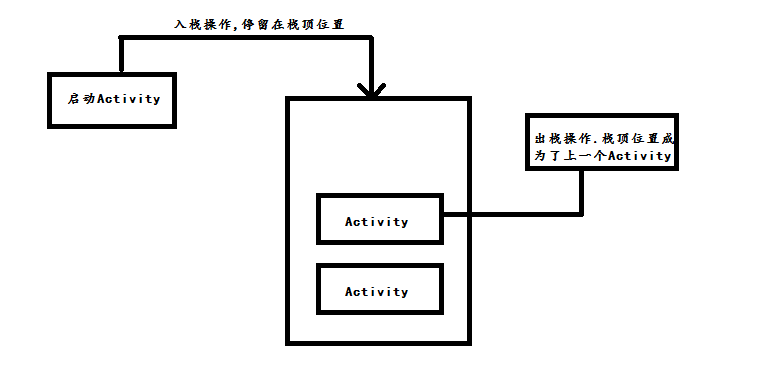 Android Activity 生命週期完整解析
返回棧Android 以返回棧管理 Activity。新啟動的 Activity 會入棧並位於頂端,按返回鍵或 finish 會出棧。狀態運行:可與使用者互動。暫停:仍可
 Android 四大組件之 BroadcastReceiver 廣播接收器詳解
BroadcastReceiver 是 Android 四大組件之一,本文從基本概念、使用方法、生命週期到廣播種類,系統性地梳理這一機制。 一、基本概念 1、Broadc
 Android Fragment完整介紹:讓Activity更模組化的關鍵元件
Fragment是什麼? Fragment可以視為Activity的一部分,它讓畫面與行為能夠更模組化。簡單來說,Fragment就像一個可嵌入Activity的子畫面或
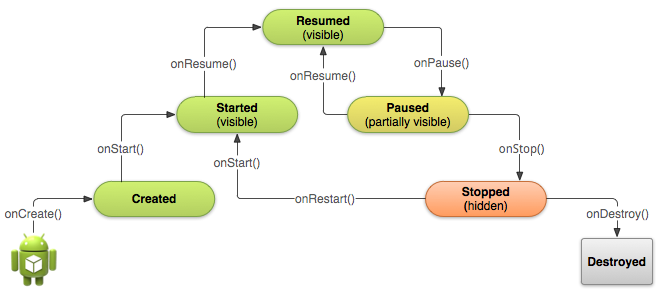 Android Activity 生命週期詳解與實踐要點
本文參考官方文檔,目的不在於羅列 Activity 如何啟動、創建、暫停與銷毀,而是從實際開發出發,分析在 Activity 各個生命週期中我們應該處理哪些工作。 Ac