

編輯:Android 程式設計入門
本文介紹如何將數據存儲到應用的私有文件夾並讀寫。
Context 提供了兩個方法,用於打開應用文件夾的 I/O(文件不存在時會創建):
FileInputStream openFileInputStream(String fileName);
FileOutputStream openFileOutputStream(String fileName, int mode);
其中 mode 的取值:
Context 還提供了以下方法:
public class NewActivity extends AppCompatActivity {
    private static final String FileName = "FirstSharedPreference";

    @Override
    protected void onCreate(@Nullable Bundle savedInstanceState) {
        super.onCreate(savedInstanceState);
        try {
            FileOutputStream fos = openFileOutput(FileName, MODE_WORLD_WRITEABLE);
            String str = "I am good at Android";
            byte[] bytes = str.getBytes();
            fos.write(bytes, 0, bytes.length);

            FileInputStream fis = openFileInput(FileName);
            InputStreamReader isr = new InputStreamReader(fis);
            BufferedReader br = new BufferedReader(isr);
            String data = "";
            StringBuilder sb = new StringBuilder();
            while ((data = br.readLine()) != null) {
                sb.append(data);
            }
        } catch (FileNotFoundException e) {
            e.printStackTrace();
        } catch (IOException e) {
            e.printStackTrace();
        }
    }
}
透過 openFileOutput 寫入數據、openFileInput 讀取數據,即可輕鬆完成應用私有文件夾內文件的讀寫操作。
 Android Activity 生命週期完整解析
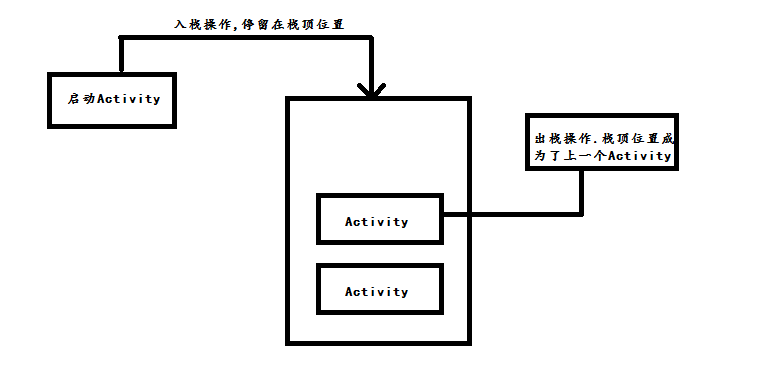
返回棧Android 以返回棧管理 Activity。新啟動的 Activity 會入棧並位於頂端,按返回鍵或 finish 會出棧。狀態運行:可與使用者互動。暫停:仍可
 Android ListView 實作(二):用 SimpleAdapter 打造圖文列表
SimpleAdapter 是 ListView 四種內建 Adapter 中最實用的一個:它能一次搞定「圖片 + 多行文字」的列表項目,不必自己繼承 BaseAdapt
 Android NDK 入門:Java 與 C/C++ 的橋樑
NDK 是什麼NDK 讓 Android 可以使用 C/C++,適合效能關鍵、需重用既有 C/C++ 庫或想增加逆向難度的情境。開發流程下載並設定 NDK 環境變數。建立
 Android Studio 如何將本地項目上傳到 git@osc
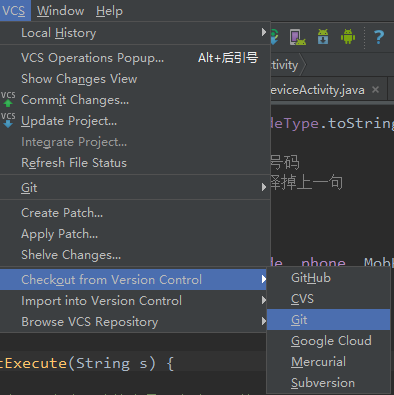
本文以 Android Studio 1.5 版本為例,介紹如何將本地項目上傳到 git@osc 遠程倉庫: 1、先在 git 上創建一個項目; 2、在 Studio 上