

編輯:Android 程式設計入門
結論:用 HttpURLConnection。
在 Android 2.2 及更早版本中,HttpClient 的 bug 較少,是當時更穩妥的選擇。而從 Android 2.3 開始,HttpURLConnection 成為官方推薦方案——它的底層实现被 switched 到 OkHttp 之后,性能和穩定性都有了明顯提升,HttpClient 則逐漸停止維護,并已在 API 22 中被標記為廢棄。
HttpURLConnection conn = null;
try {
    URL url = new URL("https://api.example.com/data");
    conn = (HttpURLConnection) url.openConnection();
    conn.setRequestMethod("GET");
    conn.setConnectTimeout(5000);
    conn.setReadTimeout(5000);

    if (conn.getResponseCode() == HttpURLConnection.HTTP_OK) {
        InputStream is = conn.getInputStream();
        ByteArrayOutputStream baos = new ByteArrayOutputStream();
        byte[] buffer = new byte[1024];
        int len;
        while ((len = is.read(buffer)) != -1) {
            baos.write(buffer, 0, len);
        }
        String result = new String(baos.toByteArray(), "UTF-8");
        // 后續解析 result
    }
} catch (Exception e) {
    e.printStackTrace();
} finally {
    if (conn != null) conn.disconnect();
}
setDoOutput(true) 并寫入 getOutputStream()。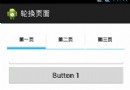 Android 實現ViewPager輪換頁面+TabHost 完整實例
本文示範如何結合 ViewPager 與 TabHost,做出左右滑動切換頁面、且與上方 Tab 連動的效果。 取得 ViewPager 控件 首先我們需要一個 Vie
 如何開發 Android Wear 穿戴應用程式(完整入門指南)
Android Wear 是連接 Android 手機與穿戴裝置的平台。自今年上半年發表以來,它獲得了大量關注——不只是消費者,開發者也開始思考如何讓自己的應用程式準備好
 Android Studio 升級後設定全部重來?兩步驟找回舊配置
把 Android Studio 升級到 1.5 之後,發現所有個人化設定全部回到初始狀態:主題外觀、字型大小與顏色、快捷鍵配置,一夕之間歸零。當下確實有點錯愕。 問題出
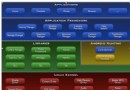 深入解析 Android 系統架構的四層設計
Android 的本質,是在標準 Linux 系統上加了 Java 虛擬機 Dalvik,並在 Dalvik 之上搭了一層 Java application framew