

編輯:Android 開發實例
標準體重計算器是入門 Android 開發時很適合動手做的小專案:元件不多、邏輯清楚,卻能完整練到版面配置、單選控制項、文字輸入、事件監聽與結果輸出。早期不少功能手機都內建這個小工具,搬到 Android 上依然是相當受歡迎的範例題。
操作流程刻意做到最簡單:先選擇性別,再輸入身高,按下計算鈕,結果直接以 Toast 提示顯示。不需要額外頁面、不需要儲存紀錄,就是一個用完即走的小工具。
標準體重的計算方式依性別而異:
這個公式屬於簡易估算模型,僅供參考,並非醫學診斷依據;若要更完整的評估,通常還會搭配 BMI 值一併解讀。
<?xml version="1.0" encoding="utf-8"?>
<LinearLayout xmlns:android="https://schemas.android.com/apk/res/android"
    android:orientation="vertical"
    android:layout_width="fill_parent"
    android:layout_height="fill_parent"
    android:background="@drawable/pic">

    <TextView
        android:id="@+id/txt"
        android:layout_width="fill_parent"
        android:layout_height="wrap_content"
        android:gravity="center"
        android:text="@string/hello"
        android:textSize="16px" />

    <TextView
        android:layout_width="fill_parent"
        android:layout_height="wrap_content"
        android:text="@string/sex" />

    <RadioGroup
        android:layout_width="fill_parent"
        android:layout_height="wrap_content"
        android:orientation="horizontal">

        <RadioButton
            android:id="@+id/male"
            android:layout_width="wrap_content"
            android:layout_height="wrap_content"
            android:text="男" />

        <RadioButton
            android:id="@+id/female"
            android:layout_width="wrap_content"
            android:layout_height="wrap_content"
            android:text="女" />
    </RadioGroup>

    <TextView
        android:layout_width="fill_parent"
        android:layout_height="26px"
        android:text="@string/heigh" />

    <EditText
        android:id="@+id/etx"
        android:layout_width="fill_parent"
        android:layout_height="wrap_content"
        android:inputType="numberDecimal" />

    <Button
        android:id="@+id/btn"
        android:layout_width="fill_parent"
        android:layout_height="wrap_content"
        android:text="@string/count" />
</LinearLayout>package com.lingdududu.bmi;
import java.text.DecimalFormat;
import java.text.NumberFormat;
import android.app.Activity;
import android.os.Bundle;
import android.view.View;
import android.view.View.OnClickListener;
import android.widget.Button;
import android.widget.EditText;
import android.widget.RadioButton;
import android.widget.Toast;
/**
* 選擇性別並輸入身高後按下按鈕,即可在 Toast 中看到標準體重。
*/
public class BMIActivity extends Activity {
private Button countButton;
private EditText heighText;
private RadioButton maleBtn, femaleBtn;
String sex = "";
double height;
@Override
public void onCreate(Bundle savedInstanceState) {
super.onCreate(savedInstanceState);
setContentView(R.layout.main);
creadView(); // 建立檢視
sexChoose(); // 預設性別
setListener(); // 註冊監聽器
}
/** 綁定 Button 事件 */
private void setListener() {
countButton.setOnClickListener(countListner);
}
private OnClickListener countListner = new OnClickListener() {
@Override
public void onClick(View v) {
String heightInput = heighText.getText().toString().trim();
// 輸入驗證:避免空值或非數字造成 NumberFormatException
if (heightInput.length() == 0) {
Toast.makeText(BMIActivity.this, "請輸入身高", Toast.LENGTH_SHORT).show();
return;
}
height = Double.parseDouble(heightInput);
Toast.makeText(BMIActivity.this,
"你是一位" + sexChoose() + "\n"
+ "你的身高為" + height + "cm\n"
+ "你的標準體重為" + getWeight(sexChoose(), height) + "kg",
Toast.LENGTH_LONG).show();
}
};
/** 取得目前選擇的性別 */
private String sexChoose() {
if (maleBtn.isChecked()) {
sex = "男性";
} else if (femaleBtn.isChecked()) {
sex = "女性";
}
return sex;
}
/** 找出各元件 */
public void creadView() {
countButton = (Button) findViewById(R.id.btn);
heighText = (EditText) findViewById(R.id.etx);
maleBtn = (RadioButton) findViewById(R.id.male);
femaleBtn = (RadioButton) findViewById(R.id.female);
}
/** 數值格式化為兩位小數 */
private String format(double num) {
NumberFormat formatter = new DecimalFormat("0.00");
return formatter.format(num);
}
/** 依性別套用不同公式計算標準體重 */
private String getWeight(String sex, double height) {
String weight = "";
if (sex.equals("男性")) {
weight = format((height - 80) * 0.7);
} else {
weight = format((height - 70) * 0.6);
}
return weight;
}
}應用執行後的畫面如下:
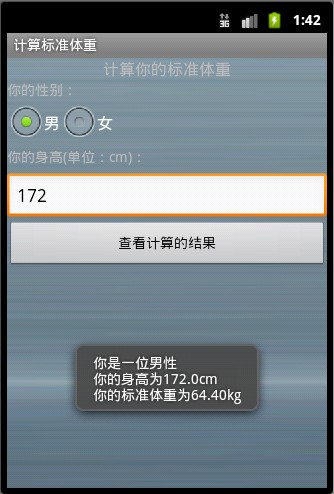
這個範例的功能已經完整,若要把它變成一個真正可上架、體面又實用的應用,還有幾個方向值得延伸:
Double.parseDouble(),使用者輸入空白或英文字 will 直接讓 App 崩潰。android:inputType="numberDecimal",可以讓系統直接叫出數字鍵盤,從源頭減少錯誤輸入。radioGroup.setOnCheckedChangeListener(),並透過 getCheckedRadioButtonId() 取得目前選項,程式碼更簡潔也不容易出錯。sexChoose() 中呼叫卻沒有設定初始值,若使用者未選擇任何選項,sex 會是空字串,結果訊息就會變成「你是一位」。在版面中為其中一個 RadioButton 加上 android:checked="true" 即可避免。textSize="16px" 與 layout_height="26px" 應改為 sp/dp,否則在不同螢幕密度上字級與間距會嚴重失真。 Android JSON 解析實戰:用 JSONObject 抓取 API 資料
JSON 的全名是 JavaScript Object Notation,它把「人能讀、機器也好處理」這件事同時做到了。相較於標籤必須成對出現的 XML,JSON 沒有冗
 攔截 TextView 裡的超連結點擊
一段文字裡如果有網址,我們通常希望它被視為可點擊的連結;但有時候需求相反——你可能想攔下這個點擊,改由自己的邏輯處理,例如導向自家 App 的內部頁面,或先跳確認對話框。
 Android 在地化實務:從 strings.xml 到語言切換
在地化的意義在地化不只是翻譯文字,也包括讓應用符合不同地區使用者的閱讀習慣。最常見的做法,是將畫面文字集中管理,並依語言提供不同資源。資源資料夾結構預設字串通常放在 re
 Android ListView 加載狀態設計與 ViewStub 技巧
ListView 加載提示可用 Dialog、Toast 或內嵌提示。較常見的是把提示放在列表上方,或用 ViewStub 覆蓋內容。ViewStub 的 inflate