

編輯:Android 開發實例
系統短信本身也存在 SQLite 數據庫裡,但出於安全機制,Android 不允許其他應用直接訪問。繞過這個限制的正規做法是利用 ContentProvider:通過 content://sms 這個 URI 查詢,再把結果落到自己的數據庫中做二次加工與展示。
整體分三步:建庫建表 → 讀系統短信增量寫入 → 從自己的庫裡查詢並渲染。
package com.homer.sms;

import java.text.SimpleDateFormat;
import java.util.Date;

import android.app.Activity;
import android.content.Context;
import android.database.Cursor;
import android.database.sqlite.SQLiteDatabase;
import android.graphics.Color;
import android.net.Uri;
import android.os.Bundle;
import android.util.Log;
import android.widget.TableLayout;
import android.widget.TableRow;
import android.widget.TextView;

/**
 * 讀取手機短信,先保存到 SQLite,再從數據庫讀出顯示
 */
public class SmsReadActivity extends Activity {

    private TableLayout tableLayout;

    @Override
    public void onCreate(Bundle savedInstanceState) {
        super.onCreate(savedInstanceState);
        setContentView(R.layout.main);
        tableLayout = (TableLayout) findViewById(R.id.tableLayout);
        showSMS();
    }

    private void showSMS() {
        SmsHander smsHander = new SmsHander(this);
        smsHander.createSMSDatabase();       // 1. 建庫建表
        smsHander.insertSMSToDatabase();     // 2. 增量導入系統短信
        Cursor cursor = smsHander.querySMSInDatabase(100);  // 3. 取最新 100 條

        cursor.moveToPosition(-1);
        while (cursor.moveToNext()) {
            String strAddress = cursor.getString(cursor.getColumnIndex("address"));
            String strDate = cursor.getString(cursor.getColumnIndex("date"));
            String strBody = cursor.getString(cursor.getColumnIndex("body"));

            SimpleDateFormat dateFormat = new SimpleDateFormat("yyyy-MM-dd HH:mm:ss");
            Date date = new Date(Long.parseLong(strDate));
            strDate = dateFormat.format(date);

            String smsTitle = strAddress + "\t\t" + strDate;
            String smsBody = strBody + "\n";
            Log.i("tableRow", smsTitle + smsBody);

            // 標題行
            TableRow trTitle = new TableRow(this);
            TextView tvTitle = new TextView(this);
            tvTitle.setText(smsTitle);
            tvTitle.getPaint().setFakeBoldText(true);
            tvTitle.setTextColor(Color.RED);
            trTitle.addView(tvTitle);
            tableLayout.addView(trTitle, new TableLayout.LayoutParams(
                    TableLayout.LayoutParams.FILL_PARENT,
                    TableLayout.LayoutParams.WRAP_CONTENT));

            // 內容行
            TableRow trBody = new TableRow(this);
            TextView tvBody = new TextView(this);
            tvBody.setText(smsBody);
            trBody.addView(tvBody);
            tableLayout.addView(trBody, new TableLayout.LayoutParams(
                    TableLayout.LayoutParams.FILL_PARENT,
                    TableLayout.LayoutParams.WRAP_CONTENT));
        }

        if (!cursor.isClosed()) {
            cursor.close();
        }
        smsHander.closeSMSDatabase();
    }
}
數據庫封裝部分有兩個設計值得留意:
public class SmsHander {

    private SQLiteDatabase db;
    private Context context;

    public SmsHander(Context context) {
        this.context = context;
    }

    public void createSMSDatabase() {
        String sql = "create table if not exists sms("
                + "_id integer primary key autoincrement,"
                + "address varchar(255),"
                + "person varchar(255),"
                + "body varchar(1024),"
                + "date varchar(255),"
                + "type integer)";
        db = SQLiteDatabase.openOrCreateDatabase(
                context.getFilesDir().toString() + "/data.db3", null);
        db.execSQL(sql);
    }

    /** 讀取系統短信游標 */
    private Cursor getSMSInPhone() {
        Uri SMS_CONTENT = Uri.parse("content://sms/");
        String[] projection = { "_id", "address", "person", "body", "date", "type" };
        return context.getContentResolver()
                      .query(SMS_CONTENT, projection, null, null, "date desc");
    }

    /** 增量導入:只寫入比本地最新一條更新的短信 */
    public void insertSMSToDatabase() {
        long lastTime;
        Cursor dbCount = db.rawQuery("select count(*) from sms", null);
        dbCount.moveToFirst();
        if (dbCount.getInt(0) > 0) {
            Cursor dbcur = db.rawQuery(
                    "select * from sms order by date desc limit 1", null);
            dbcur.moveToFirst();
            lastTime = Long.parseLong(dbcur.getString(dbcur.getColumnIndex("date")));
            dbcur.close();
        } else {
            lastTime = 0L;
        }
        dbCount.close();

        Cursor cur = getSMSInPhone();
        db.beginTransaction();
        if (cur.moveToFirst()) {
            int iAddress = cur.getColumnIndex("address");
            int iPerson  = cur.getColumnIndex("person");
            int iBody    = cur.getColumnIndex("body");
            int iDate    = cur.getColumnIndex("date");
            int iType    = cur.getColumnIndex("type");
            do {
                String date = cur.getString(iDate);
                if (Long.parseLong(date) > lastTime) {
                    String sql = "insert into sms values(null, ?, ?, ?, ?, ?)";
                    Object[] bindArgs = {
                            cur.getString(iAddress), cur.getString(iPerson),
                            cur.getString(iBody), date, cur.getInt(iType)
                    };
                    db.execSQL(sql, bindArgs);
                } else {
                    break;   // 已按 date 倒序,遇到舊數據即可停止
                }
            } while (cur.moveToNext());
            cur.close();
            db.setTransactionSuccessful();
            db.endTransaction();
        }
    }

    /** 取最新 size 條 */
    public Cursor querySMSInDatabase(int size) {
        String sql;
        Cursor dbCount = db.rawQuery("select count(*) from sms", null);
        dbCount.moveToFirst();
        if (size < dbCount.getInt(0)) {
            sql = "select * from sms order by date desc limit " + size;
        } else {
            sql = "select * from sms order by date desc";
        }
        dbCount.close();
        return db.rawQuery(sql, null);
    }

    public void closeSMSDatabase() {
        if (db != null && db.isOpen()) {
            db.close();
            db = null;
        }
    }
}
運行效果如下:
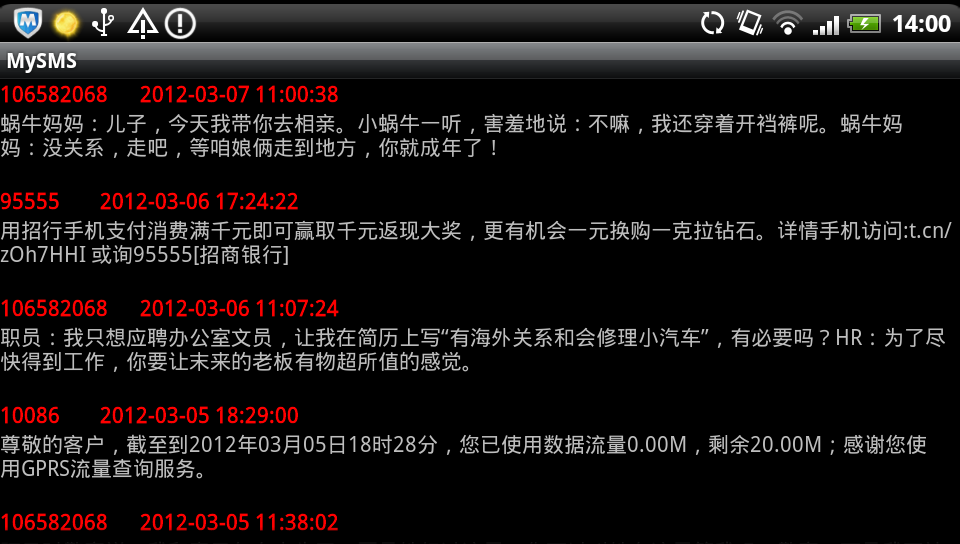
幾個實戰中必須注意的點。
權限是前提。讀短信需要在 AndroidManifest.xml 中聲明 READ_SMS 權限,Android 6.0 及以上還必須在運行時動態申請,用戶拒絕後要有降級處理,不能直接崩潰。
增量判斷依賴排序。insertSMSToDatabase 之所以能在遇到第一條舊數據時 break,前提是系統查詢用了 date desc 排序。若排序條件改動,這個提前退出就會漏數據。
批量寫入必須包事務。把整個循環包在 beginTransaction / setTransactionSuccessful / endTransaction 裡,比逐條 insert 快一個量級,這是 SQLite 寫入的通用優化。
界面渲染方式偏老。用 TableRow 動態拼短信列表,條数一多就會明顯卡頓。實際項目應改用 ListView 或 RecyclerView 加適配器複用 ItemView,並在子線程完成數據庫讀取。
另外,把用戶短信整條複製到自己的數據庫涉及隱私,上線前需要明確告知用途並提供清除入口,避免觸碰應用市場的隱私審核紅線。
 Android MediaPlayer 完整教學:打造具備進度條的音樂播放器
Android 提供了多種控制音訊/影片檔案與串流播放的方式,其中最具代表性的是 MediaPlayer 類別。 透過 MediaPlayer,App 得以使用系統內建的
 Android 本地化實作:依語言環境切換字串資源
當 App 要面對不同語言的市場時,本地化是必要步驟。Android 透過資源資料夾的命名規則,讓系統自動選擇最適合的語言資源。 字串資源 預設字串放在 res/valu
 Android ApiDemo 系列三:Activity 切換動畫
ApiDemo 的 Animation 範例示範在切換 Activity 時加入動畫效果。常見的兩種效果是淡入與縮放:淡入讓新畫面由透明逐漸顯示,縮放則讓新畫面由小變大出
 Android JSON 解析實戰:從 API 回傳資料到畫面顯示
JSON 的全名是 JavaScript Object Notation(JavaScript 物件符號法),它是一種與程式語言無關的輕量級資料交換格式,因為語法簡潔、可