

編輯:Android 開發實例
做錯誤回報、客服診斷或資料分析時,往往需要知道使用者裝置的基本資訊:手機型號、Android 版本、SDK 等級、以及 App 自己的版本號。這些資訊取得方式各不相同,值得整理成一個工具方法。
先釐清一個常見混淆:裝置資訊來自 android.os.Build,App 自身資訊則要透過 PackageManager 查詢,兩者不能混用。
package cn.testgethandsetinfo;

import android.os.Bundle;
import android.text.TextUtils;
import android.widget.TextView;
import android.app.Activity;
import android.content.Context;
import android.content.pm.PackageInfo;
import android.content.pm.PackageManager;

/**
 * Demo 描述:獲得手機型號、系統版本、App 版本號等資訊
 */
public class MainActivity extends Activity {
    private TextView mTextView;

    @Override
    protected void onCreate(Bundle savedInstanceState) {
        super.onCreate(savedInstanceState);
        setContentView(R.layout.main);
        init();
    }

    private void init() {
        mTextView = (TextView) findViewById(R.id.textView);
        mTextView.setText(getHandSetInfo());
    }

    private String getHandSetInfo() {
        String handSetInfo =
                "手機型號:" + android.os.Build.MODEL +
                ",SDK版本:" + android.os.Build.VERSION.SDK +
                ",系統版本:" + android.os.Build.VERSION.RELEASE +
                ",軟件版本:" + getAppVersionName(MainActivity.this);
        return handSetInfo;
    }

    // 取得目前 App 的版本名稱
    private String getAppVersionName(Context context) {
        String versionName = "";
        try {
            PackageManager packageManager = context.getPackageManager();
            PackageInfo packageInfo = packageManager.getPackageInfo("cn.testgethandsetinfo", 0);
            versionName = packageInfo.versionName;
            if (TextUtils.isEmpty(versionName)) {
                return "";
            }
        } catch (Exception e) {
            e.printStackTrace();
        }
        return versionName;
    }
}
<RelativeLayout
    xmlns:android="https://schemas.android.com/apk/res/android"
    xmlns:tools="https://schemas.android.com/tools"
    android:layout_width="match_parent"
    android:layout_height="match_parent" >

    <TextView
        android:id="@+id/textView"
        android:layout_width="wrap_content"
        android:layout_height="wrap_content"
        android:text="@string/hello_world"
        android:layout_centerInParent="true" />
</RelativeLayout>
一、別把包名寫死。範例中 getPackageInfo() 直接填入字面值,比較好的做法是改用 context.getPackageName(),這樣程式碼搬到別的專案也不用改。
二、版本判斷要用數字。Build.VERSION.SDK_INT 回傳的是 int,直接與常數比較即可,例如 if (Build.VERSION.SDK_INT >= Build.VERSION_CODES.LOLLIPOP)。若拿 VERSION.SDK 這個已老化的字串欄位來比對,容易在版本號位數不同時出錯。
另外提醒,PackageManager.getPackageInfo() 在元件尚未就緒的極早期時機呼叫可能拋出 NameNotFoundException,範例已用 try-catch 包住並回傳空字串,這種「取得失敗不影響主流程」的防禦性寫法值得沿用到你的專案裡。
 Android 應用本地化多語系實作教學
一款 Android App 很可能會在不同國家、不同地區的裝置上被使用。為了讓應用更貼近使用者,App 應該依據裝置所在的語言環境,自動調整文字、數字、檔案等內容的呈現
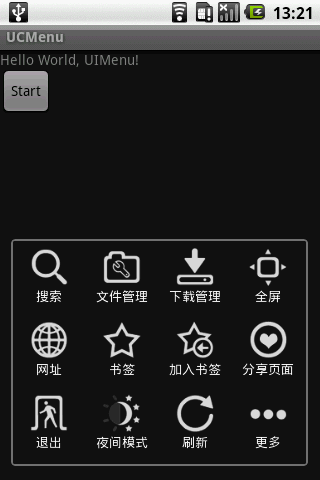 Android 模仿 UCWeb 菜單效果:PopupWindow 搭配 GridView 實作
UCWeb 那個半透明、置底彈出的九宮格菜單看起來很不錯,自己做一個也不難。整體思路是:保留實體 Menu 鍵的作用(讓它負責彈出菜單)用 PopupWindow 當菜單
 Android 多語系支援:本地化字串資源的建立與切換實測
你的 App 可能同時被東京、羅馬、墨西哥城的使用者打開。要讓每個人都讀得懂,靠的不是在程式碼裡寫一堆 if 判斷,而是把文字交給資源系統,讓它依裝置語言自動挑選合適的版
 Android 載入動畫實作:ProgressBar 轉圈模式的三行關鍵字
使用者按下按鈕後,如果畫面完全沒反應,即使背景正在跑,他也只會覺得 App 當機了。一個小小的旋轉圓環,就能把「請稍候」這個訊息傳出去——這就是 ProgressBar