

編輯:Android 開發實例
這個小工具的功能是把指定期間內的簡訊打包,透過系統分享流程寄到自己的 Gmail 信箱,前提是手機上已設定好 Gmail 帳號。
專案原始碼:https://github.com/zhwj184/smsbackup
實際效果:
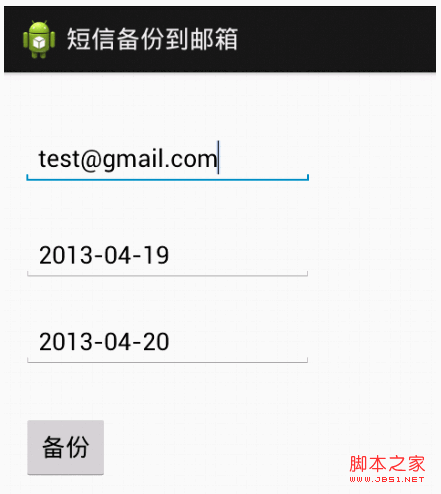

可以選擇幾天內的簡訊打包寄出,也能搭配定時機制做週期性備份。
package org.smsautobackup;

import java.text.DateFormat;
import java.text.SimpleDateFormat;
import java.util.Date;

import android.app.Activity;
import android.app.ActivityManager;
import android.content.ContentResolver;
import android.content.Intent;
import android.os.Bundle;
import android.util.Log;
import android.view.View;
import android.widget.Button;
import android.widget.EditText;

public class MainActivity extends Activity {

    @Override
    protected void onCreate(Bundle savedInstanceState) {
        super.onCreate(savedInstanceState);
        setContentView(R.layout.activity_main);

        SimpleDateFormat formatter = new SimpleDateFormat("yyyy-MM-dd");
        Date curDate = new Date(System.currentTimeMillis());   // 目前時間
        Date lastDate = new Date(curDate.getYear(), curDate.getMonth(),
                curDate.getDate() - 1);                        // 預設抓前一天

        ((EditText) findViewById(R.id.endDate)).setText(formatter.format(curDate));
        ((EditText) findViewById(R.id.startDate)).setText(formatter.format(lastDate));

        Button btn = (Button) findViewById(R.id.button1);
        btn.setOnClickListener(new View.OnClickListener() {
            public void onClick(View v) {
                sendSms(getSmsInPhone());
            }
        });
    }

    private String getSmsInPhone() {
        EditText startDatePicker = (EditText) findViewById(R.id.startDate);
        EditText endDatePicker = (EditText) findViewById(R.id.endDate);
        DateFormat df = new SimpleDateFormat("yyyy-MM-dd");
        try {
            Date startDate = df.parse(startDatePicker.getText().toString());
            Date endDate = df.parse(endDatePicker.getText().toString());
            ContentResolver cr = getContentResolver();
            return SmsUtil.getSmsInPhone(startDate, endDate, cr);
        } catch (Exception e) {
            Log.d("Exception in getSmsInPhone", e.getMessage());
        }
        return "";
    }

    @Override
    protected void onDestroy() {
        super.onDestroy();
        ActivityManager activityMgr =
                (ActivityManager) this.getSystemService(ACTIVITY_SERVICE);
        activityMgr.restartPackage(getPackageName());
    }

    private void sendSms(String content) {
        Intent intent = new Intent(android.content.Intent.ACTION_SEND);
        intent.setType("plain/text");
        // intent.setType("message/rfc822");   // 真機上改用這行

        EditText txtContent = (EditText) findViewById(R.id.editText1);
        String[] strEmailReciver = new String[] { txtContent.getText().toString() };
        intent.putExtra(android.content.Intent.EXTRA_EMAIL, strEmailReciver);  // 收件人

        EditText startDatePicker = (EditText) findViewById(R.id.startDate);
        EditText endDatePicker = (EditText) findViewById(R.id.endDate);
        intent.putExtra(Intent.EXTRA_SUBJECT, "["
                + startDatePicker.getText().toString() + "至"
                + endDatePicker.getText().toString() + "]短信備份");
        intent.putExtra(android.content.Intent.EXTRA_TEXT, content);           // 內容

        startActivity(Intent.createChooser(intent, "send SMS to your mail success"));
    }
}
這裡刻意不直接串接 SMTP,而是發出 ACTION_SEND 意圖交給系統挑選郵件客戶端。好處是不必在 App 內保存帳密、也不必處理 TLS 與重試邏輯,缺點則是流程中會跳一次「選擇程式」的對話框。
package org.smsautobackup;

import java.text.SimpleDateFormat;
import java.util.Date;

import android.content.ContentResolver;
import android.database.Cursor;
import android.database.sqlite.SQLiteException;
import android.net.Uri;
import android.util.Log;

public class SmsUtil {

    // 取得手機中所有簡訊
    public static String getSmsInPhone(Date startDate, Date endDate, ContentResolver cr) {
        final String SMS_URI_ALL = "content://sms/";
        final String SMS_URI_INBOX = "content://sms/inbox";
        final String SMS_URI_SEND = "content://sms/sent";
        final String SMS_URI_DRAFT = "content://sms/draft";

        StringBuilder smsBuilder = new StringBuilder();
        try {
            String[] projection = new String[] {
                    "_id", "address", "person", "body", "date", "type"
            };
            Uri uri = Uri.parse(SMS_URI_ALL);
            Cursor cur = cr.query(uri, projection, null, null, "date desc");

            if (cur.moveToFirst()) {
                int nameColumn = cur.getColumnIndex("person");
                int phoneNumberColumn = cur.getColumnIndex("address");
                int smsbodyColumn = cur.getColumnIndex("body");
                int dateColumn = cur.getColumnIndex("date");
                int typeColumn = cur.getColumnIndex("type");

                do {
                    String name = cur.getString(nameColumn);
                    String phoneNumber = cur.getString(phoneNumberColumn);
                    String smsbody = cur.getString(smsbodyColumn);

                    SimpleDateFormat dateFormat =
                            new SimpleDateFormat("yyyy-MM-dd hh:mm:ss");
                    Date d = new Date(Long.parseLong(cur.getString(dateColumn)));
                    if (d.before(startDate) || d.after(endDate)) {
                        continue;
                    }
                    String date = dateFormat.format(d);

                    int typeId = cur.getInt(typeColumn);
                    String type;
                    if (typeId == 1) {
                        type = "接收";
                    } else if (typeId == 2) {
                        type = "發送";
                    } else {
                        type = "";
                    }

                    smsBuilder.append("[");
                    smsBuilder.append(name == null ? "" : name + ",");
                    smsBuilder.append(phoneNumber + ",");
                    smsBuilder.append(smsbody + ",");
                    smsBuilder.append(date + ",");
                    smsBuilder.append(type);
                    smsBuilder.append("]\n");
                } while (cur.moveToNext());
            } else {
                smsBuilder.append("no result!");
            }
            smsBuilder.append("getSmsInPhone has executed!");
        } catch (SQLiteException ex) {
            Log.d("SQLiteException in getSmsInPhone", ex.getMessage());
        }
        return smsBuilder.toString();
    }
}
權限。讀取簡訊需要 READ_SMS 權限,而這屬於 Android 6.0 以後的危險權限等級,必須在執行期向使用者請求;上架 Google Play 時,SMS 權限屬於受管制的敏感權限,需要提交審核說明用途。
日期過濾的位置。範例是把日期條件放在 Java 端逐筆判斷,資料量大時效率不佳。更好的做法是把區間放進查詢的 selection 與 selectionArgs,讓資料庫直接過濾。
日期格式。範例使用 hh:mm:ss(12 小時制),跨下午時段容易產生歧義,實務上應改為 HH:mm:ss。另外 curDate.getYear() 回傳的是「年份減 1900」,這類已廢棄的 API 建議改用 java.time 的 LocalDate。
其餘設定與建置細節,請參考 GitHub 上的專案說明。
 Android NestedScrolling 完全實戰:打造自訂的嵌套滑動效果
從 Android 5.0 Lollipop 開始,官方提供了一整套 API 來支援嵌套滑動(Nested Scrolling);最新的 Support V4 包也做了向
 Android 四種動畫效果實作:Alpha、Scale、Translate、Rotate
main.xml:宣告四個按鈕 <?xml version=1.0 encoding=utf-8?> <AbsoluteLayout android:
 Android JSON 解析完整教學
JSON 是 JavaScript Object Notation 的縮寫,它是一種與語言無關的資料交換格式,憑藉著輕量、易讀的特性,成為 XML 之外相當受歡迎的替代方
 Android 手機衛士(十四):自定義組合控件構建布局結構
設置中心的各個條目長得幾乎一模一樣,如果每個都手寫一遍布局,程式碼會迅速膨脹。這時候自訂組合控制項就是正解。 自訂組合控制項的兩個核心動作: 把已寫好的布局抽取