

編輯:Android 開發實例
做了一個網站的 Android 客戶端,使用者裝到手機上之後,新版怎麼辦?一定要能更新。
理論上版本檢測最好全自動。但如果每次開啟 App 都先跑一輪網路請求,對小概率事件來說其實是浪費。有人會用「單日檢測、雙日跳過」或隨機抽樣的方式降低頻率,也有人只在設定頁放一個手動入口。
我採取的是後者:把檢測功能放在選單裡,使用者需要時自己點。畢竟這是網站的客戶端,有新版的話在網站上公告一下就好。
1、檢測有無新版本
2、下載新版本
3、安裝並覆蓋舊版本
手機端在 assets 資料夾放一個純文字檔 ver.cfg,內容只有一行:
Version=1.0
這個檔案會隨著 APK 一起裝到手機上。
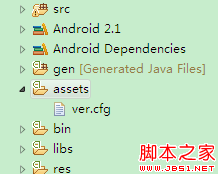
伺服器端則放一個 ver_apk.xml,內容同樣極簡:
<?xml version="1.0" encoding="utf-8" ?>
<string>1.0</string>
檢測時先抓伺服器上的這份 XML 取得最新版號,再與本機 ver.cfg 的內容比對,不一致就代表有新版本,提示使用者更新。
下載就是一般的 HTTP 取得檔案(斷點續傳這裡沒有實作)。安裝的關鍵在簽章:每個版本的簽名必須保持一致,否則新檔無法覆蓋舊檔,會出現「安裝未完成」的錯誤。
//==========================================================================
// 選單
//==========================================================================
private static final String urlApk = "https://3g.***.com/tool/***.apk";
private static final String urlVer = "https://3g.***.com/tool/ver_apk.xml";

@Override
public boolean onCreateOptionsMenu(Menu menu) {
    menu.add(Menu.NONE, Menu.FIRST + 1, 5, "檢測更新")
        .setIcon(android.R.drawable.ic_menu_upload);
    menu.add(Menu.NONE, Menu.FIRST + 2, 4, "退出")
        .setIcon(android.R.drawable.ic_lock_power_off);
    return true;
}

@Override
public boolean onOptionsItemSelected(MenuItem item) {
    switch (item.getItemId()) {
        case Menu.FIRST + 1:
            Toast.makeText(this, "正在檢測版本", Toast.LENGTH_LONG).show();
            UpdateVer uv = new UpdateVer(urlApk, urlVer, MainActivity.this);
            uv.checkVer();
            break;
        case Menu.FIRST + 2:
            confirmExit();
            break;
    }
    return false;
}
package android.***;

import android.app.Activity;
import android.app.AlertDialog;
import android.app.Dialog;
import android.app.ProgressDialog;
import android.content.Context;
import android.content.DialogInterface;
import android.content.Intent;
import android.net.Uri;
import android.os.AsyncTask;
import android.util.Log;
import android.webkit.URLUtil;
import android.widget.Toast;

import java.io.File;
import java.io.FileNotFoundException;
import java.io.FileOutputStream;
import java.io.IOException;
import java.io.InputStream;
import java.net.MalformedURLException;
import java.net.URL;
import java.net.URLConnection;
import java.util.Properties;

import org.xml.sax.InputSource;

import java.text.SimpleDateFormat;
import java.util.Date;

public class UpdateVer extends Activity {

    private static final String TAG = "DOWNLOADAPK";

    private String PastVersion;
    private String NowVersion;
    public ProgressDialog pBar;

    private String currentFilePath = "";
    private String fileEx = "";
    private String fileNa = "";
    private String strURL = "";
    private String VersionUri = "";

    private Context mContext;
    private final String fileVer = "ver.cfg";

    public UpdateVer(String urlapk, String urlver, final Context context) {
        SimpleDateFormat df = new SimpleDateFormat("yyyyMMddHHmmss");
        // 加上時間戳,避開手機的快取
        String ver = "?ver=" + df.format(new Date());
        strURL = urlapk + ver;
        VersionUri = urlver + ver;
        mContext = context;
    }

    public void checkVer() {
        getVersionxml(VersionUri);      // 解析遠端 XML 取得版本號
    }

    private void compareVer() {
        load();     // 讀取本機 ver.cfg

        if (PastVersion != null && !PastVersion.equals(NowVersion)) {
            Dialog dialog = new AlertDialog.Builder(mContext)
                    .setTitle("系統更新")
                    .setMessage(String.format("發現新版本%s,目前版本為%s,請更新!", NowVersion, PastVersion))
                    .setPositiveButton("確定", new DialogInterface.OnClickListener() {
                        @Override
                        public void onClick(DialogInterface dialog, int which) {
                            pBar = new ProgressDialog(mContext);
                            pBar.setTitle("正在下載");
                            pBar.setMessage("請稍候...");
                            pBar.setProgressStyle(ProgressDialog.STYLE_SPINNER);

                            fileEx = strURL.substring(strURL.lastIndexOf(".") + 1).toLowerCase();
                            fileEx = fileEx.substring(0, fileEx.lastIndexOf("?"));
                            fileNa = strURL.substring(strURL.lastIndexOf("/") + 1, strURL.lastIndexOf("."));

                            getFile(strURL);
                        }
                    })
                    .setNegativeButton("取消", new DialogInterface.OnClickListener() {
                        @Override
                        public void onClick(DialogInterface dialog, int whichButton) {
                        }
                    })
                    .create();
            dialog.show();
        } else {
            Toast.makeText(mContext, String.format("當前為最新版本%s", PastVersion), Toast.LENGTH_LONG).show();
        }
    }

    private void getFile(final String strPath) {
        pBar.show();
        try {
            if (strPath.equals(currentFilePath)) {
                getDataSource(strPath);
            }
            currentFilePath = strPath;

            Runnable r = new Runnable() {
                @Override
                public void run() {
                    try {
                        getDataSource(strPath);
                    } catch (Exception e) {
                        Log.e(TAG, e.getMessage(), e);
                    }
                }
            };
            new Thread(r).start();
        } catch (Exception e) {
            e.printStackTrace();
        }
    }

    /** 取得遠端檔案 */
    private void getDataSource(String strPath) throws Exception {
        if (!URLUtil.isNetworkUrl(strPath)) {
            Log.d("Tag", "error");
        } else {
            URL myURL = new URL(strPath);
            URLConnection conn = myURL.openConnection();
            conn.connect();

            InputStream is = conn.getInputStream();
            if (is == null) {
                throw new RuntimeException("沒有讀取到文件內容");
            }

            // 先寫入暫存檔
            File myTempFile = File.createTempFile(fileNa, "." + fileEx);

            FileOutputStream fos = new FileOutputStream(myTempFile);
            byte buf[] = new byte[128];
            int numread;
            while ((numread = is.read(buf)) > 0) {
                fos.write(buf, 0, numread);
            }
            fos.close();
            is.close();

            openFile(myTempFile);   // 觸發安裝程式
        }
    }

    /** 在手機上打開檔案 */
    private void openFile(File f) {
        pBar.cancel();
        Intent intent = new Intent();
        intent.addFlags(Intent.FLAG_ACTIVITY_NEW_TASK);
        intent.setAction(android.content.Intent.ACTION_VIEW);
        intent.setDataAndType(Uri.fromFile(f), getMIMEType(f));
        mContext.startActivity(intent);
    }

    /** 依副檔名判斷 MIME 類型 */
    private String getMIMEType(File f) {
        String type = "";
        String fName = f.getName();
        String end = fName.substring(fName.lastIndexOf(".") + 1).toLowerCase();

        if (end.equals("m4a") || end.equals("mp3") || end.equals("mid")
                || end.equals("xmf") || end.equals("ogg") || end.equals("wav")) {
            type = "audio";
        } else if (end.equals("3gp") || end.equals("mp4")) {
            type = "video";
        } else if (end.equals("jpg") || end.equals("gif") || end.equals("png")
                || end.equals("jpeg") || end.equals("bmp")) {
            type = "image";
        } else if (end.equals("apk")) {
            type = "application/vnd.android.package-archive";
        } else {
            type = "*";
        }

        // 非 APK 的話加上 / * ,讓系統跳出可開啟的程式清單
        if (!end.equals("apk")) {
            type += "/*";
        }
        return type;
    }

    private void getVersionxml(String resourceUrl) {
        new GetVer().execute(resourceUrl);
    }

    /** 讀取本機版本號 */
    private boolean load() {
        Properties properties = new Properties();
        try {
            InputStream stream = mContext.getAssets().open(fileVer);
            properties.load(stream);
        } catch (FileNotFoundException e) {
            return false;
        } catch (IOException e) {
            return false;
        } catch (Exception e) {
            return false;
        }
        PastVersion = properties.get("Version").toString();
        return true;
    }

    //==========================================================================
    // 背景取得遠端版本號
    //==========================================================================
    class GetVer extends AsyncTask<String, Integer, String> {
        @Override
        protected String doInBackground(String... urlVer) {
            String db = null;
            try {
                URL url = new URL(urlVer[0]);
                InputSource is = new InputSource(url.openStream());
                is.setEncoding("UTF-8");
                db = SAXGetVersionService.readRssXml(is);
            } catch (MalformedURLException e) {
                e.printStackTrace();
            } catch (Exception e) {
                e.printStackTrace();
            }
            return db;
        }

        @Override
        protected void onPostExecute(String result) {
            NowVersion = result;
            compareVer();
        }
    }
}
<uses-permission android:name="android.permission.INTERNET" />
<uses-permission android:name="android.permission.WRITE_EXTERNAL_STORAGE"/>
<uses-permission android:name="android.permission.ACCESS_NETWORK_STATE" />
上面這份寫法有幾處在現行系統上必須調整,否則會直接失敗:
1、套件安裝權限。「安裝未知來源應用」在 Android 8.0 之後改為依 App 授予的權限,必須實作 ACTION_MANAGE_UNKNOWN_APP_SOURCES 引導使用者開啟,單純宣告 INSTALL_PACKAGES 對一般應用無效。
2、FileProvider。Android 7.0 起禁止把 file:// URI 傳給其他應用(FileUriExposedException),必須改用 FileProvider 產生 content:// URI,並在 Intent 加上 FLAG_GRANT_READ_URI_PERMISSION。
3、下載位置。建議用 DownloadManager 或至少把檔案寫進 App 專屬目錄,避免_external storage 權限與分区儲存的問題,也才能取得可讀的 content URI。
4、網路與執行緒。AsyncTask 已在 API 30 標記為不建議使用,可改用 Kotlin 協程、WorkManager 或 Retrofit + ViewModel;無論用什麼,網路請求都不能放在主執行緒。
5、版本比較。用字串比對版本號在遇到 1.10 與 1.9 這類情況會出錯,改用 PackageManager 的版本判斷或自訂的數字分段比較更可靠。
 Android MediaPlayer 多媒體播放教學
Android 提供 MediaPlayer 類別,可播放音訊與視訊。使用時可透過靜態 create() 方法建立物件,再呼叫 start()、pause() 等方法控制
 Android 應用程式簽名步驟與相關知識
Android 要求每個應用程式都必須經過數字簽名才能安裝。簽名的作用不是決定使用者可以安裝哪些應用程式,而是用來標識作者並在應用程式之間建立信任關係。為什麼需要簽名開發
 Android 開發技巧:用 ViewStub 實現控制項的惰性載入
前面介紹過 <include> 標籤,它可以在佈局檔中引用另一個佈局檔,並覆蓋被引用佈局根節點所有以 android:layout 開頭的相關屬性。透過 &l
 Android JSON 剖析教學:JSONObject 與天氣資料
在 Android 開發中,JSON 解析是取得遠端資料的關鍵步驟。相較於 XML,JSON 更精簡,也更容易與 Web API 搭配。 先找出需要的欄位 解析前,先確認