

編輯:Android 開發實例
當 App 的使用者來自不同國家,文字、數字、日期甚至閱讀方向都得跟著調整。Android 把這件事抽象成「資源覆寫」:預設放一份在 res/values,其他語言各自放一份在對應的資料夾,系統在執行時依裝置地區自動挑一份最合適的。
本章把命名規則、常見語言代碼與一個可驗證的範例都梳理一遍。
格式是 values- 加上語言代碼,例如義大利文就是 values-it:
建立好資料夾後,把預設的 strings.xml 複製一份進去,只改需要翻譯的字串內容,key 名稱一定要與原版一致,否則系統找不到對應關係。
<?xml version="1.0" encoding="utf-8"?> <resources> <string name="hello_world">Ciao mondo!</string> </resources>
<?xml version="1.0" encoding="utf-8"?> <resources> <string name="hello_world">Hola Mundo!</string> </resources>
<?xml version="1.0" encoding="utf-8"?> <resources> <string name="hello_world">Bonjour le monde !</string> </resources>
| 語言 | 代碼 | 資料夾 |
|---|---|---|
| Afrikaans | af | values-af |
| Arabic | ar | values-ar |
| Bengali | bn | values-bn |
| Czech | cs | values-cs |
| Chinese | zh | values-zh |
| German | de | values-de |
| French | fr | values-fr |
| Japanese | ja | values-ja |
除了語言,還可以搭配限定符做更細的控制:-r 前綴代表地區(如 values-zh-rTW)、-land 代表橫向、-sw600dp 代表平板尺寸。多個限定符依固定順序串接,寫錯順序資源就會失效。
| 步驟 | 要做的事 |
|---|---|
| 1 | 用 Android Studio 建立專案 Locals,Target SDK 選新版。 |
| 2 | 修改 MainActivity.java(此例無額外邏輯)。 |
| 3 | 修改 activity_main.xml 放一個 TextView。 |
| 4 | 修改 res/values/string.xml 放英文。 |
| 5 | 新增 res/values-it/string.xml 放義大利文。 |
| 6 | 執行並切換系統語言驗證。 |
MainActivity.java:
package com.example.locals; import android.os.Bundle; import android.app.Activity; public class MainActivity extends Activity { @Override protected void onCreate(Bundle savedInstanceState) { super.onCreate(savedInstanceState); setContentView(R.layout.activity_main); } }
activity_main.xml:
<RelativeLayout xmlns:android="https://schemas.android.com/apk/res/android" android:layout_width="match_parent" android:layout_height="match_parent"> <TextView android:id="@+id/textV1" android:layout_centerHorizontal="true" android:text="@string/hello_world" android:textAppearance="?android:attr/textAppearanceLarge" /> </RelativeLayout>
兩份字串檔:
 <!-- res/values/string.xml --> <resources> <string name="app_name">Locals</string> <string name="hello_world">Hello world!</string> </resources>

<!-- res/values-it/string.xml --> <resources> <string name="app_name">Locals</string> <string name="hello_world">Ciao mondo!</string> </resources>
AndroidManifest.xml 保持預設:
<manifest xmlns:android="https://schemas.android.com/apk/res/android" package="com.yiibai.locals"> <application android:label="@string/app_name"> <activity android:name=".MainActivity"> <intent-filter> <action android:name="android.intent.action.MAIN" /> <category android:name="android.intent.category.LAUNCHER" /> </intent-filter> </activity> </application> </manifest>
先在英文環境啟動,看到的是預設字串:
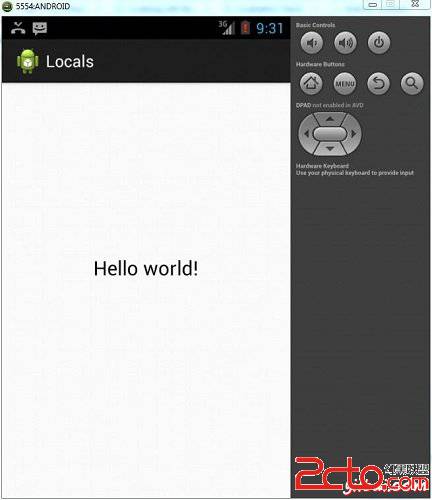
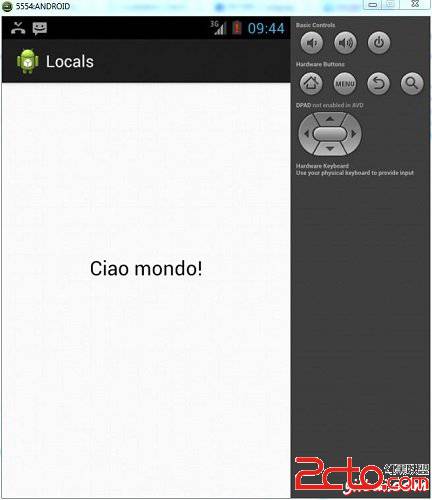
到系統設定把語言改成義大利文,重新開啟 App,同一個 TextView 就換成 Ciao mondo:
一個容易被忽略的細節:預設的 values 資料夾永遠不能拿掉。少了它,一旦使用者裝置的語言沒有對應翻譯,App 就會在載入字串時崩潰。
 Android IMF 輸入法框架實戰:SoftKeyboard 範例逐行剖析
Android 的 IMF(Input Method Framework,輸入法框架)從 SDK 1.5 起正式對外開放。想真正把輸入法開發搞懂,最經典的教材莫過於官方附
 Android 本地化:讓應用程式適配不同語言環境
Android 應用程式可以在許多不同地區的許多裝置上執行。為了讓應用程式更具互動性,它應該能處理文字、數字、檔案等內容,使其適配應用程式即將使用的語言環境。 本章將說明
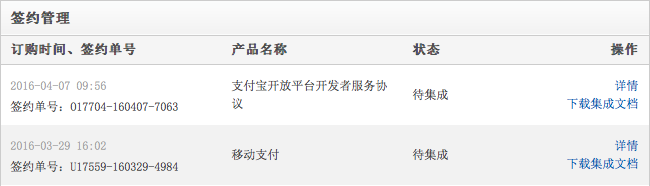 Android 支付寶支付接入實例:從簽約到跑通 Demo
一、前言 移動應用已經是紅海,移動支付更是幾乎成了電商類應用的標配。以前支付模塊不在我負責範圍內,一直覺得這東西門檻很高;最近接了訂單模塊,真正動手之後才發現,實際難度遠
 自訂控制項打造 Android 滑動解鎖九宮格完整實作
本文概述:滑動解鎖九宮格的分析:1、需要自訂控制項; 2、需要改寫事件 onTouchEvent(); 3、需要為九個點設定序號與座標,這裡用 Map 類即可; 4、需要